Core Concepts of SQL
SQL has 6 key building blocks: SELECT (pick columns), WHERE (filter rows), JOIN (combine tables), GROUP BY (aggregate), Subqueries (nest queries), and Indexes (make it fast). Master these and you can query any database.
The Big Picture
Every SQL query is built from these pieces. They snap together like building blocks — start with SELECT, layer on the rest as needed.
Explain Like I'm 12
Cheat Sheet
| Concept | Syntax | Plain English |
|---|---|---|
| SELECT | SELECT col1, col2 FROM table |
Give me these columns from this table |
| WHERE | WHERE condition |
But only rows that match this condition |
| JOIN | JOIN table2 ON t1.id = t2.id |
Combine with another table where IDs match |
| GROUP BY | GROUP BY col HAVING condition |
Group rows together and summarize each group |
| Subquery | WHERE col IN (SELECT ...) |
Use the result of one query inside another |
| Index | CREATE INDEX idx ON table(col) |
Build a shortcut so the database finds rows faster |
The 6 Building Blocks
SELECT — Pick Your Columns
Every SQL query starts with SELECT. It tells the database which columns you want back. Use * to grab everything, or list specific columns to keep things focused.
-- Get all columns
SELECT * FROM employees;

-- Get specific columns
SELECT name, email, department FROM employees;SELECT * in production code. Listing columns is faster and makes your intent clear.
You can also rename columns on the fly with AS:
SELECT name AS employee_name, salary * 12 AS annual_salary
FROM employees;
WHERE — Filter Your Rows
WHERE narrows your results. Only rows that pass the condition get returned.
-- Simple comparison
SELECT name, salary FROM employees WHERE salary > 50000;

-- Multiple conditions
SELECT name FROM employees
WHERE department = 'Engineering' AND hire_date > '2024-01-01';

-- Pattern matching
SELECT name FROM employees WHERE name LIKE 'J%';

-- List of values
SELECT name FROM employees WHERE department IN ('Sales', 'Marketing');=, !=, <, >, <=, >=, LIKE, IN, BETWEEN, IS NULL
JOIN — Combine Tables
Real data lives across multiple tables. JOIN lets you combine them by matching a shared column. This is one of SQL's most powerful features.
SELECT e.name, d.department_name
FROM employees e
JOIN departments d ON e.department_id = d.id;
There are several types of JOINs (INNER, LEFT, RIGHT, FULL) — each handles unmatched rows differently.
GROUP BY — Aggregate Data
GROUP BY collapses rows into groups and lets you run aggregate functions (COUNT, SUM, AVG, MIN, MAX) on each group.
-- How many employees per department?
SELECT department, COUNT(*) AS headcount
FROM employees
GROUP BY department;

-- Average salary per department, only show departments with 5+ people
SELECT department, AVG(salary) AS avg_salary
FROM employees
GROUP BY department
HAVING COUNT(*) >= 5;Subqueries — Query Inside a Query
A subquery is a SELECT inside another statement. Use it when you need to answer one question to ask another.
-- Who earns more than average?
SELECT name, salary
FROM employees
WHERE salary > (SELECT AVG(salary) FROM employees);

-- Find departments with no employees
SELECT department_name
FROM departments
WHERE id NOT IN (SELECT DISTINCT department_id FROM employees);= or >. If it returns many values, use IN or EXISTS.
Indexes — Make It Fast
Without an index, the database reads every single row to find your data (a "full table scan"). An index is like a book's index — it lets the database jump straight to the right rows.
-- Create an index on the email column
CREATE INDEX idx_employees_email ON employees(email);

-- Now this query is fast even with millions of rows
SELECT * FROM employees WHERE email = '[email protected]';How SQL Executes (The Secret Order)
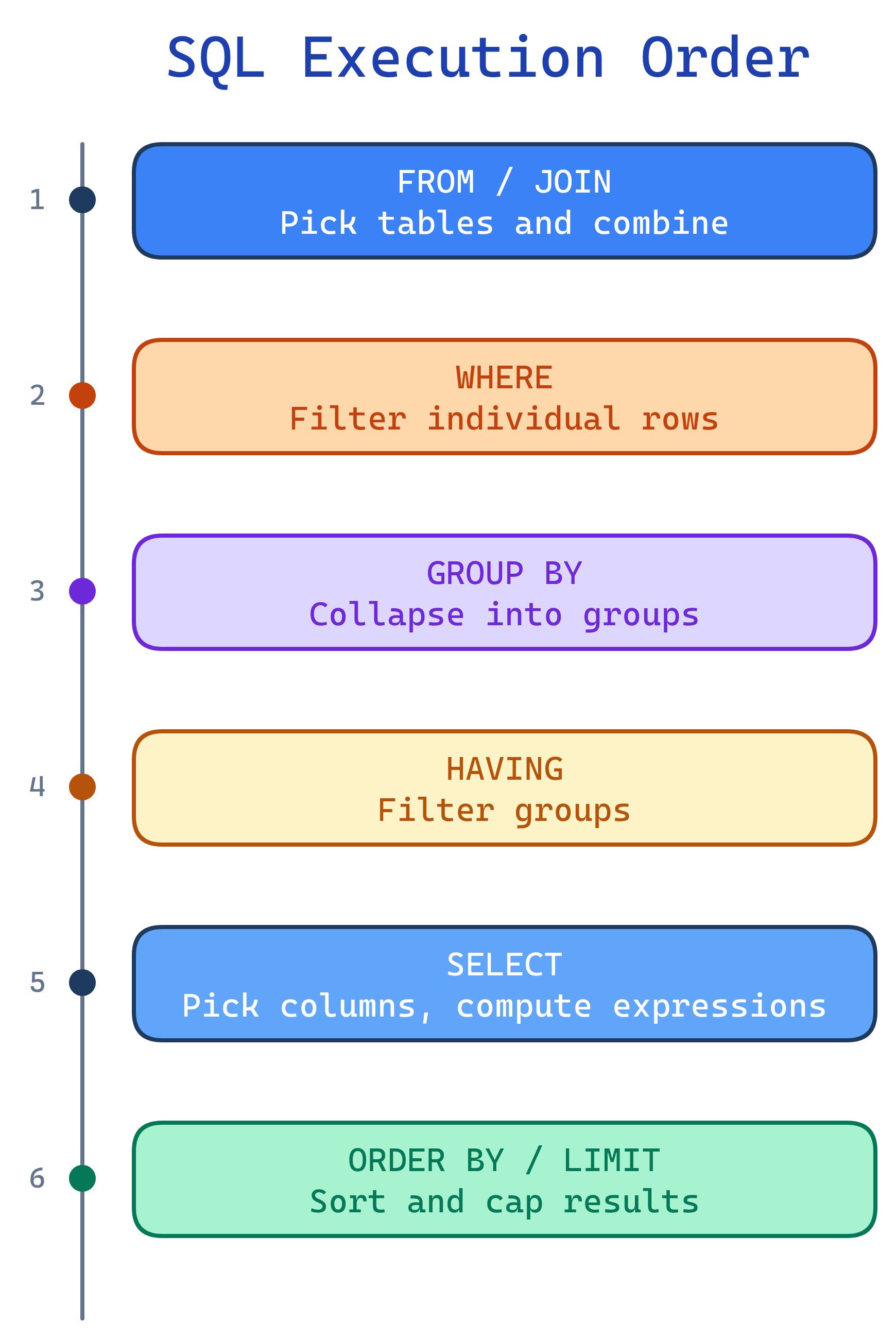
You write SQL in one order, but the database executes it in a different order. Understanding this clears up most SQL confusion:
This is why you can't use a column alias from SELECT in your WHERE clause — WHERE runs before SELECT.
Test Yourself
Q: What does SELECT do?
Q: What's the difference between WHERE and HAVING?
Q: When would you use a subquery?
Q: Why shouldn't you index every column?
Q: In what order does the database actually execute a SQL query?
Interview Questions
Q: What is the difference between WHERE and HAVING?
HAVING COUNT(*) > 5 works, but WHERE COUNT(*) > 5 is a syntax error.Q: What is the order of execution of a SQL query?
Q: When would you use a subquery instead of a JOIN?
Q: Explain the difference between clustered and non-clustered indexes.
Q: Write a query to find the 3rd highest salary without using LIMIT or window functions.
SELECT DISTINCT salary FROM employees e1
WHERE 3 = (
  SELECT COUNT(DISTINCT salary) FROM employees e2
  WHERE e2.salary >= e1.salary
);
This correlated subquery counts how many distinct salaries are ≥ each salary. The one with exactly 3 is the 3rd highest.