Local AI Core Concepts
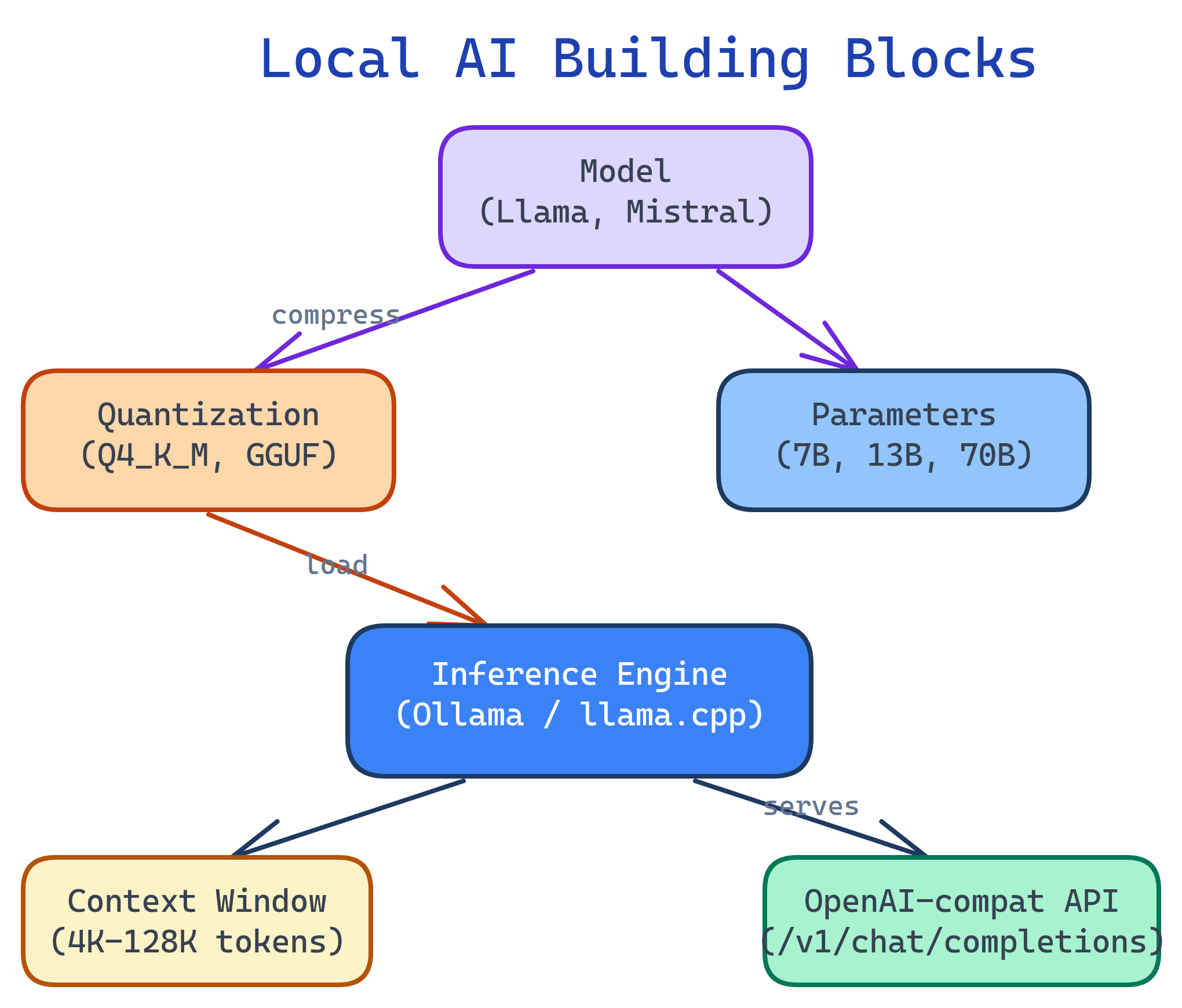
Local AI has 6 building blocks: Models (the brain), Parameters (model size/capability), Quantization (compression to fit your hardware), Inference Engines (the runtime), Context Windows (how much text fits), and the OpenAI-compatible API (how apps talk to your model). Master these and you can evaluate any local AI setup.
Concept Map
Here's how the pieces fit together. You pick a model, quantize it to fit your hardware, load it into an inference engine, and interact through a CLI, API, or web UI.
Explain Like I'm 12
Think of a local AI model like a brain in a jar:
- Model = the brain itself (Llama, Mistral, etc.)
- Parameters = how big the brain is (bigger = smarter but heavier)
- Quantization = shrinking the brain so it fits in your jar (your computer's memory)
- Inference engine = the life support machine that makes the brain think (Ollama, llama.cpp)
- Context window = how much the brain can remember at once during a conversation
- API = the phone line apps use to talk to the brain
Cheat Sheet
| Concept | What It Does | Key Terms |
|---|---|---|
| Model | Pre-trained neural network for text generation | Llama 3, Mistral, Gemma, DeepSeek, Phi, Qwen |
| Parameters | Model size — more = smarter but needs more memory | 1B, 7B, 13B, 70B |
| Quantization | Compress model to use less memory | Q4_K_M, Q5_K_M, Q8_0, GGUF, AWQ, GPTQ |
| Inference Engine | Software that loads and runs the model | Ollama, llama.cpp, vLLM, TGI |
| Context Window | Max tokens the model can see at once | 4K, 8K, 32K, 128K tokens |
| OpenAI-compat API | Standard API so any app can talk to your model | /v1/chat/completions |
The Building Blocks
1. Models
A model is a pre-trained neural network that generates text. Open-source models are released by companies and researchers for anyone to download and run. The landscape evolves fast, but these are the major families:
| Model Family | By | Sizes | Best For |
|---|---|---|---|
| Llama 3 / 3.1 | Meta | 8B, 70B, 405B | General purpose, reasoning, coding |
| Mistral / Mixtral | Mistral AI | 7B, 8x7B, 8x22B | Efficient, fast, multilingual |
| Gemma 2 | 2B, 9B, 27B | Compact, good quality per parameter | |
| DeepSeek V3 / Coder | DeepSeek | 7B, 33B, 67B | Coding, math, reasoning |
| Phi-3 / Phi-4 | Microsoft | 3.8B, 14B | Small but capable, runs on edge devices |
| Qwen 2.5 | Alibaba | 0.5B – 72B | Multilingual, strong benchmarks |
2. Parameters & Model Sizes
Parameters are the "knowledge weights" of the model. More parameters = more knowledge and better reasoning, but more memory required.
| Size | FP16 Memory | Q4 Memory | Quality Level |
|---|---|---|---|
| 1-3B | 2-6 GB | 1-2 GB | Basic tasks, autocomplete |
| 7-8B | 14-16 GB | 4-5 GB | Good for chat, coding, summaries |
| 13-14B | 26-28 GB | 8-9 GB | Better reasoning, fewer mistakes |
| 30-34B | 60-68 GB | 18-20 GB | Near-cloud quality |
| 70B | 140 GB | 40 GB | Excellent — approaches GPT-4 on many tasks |
3. Quantization
Quantization compresses a model's weights from high-precision floats (16-bit) to lower-precision integers (8-bit, 4-bit). This is the magic that makes 70B models run on consumer GPUs.
| Quant Level | Bits | Size Reduction | Quality Impact |
|---|---|---|---|
| FP16 (none) | 16 | Baseline | Full quality |
| Q8_0 | 8 | ~50% | Near-zero loss |
| Q5_K_M | 5 | ~69% | Very slight loss |
| Q4_K_M | 4 | ~75% | Minimal loss — best value |
| Q3_K_M | 3 | ~81% | Noticeable degradation |
| Q2_K | 2 | ~87% | Significant loss, not recommended |
Q4_K_M is the sweet spot for most users — 75% smaller with minimal quality loss. Use Q5_K_M if you have the VRAM, or Q8_0 for near-perfect quality.GGUF is the standard file format for quantized models. It's used by llama.cpp, Ollama, and LM Studio. You'll find GGUF files on Hugging Face (the "GitHub of AI models").
4. Inference Engines
An inference engine loads the model into memory and generates text. It handles tokenization, GPU acceleration, and the API server.
| Engine | Best For | Key Feature |
|---|---|---|
| Ollama | Easiest setup, general use | One-command install, model library, OpenAI-compat API |
| llama.cpp | Maximum control, advanced users | CPU + GPU inference, GGUF native, highly optimized |
| LM Studio | GUI-first, non-developers | Desktop app with built-in chat UI and model browser |
| vLLM | Production serving, high throughput | PagedAttention, continuous batching, multi-GPU |
| text-generation-inference | Production serving (Hugging Face) | Docker-based, tensor parallelism, flash attention |
5. Context Window
The context window is how much text the model can see at once — your system prompt, conversation history, and the current message all count. Measured in tokens (roughly 3/4 of a word).
# Check a model's context window in Ollama
ollama show llama3.1 --modelfile | grep num_ctx| Context Size | Tokens | Approx. Text | VRAM Overhead |
|---|---|---|---|
| Small | 4,096 | ~3,000 words | Low |
| Medium | 8,192 | ~6,000 words | Moderate |
| Large | 32,768 | ~25,000 words | High |
| Extra-large | 128,000 | ~100,000 words | Very high |
6. OpenAI-Compatible API
Most local inference engines expose an OpenAI-compatible REST API. This means any app built for ChatGPT (code editors, chatbots, automation tools) can work with your local model by just changing the base URL.
# Same API format as OpenAI, but pointed at localhost
curl http://localhost:11434/v1/chat/completions \
  -H "Content-Type: application/json" \
  -d '{
    "model": "llama3.1",
    "messages": [{"role": "user", "content": "Explain Docker in one sentence"}]
  }'
# Python with the official OpenAI library
from openai import OpenAI
client = OpenAI(
base_url="http://localhost:11434/v1", # Point to Ollama
api_key="not-needed" # Local = no auth
)
response = client.chat.completions.create(
model="llama3.1",
messages=[{"role": "user", "content": "Explain Docker in one sentence"}]
)
print(response.choices[0].message.content)base_url to your local server and they "just work."Test Yourself
What does "7B" mean in "Llama 3.1 7B"?
Why is Q4_K_M the most popular quantization level?
What is GGUF?
How does the OpenAI-compatible API help with local AI adoption?
api.openai.com to localhost:11434. This means VS Code extensions, chatbots, and automation tools designed for cloud AI work with local models without code changes.Why does increasing the context window use more VRAM?

