Ollama: Run LLMs Locally
Ollama is "Docker for AI models" — install it, run ollama run llama3.1, and you're chatting with a local LLM. It handles downloading, quantization, GPU detection, and serves an OpenAI-compatible API at localhost:11434. Works on Mac, Linux, and Windows.
Explain Like I'm 12
Remember how Docker lets you run any app with one command? Ollama does the same thing for AI brains. Type ollama run llama3.1 and it downloads the brain, plugs it into your computer's GPU, and lets you chat. No config files, no Python environment, no GPU drivers to fiddle with.
How Ollama Works
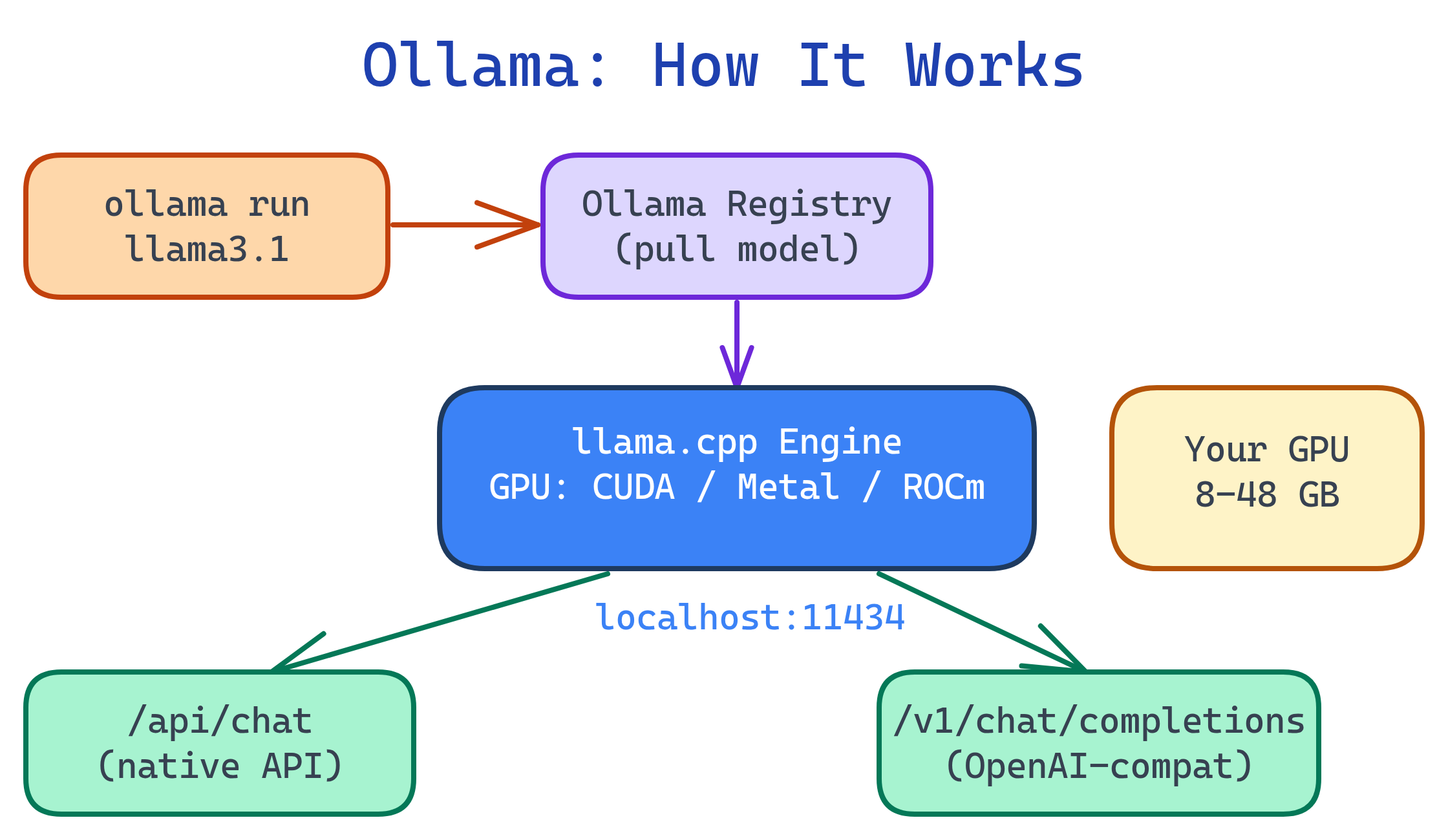
Ollama wraps llama.cpp (a highly optimized C++ inference engine) with a user-friendly CLI and a model registry. When you ollama run a model, it:
- Checks if the model is downloaded (if not, pulls it from the Ollama library)
- Detects your GPU (NVIDIA CUDA, AMD ROCm, or Apple Metal)
- Loads the model into GPU memory (or CPU RAM as fallback)
- Starts a chat session or serves the API
Installation & First Run
Install
# macOS / Linux (one-line installer)
curl -fsSL https://ollama.com/install.sh | sh

# macOS (Homebrew)
brew install ollama

# Windows: download from https://ollama.com/download
Run your first model
# Download and start chatting (auto-downloads on first run)
ollama run llama3.1

# Smaller model for limited hardware
ollama run phi3

# Coding-focused model
ollama run deepseek-coder-v2~/.ollama/models/.Model Management
# List downloaded models
ollama list

# Pull a model without starting it
ollama pull mistral

# Show model details (size, quantization, parameters)
ollama show llama3.1

# Remove a model to free disk space
ollama rm codellama

# Copy/rename a model
ollama cp llama3.1 my-custom-llama| Command | What It Does |
|---|---|
ollama list | Show all downloaded models with sizes |
ollama pull <model> | Download a model without running it |
ollama run <model> | Start interactive chat (pulls if needed) |
ollama show <model> | Show model metadata and parameters |
ollama rm <model> | Delete a model from disk |
ollama serve | Start the API server (auto-starts on install) |
ollama ps | Show currently loaded (running) models |
ollama ps to see what's loaded and ollama stop <model> to unload.Custom Models with Modelfile
A Modelfile is like a Dockerfile but for AI models. It lets you customize system prompts, temperature, context window, and even create derivative models from base models.
# Modelfile for a coding assistant
FROM llama3.1

# System prompt
SYSTEM """
You are a senior software engineer. You write clean, efficient code with
clear explanations. When asked to write code, always include comments
explaining the approach. Use modern best practices.
"""

# Parameters
PARAMETER temperature 0.3
PARAMETER num_ctx 8192
PARAMETER top_p 0.9
# Create and run your custom model
ollama create coding-assistant -f Modelfile
ollama run coding-assistantKey Modelfile instructions
| Instruction | Purpose | Example |
|---|---|---|
FROM | Base model | FROM llama3.1 |
SYSTEM | System prompt (personality, rules) | SYSTEM "You are a helpful assistant" |
PARAMETER | Model parameter overrides | PARAMETER temperature 0.7 |
TEMPLATE | Custom chat template | Advanced use, rarely needed |
ADAPTER | LoRA/QLoRA adapter path | ADAPTER ./my-lora.gguf |
temperature (0.1-0.3) for factual/coding tasks. Higher (0.7-1.0) for creative writing. The num_ctx parameter controls context window size — increase it if you're working with long documents.API Integration
Ollama serves an OpenAI-compatible API at http://localhost:11434. Any tool that works with OpenAI's API works with Ollama.
Chat completion
# Standard OpenAI-compatible endpoint
curl http://localhost:11434/v1/chat/completions \
  -H "Content-Type: application/json" \
  -d '{
    "model": "llama3.1",
    "messages": [
      {"role": "system", "content": "You are a Python expert."},
      {"role": "user", "content": "Write a function to flatten a nested list"}
    ],
    "temperature": 0.3
  }'
Python integration
from openai import OpenAI

# Point OpenAI client at Ollama
client = OpenAI(
    base_url="http://localhost:11434/v1",
    api_key="ollama"  # any string works
)

# Works exactly like the OpenAI API
response = client.chat.completions.create(
    model="llama3.1",
    messages=[
        {"role": "system", "content": "You are a Python expert."},
        {"role": "user", "content": "Explain list comprehensions"}
    ]
)
print(response.choices[0].message.content)

# Streaming
stream = client.chat.completions.create(
    model="llama3.1",
    messages=[{"role": "user", "content": "Write a haiku about coding"}],
    stream=True
)
for chunk in stream:
    if chunk.choices[0].delta.content:
        print(chunk.choices[0].delta.content, end="")
Ollama native API
# Ollama's own endpoint (simpler format)
curl http://localhost:11434/api/generate \
  -d '{"model": "llama3.1", "prompt": "Why is the sky blue?", "stream": false}'

# Embedding generation
curl http://localhost:11434/api/embeddings \
-d '{"model": "llama3.1", "prompt": "Hello world"}'/api/generate, /api/chat) and the OpenAI-compatible API (/v1/chat/completions). The OpenAI-compatible one is better for portability — apps work with both Ollama and OpenAI without code changes.Popular Integrations
| Tool | What It Does | How to Connect |
|---|---|---|
| Open WebUI | ChatGPT-like web interface | Auto-detects Ollama at localhost:11434 |
| Continue (VS Code) | AI code assistant in your editor | Set provider to "ollama" in config |
| Aider | AI pair programming in terminal | aider --model ollama/llama3.1 |
| LangChain | AI application framework | ChatOllama(model="llama3.1") |
| AnythingLLM | Document Q&A with RAG | Select Ollama as LLM provider |
localhost. To expose it to other machines (for Open WebUI in Docker), set OLLAMA_HOST=0.0.0.0 in your environment. Be careful — this opens the API to your network without authentication.Test Yourself
What happens when you run ollama run llama3.1 for the first time?
What is a Modelfile and how is it similar to a Dockerfile?
FROM), system prompt (SYSTEM), and parameter overrides (PARAMETER). Like a Dockerfile builds a custom container image from a base image, a Modelfile creates a custom AI model from a base model. Create with ollama create mymodel -f Modelfile.How can you use Ollama with the Python OpenAI library?
base_url="http://localhost:11434/v1" and api_key="ollama" (any string works). The rest of the code is identical to the OpenAI API. This works because Ollama serves an OpenAI-compatible endpoint that accepts the same request/response format.How would you create a custom coding assistant with lower temperature and a larger context window?
FROM llama3.1, add SYSTEM "You are a senior engineer...", set PARAMETER temperature 0.2 and PARAMETER num_ctx 16384. Then run ollama create coding-assistant -f Modelfile and ollama run coding-assistant.Why does Ollama keep models loaded for 5 minutes after the last request?
ollama ps to see loaded models and ollama stop <model> to free memory immediately.Interview Questions
How does Ollama differ from running llama.cpp directly?
How would you serve Ollama to multiple users on a team?
OLLAMA_HOST=0.0.0.0 to listen on all interfaces. 2) Put a reverse proxy (Nginx, Caddy) in front for TLS and authentication. 3) Deploy Open WebUI pointed at the Ollama server for a shared ChatGPT-like experience. 4) Consider resource limits — concurrent requests share GPU memory. 5) For production, use vLLM which handles batching and queuing better.What are the security considerations of running Ollama on a network?