Databases & Storage
Choose the right database: SQL (PostgreSQL, MySQL) for structured data with relationships, NoSQL (MongoDB, DynamoDB, Redis, Cassandra) for flexible schemas and scale. Know when to use each, plus caching layers, object storage, and data lakes.
Explain Like I'm 12
Think of databases like different types of storage in your house. A SQL database is like a filing cabinet with labeled folders — everything is organized in rows and columns, and you can find things by looking up the label. A NoSQL database is more like a big box where you can throw in anything — documents, photos, random notes — and find them using a tag or a key.
A cache is like keeping your most-used things on your desk instead of walking to the filing cabinet every time. Object storage is like a warehouse — cheap and huge, perfect for storing boxes of old photos and backups.
Database Landscape
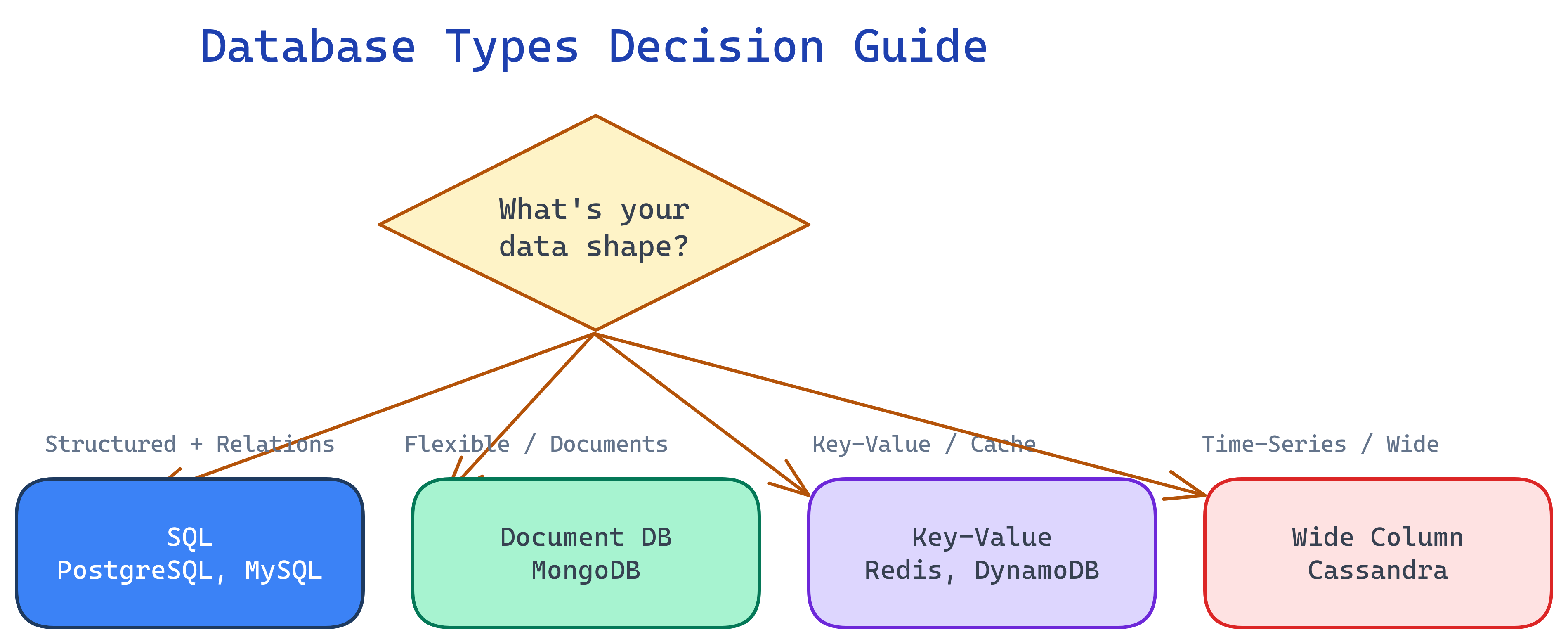
SQL vs NoSQL
This is the first question in any database decision. Both have strengths — the right choice depends on your data shape and access patterns.
| Aspect | SQL (Relational) | NoSQL (Non-Relational) |
|---|---|---|
| Schema | Fixed schema (define tables and columns upfront) | Flexible / schema-less (data can vary per record) |
| Scaling | Primarily vertical (horizontal is harder) | Built for horizontal scaling (sharding is native) |
| ACID | Full ACID transactions | Varies (some offer ACID per document, most favor eventual consistency) |
| Joins | Native JOINs across tables | No joins (denormalize or do application-level joins) |
| Query language | SQL (standardized, powerful) | Varies per database (MongoDB queries, DynamoDB API, etc.) |
| Best for | Complex relationships, transactions, reporting | High-volume writes, flexible data, horizontal scale |
| Examples | PostgreSQL, MySQL, SQL Server, Oracle | MongoDB, DynamoDB, Cassandra, Redis, Neo4j |
SQL Databases
PostgreSQL
The most feature-rich open-source database. Handles both OLTP and some OLAP workloads. Supports JSON/JSONB (so you get some NoSQL flexibility), full-text search, geospatial queries (PostGIS), and advanced indexing.
- When to use: Default choice for most applications. Complex queries, foreign keys, transactions, reporting.
- Strengths: JSONB columns, CTEs, window functions, extensions ecosystem
- Scale: Vertical scaling + read replicas. Can handle millions of rows per table easily.
MySQL
The most widely deployed open-source database. Simpler than PostgreSQL, optimized for read-heavy workloads. Powers WordPress, many legacy systems, and a lot of web applications.
- When to use: Read-heavy web apps, simpler schemas, when PostgreSQL is overkill
- Strengths: Mature replication, huge community, well-understood performance characteristics
- Limitation: Less advanced query features than PostgreSQL (no JSONB path queries, fewer window functions historically)
Indexing
Indexes are how databases make queries fast. Without an index, the database scans every row (full table scan). With an index, it jumps directly to matching rows.
- B-tree index: Default type. Great for equality and range queries. Works on most column types.
- Hash index: Only for exact equality lookups. Faster than B-tree for
=but useless for<,>, orBETWEEN. - Composite index: Covers multiple columns. Follows the "leftmost prefix" rule —
INDEX(a, b, c)helps queries on(a),(a,b), or(a,b,c), but NOT(b)alone.
EXPLAIN.
Normalization vs Denormalization
| Aspect | Normalization | Denormalization |
|---|---|---|
| What | Split data into related tables, no duplication | Combine data into fewer tables, accept duplication |
| Writes | Faster (update one place) | Slower (update multiple copies) |
| Reads | Slower (need JOINs) | Faster (data already together) |
| Best for | OLTP, write-heavy, data integrity | OLAP, read-heavy, reporting, caching |
NoSQL Database Types
Document Stores (MongoDB)
Store data as JSON-like documents. Each document can have a different structure. Great for content management, user profiles, product catalogs.
- Model: Collections of documents (like JSON objects)
- Query: Rich queries on document fields, aggregation pipeline
- Scale: Built-in sharding on any field
- Trade-off: No joins — denormalize or use application-side joins
- Best for: Flexible schemas, rapid prototyping, content management systems
Key-Value Stores (Redis, DynamoDB)
Simplest model: a key maps to a value. Blazing fast because the access pattern is always "get by key."
Redis
- In-memory: microsecond latency, used as a cache or session store
- Data structures: strings, lists, sets, sorted sets, hashes, streams
- Use cases: caching, session management, leaderboards, rate limiting, pub/sub
- Limitation: data must fit in memory (though Redis persistence options exist)
DynamoDB
- Managed: serverless, pay-per-request, auto-scales
- Model: partition key + optional sort key, supports secondary indexes
- Use cases: serverless apps, gaming leaderboards, IoT data, shopping carts
- Limitation: query flexibility is limited — design your partition key carefully
Wide-Column Stores (Cassandra)
Optimized for massive write throughput across many nodes. Data is organized by partition key and sorted by clustering columns.
- Scale: Linear scalability — add nodes to increase throughput
- Writes: Extremely fast (append-only, no read-before-write)
- Use cases: Time-series data, IoT sensor data, activity logs, messaging history
- Trade-off: Limited query flexibility — you must design tables around your query patterns
Graph Databases (Neo4j)
Optimized for data with complex relationships. Nodes connected by edges (relationships). Queries traverse the graph.
- Model: Nodes (entities) + Edges (relationships) with properties on both
- Query: Cypher query language (Neo4j) — "find all friends of friends"
- Use cases: Social networks, recommendation engines, fraud detection, knowledge graphs
- Trade-off: Not suited for non-graph workloads, smaller community
Decision Table: Which NoSQL Type?
| Your Data Shape | Recommended Type | Examples |
|---|---|---|
| JSON-like documents, flexible fields | Document store | MongoDB, Firestore |
| Simple key-value lookups, caching | Key-value store | Redis, DynamoDB, Memcached |
| Time-series, massive writes, append-only | Wide-column store | Cassandra, ScyllaDB, HBase |
| Complex relationships, traversals | Graph database | Neo4j, Amazon Neptune |
| Full-text search | Search engine | Elasticsearch, OpenSearch |
Caching Strategies
Caching is the single biggest performance win in most systems. Put frequently accessed data in fast memory (Redis, Memcached) instead of hitting the slow database on every request.
Caching Patterns
| Pattern | How it works | Best for |
|---|---|---|
| Cache-aside (Lazy loading) | App checks cache first. On miss, reads from DB, then writes to cache. | General purpose. Most common pattern. |
| Write-through | App writes to cache AND DB simultaneously. Cache is always up-to-date. | Read-heavy, consistency matters. |
| Write-back (Write-behind) | App writes to cache only. Cache async flushes to DB periodically. | Write-heavy workloads. Risk: data loss if cache crashes before flush. |
| Write-around | App writes directly to DB, bypassing cache. Cache fills on reads. | Write-heavy where written data isn't read immediately. |
Redis vs Memcached
| Feature | Redis | Memcached |
|---|---|---|
| Data types | Strings, lists, sets, hashes, sorted sets, streams | Strings only |
| Persistence | Yes (RDB snapshots, AOF) | No (pure cache) |
| Replication | Built-in (master-replica) | No native replication |
| Use case | Cache + data store (sessions, leaderboards, queues) | Simple, volatile caching |
Cache Eviction Policies
- LRU (Least Recently Used): evict the item that hasn't been accessed the longest. Most common.
- LFU (Least Frequently Used): evict the item accessed the fewest times. Better for skewed access patterns.
- TTL (Time To Live): each item expires after a set duration. Simple but effective.
Multi-Level Caching
In a real system, caching happens at multiple layers. A request passes through each layer, and any layer can serve the cached response:
Browser cache → CDN edge cache → API gateway cache → Application cache (Redis) → Database query cache → Database disk
Object Storage
Object storage (S3, Google Cloud Storage, Azure Blob Storage) is for unstructured data: files, images, videos, backups, logs. It's not a database — you can't query it with SQL.
- User uploads: profile pictures, documents, attachments
- Static assets: CSS, JS, images served via CDN
- Backups: database dumps, log archives
- Data lake storage: raw data for analytics (Parquet, JSON, CSV files)
Data Lakes & Warehouses
When you need to analyze large volumes of data (not just serve it to users), you need analytics-optimized storage.
| Aspect | Data Lake | Data Warehouse | Lakehouse |
|---|---|---|---|
| Schema | Schema-on-read (define structure at query time) | Schema-on-write (define structure at load time) | Both (open table formats) |
| Data types | Any (raw JSON, CSV, Parquet, images, logs) | Structured (tables, columns, types) | Any, with optional structure |
| Cost | Very cheap (object storage pricing) | Expensive (compute + storage bundled) | Moderate (cheap storage, pay for compute) |
| Query speed | Slow (must process raw data) | Fast (pre-optimized, columnar storage) | Fast (indexing + columnar) |
| Examples | S3 + Spark, HDFS | Snowflake, BigQuery, Redshift | Delta Lake, Apache Iceberg, Hudi |
| Best for | Raw data storage, ML training data, exploration | BI dashboards, reporting, analytics | Unifying both workloads |
Database Selection Framework
When someone asks "which database should we use?" in a system design interview, walk through this decision tree:
| Question | If Yes | Examples |
|---|---|---|
| Structured data with relationships? | SQL (PostgreSQL, MySQL) | Users, orders, inventory, banking |
| Flexible schema, document-oriented? | Document store (MongoDB) | CMS, product catalog, user profiles |
| Simple key lookups, sub-ms latency? | Key-value (Redis) | Caching, sessions, feature flags |
| Serverless, auto-scaling key-value? | DynamoDB | Shopping cart, gaming, IoT |
| Massive writes, time-series? | Wide-column (Cassandra) | Sensor data, logs, messaging |
| Complex relationships, traversals? | Graph (Neo4j) | Social graphs, fraud detection |
| Full-text search? | Elasticsearch / OpenSearch | Product search, log analysis |
| Files, images, videos? | Object storage (S3) | User uploads, backups, static assets |
| Large-scale analytics? | Data warehouse / lakehouse | BI dashboards, ML training data |
Test Yourself
Q: You're building an e-commerce platform with products, orders, and user accounts. Which database would you choose as the primary data store and why?
Q: What is the difference between cache-aside and write-through caching? When would you pick each?
Q: Why can't you just use Redis as your only database?
Q: When would you choose Cassandra over PostgreSQL?
Q: What is the difference between a data lake and a data warehouse? When would you use each?
Interview Questions
Q: Design the database schema for a Twitter-like social media platform. What databases would you use and why?
Q: How would you handle database migrations in a system with zero downtime?
Q: Explain the concept of "database per microservice." What problems does it solve and create?
Q: Your application's database CPU is at 90% during peak hours. Walk through your optimization strategy.
EXPLAIN on top queries. (2) Add indexes on columns used in WHERE, JOIN, ORDER BY. (3) Add a cache layer (Redis) for the most frequent queries. (4) Optimize queries — remove SELECT *, add pagination, avoid N+1 queries. (5) Read replicas for read-heavy workloads. (6) Connection pooling (PgBouncer) to reduce connection overhead. (7) Vertical scale (bigger machine) for quick relief. (8) Denormalize hot tables for read performance. (9) Archive old data to a separate table or cold storage. Only consider sharding as a last resort.