SEO Checklist
A complete, actionable checklist for every page and site-wide audit. Covers on-page (content & HTML), technical (speed & crawlability), off-page (backlinks & authority), and content strategy. Use it when launching a new site or auditing an existing one.
Explain Like I'm 12
This is like a pre-flight checklist for airplane pilots. Before every flight (or webpage), you go through a list of things to make sure everything works: seatbelts, engines, fuel. If you skip something, the plane might have problems. This SEO checklist makes sure your website doesn't crash in Google rankings.
The SEO Audit Flow
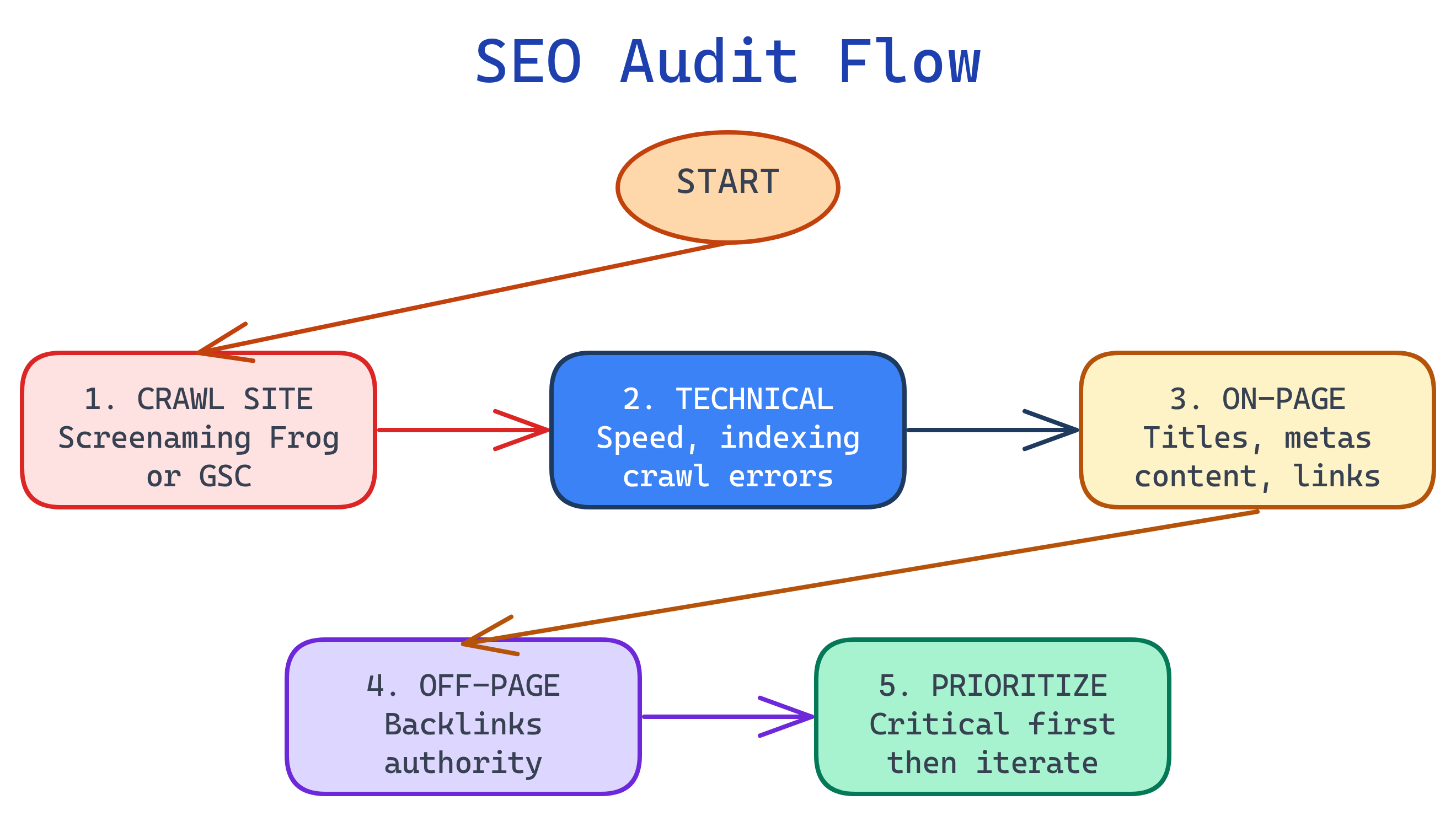
Per-Page: On-Page SEO
Run through these for every page you publish or audit.
HTML & Meta Tags
| Priority | Check | Details |
|---|---|---|
| 🔴 | <title> tag | Unique, 50-60 chars, primary keyword near front, brand at end |
| 🔴 | <meta description> | Unique, 120-160 chars, includes keyword, has a call to action |
| 🔴 | One <h1> per page | Contains primary keyword, matches search intent |
| 🔴 | Heading hierarchy | H1 → H2 → H3, never skip levels, include secondary keywords |
| 🟡 | Canonical tag | <link rel="canonical"> pointing to the preferred URL |
| 🟡 | Open Graph tags | og:title, og:description, og:image, og:url |
| 🟡 | Twitter Card tags | twitter:card, twitter:title, twitter:description |
| 🟢 | lang attribute | <html lang="en"> on every page |
| 🟢 | robots meta | <meta name="robots" content="index, follow"> |
Content Quality
| Priority | Check | Details |
|---|---|---|
| 🔴 | Matches search intent | Content type (guide/list/tool) matches what ranks for the target keyword |
| 🔴 | Comprehensive coverage | Covers the topic at least as well as the current top 3 results |
| 🔴 | Primary keyword in first 100 words | Naturally placed in the opening paragraph |
| 🟡 | Readable formatting | Short paragraphs, bullet points, tables, visuals — scannable |
| 🟡 | Original value | Unique data, insights, examples, or perspective not found elsewhere |
| 🟡 | Updated date visible | "Last updated: YYYY-MM-DD" shown on the page |
| 🟢 | E-E-A-T signals | Author bio, credentials, citations to authoritative sources |
| 🟢 | FAQ section | Targets "People Also Ask" queries with clear Q&A pairs |
Internal Links & Navigation
| Priority | Check | Details |
|---|---|---|
| 🔴 | Internal links to related pages | 3-10 contextual internal links per page |
| 🔴 | Descriptive anchor text | Keywords in anchor text, not "click here" or "read more" |
| 🟡 | Breadcrumb navigation | Shows the page path, uses schema markup |
| 🟡 | No orphan pages | Every page is linked from at least one other page |
| 🟢 | Hub-and-spoke linking | Pillar page links to all spoke pages, spokes link back |
Images
| Priority | Check | Details |
|---|---|---|
| 🔴 | Descriptive alt text | Describes the image, includes keyword where natural |
| 🟡 | Compressed file size | Under 100KB per image when possible; use WebP format |
| 🟡 | Explicit dimensions | width and height attributes set (prevents CLS) |
| 🟡 | Lazy loading | loading="lazy" on below-the-fold images |
| 🟢 | Descriptive file names | seo-title-tag-example.webp not IMG_2847.jpg |
URL
| Priority | Check | Details |
|---|---|---|
| 🔴 | HTTPS | Every page served over HTTPS |
| 🟡 | Clean URL slug | Lowercase, hyphens, keyword, 3-5 words after domain |
| 🟡 | No parameters in canonical | Canonical URL is the clean version without ?utm= etc. |
Site-Wide: Technical SEO
Run through these once for the entire site, then re-check quarterly.
Crawling & Indexing
| Priority | Check | Details |
|---|---|---|
| 🔴 | XML sitemap submitted | Submitted in Google Search Console, includes all important pages |
| 🔴 | robots.txt configured | Allows crawling of all important paths, blocks admin/API/junk URLs |
| 🔴 | No accidental noindex | Check <meta name="robots"> isn't blocking key pages |
| 🟡 | Canonical tags consistent | Self-referencing canonicals on all pages, no conflicting signals |
| 🟡 | No redirect chains | Every redirect goes directly to final destination (no A→B→C) |
| 🟡 | 404 errors fixed | Check GSC Coverage report, redirect or fix broken URLs |
| 🟢 | Hreflang tags (if multilingual) | Correct hreflang and x-default for each language |
Performance & Core Web Vitals
| Priority | Check | Details |
|---|---|---|
| 🔴 | LCP ≤ 2.5s | Largest Contentful Paint — optimize images, preload critical resources |
| 🔴 | INP ≤ 200ms | Interaction to Next Paint — minimize JavaScript, break long tasks |
| 🔴 | CLS ≤ 0.1 | Cumulative Layout Shift — explicit image dimensions, reserve ad space |
| 🟡 | Mobile-friendly | Responsive design, 48px tap targets, no horizontal scroll |
| 🟡 | Image optimization | WebP format, lazy loading, responsive srcset |
| 🟡 | Font optimization | Preload critical fonts, use font-display: swap |
| 🟢 | CDN in use | Serve assets from edge locations for faster global delivery |
| 🟢 | HTTP/2 or HTTP/3 | Modern protocol for multiplexed requests |
Structured Data
| Priority | Check | Details |
|---|---|---|
| 🟡 | BreadcrumbList schema | On all pages — improves SERP breadcrumb display |
| 🟡 | Article/TechArticle schema | On blog/guide pages — enhances article listings |
| 🟡 | FAQPage schema (where applicable) | On FAQ sections — triggers FAQ rich result |
| 🟢 | Organization schema | On homepage — populates knowledge panel |
| 🟢 | Validated with Rich Results Test | No errors or warnings in Google's testing tool |
Security & Infrastructure
| Priority | Check | Details |
|---|---|---|
| 🔴 | HTTPS everywhere | All pages, all resources — no mixed content |
| 🔴 | HTTP → HTTPS redirects | 301 redirect all HTTP URLs to HTTPS versions |
| 🟡 | www/non-www consistent | Pick one, redirect the other, update canonical tags |
| 🟢 | Security headers | HSTS, X-Content-Type-Options, X-Frame-Options |
Off-Page SEO
These happen outside your website and build authority over time.
| Priority | Check | Details |
|---|---|---|
| 🔴 | Google Search Console set up | Verify ownership, submit sitemap, monitor coverage & performance |
| 🔴 | Google Business Profile (if local) | Complete listing with NAP (name, address, phone), hours, photos |
| 🟡 | Backlink profile audit | Check for toxic links (spammy, irrelevant), disavow if needed |
| 🟡 | Competitor backlink analysis | Find where competitors get links, pursue similar opportunities |
| 🟡 | Content promotion plan | Share on social, email to newsletter, reach out to relevant sites |
| 🟢 | Brand mention monitoring | Find unlinked brand mentions, request link additions |
| 🟢 | Guest posting strategy | Write for authoritative sites in your niche, with link back |
Post-Launch: Get Discovered
You've published your website — now make sure Google (and your audience) actually finds it. Complete these steps within the first week after launch.
Step 1: Google Search Console (GSC)
This is your direct line to Google. It tells you what Google sees, what it can't crawl, and how your pages perform in search.
| Priority | Action | How |
|---|---|---|
| 🔴 | Create a GSC account | Go to search.google.com/search-console, sign in with your Google account |
| 🔴 | Add your property | Choose Domain (covers all subdomains) or URL prefix (specific URL). Domain is preferred. |
| 🔴 | Verify ownership | Options: DNS TXT record (recommended for domain), HTML file upload, HTML meta tag, Google Analytics, or Google Tag Manager |
| 🔴 | Submit your sitemap | Go to Sitemaps → enter sitemap.xml → click Submit. GSC will crawl the listed URLs. |
| 🟡 | Request indexing for key pages | URL Inspection → paste URL → click "Request Indexing". Do this for your homepage and top 5-10 pages. |
| 🟡 | Check index coverage | After 2-3 days, go to Pages report. Ensure pages are "Indexed" not "Excluded" or "Error". |
Step 2: Google Analytics (GA4) & Gtag
Analytics tells you what visitors do on your site — where they come from, which pages they view, and whether they convert.
| Priority | Action | How |
|---|---|---|
| 🔴 | Create a GA4 property | Go to analytics.google.com → Admin → Create Property. Choose "Web" as the platform. |
| 🔴 | Get your Measurement ID | Admin → Data Streams → Web → copy the G-XXXXXXXXXX ID |
| 🔴 | Add the Gtag snippet to your site | Paste in the <head> of every page (or use a tag manager / server-side solution like Cloudflare Zaraz) |
| 🟡 | Set up conversion events | Admin → Events → Mark key actions as conversions (sign-ups, purchases, form submissions) |
| 🟡 | Link GA4 to GSC | Admin → Product Links → Search Console. This lets you see search queries alongside on-site behavior. |
| 🟢 | Configure data retention | Admin → Data Settings → Data Retention → set to 14 months (max for free tier) |
Gtag Code Snippet
<!-- Google tag (gtag.js) -->
<script async src="https://www.googletagmanager.com/gtag/js?id=G-XXXXXXXXXX"></script>
<script>
  window.dataLayer = window.dataLayer || [];
  function gtag(){dataLayer.push(arguments);}
  gtag('js', new Date());
  gtag('config', 'G-XXXXXXXXXX');
</script>Step 3: Submit Sitemap & Verify Indexing
| Priority | Action | How |
|---|---|---|
| 🔴 | Generate XML sitemap | Most frameworks auto-generate. For static sites, use a script or tool like xml-sitemaps.com. Include all important pages with <lastmod> dates. |
| 🔴 | Upload to site root | Sitemap must be accessible at https://yourdomain.com/sitemap.xml |
| 🔴 | Reference in robots.txt | Add Sitemap: https://yourdomain.com/sitemap.xml at the bottom of your robots.txt |
| 🔴 | Submit in GSC | Sitemaps → Add → sitemap.xml → Submit |
| 🟡 | Submit to Bing | Also submit in Bing Webmaster Tools (bing.com/webmasters) — Bing powers DuckDuckGo, Yahoo, and some AI chatbots |
| 🟡 | Verify indexing after 3-7 days | Search site:yourdomain.com in Google. If pages don't appear, check GSC for errors. |
Step 4: Set Up Bing Webmaster Tools
| Priority | Action | How |
|---|---|---|
| 🟡 | Create account & verify | Go to bing.com/webmasters. You can import your site directly from GSC (easiest method). |
| 🟡 | Submit sitemap | Sitemaps → Submit Sitemap → enter your sitemap URL |
| 🟢 | Submit to IndexNow | Bing supports IndexNow — instant indexing via API when you publish/update pages. Cloudflare supports this natively. |
Step 5: Social & Business Profiles
| Priority | Action | Why |
|---|---|---|
| 🔴 | Google Business Profile (if local) | Required for local search and Google Maps visibility. Add NAP (name, address, phone), hours, photos, description. |
| 🟡 | Social media profiles | Create profiles on relevant platforms (LinkedIn, Twitter/X, GitHub, etc.) with a link back to your site. These count as brand signals. |
| 🟡 | Test Open Graph / Twitter Cards | Share a page URL on social — verify the preview shows the correct title, description, and image. Use Facebook Sharing Debugger or Twitter Card Validator. |
| 🟢 | Directory listings (if applicable) | Submit to relevant industry directories (Product Hunt, Crunchbase, etc.) for additional backlinks and discoverability. |
Step 6: Monitoring & First-Week Checks
| Priority | Action | When |
|---|---|---|
| 🔴 | Run PageSpeed Insights on top 5 pages | Day 1 — fix any red scores immediately |
| 🔴 | Check all pages return HTTP 200 | Day 1 — no broken pages at launch |
| 🔴 | Verify GA4 is collecting data | Day 1 — check Realtime report while browsing your site |
| 🟡 | Check GSC for crawl errors | Day 3-5 — fix any "Couldn't crawl" or "Excluded" pages |
| 🟡 | Verify pages are being indexed | Day 5-7 — search site:yourdomain.com in Google |
| 🟡 | Check for mobile usability issues | Day 1 — GSC → Mobile Usability report |
| 🟢 | Set up uptime monitoring | Day 1 — Use UptimeRobot (free) or similar. Downtime kills rankings. |
Content Strategy Checklist
Ongoing activities to maintain and grow organic traffic.
| Priority | Check | Frequency |
|---|---|---|
| 🔴 | Keyword research for new content | Monthly |
| 🔴 | Update existing content (freshness) | Quarterly per page |
| 🔴 | Check for content cannibalization | Monthly |
| 🟡 | Monitor rankings for target keywords | Weekly |
| 🟡 | Analyze GSC performance reports | Weekly |
| 🟡 | Add internal links to new content | Per new page publish |
| 🟡 | Review and fix 404s | Monthly |
| 🟢 | Competitor content gap analysis | Quarterly |
| 🟢 | Review page experience signals (CWV) | Monthly |
Essential SEO Tools
| Tool | Free? | Best For |
|---|---|---|
| Google Search Console | Yes | Index coverage, performance, Core Web Vitals, sitemaps |
| Google PageSpeed Insights | Yes | Core Web Vitals, performance scoring |
| Google Keyword Planner | Yes | Keyword research, search volume, competition |
| Ahrefs | Paid | Backlink analysis, keyword research, competitor research, site audit |
| Semrush | Paid | Keyword tracking, site audit, competitor analysis |
| Screaming Frog | Free (500 URLs) | Site crawl, find broken links, duplicate content, redirect chains |
| Rich Results Test | Yes | Validate structured data / schema markup |
| Lighthouse (Chrome DevTools) | Yes | Performance, accessibility, SEO, best practices audit |
Test Yourself
You're launching a new website. What are the first 5 SEO things you'd set up?
(1) HTTPS — SSL certificate, redirect HTTP→HTTPS. (2) Google Search Console — verify ownership, submit sitemap. (3) XML sitemap — generate and submit it. (4) robots.txt — allow all important pages, block admin areas. (5) Unique title tags + meta descriptions — on every page. These are the minimum foundation before any content optimization.
What's the difference between a 🔴 critical check and a 🟢 nice-to-have?
🔴 Critical items can prevent indexing or cause significant ranking loss (e.g., accidental noindex, no sitemap, missing title tags). 🟢 Nice-to-have items provide incremental improvements but won't cause disasters if missing (e.g., security headers, Organization schema). Always fix 🔴 items first.
How often should you update existing content for SEO?
Review each page quarterly. Update statistics, add new information, and refresh the "last updated" date. Pages that start losing rankings often just need a content refresh to regain positions. Set a content calendar to track this.
Name three free tools for a basic SEO audit.
(1) Google Search Console — indexing, performance, CWV. (2) Google PageSpeed Insights — speed and performance. (3) Screaming Frog (free tier) — crawl up to 500 URLs, find broken links, duplicates, redirect chains. Together, these cover ~80% of what paid tools do.
What should you do right after publishing a new page?
(1) Add it to your XML sitemap. (2) Request indexing in Google Search Console via "Inspect URL". (3) Add 3-5 internal links from existing relevant pages. (4) Share on social / email. (5) Verify all on-page elements (title, meta, H1, canonical). Steps 2-3 help Google discover and rank the page faster.
Interview Questions
Walk me through how you'd conduct a full SEO audit of a website.
(1) Crawl the site with Screaming Frog — find broken links, duplicate content, redirect chains, missing metas. (2) Check GSC — index coverage errors, Core Web Vitals, manual actions. (3) On-page audit — title tags, H1s, meta descriptions, content quality for top pages. (4) Technical audit — robots.txt, sitemap, HTTPS, canonical tags, schema markup. (5) Backlink audit — check quality in Ahrefs/Moz, disavow toxic links. (6) Content gap analysis — compare against competitors, find missing topics. (7) Prioritize fixes — 🔴 critical first, then 🟡, then 🟢.
A site redesign caused a 40% drop in organic traffic. What would you check?
(1) URL changes without redirects — the #1 cause. Check if old URLs 301-redirect to new ones. (2) Accidental noindex — dev/staging robots meta tags left on production. (3) Content changes — did the redesign remove content Google was ranking? (4) Internal link structure — did navigation changes orphan important pages? (5) Canonical tags — do they point to the correct new URLs? (6) Sitemap — does it reflect the new URL structure? (7) Page speed — did new design elements slow the site? Check all of these in GSC.
How do you prioritize SEO improvements when you have limited resources?
Use an impact vs effort matrix: (1) High impact, low effort — fix broken redirects, add missing title tags, submit sitemap. Do these immediately. (2) High impact, high effort — content overhaul, site speed optimization, backlink campaign. Plan these for next sprint. (3) Low impact, low effort — add schema markup, optimize image alt text. Batch these for downtime. (4) Low impact, high effort — deprioritize or skip. Focus on pages closest to page 1 (positions 5-20) for the quickest ranking gains.