Core Concepts of The Tuva Project
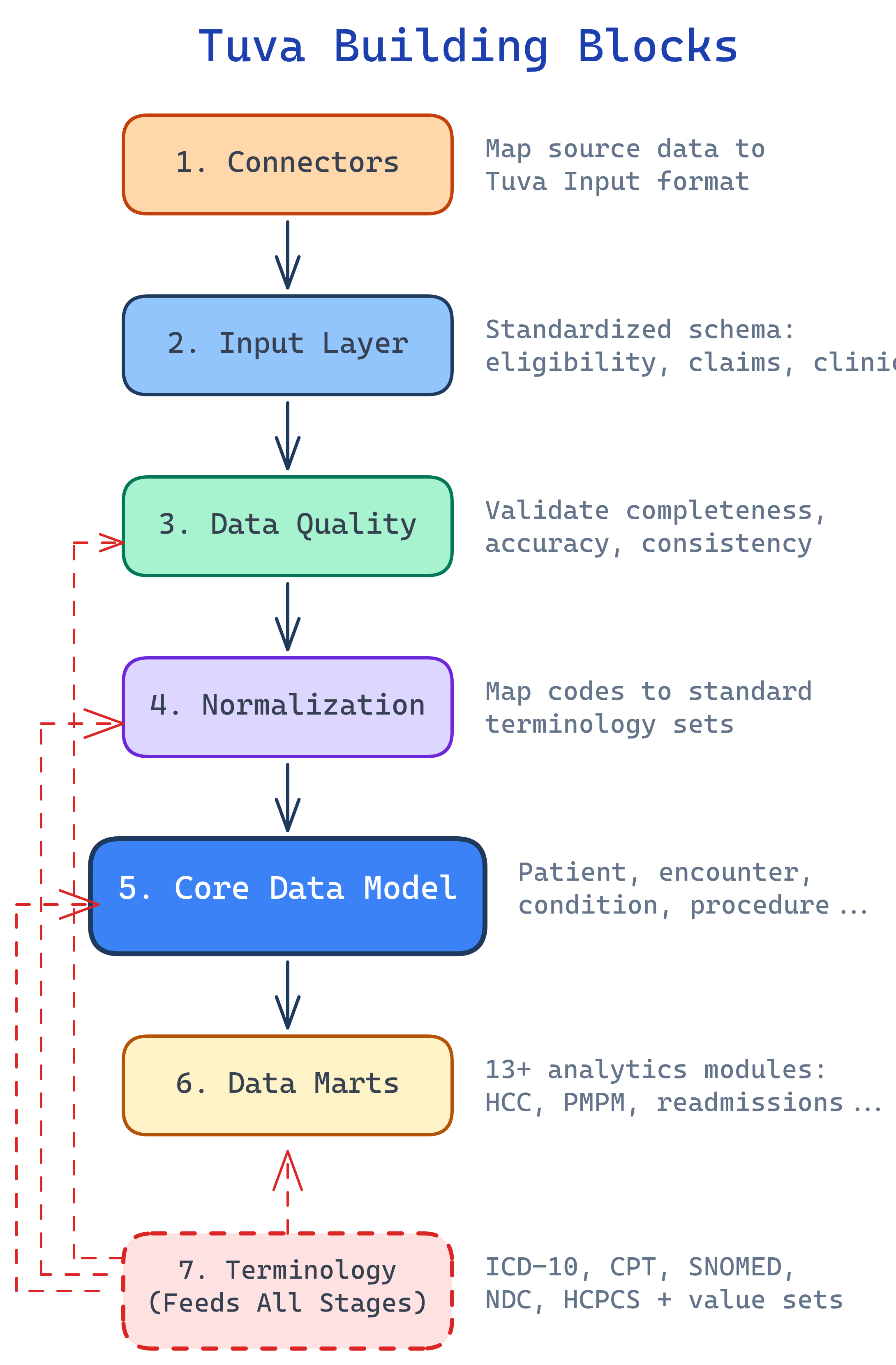
Tuva has 7 building blocks: Connectors (map raw data), Input Layer (standard format), Data Quality (validate), Normalization (standardize codes), Claims Preprocessing (group into encounters), Core Data Model (unified schema), and Data Marts (analytics-ready). Plus Terminology — healthcare code sets that ship with the package.
The Big Picture
Tuva's 7 building blocks form a pipeline. Each one transforms data a little further until you have analytics-ready datasets. Here's how they connect:
Explain Like I'm 12
Think of Tuva like a car factory assembly line. Raw materials (healthcare data) come in the door. Station 1 (Connectors) shapes the parts. Station 2 (Input Layer) puts them on a standard conveyor belt. Station 3 (Data Quality) is quality control — it rejects defective parts. Station 4 (Normalization) paints everything the same color. Station 5 (Claims Preprocessing) assembles the parts into bigger components. Station 6 (Core Data Model) builds the car. Station 7 (Data Marts) adds the features (GPS, AC, radio). And the Terminology is the parts catalog everyone references.
Cheat Sheet
| Stage | What It Does | Key Detail |
|---|---|---|
| Connectors | Maps raw data → Input Layer format | Pre-built for common sources; custom for proprietary |
| Input Layer | Standardized data format Tuva expects | Claims tables: medical_claim, pharmacy_claim, eligibility |
| Data Quality | Validates data before processing | 100+ automated checks on completeness, validity |
| Normalization | Standardizes codes and values | Maps to ICD-10, CPT, SNOMED standard terminologies |
| Claims Preprocessing | Groups claim lines into encounters | Handles claim types, service categories, grouping |
| Core Data Model | Unified patient-centric schema | Patient, condition, encounter, lab, medication tables |
| Data Marts | Pre-built analytics | 13+ marts: CMS-HCC, HEDIS, readmissions, PMPM, etc. |
The 7 Building Blocks
Connectors — Mapping Raw Data In
Connectors are dbt projects that transform raw source data into Tuva's Input Layer. Think of them as adapters — they know how to read your specific data format and translate it into the format Tuva expects.
Tuva provides pre-built connectors for common healthcare data sources. If your data comes from a proprietary system, you write a custom connector. The connector handles field mapping, type casting, and basic transformations.
Input Layer — The Standard Format
The Input Layer is the standardized format Tuva expects. Once your data is in Input Layer format, you can run the entire Tuva package. Key tables include:
medical_claim— Professional and facility claimspharmacy_claim— Prescription drug claimseligibility— Member enrollment and coverage periodslab_result— Lab test resultscondition— Diagnosis recordsprocedure— Procedure records
Each table has a defined schema with required and optional columns. The Input Layer documentation specifies every field, its data type, and whether it's required.
dbt build command. Everything downstream — data quality, normalization, the core model, all 13+ data marts — just works.
Data Quality — Validating Your Data
Tuva includes 100+ automated data quality checks that validate your data before it enters the pipeline. These checks catch problems early, before they propagate through every downstream model.
The checks fall into three categories:
- Completeness — Are required fields populated? Does every claim have a patient ID, dates of service, and diagnosis codes?
- Validity — Are codes valid? Is that ICD-10 code a real code? Are dates reasonable?
- Consistency — Do dates make sense? Is the discharge date after the admission date? Does the claim amount match the sum of its line items?
The output is a data quality report that shows exactly what's wrong with your data, how many records are affected, and what needs to be fixed.
Normalization — Standardizing Codes
Normalization maps source codes to standard terminologies. Your source data might use proprietary codes, abbreviations, or non-standard formats. Normalization translates everything into a common language.
Examples of what normalization handles:
- Custom drug codes → NDC (National Drug Code)
- Facility type abbreviations → Standard CMS facility type codes
- Discharge status values → Standard discharge status codes
- Bill type codes → Standard UB-04 bill type codes
After normalization, every record in your data speaks the same language regardless of where it came from.
Claims Preprocessing — From Lines to Encounters
Raw claims data comes as individual claim lines — each line representing a single charge. Claims Preprocessing groups these lines into clinically meaningful encounters and episodes.
This is where raw claim data becomes useful for analytics:
- Grouping — Multiple claim lines for the same hospital stay are combined into a single encounter
- Service categories — Each encounter is classified as inpatient, outpatient, emergency department, skilled nursing, etc.
- Claim type assignment — Professional vs. facility claims are identified and handled appropriately
Without this step, you'd be counting individual charge lines instead of actual patient visits.
Core Data Model — The Unified Schema
The Core Data Model is a unified, patient-centric schema that brings together all the processed data. Key tables include:
patient— One row per patient with demographics and enrollment infocondition— All diagnoses mapped to standard terminologiesencounter— Every patient visit with dates, providers, and settingslab_result— Lab test results with standard LOINC codesmedication— Prescriptions and drug claims with NDC codesprocedure— All procedures with CPT/HCPCS codesobservation— Clinical observations and vitals
Every downstream data mart reads from the Core Data Model, not from raw data. This means you only need to get the data right once.
Terminology & Value Sets
Tuva ships with a comprehensive library of healthcare terminologies and value sets:
- ICD-10-CM — Diagnosis codes (70,000+)
- CPT — Procedure codes
- SNOMED CT — Clinical terminology
- HCPCS — Healthcare procedure codes (Level II)
- NDC — National Drug Codes
- CMS value sets — HCC mappings, CCSR categories, readmission flags
These are stored as versioned seed files and auto-loaded from S3, GCS, or Azure when you run dbt seed. Tuva also includes its own concept library for mapping conditions, which makes it easy to build condition-based cohorts (e.g., "all patients with diabetes").
How It All Fits Together
Here's the simplified end-to-end flow showing how your data moves through the Tuva pipeline:
Getting Started
Once your data is in Input Layer format, running Tuva is straightforward:
dbt deps— Install the Tuva package and its dependenciesdbt seed— Load terminology files (ICD-10, CPT, value sets) into your warehousedbt build— Run the entire pipeline: data quality, normalization, core model, and data marts
That's it. Three commands to go from raw data to analytics-ready datasets.
Tuva uses dbt variables to control what runs:
claims_enabled— Set totrueif you have claims dataclinical_enabled— Set totrueif you have clinical/EHR datatuva_marts_enabled— Control which specific data marts to build
Test Yourself
What is the Input Layer and why is it important?
dbt build — everything downstream just works.What's the difference between a Connector and the Input Layer?
Name 3 tables in the Core Data Model.
What does Claims Preprocessing do?
How do you enable specific data marts in Tuva?
claims_enabled: true for claims data, clinical_enabled: true for clinical/EHR data, and tuva_marts_enabled to control which specific data marts to build. These are configured in your dbt_project.yml file.Interview Questions
Q: Explain the Tuva Project pipeline from raw data to analytics-ready output.
Q: Why is the Input Layer the most critical component of the Tuva pipeline?
Q: How does Tuva handle data from multiple healthcare data sources with different formats?
Q: What is the difference between Tuva's Normalization and Claims Preprocessing stages?
Q: What are the steps to deploy Tuva in a new data warehouse environment?
dbt deps to install the Tuva package and dependencies, (2) dbt seed to load terminology files (ICD-10, CPT, SNOMED, value sets) into the warehouse — these are versioned seed files auto-loaded from cloud storage, and (3) dbt build to run the entire pipeline. Before this, you need a Connector that maps your source data to the Input Layer. You configure dbt variables like claims_enabled, clinical_enabled, and tuva_marts_enabled to control what runs. Tuva supports Snowflake, BigQuery, Redshift, and DuckDB (for development).