AWS Managed Services
Managed services let AWS handle patching, backups, scaling, and availability. RDS = managed relational databases. DynamoDB = serverless NoSQL. SQS/SNS = messaging and notifications. CloudWatch = monitoring and alerts. CloudFormation = infrastructure as code.
Explain Like I'm 12
Instead of cooking every meal from scratch, you can order from a restaurant that handles shopping, cooking, and cleaning. RDS is like ordering a database meal — you pick the type (PostgreSQL, MySQL), and AWS cooks it, keeps it fresh, and makes backups. SQS is a to-do list that multiple workers can pull tasks from. CloudWatch is the security camera system watching everything in your AWS house.
Managed Services Ecosystem
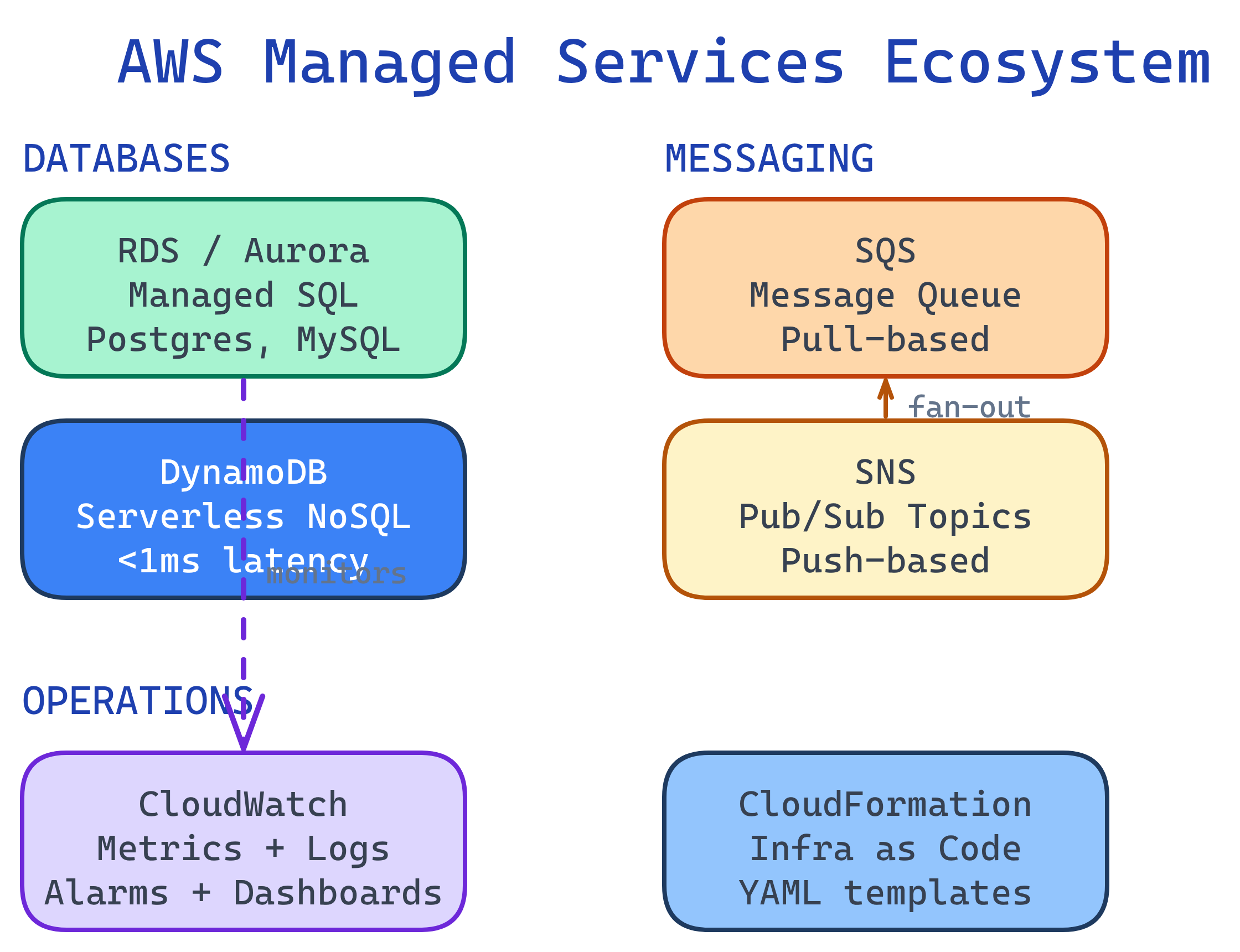
RDS — Relational Database Service
RDS manages relational databases so you don't have to handle installation, patching, backups, or replication. It supports PostgreSQL, MySQL, MariaDB, Oracle, SQL Server, and Amazon Aurora.
RDS vs. Self-Managed on EC2
| Responsibility | RDS (Managed) | EC2 (Self-Managed) |
|---|---|---|
| OS patching | AWS handles it | You do it |
| Automated backups | Built-in (35-day retention) | You script it |
| Multi-AZ failover | One checkbox | You build replication |
| Read replicas | CLI command | You configure replication |
| Scaling | Modify instance class | Manual migration |
| Custom DB extensions | Limited | Full control |
# Create a PostgreSQL RDS instance
aws rds create-db-instance \
  --db-instance-identifier my-postgres \
  --db-instance-class db.t3.micro \
  --engine postgres \
  --engine-version 16.1 \
  --master-username admin \
  --master-user-password MySecurePass123! \
  --allocated-storage 20 \
  --multi-az \
  --backup-retention-period 7

# Create a read replica for scaling reads
aws rds create-db-instance-read-replica \
  --db-instance-identifier my-postgres-replica \
--source-db-instance-identifier my-postgresDynamoDB — Serverless NoSQL
DynamoDB is a fully managed NoSQL database with single-digit millisecond latency at any scale. No servers to manage, no capacity planning — it scales automatically.
Key Concepts
- Table — Collection of items (like a SQL table)
- Partition Key — Primary key used for data distribution (must be unique or combined with sort key)
- Sort Key — Optional secondary key for range queries within a partition
- GSI (Global Secondary Index) — Query by different attributes
# Create a DynamoDB table
aws dynamodb create-table \
  --table-name Orders \
  --attribute-definitions \
    AttributeName=customerId,AttributeType=S \
    AttributeName=orderId,AttributeType=S \
  --key-schema \
    AttributeName=customerId,KeyType=HASH \
    AttributeName=orderId,KeyType=RANGE \
  --billing-mode PAY_PER_REQUEST

# Put an item
aws dynamodb put-item --table-name Orders \
  --item '{
    "customerId": {"S": "CUST-001"},
    "orderId": {"S": "ORD-2026-0001"},
    "total": {"N": "59.99"},
    "status": {"S": "shipped"}
  }'

# Query all orders for a customer
aws dynamodb query --table-name Orders \
  --key-condition-expression "customerId = :cid" \
--expression-attribute-values '{":cid": {"S": "CUST-001"}}'SQS & SNS — Messaging
These two services decouple your components so they don't need to communicate directly.
SQS vs. SNS
| Feature | SQS (Queue) | SNS (Pub/Sub) |
|---|---|---|
| Pattern | Pull — consumers poll for messages | Push — subscribers receive immediately |
| Consumers | One consumer processes each message | Multiple subscribers get every message |
| Retention | Up to 14 days | No retention (deliver or lose) |
| Use case | Task queues, order processing | Notifications, fan-out to multiple services |
# Create an SQS queue
QUEUE_URL=$(aws sqs create-queue --queue-name order-processing \
  --query 'QueueUrl' --output text)

# Send a message
aws sqs send-message --queue-url $QUEUE_URL \
  --message-body '{"orderId": "ORD-001", "action": "process"}'

# Receive and delete a message
MSG=$(aws sqs receive-message --queue-url $QUEUE_URL \
  --query 'Messages[0]' --output json)
# ... process the message ...
aws sqs delete-message --queue-url $QUEUE_URL \
  --receipt-handle $(echo $MSG | jq -r '.ReceiptHandle')

# Create an SNS topic and subscribe email
TOPIC_ARN=$(aws sns create-topic --name alerts \
  --query 'TopicArn' --output text)
aws sns subscribe --topic-arn $TOPIC_ARN \
--protocol email --notification-endpoint [email protected]CloudWatch — Monitoring & Observability
CloudWatch collects metrics, logs, and events from all AWS services. It's your single pane of glass for monitoring.
- Metrics — CPU, memory, request count, error rate (auto-collected for most services)
- Alarms — Trigger actions when metrics cross thresholds (e.g., auto-scale, send SNS alert)
- Logs — Centralized log storage from EC2, Lambda, containers, etc.
- Dashboards — Custom visualizations of your metrics
# Create an alarm: alert if CPU > 80% for 5 minutes
aws cloudwatch put-metric-alarm \
  --alarm-name high-cpu-alarm \
  --metric-name CPUUtilization \
  --namespace AWS/EC2 \
  --statistic Average \
  --period 300 \
  --threshold 80 \
  --comparison-operator GreaterThanThreshold \
  --evaluation-periods 1 \
  --dimensions Name=InstanceId,Value=i-0abc123def456 \
  --alarm-actions arn:aws:sns:us-east-1:123456789012:alerts

# Query logs
aws logs filter-log-events \
  --log-group-name /aws/lambda/processUpload \
--filter-pattern "ERROR"CloudFormation — Infrastructure as Code
CloudFormation lets you define your entire AWS infrastructure in YAML or JSON templates. Instead of clicking through the console, you version-control your infrastructure like application code.
# template.yaml — Create a VPC + EC2 instance
AWSTemplateFormatVersion: '2010-09-09'
Description: Simple web server stack

Resources:
  WebServerInstance:
    Type: AWS::EC2::Instance
    Properties:
      InstanceType: t3.micro
      ImageId: ami-0c02fb55956c7d316
      SecurityGroupIds:
        - !Ref WebServerSG
      Tags:
        - Key: Name
          Value: my-web-server

  WebServerSG:
    Type: AWS::EC2::SecurityGroup
    Properties:
      GroupDescription: Allow HTTP
      SecurityGroupIngress:
        - IpProtocol: tcp
          FromPort: 80
          ToPort: 80
          CidrIp: 0.0.0.0/0

Outputs:
  InstanceId:
    Value: !Ref WebServerInstance
  PublicIP:
    Value: !GetAtt WebServerInstance.PublicIp
# Deploy the stack
aws cloudformation create-stack \
--stack-name my-web-stack \
--template-body file://template.yaml
# Update an existing stack
aws cloudformation update-stack \
--stack-name my-web-stack \
--template-body file://template.yaml
# Delete everything created by the stack
aws cloudformation delete-stack --stack-name my-web-stackTest Yourself
When would you choose DynamoDB over RDS?
Explain the SNS → SQS fan-out pattern. Why is it useful?
What happens when you delete a CloudFormation stack?
Your Lambda function writes to DynamoDB but sometimes fails. How do you prevent data loss?
How would you set up monitoring for a production application on AWS?
Interview Questions
Design an event-driven order processing system using AWS managed services.
Your RDS PostgreSQL instance is hitting 90% CPU during peak hours. Walk through your optimization strategy.
Why should you use Infrastructure as Code (CloudFormation/CDK) instead of the AWS Console?

