AWS Networking & Security
VPC isolates your network. Subnets split it into public/private zones. Security Groups are stateful firewalls per resource. NACLs are stateless firewalls per subnet. IAM Policies control API-level access. Route 53 handles DNS. CloudFront caches content at edge locations globally.
Explain Like I'm 12
Your VPC is like your house. Subnets are rooms — the living room (public, anyone can visit) and the bedroom (private, only family). Security Groups are the locks on each door — they remember who came in and let them back out. NACLs are the front gate guard who checks everyone coming AND going, with no memory. IAM decides who gets a key to the house in the first place.
VPC Architecture Overview
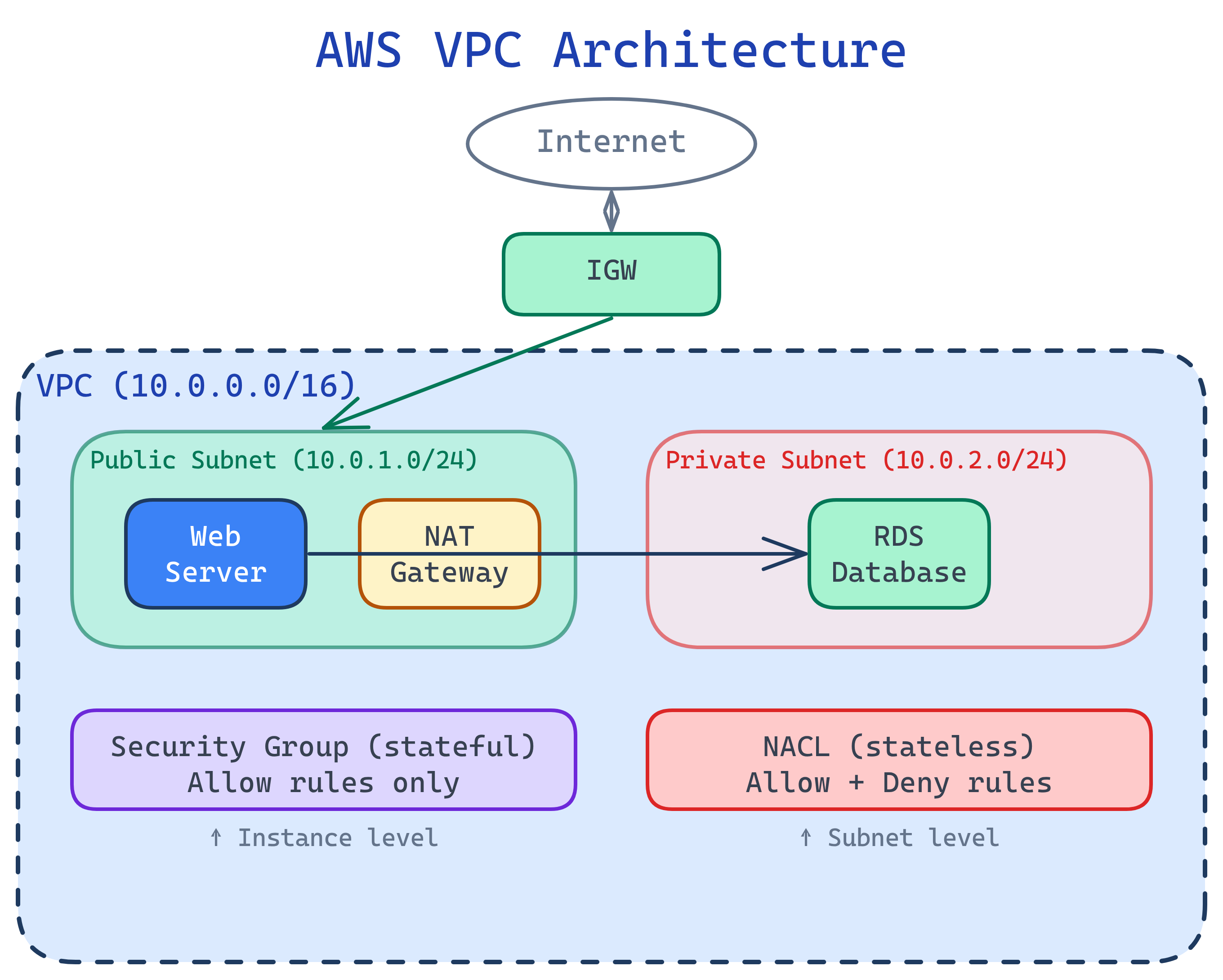
VPC Deep Dive
A VPC is a logically isolated section of the AWS cloud where you launch resources. You define its IP range using CIDR notation.
CIDR Blocks & Subnets
| CIDR | IPs Available | Common Use |
|---|---|---|
10.0.0.0/16 | 65,536 | VPC (large) |
10.0.0.0/20 | 4,096 | VPC (medium) |
10.0.1.0/24 | 256 (251 usable) | Subnet |
Public vs. Private Subnets
- Public subnet — Route table has a route to an Internet Gateway (IGW). Resources can have public IPs and be reached from the internet.
- Private subnet — No direct internet route. Resources can reach the internet outbound through a NAT Gateway (in a public subnet), but can't be reached from outside.
# Create a VPC
VPC_ID=$(aws ec2 create-vpc --cidr-block 10.0.0.0/16 \
  --query 'Vpc.VpcId' --output text)

# Create public subnet
PUB_SUBNET=$(aws ec2 create-subnet --vpc-id $VPC_ID \
  --cidr-block 10.0.1.0/24 --availability-zone us-east-1a \
  --query 'Subnet.SubnetId' --output text)

# Create private subnet
PRIV_SUBNET=$(aws ec2 create-subnet --vpc-id $VPC_ID \
  --cidr-block 10.0.2.0/24 --availability-zone us-east-1a \
  --query 'Subnet.SubnetId' --output text)

# Create and attach Internet Gateway
IGW_ID=$(aws ec2 create-internet-gateway \
  --query 'InternetGateway.InternetGatewayId' --output text)
aws ec2 attach-internet-gateway --internet-gateway-id $IGW_ID \
--vpc-id $VPC_IDSecurity Groups vs. NACLs
Both filter network traffic, but they work differently:
| Feature | Security Group | NACL |
|---|---|---|
| Level | Instance/ENI level | Subnet level |
| Statefulness | Stateful (return traffic auto-allowed) | Stateless (must allow both directions) |
| Rules | Allow rules only | Allow AND Deny rules |
| Evaluation | All rules evaluated together | Rules evaluated in order (lowest number first) |
| Default | Deny all inbound, allow all outbound | Allow all inbound and outbound |
# Create a security group for a web server
SG_ID=$(aws ec2 create-security-group \
  --group-name web-server-sg \
  --description "Allow HTTP/HTTPS from anywhere, SSH from my IP" \
  --vpc-id $VPC_ID \
  --query 'GroupId' --output text)

# Allow HTTPS from anywhere
aws ec2 authorize-security-group-ingress --group-id $SG_ID \
  --protocol tcp --port 443 --cidr 0.0.0.0/0

# Allow SSH from a specific IP only
aws ec2 authorize-security-group-ingress --group-id $SG_ID \
--protocol tcp --port 22 --cidr 203.0.113.50/320.0.0.0/0 in production. Restrict it to specific IPs or use AWS Systems Manager Session Manager for remote access without opening any ports.IAM Policies in Depth
IAM policies are JSON documents that define permissions. They follow the principle of least privilege — grant only the access needed.
Policy Structure
{
  "Version": "2012-10-17",
  "Statement": [
    {
      "Sid": "AllowS3ReadOnly",
      "Effect": "Allow",
      "Action": [
        "s3:GetObject",
        "s3:ListBucket"
      ],
      "Resource": [
        "arn:aws:s3:::my-data-bucket",
        "arn:aws:s3:::my-data-bucket/*"
      ],
      "Condition": {
        "IpAddress": {
          "aws:SourceIp": "203.0.113.0/24"
        }
      }
    }
  ]
}Common IAM Patterns
| Pattern | What It Does | Example |
|---|---|---|
| Identity-based | Attached to user/group/role | "This developer can read S3" |
| Resource-based | Attached to a resource | "This S3 bucket allows cross-account access" |
| Permission boundary | Max permissions limit | "This role can never delete production resources" |
| SCP (Org-level) | Guardrail for entire accounts | "No account can launch in ap-east-1" |
Route 53 & CloudFront
Route 53 is AWS's DNS service. CloudFront is the CDN that caches content at 400+ edge locations worldwide.
Route 53 Routing Policies
- Simple — One record, one destination
- Weighted — Split traffic by percentage (A/B testing, blue-green deploys)
- Latency — Route to the Region with lowest latency for the user
- Failover — Primary/secondary with health checks
- Geolocation — Route based on user's country/continent
# Create a CloudFront distribution for an S3 static site
aws cloudfront create-distribution \
  --origin-domain-name my-bucket.s3.amazonaws.com \
--default-root-object index.htmlTest Yourself
What's the difference between a stateful and stateless firewall? Give an AWS example of each.
A web server in a public subnet needs to reach a database in a private subnet. What networking components make this work?
Why does NAT Gateway need to be in a public subnet?
How does IAM policy evaluation work when multiple policies apply?
When would you use Route 53 latency-based routing vs. CloudFront?
Interview Questions
Design a secure VPC architecture for a 3-tier web application (web, app, database).
How would you securely allow a Lambda function in Account A to access an S3 bucket in Account B?
sts:AssumeRole. Option 1 is simpler for S3; option 2 is more flexible for multiple services.A security audit found that your EC2 instances have public IPs they don't need. How do you fix this without downtime?