SQL JOINs
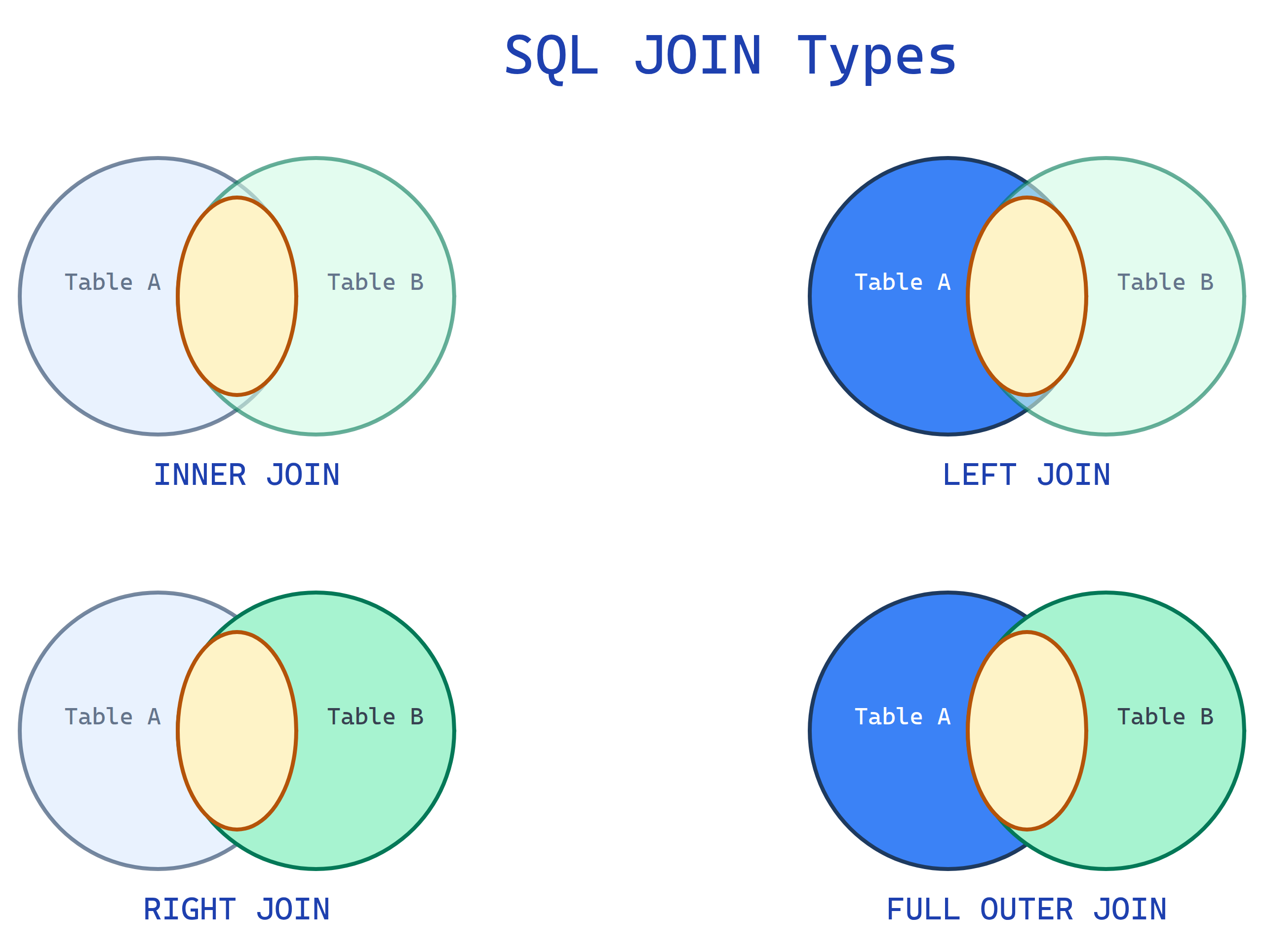
JOINs combine rows from two or more tables based on a related column. INNER returns only matches. LEFT returns all from the left table plus matches. RIGHT is the mirror. FULL returns everything from both sides.
Explain Like I'm 12
Imagine you have two lists. One has student names and their class IDs. The other has class IDs and class names. A JOIN is like laying them side by side and connecting each student to their class name using the class ID they share.
INNER JOIN: Only show students who have a matching class. LEFT JOIN: Show ALL students, even if they don't have a class yet (their class column will be blank). RIGHT JOIN: Show ALL classes, even empty ones with no students. FULL JOIN: Show everything from both lists.
The 4 JOIN Types at a Glance
Our Sample Data
We'll use these two tiny tables for every example. Get familiar with them — you'll see them throughout this page.
employees
| id | name | dept_id |
|---|---|---|
| 1 | Alice | 10 |
| 2 | Bob | 20 |
| 3 | Charlie | 10 |
| 4 | Diana | NULL |
departments
| id | dept_name |
|---|---|
| 10 | Engineering |
| 20 | Marketing |
| 30 | Sales |
Notice: Diana has no department (NULL). Sales has no employees. These edge cases are where different JOINs behave differently.
INNER JOIN
Returns only rows that have a match in both tables. No match = not in the result.
Only the overlap
SELECT e.name, d.dept_name
FROM employees e
INNER JOIN departments d ON e.dept_id = d.id;
Result
| name | dept_name |
|---|---|
| Alice | Engineering |
| Bob | Marketing |
| Charlie | Engineering |
Diana is gone (no dept_id match). Sales is gone (no employees).
LEFT JOIN
Returns all rows from the left table, plus matched rows from the right. Unmatched right columns become NULL.
All of left + overlap
SELECT e.name, d.dept_name
FROM employees e
LEFT JOIN departments d ON e.dept_id = d.id;
Result
| name | dept_name |
|---|---|
| Alice | Engineering |
| Bob | Marketing |
| Charlie | Engineering |
| Diana | NULL |
Diana is back! Her dept_name is NULL because she has no department. Sales is still missing (it's not in the left table).
RIGHT JOIN
Returns all rows from the right table, plus matched rows from the left. The mirror of LEFT JOIN.
Overlap + all of right
SELECT e.name, d.dept_name
FROM employees e
RIGHT JOIN departments d ON e.dept_id = d.id;
Result
| name | dept_name |
|---|---|
| Alice | Engineering |
| Charlie | Engineering |
| Bob | Marketing |
| NULL | Sales |
Sales is back! But Diana is gone. RIGHT JOIN keeps all departments, even empty ones.
FULL OUTER JOIN
Returns all rows from both tables. Unmatched columns on either side become NULL.
All of both sides
SELECT e.name, d.dept_name
FROM employees e
FULL OUTER JOIN departments d ON e.dept_id = d.id;
Result
| name | dept_name |
|---|---|
| Alice | Engineering |
| Bob | Marketing |
| Charlie | Engineering |
| Diana | NULL |
| NULL | Sales |
Everyone and everything. Diana (no dept) and Sales (no employees) both appear with NULLs.
Comparison Table
| JOIN Type | Left unmatched | Matched rows | Right unmatched | Use when |
|---|---|---|---|---|
| INNER | Dropped | Included | Dropped | You only want rows that exist in both tables |
| LEFT | Included (NULL-padded) | Included | Dropped | You want all from the left, optionally enriched with right |
| RIGHT | Dropped | Included | Included (NULL-padded) | You want all from the right (rare, use LEFT instead) |
| FULL | Included (NULL-padded) | Included | Included (NULL-padded) | You want everything from both sides, no data lost |
Common JOIN Patterns
Multi-table JOIN
Chain JOINs to connect three or more tables:
SELECT e.name, d.dept_name, o.city
FROM employees e
JOIN departments d ON e.dept_id = d.id
JOIN offices o ON d.office_id = o.id;
Self JOIN
Join a table to itself. Useful for hierarchies like employee-manager:
SELECT e.name AS employee, m.name AS manager
FROM employees e
LEFT JOIN employees m ON e.manager_id = m.id;
Find unmatched rows (anti-join)
LEFT JOIN + WHERE NULL is a powerful pattern to find orphaned records:
-- Find employees with no department
SELECT e.name
FROM employees e
LEFT JOIN departments d ON e.dept_id = d.id
WHERE d.id IS NULL;
Performance Tips
- Index your JOIN columns. If you JOIN ON
e.dept_id = d.id, make sure both columns are indexed. - Filter early with WHERE. Reduce rows before the JOIN happens, not after.
- Avoid SELECT * in JOINs. You're pulling columns from multiple tables — only select what you need.
- Use EXPLAIN. Run
EXPLAIN SELECT ...to see how the database plans your JOIN. Look for "table scan" warnings.
Test Yourself
Q: What does INNER JOIN return?
Q: You want all customers, even those with no orders. Which JOIN?
Q: What appears in the result when a LEFT JOIN has no match on the right side?
Q: How do you find orphaned rows (rows in the left table with no match in the right)?
WHERE right_table.id IS NULL. This is called an anti-join pattern.Q: Why should you index JOIN columns?
Interview Questions
Q: What is the difference between INNER JOIN and LEFT JOIN?
Q: Can you JOIN a table to itself? When would you?
JOIN employees m ON e.manager_id = m.id), (2) finding pairs (e.g., flights with matching departure/arrival), (3) comparing rows within the same table. Always use table aliases to distinguish the two instances.Q: Write a query to find all departments with no employees.
-- Anti-join pattern (most performant)
SELECT d.dept_name
FROM departments d
LEFT JOIN employees e ON d.id = e.dept_id
WHERE e.id IS NULL;

-- Alternative with NOT EXISTS
SELECT dept_name FROM departments d
WHERE NOT EXISTS (
  SELECT 1 FROM employees e WHERE e.dept_id = d.id
);
Q: What's a cross join? When would you use one?
Q: You have a slow query with multiple JOINs. How do you optimize it?