SQL Window Functions
Window functions calculate across a set of rows related to the current row — without collapsing them into one like GROUP BY does. Use OVER() to define the window. Add PARTITION BY to group and ORDER BY to sort within the window.
Explain Like I'm 12
Imagine your class got test scores back. GROUP BY is like: "What's the average score per subject?" — you get one number per subject, and all the individual scores disappear.
Window functions are like: "Show me everyone's score AND their rank in the class, AND how they compare to the average." Every row stays — you just add extra columns with calculations based on the group.
How Window Functions Work
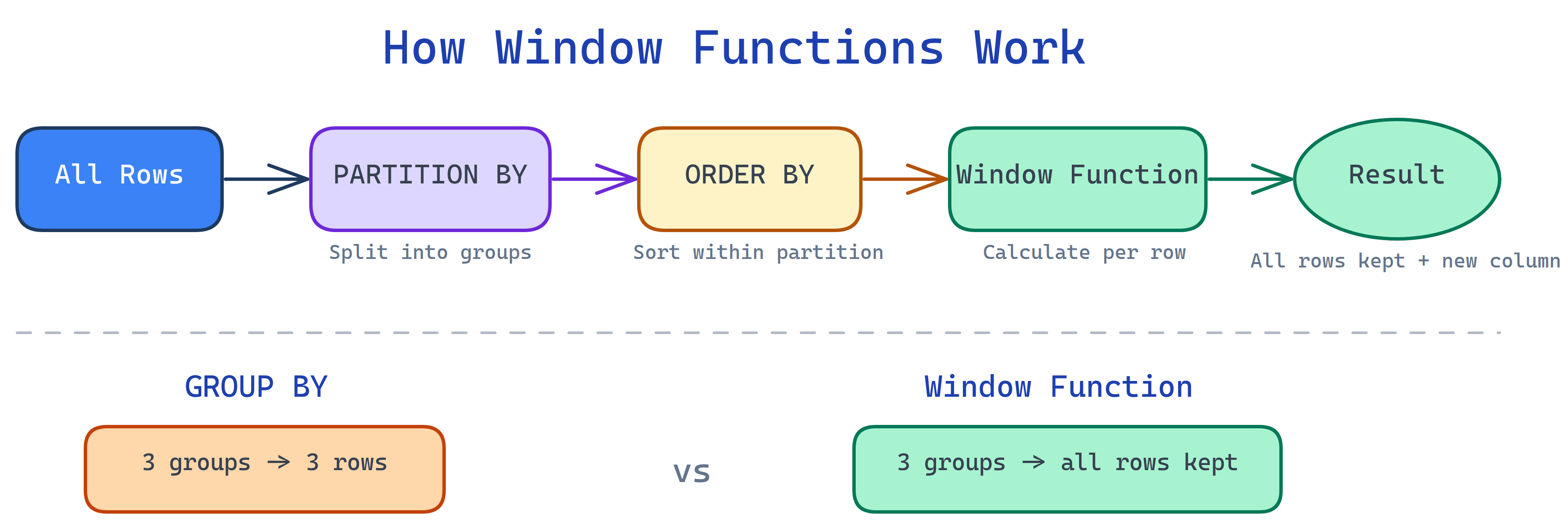
The Syntax
function_name() OVER (
  PARTITION BY column    -- optional: split into groups
  ORDER BY column        -- optional: sort within group
)OVER() is what makes a function a window function. Without it, SUM() and COUNT() are just aggregate functions.
Sample Data
We'll use this sales table for every example:
| id | name | department | salary |
|---|---|---|---|
| 1 | Alice | Engineering | 95000 |
| 2 | Bob | Engineering | 90000 |
| 3 | Charlie | Engineering | 90000 |
| 4 | Diana | Marketing | 85000 |
| 5 | Eve | Marketing | 80000 |
| 6 | Frank | Sales | 70000 |
Ranking Functions
The three ranking functions differ only in how they handle ties:
SELECT name, department, salary,
  ROW_NUMBER() OVER (ORDER BY salary DESC) AS row_num,
  RANK()       OVER (ORDER BY salary DESC) AS rank,
  DENSE_RANK() OVER (ORDER BY salary DESC) AS dense_rank
FROM employees;| name | salary | row_num | rank | dense_rank |
|---|---|---|---|---|
| Alice | 95000 | 1 | 1 | 1 |
| Bob | 90000 | 2 | 2 | 2 |
| Charlie | 90000 | 3 | 2 | 2 |
| Diana | 85000 | 4 | 4 | 3 |
| Eve | 80000 | 5 | 5 | 4 |
| Frank | 70000 | 6 | 6 | 5 |
- ROW_NUMBER — always unique, like a ticket number (1, 2, 3, 4...)
- RANK — ties share a rank, then skips (1, 2, 2, 4...)
- DENSE_RANK — ties share a rank, no gaps (1, 2, 2, 3...)
PARTITION BY — Rank Within Groups
PARTITION BY is like GROUP BY for window functions. It splits the rows into groups, and the function runs independently within each group.
-- Rank employees within their department
SELECT name, department, salary,
  RANK() OVER (
    PARTITION BY department
    ORDER BY salary DESC
  ) AS dept_rank
FROM employees;| name | department | salary | dept_rank |
|---|---|---|---|
| Alice | Engineering | 95000 | 1 |
| Bob | Engineering | 90000 | 2 |
| Charlie | Engineering | 90000 | 2 |
| Diana | Marketing | 85000 | 1 |
| Eve | Marketing | 80000 | 2 |
| Frank | Sales | 70000 | 1 |
Notice how the rank resets to 1 for each department. That's PARTITION BY at work.
LAG and LEAD — Look at Neighboring Rows
LAG looks at the previous row. LEAD looks at the next row. Perfect for comparisons over time.
-- Compare each employee's salary to the next lower one
SELECT name, salary,
  LAG(salary, 1)  OVER (ORDER BY salary DESC) AS prev_higher,
  LEAD(salary, 1) OVER (ORDER BY salary DESC) AS next_lower,
  salary - LEAD(salary, 1) OVER (ORDER BY salary DESC) AS gap
FROM employees;| name | salary | prev_higher | next_lower | gap |
|---|---|---|---|---|
| Alice | 95000 | NULL | 90000 | 5000 |
| Bob | 90000 | 95000 | 90000 | 0 |
| Charlie | 90000 | 90000 | 85000 | 5000 |
| Diana | 85000 | 90000 | 80000 | 5000 |
| Eve | 80000 | 85000 | 70000 | 10000 |
| Frank | 70000 | 80000 | NULL | NULL |
Aggregate Window Functions
Any aggregate function (SUM, AVG, COUNT, MIN, MAX) becomes a window function when you add OVER().
SELECT name, department, salary,
  AVG(salary) OVER (PARTITION BY department) AS dept_avg,
  salary - AVG(salary) OVER (PARTITION BY department) AS diff_from_avg,
  SUM(salary) OVER () AS company_total
FROM employees;OVER() with no PARTITION BY treats the entire result set as one window. Useful for totals and percentages.
Running Totals
-- Running total of salary ordered by hire date
SELECT name, salary,
  SUM(salary) OVER (ORDER BY hire_date) AS running_total
FROM employees;
Common Patterns
Top-N per Group
One of the most common interview questions: "Get the top 3 earners per department."
SELECT * FROM (
  SELECT name, department, salary,
    ROW_NUMBER() OVER (
      PARTITION BY department ORDER BY salary DESC
    ) AS rn
  FROM employees
) ranked
WHERE rn <= 3;
Percentage of Total
SELECT name, department, salary,
  ROUND(100.0 * salary / SUM(salary) OVER (), 1) AS pct_of_total,
  ROUND(100.0 * salary / SUM(salary) OVER (PARTITION BY department), 1) AS pct_of_dept
FROM employees;
Deduplication
-- Keep only the latest record per user
DELETE FROM events
WHERE id NOT IN (
  SELECT id FROM (
    SELECT id,
      ROW_NUMBER() OVER (PARTITION BY user_id ORDER BY created_at DESC) AS rn
    FROM events
  ) t WHERE rn = 1
);
GROUP BY vs Window Functions
| Feature | GROUP BY | Window Function |
|---|---|---|
| Rows in result | One per group | All original rows kept |
| Access to individual rows | No — collapsed | Yes — each row visible |
| Multiple aggregations | All same grouping | Each can have different PARTITION |
| Ranking | Not possible | ROW_NUMBER, RANK, etc. |
| Neighbor access | Not possible | LAG, LEAD |
| Performance | Generally faster | Can be slower on large sets |
Test Yourself
Q: What's the difference between RANK and DENSE_RANK?
Q: What does PARTITION BY do?
Q: How do LAG and LEAD differ?
Q: How do you make SUM() a window function instead of an aggregate?
OVER() after it: SUM(salary) OVER (PARTITION BY department). Without OVER, it collapses rows. With OVER, every row stays.Interview Questions
Q: Write a query to find the 2nd highest salary in each department.
SELECT * FROM (
  SELECT name, department, salary,
    DENSE_RANK() OVER (
      PARTITION BY department ORDER BY salary DESC
    ) AS dr
  FROM employees
) t WHERE dr = 2;
Use DENSE_RANK (not RANK) so ties don't cause you to skip the 2nd position.
Q: How would you calculate month-over-month revenue growth as a percentage?
SELECT month, revenue,
  LAG(revenue) OVER (ORDER BY month) AS prev_month,
  ROUND(100.0 * (revenue - LAG(revenue) OVER (ORDER BY month))
    / LAG(revenue) OVER (ORDER BY month), 1) AS growth_pct
FROM monthly_revenue;
Q: What's the difference between a window function and a GROUP BY? When would you choose one over the other?
Q: How do you remove duplicate rows keeping only the most recent one per user?
WITH ranked AS (
  SELECT *, ROW_NUMBER() OVER (
    PARTITION BY user_id ORDER BY created_at DESC
  ) AS rn
  FROM events
)
SELECT * FROM ranked WHERE rn = 1;
ROW_NUMBER (not RANK) guarantees exactly one row per user, even if timestamps tie.
Q: Can you use a window function in a WHERE clause? Why or why not?