Branching & Merging Strategies
Branches let you work on features in isolation. Merge preserves history, rebase keeps it linear. Use Git Flow for release-based projects and trunk-based development for CI/CD speed. Always resolve conflicts carefully — never just accept one side blindly.
Explain Like I'm 12
Imagine you're building a LEGO castle with friends. Instead of everyone working on the same castle at once (chaos!), each person takes a copy of the instructions and builds their section separately. When they're done, you snap the pieces together.
Branching = everyone working on their own section. Merging = snapping the pieces together. Sometimes two people built the same tower differently — that's a conflict, and you have to decide which version to keep.
How Branching Works
Every branch is just a lightweight pointer to a commit. Creating a branch is instant — Git doesn't copy files, it just creates a new pointer.
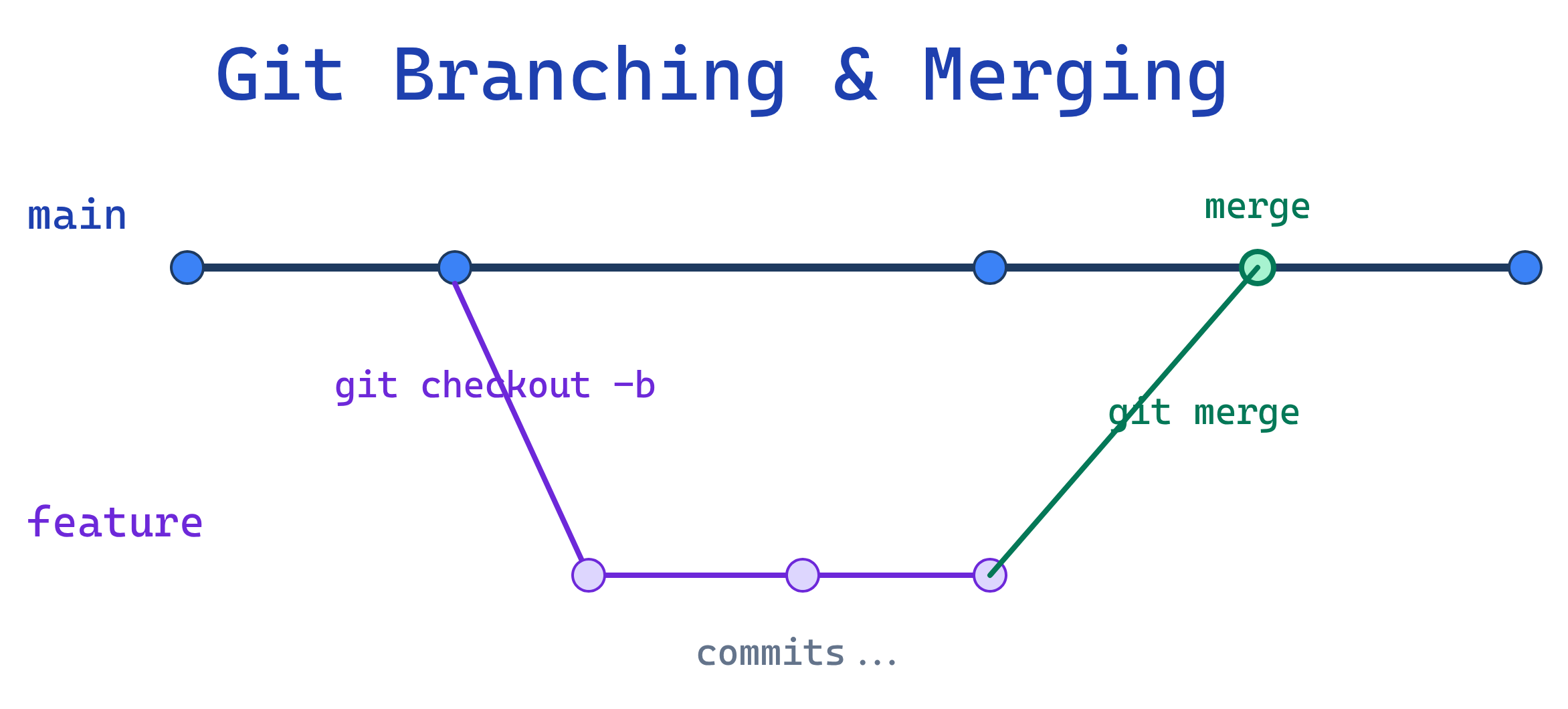
Merge vs Rebase
The two main ways to integrate changes from one branch into another:
| Aspect | Merge | Rebase |
|---|---|---|
| How it works | Creates a merge commit joining two branches | Replays your commits on top of the target branch |
| History | Preserves full branch history (non-linear) | Creates a clean, linear history |
| Safety | Safe — never rewrites history | Rewrites commit SHAs — dangerous on shared branches |
| Best for | Shared branches, PRs, releases | Local cleanup before pushing, keeping up with main |
| Conflict resolution | Resolve once during merge | May need to resolve at each replayed commit |
# Merge: creates a merge commit
git switch main
git merge feature/login
# Creates commit: "Merge branch 'feature/login' into main"

# Rebase: replays commits on top of main
git switch feature/login
git rebase main
# Moves feature commits after latest main commit
git switch main
git merge feature/login # Now a fast-forward (linear)Branching Strategies
Git Flow
A structured model with dedicated branches for features, releases, and hotfixes. Best for projects with scheduled releases.
| Branch | Purpose | Merges Into |
|---|---|---|
main | Production-ready code, tagged with versions | — |
develop | Integration branch for next release | main (via release) |
feature/* | New features | develop |
release/* | Release prep (bug fixes, versioning) | main + develop |
hotfix/* | Emergency production fixes | main + develop |
Trunk-Based Development
Everyone commits to main (the trunk) directly or via very short-lived branches (< 1 day). Best for teams practicing continuous delivery.
# Short-lived feature branch
git switch -c feat/add-button
# ... make changes, commit ...
git push origin feat/add-button
# Open PR, get review, merge same day
# Delete branch after mergeGitHub Flow
A simplified model: main is always deployable, features go in branches, PRs are the review mechanism. The most common model for GitHub projects.
- Create a branch from
main - Make commits
- Open a pull request
- Review + discuss
- Merge to
main - Deploy
Resolving Merge Conflicts
Conflicts happen when two branches change the same lines. Git marks the conflicting sections:
<<<<<<< HEAD
const greeting = "Hello, World!";
=======
const greeting = "Hi there!";
>>>>>>> feature/new-greeting
To resolve:
- Open the conflicted file and choose the correct code (or combine both)
- Remove the conflict markers (
<<<<<<<,=======,>>>>>>>) - Stage and commit the resolved file
# After manually editing the file:
git add src/greeting.js
git commit -m "Resolve conflict: use combined greeting"Cherry-Pick
git cherry-pick copies a specific commit from one branch to another — without merging the whole branch.
# Apply a specific commit to current branch
git cherry-pick a1b2c3d

# Cherry-pick without committing (stage only)
git cherry-pick --no-commit a1b2c3ddevelop to main without merging everything else.Test Yourself
When should you use rebase instead of merge?
main. Use merge for shared branches and pull requests where preserving the full history matters. Golden rule: rebase local, merge shared.What's the difference between Git Flow and trunk-based development?
What does git cherry-pick do?
git cherry-pick takes a specific commit (by SHA) from one branch and applies it to your current branch as a new commit. It doesn't merge the whole branch — just that one commit. Useful for applying hotfixes or specific changes selectively.How do you resolve a merge conflict?
<<<<<<<, =======, >>>>>>> markers. (2) Edit the file to keep the correct code and remove the markers. (3) Stage the resolved file with git add. (4) Complete the merge with git commit.Why is rebasing dangerous on shared branches?
Interview Questions
Explain the difference between a fast-forward merge and a three-way merge.
Your team uses Git Flow. A critical bug is found in production. Walk through the process to fix it.
hotfix/fix-critical-bug branch from main. (2) Fix the bug and commit. (3) Merge the hotfix into main and tag the release. (4) Also merge the hotfix into develop so the fix carries forward. (5) Delete the hotfix branch.What is git rebase --interactive used for?
git rebase -i) lets you edit, squash, reorder, or drop commits in your branch history. Common uses: squash multiple WIP commits into one clean commit before a PR, reword commit messages, or remove accidental commits. Only use on local/unpushed branches.