GitHub Actions — CI/CD Automation
GitHub Actions lets you automate workflows directly in your repo. Write YAML files in .github/workflows/ to run tests on every push, deploy on merge to main, publish packages, and more. Free for public repos, 2,000 minutes/month for private.
Explain Like I'm 12
Imagine you have a robot assistant that watches your homework folder. Every time you save a new version, the robot automatically checks your spelling, runs the math problems through a calculator, and if everything's correct, prints it out and puts it in your teacher's mailbox. That's GitHub Actions — a robot that automatically checks and ships your code.
How GitHub Actions Works
A workflow is triggered by an event (push, PR, schedule), runs jobs on virtual machines, and each job has steps that execute commands or use pre-built actions.
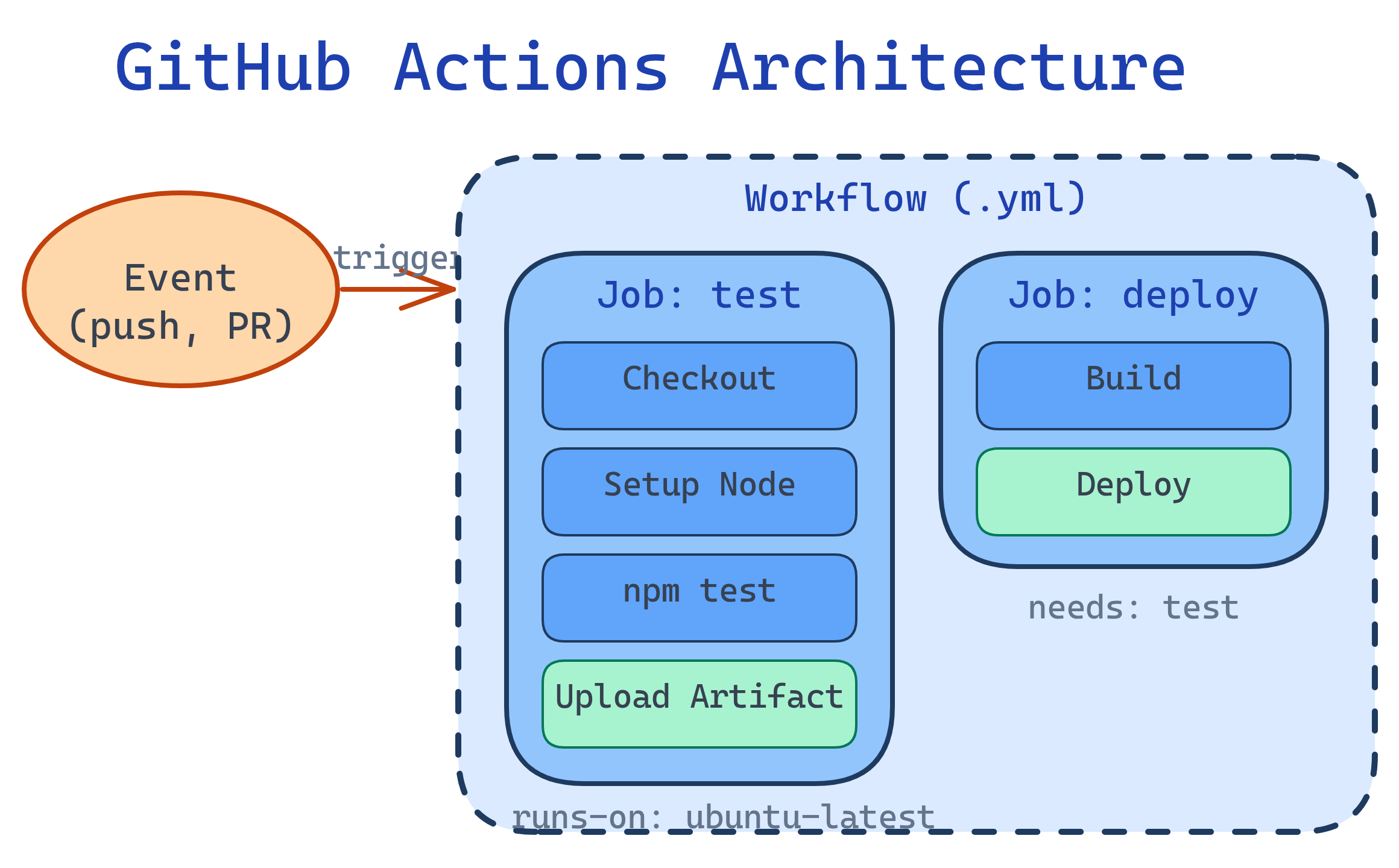
Anatomy of a Workflow
Workflows live in .github/workflows/*.yml. Here's a complete CI workflow:
# .github/workflows/ci.yml
name: CI

on:
  push:
    branches: [main]
  pull_request:
    branches: [main]

jobs:
  test:
    runs-on: ubuntu-latest
    strategy:
      matrix:
        node-version: [18, 20, 22]

    steps:
      - name: Checkout code
        uses: actions/checkout@v4

      - name: Setup Node.js
        uses: actions/setup-node@v4
        with:
          node-version: ${{ matrix.node-version }}
          cache: 'npm'

      - name: Install dependencies
        run: npm ci

      - name: Run linter
        run: npm run lint

      - name: Run tests
        run: npm test

      - name: Upload coverage
        if: matrix.node-version == 22
        uses: actions/upload-artifact@v4
        with:
          name: coverage
path: coverage/matrix strategy runs the same job across multiple configurations in parallel. The example above tests on Node 18, 20, and 22 simultaneously.Workflow Triggers
| Trigger | YAML | When It Fires |
|---|---|---|
| Push | on: push | Code pushed to a branch |
| Pull Request | on: pull_request | PR opened, updated, or reopened |
| Schedule | on: schedule | Cron schedule (e.g., nightly builds) |
| Manual | on: workflow_dispatch | Manually triggered from GitHub UI |
| Release | on: release | Release published |
| Other workflows | on: workflow_call | Called by another workflow (reusable) |
# Run nightly at 2 AM UTC
on:
  schedule:
    - cron: '0 2 * * *'

# Manual trigger with inputs
on:
  workflow_dispatch:
    inputs:
      environment:
        description: 'Deploy to'
        required: true
        default: 'staging'
        type: choice
options: [staging, production]paths filter to only run workflows when relevant files change: on: push: paths: ['src/**', 'tests/**']. This saves CI minutes.Actions & the Marketplace
Actions are reusable building blocks. Use community actions from the GitHub Marketplace or write your own.
Most-Used Actions
| Action | Purpose |
|---|---|
actions/checkout@v4 | Check out your repository code |
actions/setup-node@v4 | Install and cache Node.js |
actions/setup-python@v5 | Install and cache Python |
actions/cache@v4 | Cache dependencies between runs |
actions/upload-artifact@v4 | Save files (logs, builds) from a run |
github/codeql-action@v3 | Security scanning for vulnerabilities |
@v4) or commit SHA — never use @main. A compromised action at @main could execute malicious code in your CI pipeline.Secrets & Environment Variables
Store sensitive data (API keys, tokens) as encrypted secrets in repo settings:
steps:
  - name: Deploy to production
    env:
      API_KEY: ${{ secrets.PRODUCTION_API_KEY }}
      DEPLOY_TOKEN: ${{ secrets.DEPLOY_TOKEN }}
    run: |
      echo "Deploying with token..."
./deploy.shExample: Deploy on Merge to Main
# .github/workflows/deploy.yml
name: Deploy

on:
  push:
    branches: [main]

jobs:
  deploy:
    runs-on: ubuntu-latest
    environment: production

    steps:
      - uses: actions/checkout@v4

      - name: Setup Node.js
        uses: actions/setup-node@v4
        with:
          node-version: 22
          cache: 'npm'

      - run: npm ci
      - run: npm run build

      - name: Deploy to Cloudflare Pages
        uses: cloudflare/pages-action@v1
        with:
          apiToken: ${{ secrets.CF_API_TOKEN }}
          accountId: ${{ secrets.CF_ACCOUNT_ID }}
          projectName: my-app
          directory: dist
Performance Tips
- Cache dependencies — use
actions/cacheor built-in caching in setup actions - Use path filters — skip CI when only docs changed
- Run jobs in parallel — independent jobs run simultaneously by default
- Use
concurrency— cancel in-progress runs when a new push arrives
# Cancel outdated runs for the same branch
concurrency:
  group: ${{ github.workflow }}-${{ github.ref }}
cancel-in-progress: trueconcurrency setting prevents wasted CI minutes when you push multiple times in quick succession.Test Yourself
What's the difference between on: push and on: pull_request triggers?
on: push fires when commits are pushed to a branch. on: pull_request fires when a PR is opened, updated (new commits pushed to the PR branch), or reopened. Key difference: pull_request runs against the merge result (base + head), while push runs against the pushed commit directly.How do you store and use sensitive credentials in GitHub Actions?
${{ secrets.SECRET_NAME }}. GitHub automatically masks secret values in logs. For environment-specific secrets, create Environments with approval gates.What does a matrix strategy do?
matrix: { node-version: [18, 20, 22], os: [ubuntu-latest, windows-latest] } creates 6 jobs (3 versions × 2 OS). Great for testing compatibility across versions and platforms.Why should you pin actions to a version or SHA instead of using @main?
@main means your CI runs whatever code is currently on the action's main branch. If the action is compromised or updated with breaking changes, your workflow breaks or runs malicious code. Pinning to @v4 or a commit SHA ensures you use a known, tested version.How can you reduce CI minutes when pushing frequently?
cancel-in-progress: true to cancel outdated runs. Use path filters to skip runs when only irrelevant files changed. Cache dependencies to avoid re-downloading. Run jobs in parallel instead of sequentially.Interview Questions
Design a CI/CD pipeline for a Node.js app with staging and production environments.
How would you create a reusable workflow that multiple repos can share?
on: workflow_call in a shared repo. Define inputs and secrets the caller must provide. Callers reference it with uses: org/shared-repo/.github/workflows/ci.yml@v1. This is different from reusable actions (which are individual steps). Reusable workflows share entire job definitions.A developer accidentally committed an API key to a public repo. What GitHub features help prevent and detect this?
git-secrets or pre-commit hooks to block secrets locally. (2) GitHub push protection — blocks pushes containing known secret patterns. Detection: (3) Secret scanning — alerts when secrets are found in code. (4) Dependabot alerts for vulnerable dependencies. Response: rotate the key immediately, use git filter-repo to remove from history, enable branch protection to require reviews.