Docker Core Concepts
Docker has 6 building blocks: Images (blueprints), Containers (running instances), Dockerfiles (build recipes), Volumes (persistent storage), Networks (container communication), and Registries (image distribution). Master these and you understand Docker.
Concept Map
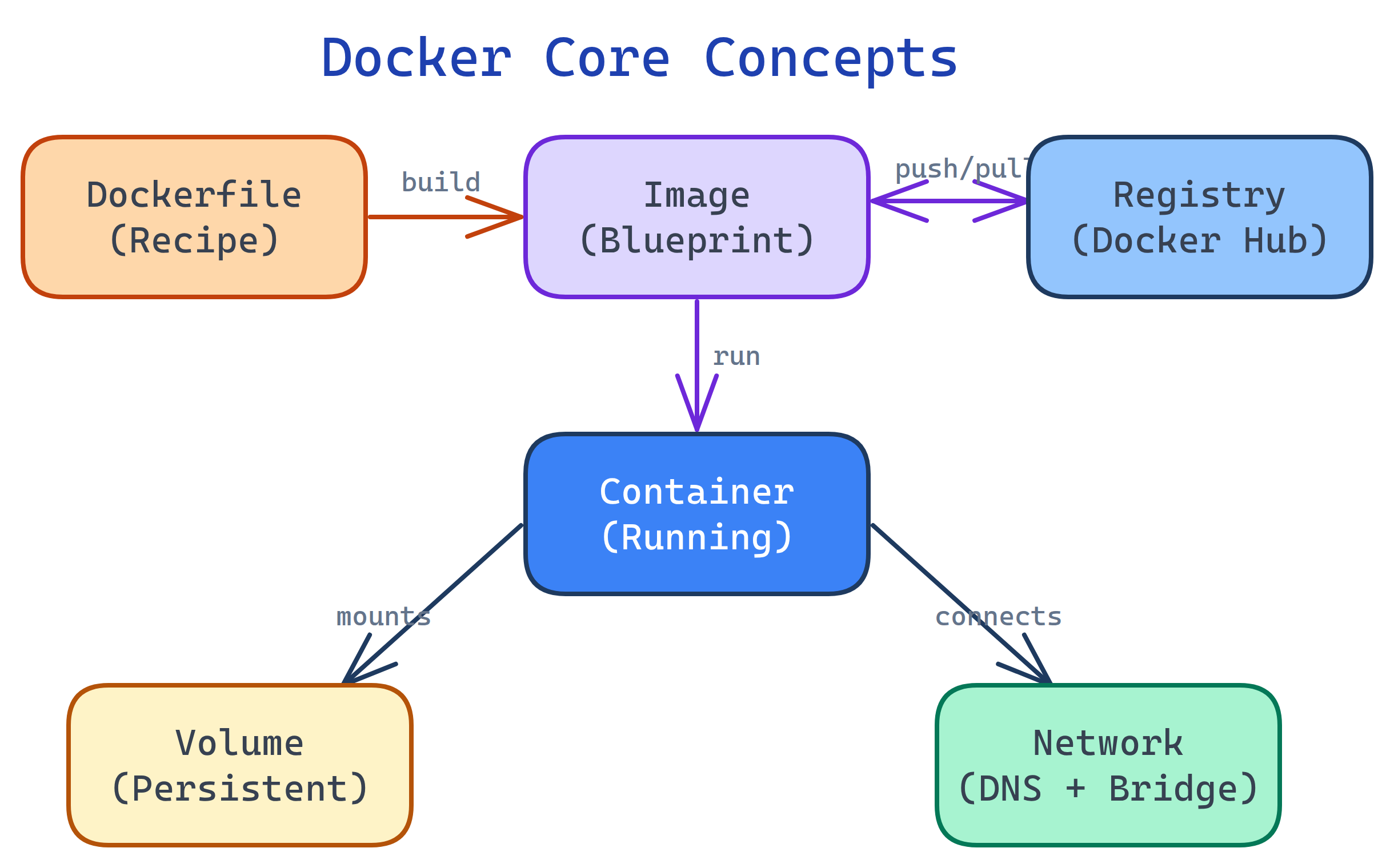
Here's how Docker's core concepts relate to each other. A Dockerfile builds an image, images run as containers, containers use volumes for storage and networks for communication, and registries distribute images between machines.
Explain Like I'm 12
Think of Docker like a food truck business:
- Dockerfile = the recipe book (instructions to build)
- Image = a ready-to-go food truck kit (everything packed up)
- Container = an actual food truck serving customers (the kit, running)
- Volume = the refrigerator (data that stays even if you park the truck)
- Network = the walkie-talkies between trucks (how containers talk)
- Registry = the warehouse storing truck kits (Docker Hub)
Cheat Sheet
| Concept | What It Does | Key Commands |
|---|---|---|
| Image | Read-only template with your app + dependencies | docker build, docker pull, docker images |
| Container | Running instance of an image | docker run, docker ps, docker stop |
| Dockerfile | Text file with build instructions | FROM, RUN, COPY, CMD |
| Volume | Persistent storage that outlives containers | docker volume create, -v flag |
| Network | Virtual network for container communication | docker network create, --network |
| Registry | Image storage & distribution (Docker Hub) | docker push, docker pull |
The Building Blocks
1. Images
A Docker image is a read-only template containing your application code, runtime, system libraries, and configuration. Images are built in layers — each instruction in your Dockerfile adds a new layer on top of the previous one.
Layers are cached and shared. If 10 containers use the same base image (python:3.12), that layer is stored once on disk. Only the layers unique to each app add extra space.
# Pull an image from Docker Hub
docker pull python:3.12-slim

# List all local images
docker images

# Remove an image
docker rmi python:3.12-slimrepository:tag. If you omit the tag, Docker uses :latest by default. Always pin a specific tag in production (e.g., python:3.12-slim not python:latest).2. Containers
A container is a running instance of an image. It's an isolated process with its own filesystem, network interface, and process tree. You can run, stop, restart, and delete containers without affecting the image.
# Run a container (interactive, with terminal)
docker run -it python:3.12-slim bash

# Run in background (detached)
docker run -d --name my-app -p 8080:80 nginx

# List running containers
docker ps

# Stop and remove
docker stop my-app
docker rm my-appdocker run --rm to automatically remove the container when it exits. Great for one-off tasks like running tests or scripts.3. Dockerfiles
A Dockerfile is a text file with instructions to build an image. Each instruction creates a layer. Docker caches layers, so unchanged instructions are fast on rebuild.
# Start from a base image
FROM python:3.12-slim

# Set the working directory
WORKDIR /app

# Copy dependency file first (better caching)
COPY requirements.txt .
RUN pip install --no-cache-dir -r requirements.txt

# Copy application code
COPY . .

# Expose port and define startup command
EXPOSE 8000
CMD ["python", "app.py"]4. Volumes
By default, data inside a container is lost when the container is removed. Volumes solve this by storing data outside the container's filesystem, on the host machine.
# Create a named volume
docker volume create my-data

# Run with volume mounted
docker run -d --name db \
  -v my-data:/var/lib/postgresql/data \
  postgres:16

# List volumes
docker volume ls

# Inspect a volume
docker volume inspect my-data| Storage Type | Syntax | Use Case |
|---|---|---|
| Named volume | -v my-vol:/data | Database storage, persistent state |
| Bind mount | -v ./src:/app/src | Development (live code reload) |
| tmpfs mount | --tmpfs /tmp | Sensitive data (never written to disk) |
5. Networks
Docker creates a virtual network so containers can communicate. By default, containers on the same network can reach each other by container name (Docker has built-in DNS).
# Create a custom network
docker network create my-app-net

# Run containers on the same network
docker run -d --name api --network my-app-net my-api
docker run -d --name db --network my-app-net postgres:16

# Now "api" can connect to "db" by name:
# postgres://db:5432/mydb| Network Driver | Use Case |
|---|---|
bridge (default) | Single-host container-to-container communication |
host | Container shares host's network (no isolation, max performance) |
none | No networking (isolated container) |
overlay | Multi-host networking (Docker Swarm) |
bridge. Custom networks provide automatic DNS resolution by container name; the default bridge does not.6. Registries
A registry is a storage and distribution service for Docker images. Docker Hub is the default public registry, but you can use private registries (AWS ECR, GCR, GitHub Container Registry) for proprietary images.
# Login to Docker Hub
docker login

# Tag your image for a registry
docker tag my-app:latest username/my-app:1.0

# Push to registry
docker push username/my-app:1.0

# Pull from registry (on any machine)
docker pull username/my-app:1.0:1.0, :2.3.1). The :latest tag is mutable and can cause confusion in production — you can't tell which version is "latest" without inspecting the image.Test Yourself
What happens to data inside a container when you run docker rm?
Why does the order of instructions in a Dockerfile matter?
How can two containers on the same Docker network communicate?
api can connect to postgres://db:5432 if both are on the same network.What's the difference between a named volume and a bind mount?
/var/lib/docker/volumes/). A bind mount maps a specific host directory to a container path. Named volumes are portable and easy to back up; bind mounts are great for development when you want live code changes reflected in the container.Why should you use python:3.12-slim instead of python:latest in production?
:latest is a moving target that can change at any time, so builds may break unexpectedly. 2) Size — -slim variants exclude build tools and documentation, producing images that are 3-5x smaller than the full image.