Docker Compose
Docker Compose lets you define multi-container applications in a single compose.yaml file. One command (docker compose up) starts your entire stack — API, database, cache, worker — with networking, volumes, and environment variables pre-configured.
Explain Like I'm 12
Imagine you're organizing a school play. You need actors, a stage crew, lighting, and sound — all working together. Instead of calling each person individually, you write one script that says "Actor 1 enters from the left, lights go up, sound plays music." Everyone knows what to do.
Docker Compose is that script for your app. Instead of running 5 separate docker run commands, you write one YAML file that describes all your services. One command starts everything in the right order.
Compose Architecture
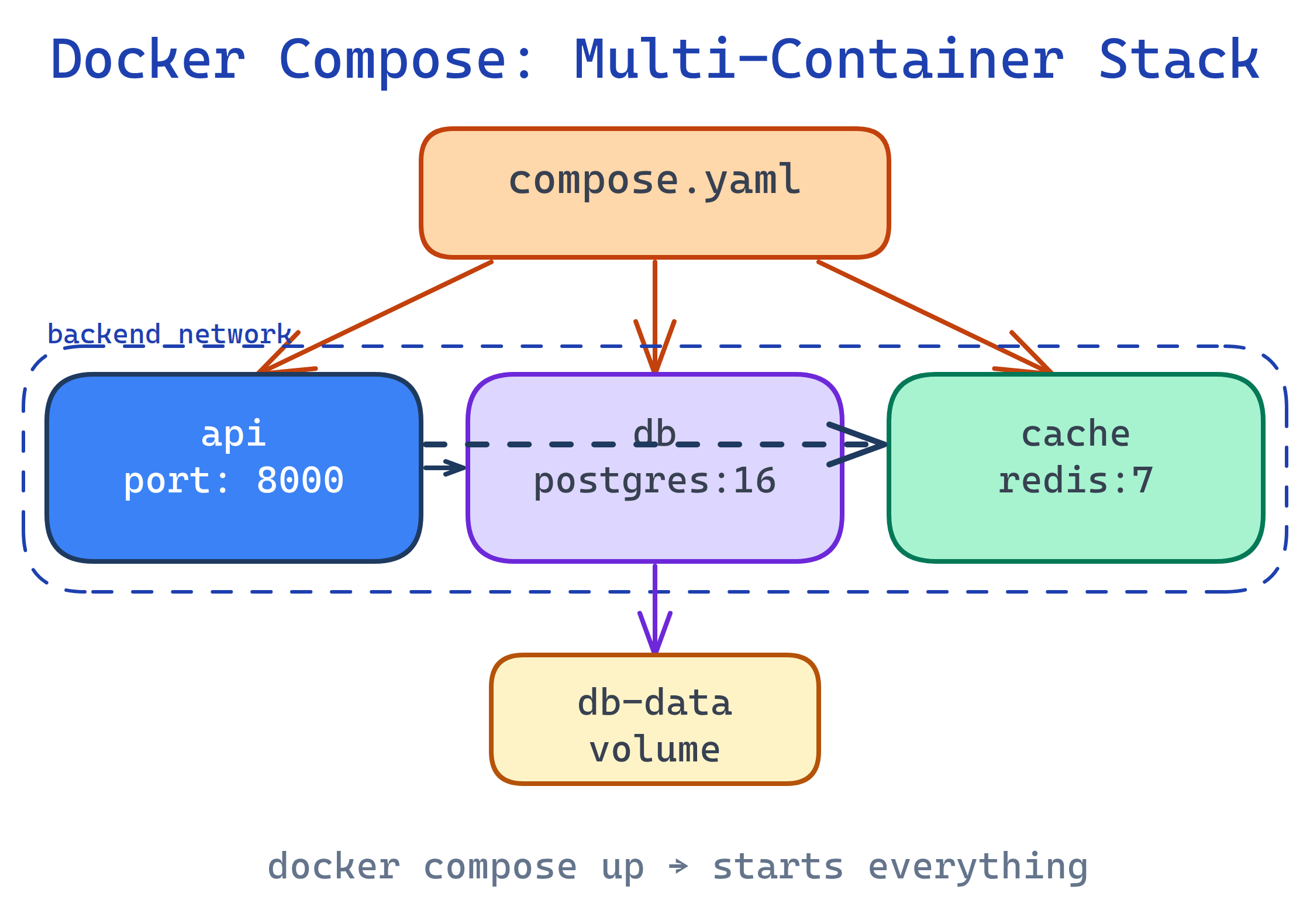
A typical web application has multiple services that need to work together. Docker Compose connects them into a single stack with shared networking and managed volumes.
Anatomy of compose.yaml
A Compose file has three top-level sections: services (your containers), volumes (persistent storage), and networks (communication channels).
services:
  # --- Web API ---
  api:
    build: ./api
    ports:
      - "8000:8000"
    environment:
      - DATABASE_URL=postgres://user:pass@db:5432/myapp
      - REDIS_URL=redis://cache:6379
    depends_on:
      db:
        condition: service_healthy
      cache:
        condition: service_started
    volumes:
      - ./api:/app        # Bind mount for live reload
    networks:
      - backend

  # --- PostgreSQL Database ---
  db:
    image: postgres:16
    environment:
      POSTGRES_USER: user
      POSTGRES_PASSWORD: pass
      POSTGRES_DB: myapp
    volumes:
      - db-data:/var/lib/postgresql/data
    healthcheck:
      test: ["CMD-SHELL", "pg_isready -U user"]
      interval: 5s
      timeout: 5s
      retries: 5
    networks:
      - backend

  # --- Redis Cache ---
  cache:
    image: redis:7-alpine
    networks:
      - backend

volumes:
  db-data:          # Named volume for database persistence

networks:
backend: # Custom network for service discoverycompose.yaml is the modern default (Docker Compose v2+). The old docker-compose.yml still works but is legacy. No version: field is needed in modern Compose files.Essential Commands
| Command | What It Does |
|---|---|
docker compose up -d | Start all services in background (detached) |
docker compose down | Stop and remove containers, networks |
docker compose down -v | Also remove volumes (destroys data!) |
docker compose ps | List running services and their status |
docker compose logs -f api | Follow logs for a specific service |
docker compose exec api bash | Open a shell inside a running service |
docker compose build | Rebuild images (after code or Dockerfile changes) |
docker compose up -d --build | Rebuild and restart in one step |
docker compose config | Validate and display the resolved config |
docker compose up -d --build as your go-to development command. It rebuilds only services whose Dockerfiles or build context changed, then restarts them.Service Configuration Deep Dive
Build vs Image
# Build from local Dockerfile
api:
  build:
    context: ./api
    dockerfile: Dockerfile.dev
    args:
      NODE_ENV: development

# Use pre-built image
db:
  image: postgres:16
Port Mapping
ports:
  - "8080:80"       # host:container
  - "5432:5432"     # same port on both sides
  - "127.0.0.1:9090:9090"  # only accessible from localhost
Environment Variables
# Inline
environment:
  - NODE_ENV=production
  - API_KEY=secret

# From .env file
env_file:
  - .env
- .env.local.env files with real secrets to version control. Use .env.example with placeholder values and add .env to .gitignore.Health Checks
healthcheck:
  test: ["CMD", "curl", "-f", "http://localhost:8000/health"]
  interval: 30s
  timeout: 10s
  retries: 3
  start_period: 40s
Dependency Order
depends_on:
  db:
    condition: service_healthy    # Wait until db passes healthcheck
  cache:
condition: service_started # Just wait until it startsdepends_on controls startup order, not readiness. Use condition: service_healthy with a healthcheck to ensure a service is actually ready to accept connections.Common Patterns
Development Overrides
Use a compose.override.yaml for dev-specific settings. Docker Compose automatically merges it with compose.yaml.
# compose.yaml (base)
services:
  api:
    build: ./api
    ports:
      - "8000:8000"

# compose.override.yaml (auto-merged in dev)
services:
  api:
    volumes:
      - ./api:/app          # Live reload
    environment:
      - DEBUG=true
Production with Explicit File
# Use a production-specific file
docker compose -f compose.yaml -f compose.prod.yaml up -d
Running One-Off Commands
# Run database migrations
docker compose exec api python manage.py migrate

# Run tests
docker compose run --rm api pytest

# Open a database shell
docker compose exec db psql -U user myapp
Compose vs Kubernetes
| Feature | Docker Compose | Kubernetes |
|---|---|---|
| Best for | Dev, testing, small deployments | Production at scale |
| Complexity | One YAML file | Multiple YAML manifests |
| Scaling | docker compose up --scale api=3 | Auto-scaling, rolling updates |
| Multi-host | Single machine only | Cluster of machines |
| Self-healing | restart: always | Built-in pod restart, rescheduling |
| Learning curve | Minutes | Weeks |
Test Yourself
What does docker compose down -v do differently from docker compose down?
docker compose down stops and removes containers and networks. Adding -v also removes named volumes, which permanently deletes persistent data (like database contents). Use -v carefully — it's the equivalent of dropping your database.How does depends_on with condition: service_healthy differ from plain depends_on?
depends_on only ensures a service starts before the dependent one. But starting doesn't mean ready — a database might take 10 seconds to accept connections. condition: service_healthy waits until the service's healthcheck passes, ensuring it's actually ready.How do services communicate by name in Docker Compose?
api and db, the API can connect to postgres://db:5432. Docker's embedded DNS resolves service names to container IPs.What's the advantage of using compose.override.yaml?
compose.override.yaml with compose.yaml. This lets you keep production config in the base file and dev-specific settings (volume mounts for live reload, debug flags, exposed ports) in the override. No -f flag needed — it just works.When should you use docker compose run vs docker compose exec?
exec runs a command in an already running container. run creates a new, temporary container for a one-off task. Use exec for debugging a running service. Use run --rm for one-off tasks like migrations, tests, or seed scripts.Interview Questions
How would you handle secrets in Docker Compose for production?
env_file with a .env that's not in version control. 2) Use Docker secrets (Swarm mode): secrets: in compose.yaml, files mounted to /run/secrets/. 3) Use an external secrets manager (Vault, AWS Secrets Manager) and inject at runtime. Never hardcode secrets in the Compose file or Dockerfile.Your API starts before the database is ready, causing connection errors. How do you fix this?
healthcheck to the database service and set depends_on with condition: service_healthy. Also implement retry logic in your application — infrastructure-level ordering is a best effort, and your app should handle transient connection failures gracefully.How do you manage different Compose configurations for dev, staging, and production?
compose.yaml (base) + environment-specific overrides. Dev uses compose.override.yaml (auto-merged). Production uses docker compose -f compose.yaml -f compose.prod.yaml up. This avoids duplication while allowing environment-specific ports, volumes, replicas, and resource limits.