Writing Dockerfiles
A Dockerfile is a recipe for building Docker images. Master layer ordering for fast builds, multi-stage builds for small images, and .dockerignore + non-root users for security. A well-written Dockerfile is the difference between a 1.2 GB image that takes 10 minutes to build and a 50 MB image that builds in 30 seconds.
Explain Like I'm 12
A Dockerfile is like IKEA assembly instructions for your app. Each step (FROM, COPY, RUN) adds one layer — like adding one piece of furniture at a time. If you change step 7, Docker only rebuilds from step 7 onward — it keeps steps 1-6 from last time. That's why order matters: put the stuff that rarely changes first.
How Docker Builds an Image
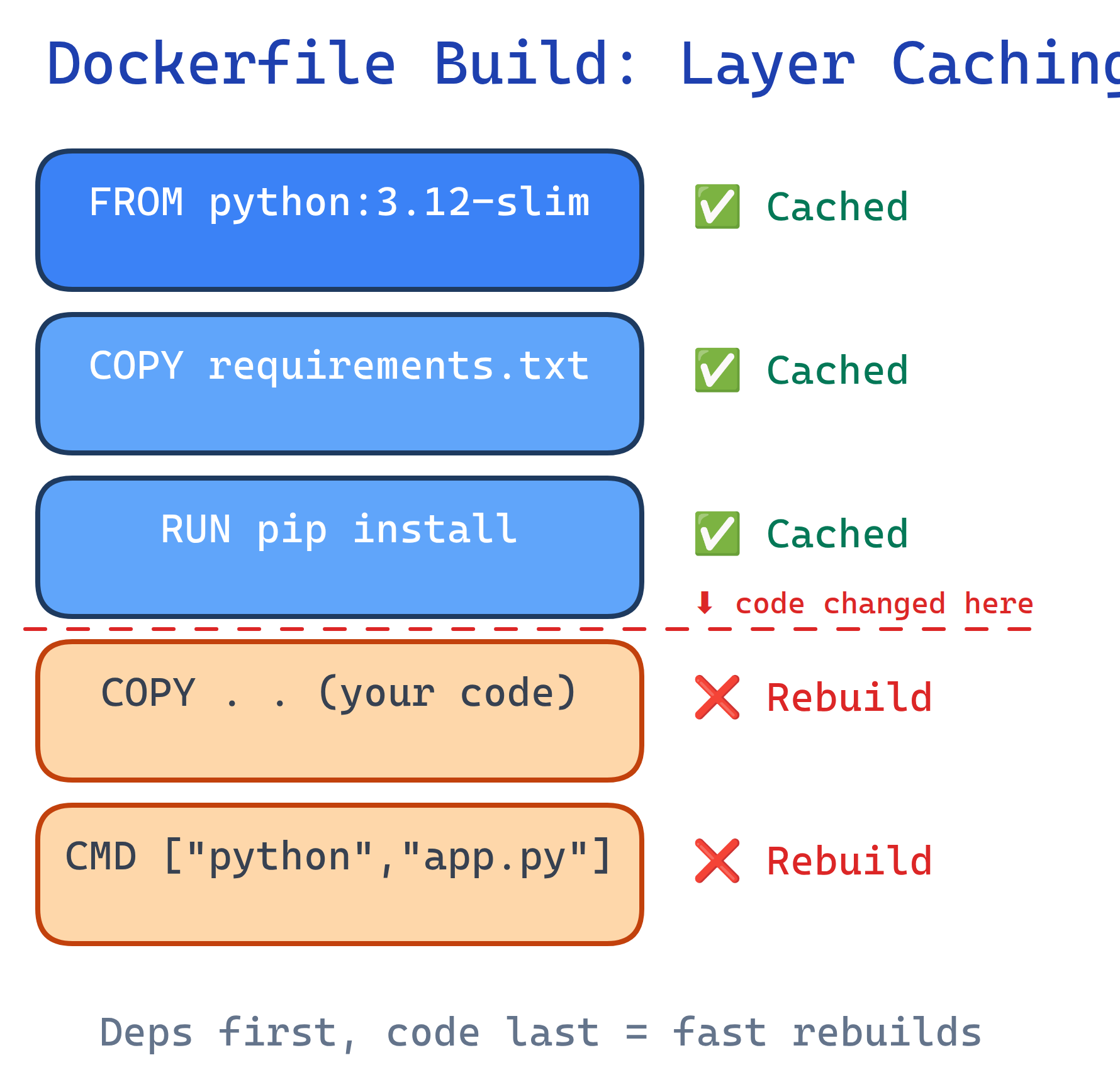
When you run docker build, Docker reads each instruction top-to-bottom. Each instruction creates a new layer. Layers are cached — if an instruction hasn't changed, Docker reuses the cached layer instead of re-executing it.
Essential Dockerfile Instructions
| Instruction | Purpose | Example |
|---|---|---|
FROM | Base image to start from | FROM python:3.12-slim |
WORKDIR | Set working directory | WORKDIR /app |
COPY | Copy files from host to image | COPY . . |
RUN | Execute command during build | RUN pip install -r requirements.txt |
ENV | Set environment variable | ENV NODE_ENV=production |
EXPOSE | Document which port the app uses | EXPOSE 8000 |
CMD | Default command when container starts | CMD ["python", "app.py"] |
ENTRYPOINT | Fixed command (CMD becomes arguments) | ENTRYPOINT ["python"] |
ARG | Build-time variable | ARG VERSION=1.0 |
HEALTHCHECK | Container health monitoring | HEALTHCHECK CMD curl -f http://localhost/ |
CMD provides defaults that can be overridden at runtime (docker run myapp bash). ENTRYPOINT sets a fixed command — runtime arguments are appended to it. Use ENTRYPOINT for tools (ENTRYPOINT ["curl"]) and CMD for services.Layer Caching Strategy
The #1 Dockerfile optimization: put things that change rarely at the top, things that change often at the bottom. When a layer changes, all layers below it are rebuilt.
Bad: Code changes bust the entire cache
FROM python:3.12-slim
COPY . .                          # Code changes? Rebuild EVERYTHING below
RUN pip install -r requirements.txt  # Re-downloads all packages every time
CMD ["python", "app.py"]
Good: Dependencies cached separately from code
FROM python:3.12-slim
WORKDIR /app

# Layer 1: Dependencies (changes rarely)
COPY requirements.txt .
RUN pip install --no-cache-dir -r requirements.txt

# Layer 2: Application code (changes often)
COPY . .

CMD ["python", "app.py"]COPY package*.json before COPY . .), Go (COPY go.mod go.sum), and Rust (COPY Cargo.toml Cargo.lock).Multi-Stage Builds
Multi-stage builds use multiple FROM instructions. Build your app in one stage (with compilers, dev tools), then copy only the output to a minimal final stage. This dramatically reduces image size.
Go example: 1.2 GB → 12 MB
# Stage 1: Build
FROM golang:1.22 AS builder
WORKDIR /app
COPY go.mod go.sum ./
RUN go mod download
COPY . .
RUN CGO_ENABLED=0 go build -o server .

# Stage 2: Run (minimal image)
FROM alpine:3.19
RUN apk --no-cache add ca-certificates
WORKDIR /app
COPY --from=builder /app/server .
EXPOSE 8080
CMD ["./server"]
Node.js example: 950 MB → 150 MB
# Stage 1: Build
FROM node:20 AS builder
WORKDIR /app
COPY package*.json ./
RUN npm ci
COPY . .
RUN npm run build

# Stage 2: Production
FROM node:20-slim
WORKDIR /app
COPY --from=builder /app/dist ./dist
COPY --from=builder /app/node_modules ./node_modules
COPY package*.json ./
EXPOSE 3000
CMD ["node", "dist/index.js"]--from=builder flag copies files from a named build stage. Only the final FROM stage ends up in the output image. Build tools, source code, and dev dependencies are discarded.Security Best Practices
Run as non-root
By default, containers run as root. If an attacker escapes the container, they have root on the host. Always create and switch to a non-root user.
FROM python:3.12-slim
WORKDIR /app

# Create non-root user
RUN groupadd -r appuser && useradd -r -g appuser appuser

COPY requirements.txt .
RUN pip install --no-cache-dir -r requirements.txt
COPY . .

# Switch to non-root user
USER appuser

CMD ["python", "app.py"]
Use .dockerignore
A .dockerignore file excludes files from the build context, preventing secrets and unnecessary files from ending up in your image.
# .dockerignore
.git
.env
node_modules
__pycache__
*.md
.vscode
docker-compose*.ymldocker run -e SECRET_KEY=...) or Docker secrets for Swarm/Kubernetes.Scan for vulnerabilities
# Scan an image for known CVEs
docker scout cves my-app:latest

# Or use Trivy (open source)
trivy image my-app:latest
Size Optimization Checklist
| Technique | Impact | How |
|---|---|---|
Use -slim or -alpine base | 3-5x smaller | FROM python:3.12-slim |
| Multi-stage builds | 10-100x smaller | Build in full image, run in minimal image |
| Combine RUN commands | Fewer layers | RUN apt-get update && apt-get install -y pkg && rm -rf /var/lib/apt/lists/* |
--no-cache-dir | ~50 MB less | RUN pip install --no-cache-dir |
.dockerignore | Faster builds | Exclude .git, node_modules, tests |
Test Yourself
Why should you copy requirements.txt before COPY . .?
requirements.txt first and run pip install, Docker caches that layer. When you change your code but not your dependencies, Docker reuses the cached dependencies layer and only rebuilds the COPY . . layer. If you COPY . . first, any code change invalidates the pip install cache.What's the difference between CMD and ENTRYPOINT?
CMD provides a default command that can be completely overridden at runtime. ENTRYPOINT sets a fixed executable — anything passed at runtime becomes arguments to it. Example: ENTRYPOINT ["python"] with CMD ["app.py"] means docker run myapp runs python app.py, but docker run myapp test.py runs python test.py.How do multi-stage builds reduce image size?
FROM instructions. You build your app in a "fat" stage with compilers and dev tools, then COPY --from=builder only the compiled output into a minimal final stage (like alpine). The build tools, source code, and intermediate files are discarded — only the final stage becomes the image.Why should containers run as a non-root user?
USER appuser in your Dockerfile.What does .dockerignore do, and why is it important?
.dockerignore excludes files from the Docker build context (the set of files sent to the Docker daemon). It prevents secrets (.env), large directories (node_modules, .git), and irrelevant files from being copied into the image. This speeds up builds and avoids accidentally leaking sensitive data.Interview Questions
Explain the difference between ADD and COPY in a Dockerfile.
COPY simply copies files from host to image. ADD does the same but also supports URLs and auto-extracts tar archives. Best practice: use COPY unless you specifically need tar extraction. ADD is less transparent and can introduce unexpected behavior.How would you debug a failing Docker build?
docker build --no-cache to rule out stale cache issues. 3) Add a temporary RUN ls -la to inspect the filesystem at that stage. 4) Use docker run -it <last-successful-layer> bash to interactively debug. 5) Check .dockerignore if files aren't being found.How would you reduce a 1.5 GB Docker image to under 100 MB?
-slim or alpine base image. 3) Remove package manager cache (rm -rf /var/lib/apt/lists/*). 4) Use --no-cache-dir for pip. 5) Combine RUN commands to reduce layers. 6) Add .dockerignore to exclude unnecessary files. 7) For compiled languages (Go, Rust), use scratch or distroless as the final base.