File System & Permissions
Linux uses a single tree rooted at / following the FHS standard. Every file has an owner, group, and three permission levels: read (4), write (2), execute (1). chmod 755 = owner rwx, group r-x, others r-x. Special bits (setuid, setgid, sticky) handle advanced access control. Use df -h for disk space and du -sh for directory sizes.
Explain Like I'm 12
Think of the Linux file system as a giant tree. The root (/) is the trunk. Branches are directories like /home (your bedroom), /etc (the instruction manual), /var (the recycling bin that fills up). Every file has a lock with 3 settings: what the owner can do, what the group (family) can do, and what everyone else can do. Each setting is a combo of reading (looking), writing (changing), and executing (running). The number 755 means: owner can do everything, others can only look and run things.
FHS Directory Layout
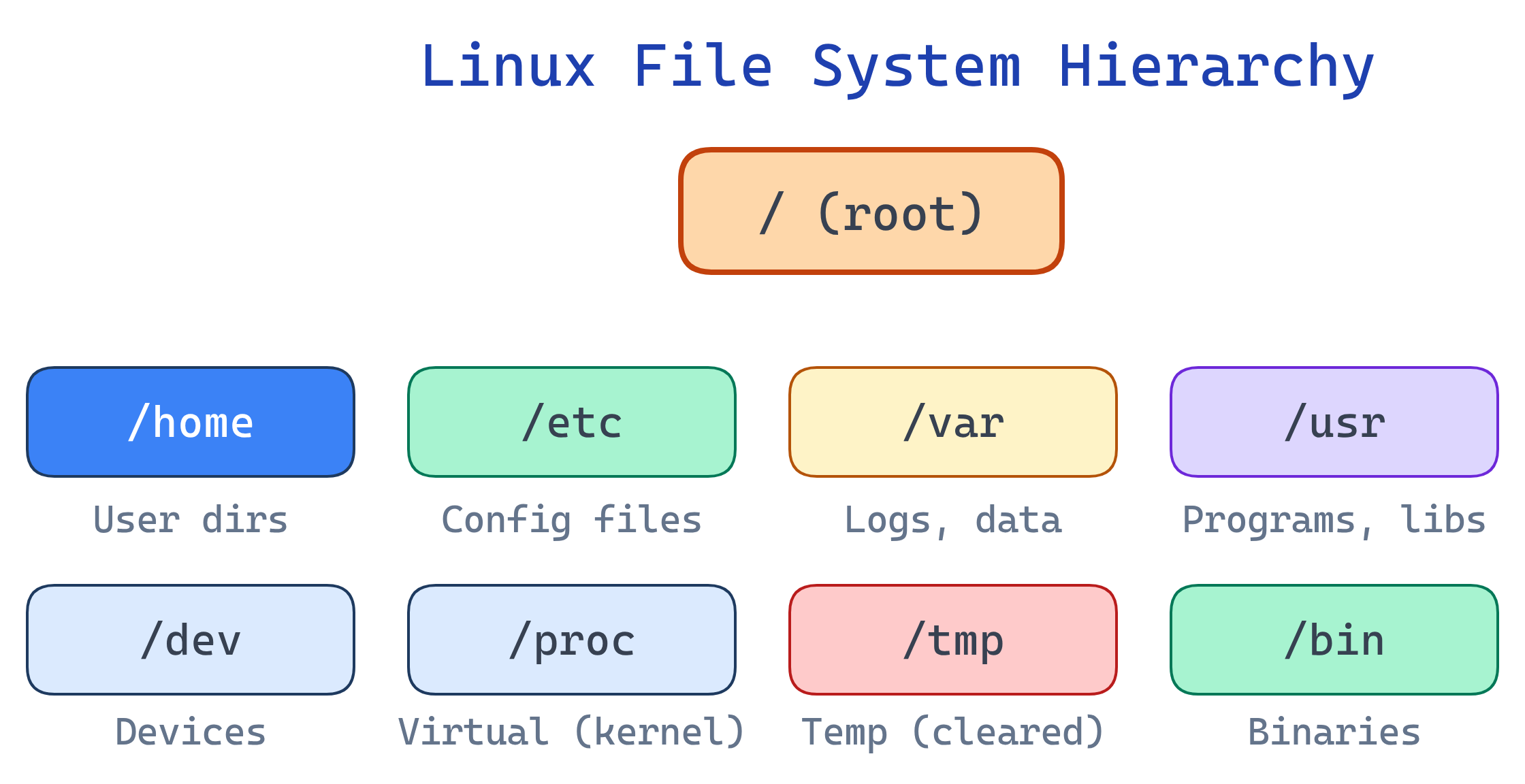
File System Hierarchy Standard (FHS)
| Directory | Purpose | Examples |
|---|---|---|
/ | Root — everything starts here | The trunk of the tree |
/home | User home directories | /home/alice, /home/bob |
/etc | System-wide configuration | nginx.conf, ssh/sshd_config, fstab |
/var | Variable data (grows over time) | Logs, databases, mail, caches |
/var/log | System and application logs | syslog, auth.log, nginx/access.log |
/tmp | Temporary files (cleared on reboot) | Session files, build artifacts |
/usr | User programs and libraries | /usr/bin, /usr/lib, /usr/share |
/bin | Essential binaries | ls, cp, mv, cat, bash |
/sbin | System administration binaries | iptables, fdisk, mkfs |
/dev | Device files | /dev/sda (disk), /dev/null, /dev/zero |
/proc | Virtual FS for process/kernel info | /proc/cpuinfo, /proc/meminfo |
/sys | Virtual FS for kernel/device settings | Hardware info, tunables |
/opt | Optional third-party software | /opt/google/chrome |
/mnt, /media | Mount points for external drives | USB drives, network shares |
/proc and /sys don't exist on disk — they're virtual filesystems generated by the kernel in real time. cat /proc/meminfo shows current memory usage, not a stored file. This is the "everything is a file" philosophy in action.Linux File Types
# ls -la shows the file type as the first character
# -  Regular file         -rw-r--r--
# d  Directory            drwxr-xr-x
# l  Symbolic link        lrwxrwxrwx -> /target
# b  Block device         brw-rw----  (disk: /dev/sda)
# c  Character device     crw-rw-rw-  (terminal: /dev/tty)
# p  Named pipe (FIFO)    prw-r--r--
# s Socket srwxrwxrwxfile command to identify file types regardless of extension: file mystery-file might show "ELF 64-bit executable" or "ASCII text" or "gzip compressed data".Permissions Deep Dive
# Permission string: -rwxr-xr--
# Position:           type | owner | group | others
# Breakdown:          -    | rwx   | r-x   | r--
# Octal:                   | 7     | 5     | 4     = 754

# Read (r=4): view file contents / list directory contents
# Write (w=2): modify file / create/delete files in directory
# Execute (x=1): run as program / enter (cd into) directory| Octal | Binary | Permission | Meaning |
|---|---|---|---|
| 0 | 000 | --- | No access |
| 1 | 001 | --x | Execute only |
| 4 | 100 | r-- | Read only |
| 5 | 101 | r-x | Read + execute |
| 6 | 110 | rw- | Read + write |
| 7 | 111 | rwx | Full access |
# Common permission patterns
chmod 644 file.txt       # rw-r--r-- (standard file)
chmod 755 script.sh      # rwxr-xr-x (executable script)
chmod 700 ~/.ssh         # rwx------ (private directory)
chmod 600 ~/.ssh/id_rsa  # rw------- (private key)

# Symbolic mode
chmod u+x script.sh      # Add execute for user (owner)
chmod g-w file.txt        # Remove write from group
chmod o= file.txt         # Remove all permissions for others
chmod a+r file.txt # Add read for all (a = all)cd into it and access files inside. Without x on a directory, you can't enter it even if you have read permission. For directories, 755 is standard; 750 if you want to restrict others.Special Permissions
| Bit | Octal | On File | On Directory |
|---|---|---|---|
| setuid | 4xxx | Run as the file's owner (not the user running it) | — |
| setgid | 2xxx | Run as the file's group | New files inherit directory's group |
| sticky bit | 1xxx | — | Only owner can delete their own files |
# setuid example: passwd command
ls -la /usr/bin/passwd
# -rwsr-xr-x  (note the 's' — runs as root to modify /etc/shadow)

# Sticky bit example: /tmp
ls -ld /tmp
# drwxrwxrwt  (note the 't' — anyone can write, but only delete own files)

# Set special permissions
chmod 4755 program        # setuid + rwxr-xr-x
chmod 2775 shared-dir/    # setgid + rwxrwxr-x
chmod 1777 /tmp # sticky + rwxrwxrwx/tmp has the sticky bit because it's world-writable. Without the sticky bit, any user could delete any other user's temp files. With it, you can only delete your own files — even though the directory is writable by everyone.Disk Management
# Check disk space
df -h                     # All mounted filesystems (human-readable)
df -h /home               # Specific mount point

# Check directory sizes
du -sh /var/log            # Total size of directory
du -sh /var/log/*          # Size of each subdirectory
du -sh * | sort -rh | head # Largest items in current dir

# Mount/unmount
mount /dev/sdb1 /mnt/usb  # Mount a partition
umount /mnt/usb            # Unmount

# View block devices
lsblk                     # Tree view of disks and partitions
blkid                     # Show UUIDs and filesystem types

# Persistent mounts (survive reboot)
cat /etc/fstab             # Auto-mount configuration
Hard Links vs Symbolic Links
| Hard Link | Symbolic (Soft) Link | |
|---|---|---|
| What it is | Another name for the same inode | A pointer file to a path |
| Cross filesystem? | No | Yes |
| Target deleted? | File still accessible | Link becomes broken (dangling) |
| Directories? | No (prevents loops) | Yes |
| Create | ln target link | ln -s target link |
Test Yourself
What does the permission -rwxr-x--- translate to in octal?
Why does /tmp have the sticky bit set?
/tmp is world-writable (anyone can create files). The sticky bit (t) ensures users can only delete their own files, not files created by others. Without it, any user could delete any file in /tmp.What happens if a directory has read (r) but not execute (x) permission?
ls the directory to see file names, but you cannot cd into it, cannot access file metadata (sizes, permissions), and cannot open any files inside. Execute on a directory means "traverse" — you need it to enter or access contents. This is rarely useful alone; directories usually need both r and x.What's the difference between /proc and /var/log?
/proc is a virtual filesystem — it doesn't exist on disk. The kernel generates its contents in real time (process info, CPU stats, memory). /var/log contains real files on disk — actual log files that grow over time. Reading /proc/meminfo queries the kernel live; reading /var/log/syslog reads a persistent file.A file has permissions -rwsr-xr-x. What does the 's' mean?
/usr/bin/passwd is owned by root with setuid — regular users can run it and it writes to /etc/shadow (root-only file).Interview Questions
The /var partition is 95% full on a production server. How do you diagnose and fix this?
df -h to confirm which partition is full. 2) du -sh /var/* to find the biggest subdirectory (usually /var/log). 3) Check for huge log files: find /var -type f -size +100M. 4) Truncate (not delete) active logs: cat /dev/null > /var/log/huge.log (deleting a file still held open doesn't free space). 5) Set up logrotate to prevent future issues. 6) Consider moving /var to a larger partition.Explain inodes. What happens when you run out of inodes but still have disk space?
df -i shows inode usage. Fix: delete unneeded tiny files (common: session files in /tmp, mail queue files).What is the security risk of setuid binaries? How would you audit them?
find / -perm -4000 -type f 2>/dev/null lists all setuid files. Review each one — remove setuid from anything that doesn't need it. Keep setuid binaries patched and minimal.