On-Page SEO
On-page SEO is everything you can optimize directly on your webpage — title tags, meta descriptions, heading hierarchy, keyword placement, internal links, image alt text, and content quality. It's the pillar you have the most control over.
Explain Like I'm 12
Imagine you're writing a school report. On-page SEO is like giving it a clear title, using headings for each section, highlighting key words, adding pictures with captions, and linking to your sources. The teacher (Google) reads your report and grades it — the better organized and more helpful it is, the higher your grade.
On-Page SEO Anatomy
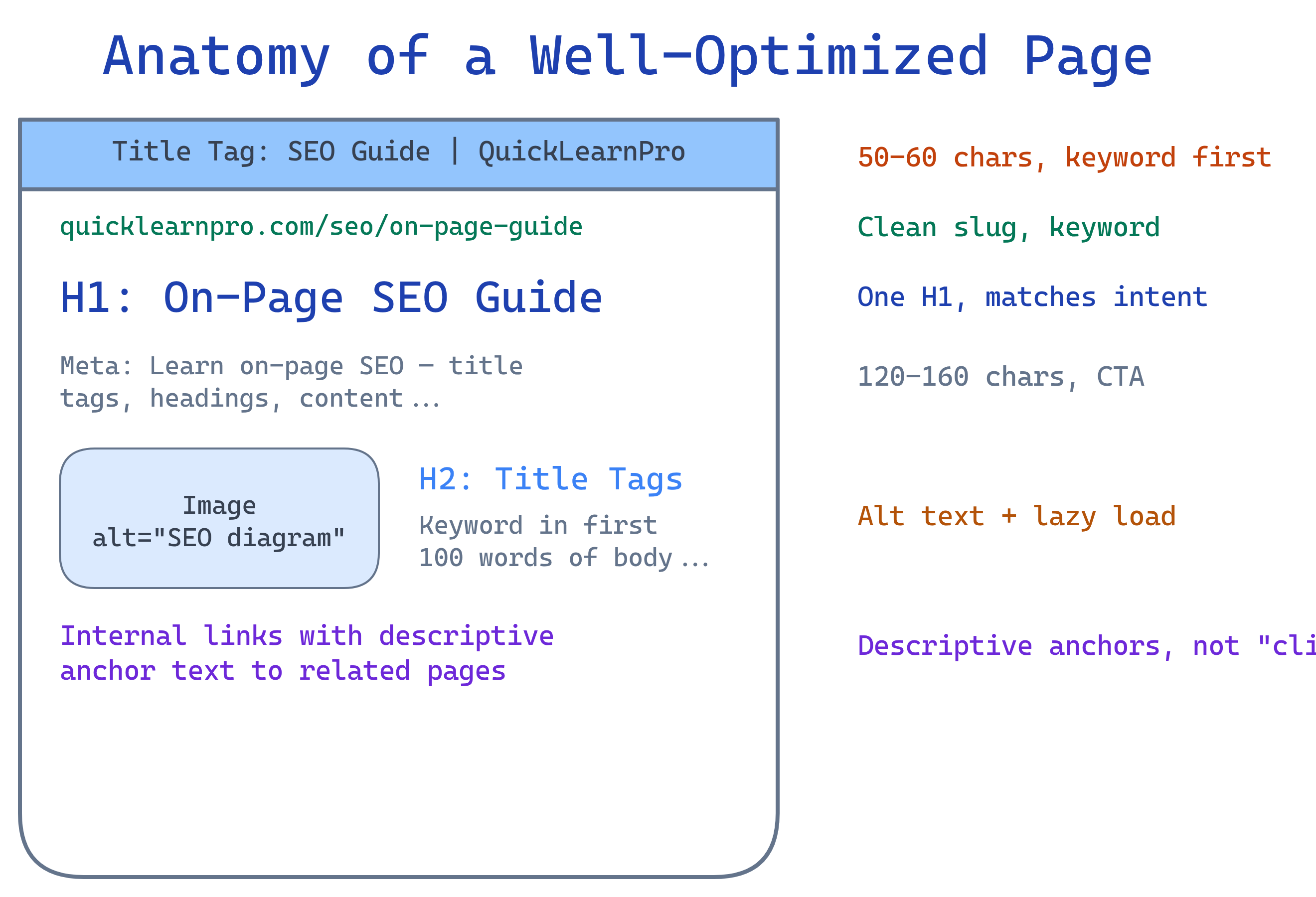
Meta Descriptions
The meta description is the snippet shown below your title in search results. It doesn't directly affect rankings, but it heavily influences click-through rate (CTR).
<meta name="description" content="Learn on-page SEO fundamentals: title tags, meta descriptions, heading structure, content optimization, and internal linking strategies. Actionable tips with code examples.">Best Practices
- Length: 120-160 characters
- Include the keyword: Google bolds matching terms in the snippet
- Call to action: "Learn how…", "Discover…", "Get the complete guide…"
- Unique per page: Never duplicate meta descriptions
- Honest preview: Accurately describe the page content
Heading Structure (H1-H6)
Headings create a hierarchy that helps both users and search engines understand your content structure.
<h1>On-Page SEO Guide</h1>           <!-- One per page, the page title -->
  <h2>Title Tags</h2>                  <!-- Major sections -->
    <h3>Best Practices</h3>             <!-- Subsections -->
    <h3>Common Mistakes</h3>
  <h2>Meta Descriptions</h2>
    <h3>How to Write Them</h3>
Rules
- One H1 per page — must include the primary keyword
- Never skip levels — don't jump from H1 to H3
- Use headings for structure, not styling — don't use H2 just because you want big text
- Include keywords naturally — H2s and H3s are great places for secondary keywords
Content Optimization
Great content is the core of on-page SEO. Google's goal is to surface the most helpful result, so your content needs to be the best answer for the query.
Keyword Placement
Place your primary keyword in these locations:
- Title tag (near the front)
- H1 heading
- First 100 words of body content
- At least one H2 subheading
- Image alt text
- URL slug
- Meta description
Content Quality Signals
- Comprehensiveness — Cover the topic thoroughly. Top-ranking pages average 1,500-2,500 words for informational queries.
- Originality — Add unique insights, data, or perspectives. Don't just rewrite existing content.
- Readability — Short paragraphs, bullet points, tables, and visuals. Aim for 8th-grade reading level.
- Freshness — Update content regularly. Add a "last updated" date.
Internal Linking
Internal links connect your pages together. They help Google discover new pages, understand site structure, and distribute "link equity" (ranking power) across your site.
Strategy
- Hub-and-spoke model — Create a pillar page (hub) that links to related deep-dive pages (spokes), and have spokes link back to the hub
- Descriptive anchor text — Use "on-page SEO checklist" not "click here"
- Link deep — Don't just link to your homepage. Link to specific, relevant inner pages
- Fix orphan pages — Every page should be reachable via internal links
- Contextual links — Links within body content are more valuable than sidebar/footer links
<!-- Good: descriptive anchor text -->
<p>Learn more about <a href="/seo/technical-seo">technical SEO and Core Web Vitals</a>.</p>

<!-- Bad: generic anchor text -->
<p>For more info, <a href="/seo/technical-seo">click here</a>.</p>Image SEO
Images can drive traffic through Google Image Search and improve your page's relevance signals.
<img
  src="/img/seo-title-tag-example.webp"
  alt="Example of a well-optimized title tag showing keyword placement and brand name"
  width="800" height="400"
  loading="lazy"
>
Image Optimization Checklist
- Alt text — Descriptive, includes keyword where natural (not "image1.jpg")
- File name — Use
seo-title-tag-example.webpnotIMG_2847.jpg - Format — WebP for best compression; fallback to JPEG/PNG
- Compression — Keep under 100KB when possible
- Dimensions — Set explicit
widthandheightattributes (prevents CLS) - Lazy loading — Use
loading="lazy"for below-the-fold images
URL Structure
Clean URLs help both users and search engines understand what a page is about.
| ❌ Bad URL | ✅ Good URL |
|---|---|
/page?id=482&cat=3 | /seo/on-page-seo |
/2026/04/04/post-title-here-long | /seo/title-tags |
/ON-PAGE-SEO-GUIDE | /seo/on-page-guide |
URL Rules
- Use lowercase, hyphens between words
- Include the primary keyword
- Keep it short (3-5 words after the domain)
- Avoid dates, parameters, and special characters
- Use HTTPS (ranking signal since 2014)
Test Yourself
What is the ideal length for a title tag?
50-60 characters. Google truncates titles at roughly 600px width, which is about 60 characters. Put the primary keyword near the front.
Where should you place your primary keyword on a page? (List at least 5 locations)
Title tag, H1, first 100 words, at least one H2, image alt text, URL slug, and meta description. These are the 7 key keyword placement spots for on-page SEO.
Why is "click here" bad anchor text for internal links?
"Click here" tells Google nothing about the linked page. Descriptive anchor text like "technical SEO checklist" helps search engines understand the topic of the destination page, which improves its ranking for that keyword.
What's the difference between keyword optimization and keyword stuffing?
Keyword optimization means placing the keyword naturally in key positions (title, H1, first paragraph). Keyword stuffing means repeating it unnaturally to manipulate rankings. The test: read it aloud. If it sounds robotic, it's stuffing. Google penalizes keyword stuffing.
What is the hub-and-spoke model for internal linking?
A pillar page (hub) covers a broad topic and links to detailed spoke pages that each cover a subtopic. Spokes link back to the hub. This creates a topic cluster that signals topical authority to Google and distributes link equity effectively.
Interview Questions
How would you audit the on-page SEO of an existing webpage?
Check: (1) Title tag — unique, keyword at front, under 60 chars. (2) Meta description — compelling, under 160 chars. (3) H1 — one per page, matches search intent. (4) Heading hierarchy — logical H1→H2→H3, no skipped levels. (5) Content — comprehensive, original, readable. (6) Internal links — descriptive anchors, links to/from related pages. (7) Images — alt text, compressed, lazy-loaded. (8) URL — clean, keyword-rich, HTTPS.
A page ranks #11 for its target keyword. What on-page changes would you try first?
Since it's close to page 1: (1) Improve the title tag to be more compelling and keyword-focused. (2) Expand the content to cover subtopics competitors cover but you don't. (3) Add more internal links from high-authority pages on your site. (4) Improve the heading structure with secondary keywords. (5) Add a FAQ section targeting "People Also Ask" queries. These small improvements often push a #11 to top 10.
What is content cannibalization and how do you fix it?
Content cannibalization happens when multiple pages on your site target the same keyword, forcing Google to choose between them (and often picking the wrong one). Fix it by: (1) Consolidating — merge similar pages into one comprehensive page. (2) Differentiating — re-target one page for a different keyword. (3) Canonical tags — point duplicate/similar pages to the preferred version.