Technical SEO
Technical SEO is the foundation that lets search engines crawl, index, and render your site. Without it, your great content never gets seen. Key areas: Core Web Vitals (speed), sitemaps, robots.txt, schema markup, HTTPS, mobile-friendliness, and canonical URLs.
Explain Like I'm 12
Imagine your website is a house. On-page SEO is decorating the rooms to look nice. Technical SEO is making sure the house has a foundation, working doors, a clear address, and roads that lead to it. If the road is broken (slow site) or the door is locked (blocked by robots.txt), nobody can get inside — no matter how beautiful the rooms are.
Technical SEO Architecture
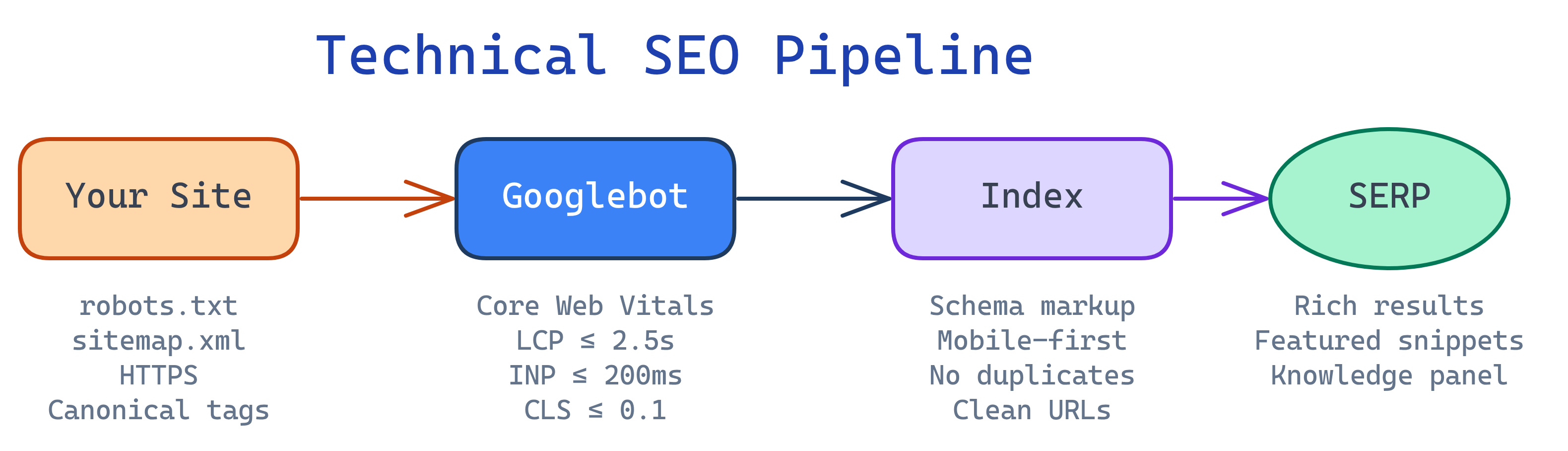
Core Web Vitals
Core Web Vitals are Google's page experience metrics that became a ranking factor in 2021. They measure real-user experience.
| Metric | What It Measures | Good | Needs Improvement | Poor |
|---|---|---|---|---|
| LCP (Largest Contentful Paint) | Loading speed — when the main content appears | ≤ 2.5s | 2.5-4s | > 4s |
| INP (Interaction to Next Paint) | Responsiveness — delay between user action and visual response | ≤ 200ms | 200-500ms | > 500ms |
| CLS (Cumulative Layout Shift) | Visual stability — how much the page layout shifts during loading | ≤ 0.1 | 0.1-0.25 | > 0.25 |
Common Fixes
- LCP: Optimize images (WebP, lazy loading), preload critical resources, use a CDN
- INP: Minimize JavaScript, break up long tasks, use
requestIdleCallback - CLS: Set explicit
width/heighton images, reserve space for ads, avoid injecting content above the fold
Crawling & Indexing
Before Google can rank your pages, it needs to discover them (crawling) and store them (indexing).
robots.txt
The robots.txt file at your site root tells crawlers which pages they can and can't access.
# Allow everything (most sites)
User-agent: *
Disallow:

Sitemap: https://example.com/sitemap.xml

# Block specific paths
User-agent: *
Disallow: /admin/
Disallow: /api/
Disallow: /tmp/Disallow prevents crawling but NOT indexing. If other sites link to a disallowed page, Google may still index its URL (just without content). Use <meta name="robots" content="noindex"> to prevent indexing.XML Sitemap
An XML sitemap is a roadmap of all the pages you want Google to index.
<?xml version="1.0" encoding="UTF-8"?>
<urlset xmlns="http://www.sitemaps.org/schemas/sitemap/0.9">
  <url>
    <loc>https://example.com/seo/on-page-seo</loc>
    <lastmod>2026-04-04</lastmod>
    <changefreq>monthly</changefreq>
    <priority>0.8</priority>
  </url>
</urlset>Canonical URLs
The canonical tag tells Google which version of a page is the "official" one when duplicate or similar pages exist.
<link rel="canonical" href="https://example.com/seo/on-page-seo">Use canonicals when:
- The same content is accessible at multiple URLs (www vs non-www, HTTP vs HTTPS)
- URL parameters create duplicates (
?sort=price,?ref=twitter) - You syndicate content to other sites
Schema Markup (Structured Data)
Schema markup is JSON-LD code you add to your pages to help Google understand your content. It can trigger rich results — enhanced SERP features like star ratings, FAQ dropdowns, and recipe cards.
<script type="application/ld+json">
{
  "@context": "https://schema.org",
  "@type": "Article",
  "headline": "Technical SEO Guide",
  "author": { "@type": "Person", "name": "Jane Smith" },
  "datePublished": "2026-04-04",
  "description": "Complete guide to technical SEO"
}
</script>
Most Useful Schema Types
| Schema Type | Rich Result | Best For |
|---|---|---|
Article | Enhanced article listing | Blog posts, news |
FAQPage | FAQ accordion in SERP | FAQ pages, guides |
HowTo | Step-by-step display | Tutorials |
BreadcrumbList | Breadcrumb trail in SERP | All pages |
Product | Price, availability, reviews | E-commerce |
LocalBusiness | Business info in knowledge panel | Local businesses |
Mobile-First Indexing
Since 2023, Google uses the mobile version of every page for indexing and ranking. If your mobile site is broken or missing content, your rankings suffer — even for desktop searches.
Mobile SEO Checklist
- Responsive design (same URL for mobile and desktop)
- Touch-friendly buttons (min 48x48px tap targets)
- No horizontal scrolling
- Text readable without zooming (min 16px font)
- Same content on mobile as desktop (don't hide content behind tabs)
- Fast loading on 3G (test with Lighthouse mobile audit)
HTTPS & Security
HTTPS has been a ranking signal since 2014. Beyond SEO, browsers mark HTTP sites as "Not Secure" which tanks user trust.
- Get an SSL/TLS certificate (free from Let's Encrypt or your host)
- 301-redirect all HTTP URLs to HTTPS
- Update internal links to use HTTPS
- Update canonical tags and sitemap to HTTPS URLs
- Check for mixed content (HTTP resources on HTTPS pages)
Site Architecture
A well-structured site helps Google crawl efficiently and helps users find content.
Best Practices
- Flat hierarchy — Every page should be reachable within 3 clicks from the homepage
- Logical URL structure —
/domain/topic/pagemirrors the content hierarchy - Breadcrumb navigation — Shows the path and provides internal links
- HTML sitemap — A user-facing page listing all main sections
- Pagination — Use
rel="next"/rel="prev"or load-more patterns for paginated content
Test Yourself
What are the three Core Web Vitals, and what does each measure?
LCP (Largest Contentful Paint) — loading speed. INP (Interaction to Next Paint) — responsiveness. CLS (Cumulative Layout Shift) — visual stability. Good thresholds: LCP ≤ 2.5s, INP ≤ 200ms, CLS ≤ 0.1.
What's the difference between robots.txt Disallow and a noindex meta tag?
Disallow in robots.txt prevents crawling — Google won't visit the page, but may still index the URL if other sites link to it. <meta name="robots" content="noindex"> prevents indexing — even if Google crawls it, it won't appear in search results.
When should you use a canonical tag?
Use canonical tags when the same or very similar content exists at multiple URLs — e.g., www vs non-www, HTTP vs HTTPS, URL parameters creating duplicates, or syndicated content. The canonical tells Google which version to index and rank.
Why does mobile-first indexing matter for desktop rankings?
Since 2023, Google uses the mobile version of every page as the primary version for indexing and ranking — even for desktop searches. If your mobile site is missing content, has broken layouts, or loads slowly, your rankings on ALL devices suffer.
What is schema markup and why should you use it?
Schema markup is structured data (JSON-LD) that helps Google understand your content type. It can trigger rich results — enhanced SERP features like FAQ dropdowns, star ratings, recipe cards, and breadcrumbs that increase click-through rates.
Interview Questions
A client's site has 100,000 pages but only 20,000 are indexed. What would you investigate?
Check: (1) Crawl budget — are junk/duplicate URLs wasting the bot's time? (2) robots.txt — are important sections accidentally blocked? (3) Internal linking — are unindexed pages orphaned (no links pointing to them)? (4) Server errors — are pages returning 4xx/5xx? (5) Duplicate content — are canonical tags pointing correctly? (6) Sitemap — does it include all important URLs? Use Google Search Console's Index Coverage report.
How would you diagnose and fix a poor CLS score?
Common CLS causes: (1) Images without width/height — add explicit dimensions. (2) Ads injecting without reserved space — set min-height on ad containers. (3) Web fonts causing FOUT — use font-display: swap with metric-matched fallback fonts. (4) Dynamic content injected above the viewport — insert it below the fold or use CSS containment. Use Chrome DevTools Performance tab to identify which elements shift.
Explain the difference between server-side rendering (SSR) and client-side rendering (CSR) for SEO.
SSR sends fully-rendered HTML to the browser — Google can easily read it. CSR sends an empty HTML shell and builds content with JavaScript — Google may not execute JS correctly or may deprioritize JS-heavy pages. For SEO, SSR (or static site generation) is preferred because content is immediately available for indexing.