APIs & REST Deep Dive
REST APIs are the contract between frontend and backend. Every request has a method (GET/POST/PUT/DELETE), a URL (the resource), headers (metadata), and an optional body (data). Every response has a status code (200/400/500), headers, and a body. Master this pattern and you can build or consume any API.
The Big Picture
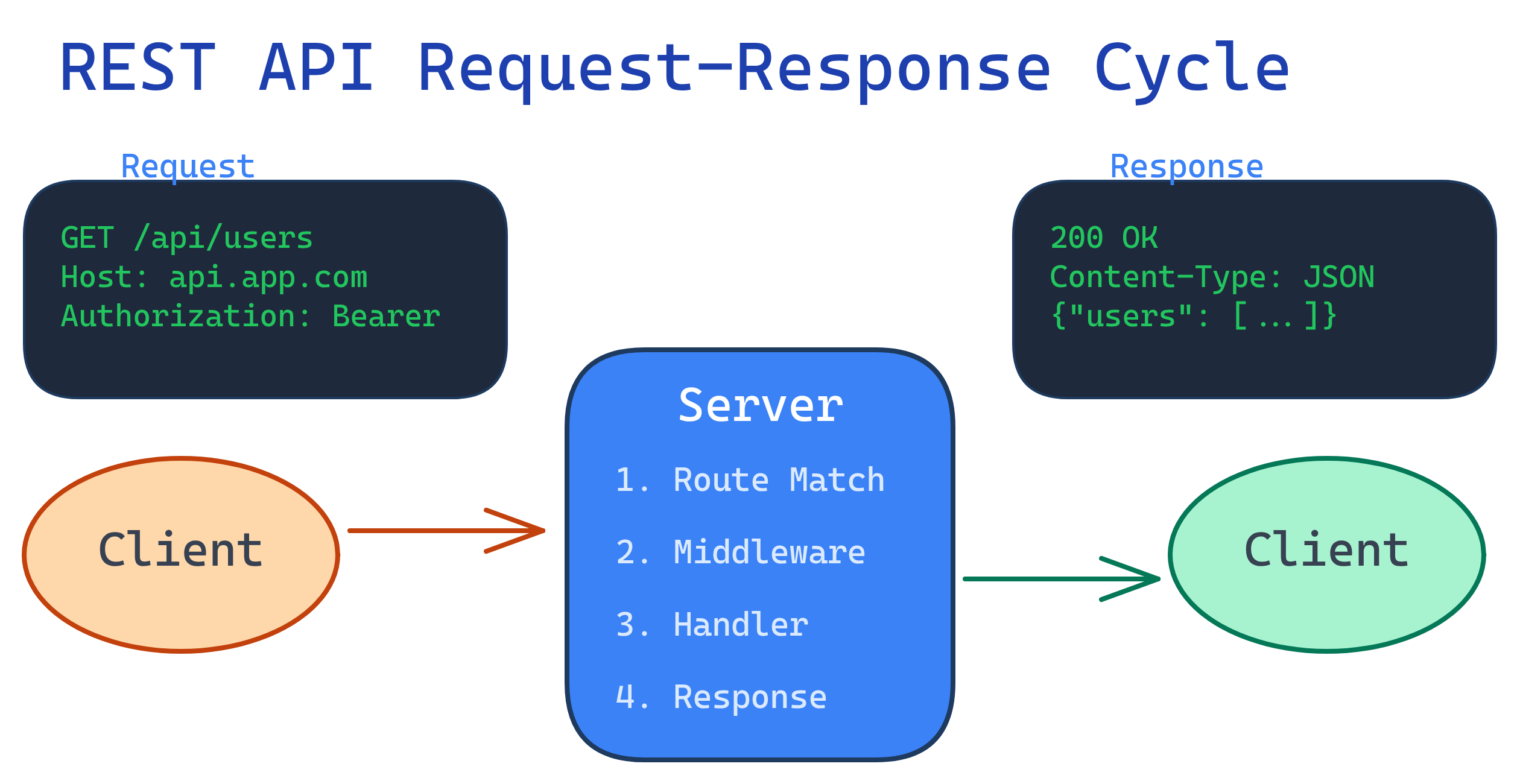
Every REST interaction follows the same pattern: a client sends an HTTP request to a server, and the server sends back an HTTP response. That's it. Everything else is just details about what goes inside those two messages.
Explain Like I'm 12
An API is like a waiter in a restaurant. You (the client) tell the waiter (API) what you want from the menu. The waiter goes to the kitchen (server), gets your food (data), and brings it back. REST is just a set of rules for how the waiter should behave — always use the same menu format, always bring back a receipt (status code).
HTTP Methods
HTTP methods tell the server what you want to do with a resource. Think of them as verbs: you GET data, POST new data, PUT updated data, and DELETE data. There are five you need to know cold.
| Method | Description | Idempotent? | Safe? | Example |
|---|---|---|---|---|
| GET | Retrieve a resource | Yes | Yes | GET /api/users/42 |
| POST | Create a new resource | No | No | POST /api/users |
| PUT | Replace an entire resource | Yes | No | PUT /api/users/42 |
| PATCH | Partially update a resource | Not guaranteed | No | PATCH /api/users/42 |
| DELETE | Remove a resource | Yes | No | DELETE /api/users/42 |
Status Codes
Status codes are the server's way of saying "here's what happened." They're grouped into five families, but you only need to memorize about 15 to handle 99% of real-world situations.
2xx — Success
The request worked. Celebrate.
| Code | Name | When to Use |
|---|---|---|
| 200 | OK | General success (GET, PUT, PATCH, DELETE) |
| 201 | Created | A new resource was created (POST). Include a Location header pointing to the new resource. |
| 204 | No Content | Success, but nothing to return (common for DELETE) |
3xx — Redirect
The resource moved. Follow the breadcrumbs.
| Code | Name | When to Use |
|---|---|---|
| 301 | Moved Permanently | The resource has a new permanent URL. Update your bookmarks. |
| 304 | Not Modified | Cached version is still fresh. Don't re-download. |
4xx — Client Error
You messed up. Fix your request.
| Code | Name | When to Use |
|---|---|---|
| 400 | Bad Request | Malformed syntax, missing required fields, invalid data |
| 401 | Unauthorized | No authentication provided (or invalid token) |
| 403 | Forbidden | Authenticated, but you don't have permission |
| 404 | Not Found | The resource doesn't exist at this URL |
| 409 | Conflict | Request conflicts with current state (duplicate email, version mismatch) |
| 422 | Unprocessable Entity | Valid syntax, but semantically wrong (email format invalid, age is negative) |
| 429 | Too Many Requests | Rate limit exceeded. Slow down and retry after the Retry-After header. |
5xx — Server Error
The server messed up. Not your fault (usually).
| Code | Name | When to Use |
|---|---|---|
| 500 | Internal Server Error | Unhandled exception. Something broke server-side. |
| 502 | Bad Gateway | Reverse proxy (Nginx, load balancer) got a bad response from upstream |
| 503 | Service Unavailable | Server is overloaded or down for maintenance |
200 OK with an error message in the body. This is a common anti-pattern that breaks client-side error handling. If something went wrong, use the appropriate 4xx or 5xx status code. Your clients' catch blocks depend on it.
Request & Response Anatomy
Let's dissect a real HTTP exchange. Every request and response follows the same structure: a start line, headers, and an optional body. Once you see the pattern, it never changes.
The Request
Here's a POST request to create a new user, sent via curl:
curl -X POST https://api.example.com/api/users \
  -H "Content-Type: application/json" \
  -H "Authorization: Bearer eyJhbGciOiJIUzI1NiIs..." \
  -d '{
    "name": "Alice Johnson",
    "email": "[email protected]",
    "role": "admin"
  }'
Breaking that down:
- Method + URL:
POST /api/users— "create a new user" - Content-Type header: tells the server the body is JSON
- Authorization header: proves who you are (Bearer token)
- Body: the actual data you're sending (JSON)
The Response
{
  "status": 201,
  "headers": {
    "Content-Type": "application/json",
    "Location": "/api/users/128",
    "X-Request-Id": "req_abc123"
  },
  "body": {
    "id": 128,
    "name": "Alice Johnson",
    "email": "[email protected]",
    "role": "admin",
    "createdAt": "2026-04-01T10:30:00Z"
  }
}
Breaking that down:
- Status 201: "Created" — the user was successfully created
- Location header: where the new resource lives
- X-Request-Id: a tracking ID for debugging (extremely useful in production)
- Body: the created resource, including server-generated fields (
id,createdAt)
X-Request-Id). When a customer reports "the API is broken," you can ask for their request ID and trace exactly what happened in your logs. This single header will save you hours of debugging.
Designing REST Endpoints
Good endpoint design makes your API intuitive. Bad endpoint design makes your API a guessing game. Here are the rules that separate the two.
The Three Rules
- Use nouns, not verbs. The HTTP method IS the verb. The URL is the noun.
- Use plural resource names.
/users, not/user. Even when fetching one. - Nest for relationships.
/users/42/posts= "posts belonging to user 42."
Good vs Bad Endpoint Design
| Bad (Don't Do This) | Good (Do This) | Why |
|---|---|---|
GET /getUsers |
GET /api/users |
GET already means "get" — don't repeat the verb |
POST /createUser |
POST /api/users |
POST already means "create" |
GET /user/42 |
GET /api/users/42 |
Always use plural: /users |
DELETE /deleteUser?id=42 |
DELETE /api/users/42 |
Resource ID goes in the path, not query params |
GET /getUserPosts?userId=42 |
GET /api/users/42/posts |
Nesting shows the relationship |
Path Params vs Query Params
Use path parameters to identify a specific resource. Use query parameters to filter, sort, or paginate a collection.
/api/users/42— path param identifies user 42/api/users?role=admin&sort=name— query params filter and sort the collection
Full CRUD Route Set
Here's what a complete set of CRUD routes looks like for a /api/users resource:
# List all users (with optional filters)
GET    /api/users?page=1&limit=20&role=admin

# Get a single user by ID
GET    /api/users/42

# Create a new user
POST   /api/users

# Replace user entirely
PUT    /api/users/42

# Partially update a user
PATCH  /api/users/42

# Delete a user
DELETE /api/users/42

# Get posts belonging to user 42
GET /api/users/42/posts/users/42/posts is fine. /users/42/posts/7/comments/3/likes is a nightmare. If you need deeper relationships, flatten them: /comments/3/likes.
Pagination, Filtering & Sorting
Any API that returns collections needs pagination. Without it, a "get all users" request with a million rows will crash your server and your client. There are two main approaches, and choosing the right one matters.
Offset vs Cursor Pagination
| Feature | Offset Pagination | Cursor Pagination |
|---|---|---|
| How it works | ?page=3&limit=20 (skip 40, take 20) |
?cursor=abc123&limit=20 (start after this record) |
| Jump to page? | Yes (go straight to page 50) | No (must go forward sequentially) |
| Performance at scale | Degrades — OFFSET 1000000 is slow in SQL |
Consistent — always uses an indexed WHERE clause |
| Handles inserts/deletes? | No — rows shift, causing duplicates or skips | Yes — cursor is stable regardless of changes |
| Best for | Admin dashboards, small datasets | Infinite scroll, feeds, large datasets |
Offset Pagination Example
# Request: page 3, 20 items per page
GET /api/books?page=3&limit=20&sort=title&order=asc
{
"data": [
{ "id": 41, "title": "Clean Code" },
{ "id": 42, "title": "Code Complete" }
],
"pagination": {
"page": 3,
"limit": 20,
"total": 487,
"totalPages": 25
}
}Cursor Pagination Example
# Request: next 20 items after cursor
GET /api/books?cursor=eyJpZCI6NDB9&limit=20
{
"data": [
{ "id": 41, "title": "Clean Code" },
{ "id": 42, "title": "Code Complete" }
],
"pagination": {
"nextCursor": "eyJpZCI6NjB9",
"hasMore": true
}
}{"id": 60}). It's opaque to the client — they just pass it back to get the next page.
Error Handling
Every API will have errors. The difference between a good API and a frustrating one is how predictably those errors are communicated. The goal: every error response should have the same shape, so clients can parse errors with a single handler.
Standard Error Response Format
{
  "error": {
    "code": "VALIDATION_ERROR",
    "message": "Request validation failed",
    "details": [
      {
        "field": "email",
        "message": "Must be a valid email address"
      },
      {
        "field": "age",
        "message": "Must be a positive integer"
      }
    ],
    "requestId": "req_abc123",
    "timestamp": "2026-04-01T10:30:00Z"
  }
}
The structure follows a simple contract:
- code: A machine-readable string (not the HTTP status — that's already in the response header). Examples:
VALIDATION_ERROR,RESOURCE_NOT_FOUND,RATE_LIMIT_EXCEEDED. - message: A human-readable summary.
- details: An array of specific problems (especially useful for validation).
- requestId: For tracing in logs.
Error Response Examples by Status Code
// 401 Unauthorized
{
  "error": {
    "code": "AUTHENTICATION_REQUIRED",
    "message": "Missing or invalid Bearer token",
    "requestId": "req_xyz789"
  }
}

// 404 Not Found
{
  "error": {
    "code": "RESOURCE_NOT_FOUND",
    "message": "User with id 999 does not exist",
    "requestId": "req_def456"
  }
}

// 429 Too Many Requests
{
  "error": {
    "code": "RATE_LIMIT_EXCEEDED",
    "message": "You've exceeded 100 requests per minute",
    "retryAfter": 32,
    "requestId": "req_ghi012"
  }
}error.message, msg, detail, or errors[0].description. One format. Every time. No exceptions.
API Versioning
APIs evolve. Fields get renamed, endpoints get deprecated, response shapes change. Versioning lets you make breaking changes without breaking existing clients. There are three main strategies.
| Strategy | Example | Pros | Cons |
|---|---|---|---|
| URL Path | /api/v1/users |
Obvious, easy to route, easy to cache | URL pollution, harder to sunset |
| Custom Header | API-Version: 2 |
Clean URLs, fine-grained control | Easy to forget, harder to test in browser |
| Query Parameter | /api/users?version=2 |
Easy to test, optional | Clutters query string, caching issues |
/v1/) because it's the most visible and hardest to mess up. GitHub, Stripe, and Twilio all use it. The other strategies have niche benefits, but URL versioning is the industry default for a reason: when a client is hitting the wrong version, you can see it immediately in the access logs.
Real-World Example: Bookstore API
Let's tie everything together with a complete mini API for a bookstore. Five endpoints, full request/response examples, proper status codes, and consistent error handling.
Endpoint 1: List All Books
# Request
GET /api/v1/books?page=1&limit=10&genre=fiction&sort=title
{
"data": [
{
"id": 1,
"title": "The Great Gatsby",
"author": "F. Scott Fitzgerald",
"genre": "fiction",
"price": 12.99,
"isbn": "978-0743273565"
},
{
"id": 2,
"title": "To Kill a Mockingbird",
"author": "Harper Lee",
"genre": "fiction",
"price": 14.99,
"isbn": "978-0061120084"
}
],
"pagination": {
"page": 1,
"limit": 10,
"total": 47,
"totalPages": 5
}
}Endpoint 2: Get a Single Book
# Request
GET /api/v1/books/1
{
"id": 1,
"title": "The Great Gatsby",
"author": "F. Scott Fitzgerald",
"genre": "fiction",
"price": 12.99,
"isbn": "978-0743273565",
"publishedDate": "1925-04-10",
"pageCount": 180,
"description": "A story of the mysteriously wealthy Jay Gatsby...",
"createdAt": "2026-03-15T08:00:00Z",
"updatedAt": "2026-03-15T08:00:00Z"
}Endpoint 3: Create a New Book
# Request
curl -X POST /api/v1/books \
  -H "Content-Type: application/json" \
  -H "Authorization: Bearer eyJhbGci..." \
  -d '{
    "title": "Clean Code",
    "author": "Robert C. Martin",
    "genre": "technical",
    "price": 34.99,
    "isbn": "978-0132350884"
  }'
// Response: 201 Created
// Location: /api/v1/books/48
{
"id": 48,
"title": "Clean Code",
"author": "Robert C. Martin",
"genre": "technical",
"price": 34.99,
"isbn": "978-0132350884",
"createdAt": "2026-04-01T10:30:00Z",
"updatedAt": "2026-04-01T10:30:00Z"
}Endpoint 4: Update a Book (PATCH)
# Request: only updating the price
curl -X PATCH /api/v1/books/48 \
  -H "Content-Type: application/json" \
  -H "Authorization: Bearer eyJhbGci..." \
  -d '{ "price": 29.99 }'
// Response: 200 OK
{
"id": 48,
"title": "Clean Code",
"author": "Robert C. Martin",
"genre": "technical",
"price": 29.99,
"isbn": "978-0132350884",
"createdAt": "2026-04-01T10:30:00Z",
"updatedAt": "2026-04-01T11:15:00Z"
}Endpoint 5: Delete a Book
# Request
curl -X DELETE /api/v1/books/48 \
  -H "Authorization: Bearer eyJhbGci..."
// Response: 204 No Content
// (empty body)And when things go wrong:
// POST /api/v1/books with missing required field
// Response: 422 Unprocessable Entity
{
  "error": {
    "code": "VALIDATION_ERROR",
    "message": "Request validation failed",
    "details": [
      { "field": "title", "message": "Title is required" },
      { "field": "isbn", "message": "ISBN must be a valid ISBN-13 format" }
    ],
    "requestId": "req_book_001"
  }
}Authorization header. A bookstore API that lets anyone delete books is not long for this world.
Test Yourself
What's the difference between PUT and PATCH?
When should you return 201 vs 200?
Location header pointing to the URL of the newly created resource.Design REST endpoints for a blog with posts and comments.
GET /api/posts — list all postsPOST /api/posts — create a postGET /api/posts/:id — get a single postPATCH /api/posts/:id — update a postDELETE /api/posts/:id — delete a postGET /api/posts/:id/comments — list comments on a postPOST /api/posts/:id/comments — add a comment to a postDELETE /api/comments/:id — delete a specific comment (flattened — no deep nesting)
What is idempotency and why does it matter?
Explain cursor vs offset pagination trade-offs.
?page=5&limit=20) lets you jump to any page but gets slow on large datasets because the database must count and skip rows. It also breaks when data is inserted/deleted between requests (rows shift). Cursor pagination (?cursor=abc&limit=20) uses a pointer to the last seen record, so it performs consistently regardless of dataset size and handles real-time data changes. The trade-off: you can't jump to "page 50" with cursors — you must navigate sequentially. Use offset for admin UIs, cursor for feeds and large collections.Interview Questions
How would you design a rate-limiting system for a public API?
A solid rate-limiting design has several layers:
Algorithm: Use a sliding window or token bucket algorithm. Token bucket allows bursts (fill tokens at a steady rate; each request costs one token), while sliding window tracks exact request counts per time window.
Storage: Use Redis with atomic INCR + EXPIRE operations. Redis is fast enough to check on every request without adding meaningful latency.
Identification: Rate limit by API key (for authenticated users) or IP address (for anonymous). API key is more reliable since multiple users can share an IP (offices, VPNs).
Headers: Return X-RateLimit-Limit, X-RateLimit-Remaining, and X-RateLimit-Reset on every response so clients can self-throttle. When exceeded, return 429 Too Many Requests with a Retry-After header.
Tiers: Different rate limits for different plans (free: 100/min, pro: 1000/min). Implement at the API gateway (Kong, Nginx) for global limits, and in application code for per-endpoint limits.
Your API returns 200 OK but the client says it's broken. How do you debug this?
This is a classic "200 with an error body" scenario, or a subtle data issue. Here's the debugging checklist:
1. Get the request ID. Ask the client for the X-Request-Id from the response headers, then trace it through your logs.
2. Compare request vs expectation. Reproduce the exact request (same headers, body, auth token). Check if the response body actually contains an error message disguised inside a 200 — this is an anti-pattern but very common in legacy APIs.
3. Check the response shape. Did the API return data in a different format than the client expects? Maybe a field was renamed, null instead of an empty array, or a nested object changed structure.
4. Check serialization. Dates, numbers, and enums are common culprits. Is createdAt returning a Unix timestamp when the client expects ISO 8601? Is a price returning as a string instead of a number?
5. Check middleware and caching. Is a CDN or reverse proxy returning a stale cached response? Check Cache-Control and Age headers.
Fix: If the API is returning 200 for errors, fix the status codes. Add contract tests (schema validation) to prevent response shape drift.
Explain the Richardson Maturity Model for REST APIs.
The Richardson Maturity Model describes four levels of REST maturity:
Level 0 — The Swamp of POX: One URL, one HTTP method (usually POST) for everything. The body contains the action. Example: POST /api with {"action": "getUser", "id": 42}. This is basically RPC over HTTP.
Level 1 — Resources: Different URLs for different resources (/users, /orders), but still using a single HTTP method. You've introduced the concept of resources but not leveraging HTTP properly.
Level 2 — HTTP Verbs: Proper use of HTTP methods (GET for reading, POST for creating, DELETE for removing) plus meaningful status codes. This is where most production APIs live, and it's considered "good enough" for the vast majority of use cases.
Level 3 — Hypermedia (HATEOAS): Responses include links to related actions and resources. Example: a user response includes "links": [{"rel": "posts", "href": "/users/42/posts"}]. The client discovers the API by following links rather than hardcoding URLs. In theory, this is the most RESTful. In practice, very few APIs implement it because the complexity rarely justifies the benefit.