Webhooks, Queues & Caching
Webhooks push real-time notifications to your server. Message queues (RabbitMQ, SQS, Kafka) decouple services for async processing. Caching (Redis, CDN, in-memory) stores frequently accessed data closer to the user. Together, these three patterns make backends fast, reliable, and scalable.
Explain Like I'm 12
Think of a restaurant. Webhooks are like the buzzer they give you when you order — instead of asking "is my food ready?" every 30 seconds, the buzzer just tells you when it's done (push notification). Queues are the ticket system chefs use to work through orders one by one without dropping any, even when 50 orders come in at once. Caching is keeping ketchup on the table instead of walking to the kitchen every time you want some. These three tricks let a restaurant serve hundreds of people without chaos.
The Big Picture
Webhooks, queues, and caching work together to build backends that are responsive, resilient, and fast. Webhooks bring data in, queues smooth out the processing, and caching speeds up the delivery.
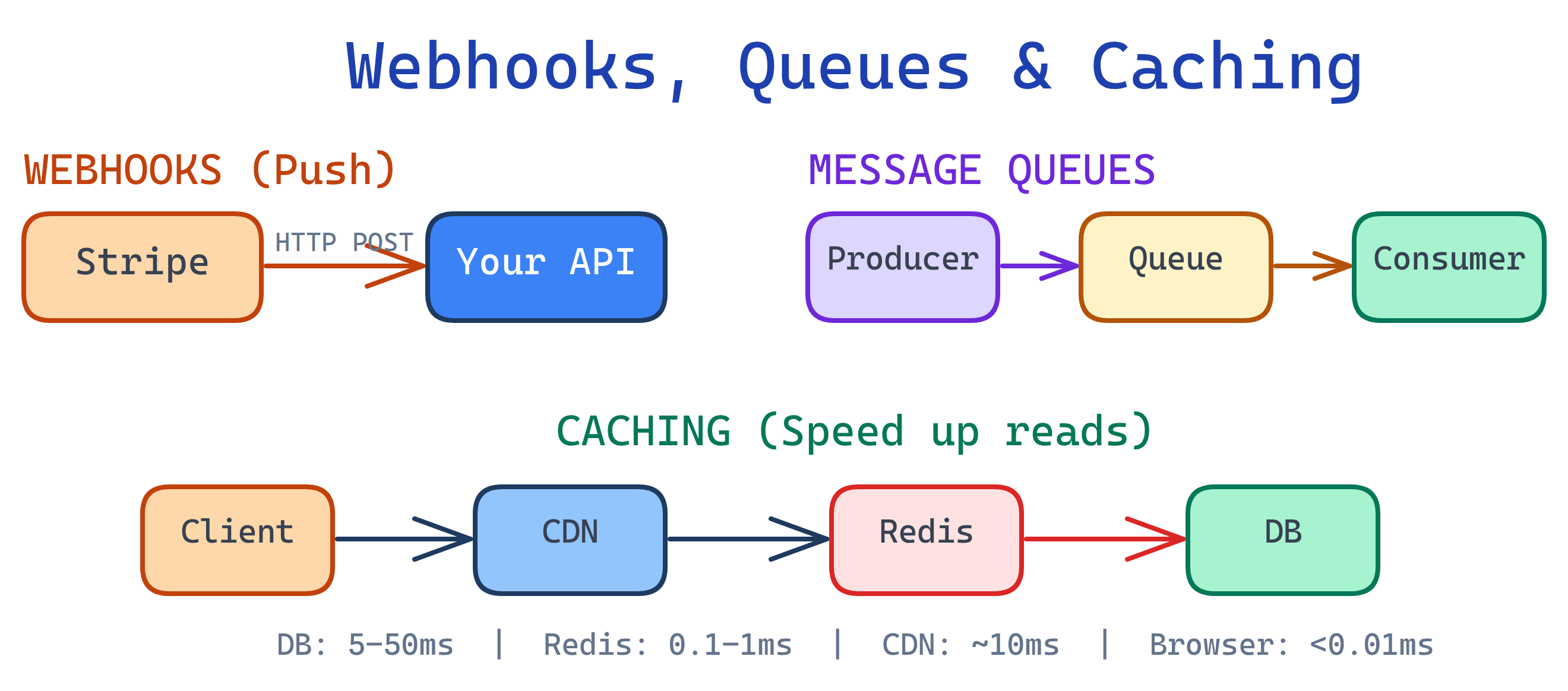
Webhooks
A webhook is an HTTP callback — when something happens in an external service, it sends an HTTP POST request to a URL you've registered. Instead of your code constantly asking "did anything change?", the service tells you the moment something happens.
Push vs Poll
| Approach | How It Works | Latency | Resource Usage | Complexity |
|---|---|---|---|---|
| Polling | Your server asks "anything new?" on a timer | Depends on interval (seconds to minutes) | High — constant requests even when nothing changed | Simple to implement |
| Webhooks (Push) | External service sends you data when events happen | Near real-time (milliseconds to seconds) | Low — only fires when there's actual data | Need a public endpoint + verification |
How Webhooks Work
- You register a callback URL with the external service (e.g.,
https://yourapp.com/webhooks/stripe). - When an event happens (payment completed, PR merged, message sent), the service creates a JSON payload describing the event.
- The service sends an HTTP POST request to your URL with the payload.
- Your server receives it, verifies the signature, and processes the event.
- You return a 200 OK immediately. If you don't, the service will retry.
Webhook Payload Example
// Stripe payment webhook payload
{
  "id": "evt_1NqFbSD2eZvKYlo2C3LPaXnf",
  "type": "payment_intent.succeeded",
  "data": {
    "object": {
      "id": "pi_3NqFbSD2eZvKYlo20kL2LvZ",
      "amount": 2000,
      "currency": "usd",
      "status": "succeeded",
      "customer": "cus_9s6XKzkNRiz8i3",
      "metadata": {
        "order_id": "order_12345"
      }
    }
  },
  "created": 1694123456
}

// GitHub push event webhook payload
{
  "ref": "refs/heads/main",
  "repository": {
    "full_name": "user/repo",
    "html_url": "https://github.com/user/repo"
  },
  "pusher": {
    "name": "developer",
    "email": "[email protected]"
  },
  "commits": [
    {
      "id": "abc123",
      "message": "Fix login bug",
      "timestamp": "2026-04-04T10:30:00Z"
    }
  ]
}
Building a Webhook Receiver
// Express.js webhook receiver
const express = require('express');
const crypto = require('crypto');
const app = express();

// IMPORTANT: Use raw body for signature verification
app.post('/webhooks/stripe',
  express.raw({ type: 'application/json' }),
  (req, res) => {
    const signature = req.headers['stripe-signature'];
    const endpointSecret = process.env.STRIPE_WEBHOOK_SECRET;

    // 1. Verify the signature (HMAC-SHA256)
    let event;
    try {
      event = stripe.webhooks.constructEvent(
        req.body, signature, endpointSecret
      );
    } catch (err) {
      console.error('Signature verification failed:', err.message);
      return res.status(400).send('Invalid signature');
    }

    // 2. Return 200 immediately (process async later)
    res.status(200).json({ received: true });

    // 3. Process the event asynchronously
    processWebhookAsync(event).catch(err => {
      console.error('Webhook processing failed:', err);
    });
  }
);

async function processWebhookAsync(event) {
  switch (event.type) {
    case 'payment_intent.succeeded':
      await fulfillOrder(event.data.object.metadata.order_id);
      break;
    case 'payment_intent.payment_failed':
      await notifyCustomer(event.data.object.customer);
      break;
    default:
      console.log('Unhandled event type:', event.type);
  }
}
Verifying Webhook Signatures
Never trust an incoming webhook without verifying its signature. Anyone can send a POST request to your endpoint. Webhook providers sign payloads using HMAC-SHA256 with a shared secret.
# Manual HMAC-SHA256 verification (Python)
import hmac
import hashlib

def verify_webhook(payload_body, signature_header, secret):
    """Verify that a webhook came from the expected sender."""
    expected_signature = hmac.new(
        key=secret.encode('utf-8'),
        msg=payload_body,
        digestmod=hashlib.sha256
    ).hexdigest()

    # Use constant-time comparison to prevent timing attacks
    return hmac.compare_digest(
        f"sha256={expected_signature}",
        signature_header
    )
Idempotency: Handling Duplicate Deliveries
Webhook providers retry on failures, which means you may receive the same event multiple times. Your handler must be idempotent — processing the same event twice should have the same result as processing it once.
# Idempotency with a processed events table
async def handle_webhook(event):
    event_id = event['id']

    # Check if we already processed this event
    if await db.events.find_one({'event_id': event_id}):
        return  # Already processed, skip

    # Process the event
    await process_event(event)

    # Mark as processed
    await db.events.insert_one({
        'event_id': event_id,
        'processed_at': datetime.utcnow()
    })
Retry Logic and Failure Handling
Most webhook providers use exponential backoff for retries:
- Attempt 1: Immediately
- Attempt 2: After 1 minute
- Attempt 3: After 5 minutes
- Attempt 4: After 30 minutes
- Attempt 5: After 2 hours
- After all retries fail, the event is dropped or sent to a dead letter queue
Common Webhook Providers
| Provider | Common Events | Signature Method |
|---|---|---|
| Stripe | Payment succeeded, refund issued, subscription updated | HMAC-SHA256 (Stripe-Signature header) |
| GitHub | Push, PR opened, issue created, release published | HMAC-SHA256 (X-Hub-Signature-256 header) |
| Twilio | SMS received, call completed, voicemail left | HMAC-SHA1 (X-Twilio-Signature header) |
| Slack | Message posted, reaction added, channel created | HMAC-SHA256 (X-Slack-Signature header) |
| Shopify | Order created, product updated, checkout completed | HMAC-SHA256 (X-Shopify-Hmac-SHA256 header) |
200 OK immediately and process the webhook asynchronously (push it onto a queue). If your processing takes more than a few seconds, the webhook provider will time out and retry — leading to duplicate deliveries and wasted resources.
Message Queues
A message queue is a buffer that sits between producers (services that send messages) and consumers (services that process them). The producer drops a message into the queue and moves on. The consumer picks it up when it's ready. They don't need to be online at the same time — the queue holds messages until they're consumed.
Why Use Queues?
- Decouple services — The API server doesn't need to know (or wait for) the email service. It just drops "send welcome email" onto the queue.
- Handle traffic spikes — 10,000 orders in a flash sale? The queue absorbs the spike and workers process them at their own pace.
- Retry failures — If a consumer crashes, the message goes back on the queue and another worker picks it up.
- Async processing — Move slow work (PDF generation, image processing, API calls) out of the request-response cycle.
Comparison: Message Queue Technologies
| Feature | RabbitMQ | Amazon SQS | Apache Kafka | Redis Pub/Sub |
|---|---|---|---|---|
| Type | Traditional message broker | Managed queue service | Distributed event streaming | In-memory pub/sub |
| Delivery | At-least-once, exactly-once possible | At-least-once (standard), exactly-once (FIFO) | At-least-once, exactly-once with transactions | At-most-once (fire and forget) |
| Persistence | Persists to disk | Persists (managed by AWS) | Persists to disk (retention-based) | No persistence (messages lost if no subscriber) |
| Throughput | ~10K–50K msg/sec | ~3K msg/sec (standard), scales with shards | ~100K–1M msg/sec per partition | ~500K msg/sec (in-memory, no persistence) |
| Best For | Task queues, routing, RPC | Serverless, simple queues, AWS-native apps | Event streaming, log aggregation, real-time pipelines | Real-time notifications, simple broadcasting |
| Complexity | Medium (self-hosted or managed) | Low (fully managed) | High (cluster management, partitions, consumer groups) | Low (if already using Redis) |
Key Concepts
| Concept | What It Means | Why It Matters |
|---|---|---|
| Acknowledgment (ACK) | Consumer tells the queue "I processed this message successfully" | Without ACK, the queue redelivers the message to another consumer |
| Dead Letter Queue (DLQ) | A separate queue where failed messages go after max retries | Prevents poison messages from blocking the main queue forever |
| At-least-once delivery | The queue guarantees delivery but may deliver duplicates | Your consumer must be idempotent (handle duplicates safely) |
| Exactly-once delivery | Each message is processed exactly once (harder to guarantee) | Required for financial transactions; adds overhead |
Publishing and Consuming with Python
# RabbitMQ with pika (Python)
import pika
import json

# --- Publisher (sends messages) ---
connection = pika.BlockingConnection(
    pika.ConnectionParameters('localhost')
)
channel = connection.channel()

# Declare a durable queue (survives broker restart)
channel.queue_declare(queue='email_tasks', durable=True)

# Publish a message
message = {
    'to': '[email protected]',
    'subject': 'Welcome!',
    'template': 'welcome_email'
}
channel.basic_publish(
    exchange='',
    routing_key='email_tasks',
    body=json.dumps(message),
    properties=pika.BasicProperties(
        delivery_mode=2  # Make message persistent
    )
)
print("Message sent to queue")
connection.close()


# --- Consumer (processes messages) ---
connection = pika.BlockingConnection(
    pika.ConnectionParameters('localhost')
)
channel = connection.channel()
channel.queue_declare(queue='email_tasks', durable=True)

# Process only 1 message at a time (fair dispatch)
channel.basic_qos(prefetch_count=1)

def callback(ch, method, properties, body):
    task = json.loads(body)
    try:
        send_email(task['to'], task['subject'], task['template'])
        # Acknowledge: remove from queue
        ch.basic_ack(delivery_tag=method.delivery_tag)
        print(f"Email sent to {task['to']}")
    except Exception as e:
        # Reject and requeue for retry
        ch.basic_nack(
            delivery_tag=method.delivery_tag,
            requeue=True
        )
        print(f"Failed, requeued: {e}")

channel.basic_consume(
    queue='email_tasks',
    on_message_callback=callback
)
print("Waiting for messages...")
channel.start_consuming()
Common Use Cases
- Email sending — Drop email tasks into a queue; a worker sends them without blocking the API response.
- Image processing — User uploads a photo; a queue job resizes, crops, and generates thumbnails in the background.
- Payment processing — Webhook arrives from Stripe; push it onto a queue for reliable, ordered processing.
- Event sourcing — Every state change is an event on a Kafka topic; replay events to rebuild state.
- Data pipelines — ETL jobs that extract, transform, and load data between systems.
Background Jobs & Task Queues
A background job is any work that happens outside the HTTP request-response cycle. Instead of making the user wait while your server generates a PDF, resizes an image, or calls a slow third-party API, you push the work to a task queue and respond immediately.
Popular Task Queue Libraries
| Library | Language | Broker | Best For |
|---|---|---|---|
| Celery | Python | Redis, RabbitMQ | Most Python web apps (Django, Flask, FastAPI) |
| Bull / BullMQ | Node.js | Redis | Node.js apps, job scheduling, rate limiting |
| Sidekiq | Ruby | Redis | Rails applications |
| Dramatiq | Python | Redis, RabbitMQ | Simpler Celery alternative with sane defaults |
When to Move Work to the Background
- Sending emails — SMTP calls take 1–5 seconds. Don't make the user wait.
- Generating reports — A complex CSV or PDF export might take 30 seconds.
- Image/video processing — Resizing, transcoding, and thumbnail generation are CPU-heavy.
- Third-party API calls — External services can be slow or unreliable.
- Data aggregation — Computing analytics, leaderboards, or recommendations.
Celery Task Example
# tasks.py - Define background tasks with Celery
from celery import Celery
from datetime import timedelta

app = Celery('tasks', broker='redis://localhost:6379/0')

# Configure retries and timeouts
app.conf.update(
    task_serializer='json',
    result_serializer='json',
    accept_content=['json'],
    task_time_limit=300,       # Hard kill after 5 minutes
    task_soft_time_limit=240,  # Raise exception after 4 minutes
)

@app.task(
    bind=True,
    max_retries=3,
    default_retry_delay=60,  # Wait 60s between retries
)
def send_welcome_email(self, user_id):
    """Send a welcome email to a new user."""
    try:
        user = get_user(user_id)
        email_service.send(
            to=user.email,
            subject="Welcome!",
            template="welcome",
            context={"name": user.name}
        )
    except EmailServiceError as exc:
        # Retry with exponential backoff
        raise self.retry(exc=exc, countdown=60 * (2 ** self.request.retries))

@app.task(bind=True, max_retries=2)
def generate_report(self, report_id):
    """Generate a PDF report in the background."""
    try:
        report = build_report(report_id)
        upload_to_s3(report)
        notify_user(report_id, status="complete")
    except Exception as exc:
        notify_user(report_id, status="failed")
        raise self.retry(exc=exc)
# views.py - Dispatch tasks from your API handler
from tasks import send_welcome_email, generate_report
def register_user(request):
user = create_user(request.data)
# Fire and forget: push to background queue
send_welcome_email.delay(user.id)
# Return immediately - email sends in background
return {"id": user.id, "message": "Account created!"}
def request_report(request):
report = create_report_record(request.data)
# Dispatch background job
generate_report.delay(report.id)
return {"report_id": report.id, "status": "processing"}Monitoring Background Jobs
- Flower (Celery) — Web dashboard showing active workers, task history, success/failure rates.
- Bull Board (BullMQ) — UI to inspect queues, retry failed jobs, view job data.
- Key metrics to track: queue depth (are jobs piling up?), processing time, failure rate, retry count.
task_time_limit and max_retries on every background task. A task without a timeout can hang forever, blocking a worker. A task without a retry limit can loop infinitely if it keeps failing. Fail fast, retry smart, alert loud.
Caching
Caching stores copies of frequently accessed data in a faster storage layer so you don't have to recompute or re-fetch it every time. It's the single most impactful optimization for read-heavy applications.
Why Caching Matters: Latency by Storage Layer
| Storage Layer | Typical Latency | Example |
|---|---|---|
| In-memory (app variable) | < 0.01ms | Python dict, Node.js Map, local variable |
| Redis / Memcached | 0.1 – 1ms | Shared cache across app instances |
| Database query | 5 – 50ms | PostgreSQL SELECT with index |
| Database (no index) | 100 – 5,000ms | Full table scan on millions of rows |
| External API call | 50 – 2,000ms | Third-party REST API over the internet |
Cache Layers
- Browser cache — The user's browser stores static assets (images, CSS, JS) locally. Controlled by
Cache-ControlandETagheaders. - CDN (Content Delivery Network) — Servers at the network edge (Cloudflare, CloudFront) cache static and even dynamic content close to users worldwide.
- Reverse proxy (Nginx/Varnish) — Sits in front of your app server and caches full HTTP responses. Great for public pages that don't change often.
- Application cache (Redis/Memcached) — Your code explicitly caches data (database results, API responses, computed values) in a shared in-memory store.
- Database query cache — Some databases cache recent query results automatically. Useful but limited — invalidated on every write to the table.
Caching Strategies
| Strategy | How It Works | Pros | Cons | Best For |
|---|---|---|---|---|
| Cache-Aside (Lazy) | App checks cache first. On miss, reads from DB and writes to cache. | Simple, only caches what's actually used | First request is always a cache miss | Most read-heavy workloads |
| Write-Through | App writes to cache and DB simultaneously on every write. | Cache is always up-to-date | Slower writes (two writes per operation) | Data that's read immediately after writing |
| Write-Behind (Write-Back) | App writes to cache only. Cache asynchronously writes to DB later. | Fastest writes | Risk of data loss if cache crashes before DB write | Write-heavy workloads where slight data loss is acceptable |
| Read-Through | Cache itself loads from DB on a miss (app only talks to cache). | App code is simpler — only talks to cache | Requires cache provider support | Frameworks that support built-in read-through |
Redis as a Cache
# Redis CLI basics
redis-cli

# SET a value with TTL (expire after 300 seconds)
SET user:123:profile '{"name":"Alice","email":"[email protected]"}' EX 300

# GET a cached value
GET user:123:profile

# Check TTL remaining
TTL user:123:profile

# Delete a cached key
DEL user:123:profile

# Set only if key doesn't exist (cache miss pattern)
SET user:123:profile '{"name":"Alice"}' NX EX 300
Caching in Python with Redis
import redis
import json

r = redis.Redis(host='localhost', port=6379, db=0)

def get_user_profile(user_id):
    """Cache-aside pattern: check cache first, fallback to DB."""
    cache_key = f"user:{user_id}:profile"

    # 1. Check cache
    cached = r.get(cache_key)
    if cached:
        return json.loads(cached)  # Cache hit!

    # 2. Cache miss: fetch from database
    profile = db.query("SELECT * FROM users WHERE id = %s", user_id)

    # 3. Store in cache with TTL (5 minutes)
    r.setex(cache_key, 300, json.dumps(profile))

    return profile

def update_user_profile(user_id, data):
    """Update DB and invalidate cache."""
    db.execute(
        "UPDATE users SET name=%s, email=%s WHERE id=%s",
        data['name'], data['email'], user_id
    )
    # Invalidate the cached version
    r.delete(f"user:{user_id}:profile")
Caching in Node.js with Redis
const Redis = require('ioredis');
const redis = new Redis();

async function getUserProfile(userId) {
  const cacheKey = `user:${userId}:profile`;

  // 1. Check cache
  const cached = await redis.get(cacheKey);
  if (cached) {
    return JSON.parse(cached); // Cache hit!
  }

  // 2. Cache miss: fetch from database
  const profile = await db.query(
    'SELECT * FROM users WHERE id = $1', [userId]
  );

  // 3. Store in cache with TTL (5 minutes)
  await redis.setex(cacheKey, 300, JSON.stringify(profile));

  return profile;
}

async function updateUserProfile(userId, data) {
  await db.query(
    'UPDATE users SET name=$1, email=$2 WHERE id=$3',
    [data.name, data.email, userId]
  );
  // Invalidate the cached version
  await redis.del(`user:${userId}:profile`);
}
Cache Invalidation
Cached data goes stale. The three main invalidation strategies are:
- TTL-based (Time To Live) — Set an expiration time. After 5 minutes (or whatever you choose), the cache entry is automatically deleted. Simple and good enough for most cases.
- Event-based — When data changes, actively delete or update the cache entry. More complex but ensures freshness. Works well with webhooks and message queues.
- Manual purge — An admin or deployment script clears the cache. Used for deployments or emergency fixes.
CDN Caching
A CDN caches your content on servers around the world (edge locations). Users in Tokyo get served from a Tokyo edge server instead of your origin in Virginia — cutting latency from 200ms to 20ms.
# Cache-Control headers for different content types

# Static assets (CSS, JS, images): cache for 1 year
Cache-Control: public, max-age=31536000, immutable

# HTML pages: cache briefly, revalidate
Cache-Control: public, max-age=3600, must-revalidate

# API responses: don't cache by default
Cache-Control: no-store

# Private data (user-specific): never cache on CDN
Cache-Control: private, no-cache- Static assets — Cache aggressively (1 year) with content hashing in filenames (
style.abc123.css) so new deploys get new URLs. - HTML pages — Short TTL (1 hour) with
must-revalidateso users get fresh content without waiting too long. - API responses — Generally
no-storeunless the data is public and rarely changes (e.g., product catalog).
When to Use What
These patterns often work together, but here's a quick decision guide for when to reach for each one:
| Scenario | Solution | Why |
|---|---|---|
| Need real-time notifications from an external service | Webhooks | Push-based: the service tells you when something happens instead of you polling |
| Need to decouple services or handle traffic spikes | Message Queue | Buffers work, retries failures, lets services scale independently |
| Need to speed up repeated reads | Caching | Store computed results in fast storage; avoid hitting the database on every request |
| Need to offload slow work from the request cycle | Background Jobs | Respond to the user immediately; process heavy work asynchronously |
| Need event streaming or log aggregation | Kafka | High-throughput, persistent, replayable event stream for real-time data pipelines |
Test Yourself
Q1: What's the difference between a webhook and polling? When would you use each?
Q2: When should you introduce a message queue into your architecture?
Q3: Explain the cache-aside pattern step by step.
Q4: What is a dead letter queue and why is it important?
Q5: How should you handle webhook failures and retries?
Interview Questions
Q1: Design a webhook system that can handle 10,000 events per second.
Architecture: Use a thin webhook receiver behind a load balancer. The receiver does only two things: (1) verify the signature and (2) push the raw payload onto a message queue (Kafka or SQS). Return 200 immediately. This keeps the receiver fast (~1ms per request).
Processing layer: A fleet of consumer workers pulls messages from the queue and processes them. Scale consumers horizontally based on queue depth. Use consumer groups (Kafka) or competing consumers (RabbitMQ) for parallel processing.
Reliability: Kafka persists messages to disk with configurable retention (e.g., 7 days). If consumers go down, messages wait in the queue. Dead letter queues catch poison messages. Every consumer is idempotent using event IDs stored in a database.
Scaling: The receiver layer scales horizontally behind the load balancer. Kafka partitions allow parallel consumption. Add more partitions and consumers as throughput grows. Redis can cache deduplication checks for recently processed event IDs.
Q2: How do you prevent processing the same webhook event twice?
Idempotency key: Every webhook event has a unique ID (e.g., Stripe's evt_1NqFbSD2eZvKYlo2C3LPaXnf). Store processed event IDs in a database table with a unique constraint.
Before processing: Attempt to INSERT the event ID. If it already exists (unique constraint violation), skip processing — you've already handled this event.
Atomic check-and-process: Use a database transaction: INSERT the event ID and process the event in the same transaction. If the insert fails (duplicate), the entire transaction rolls back and no work is done.
Fast dedup layer: For high-throughput systems, add a Redis SET check before the database. SADD processed_events evt_id returns 0 if already in the set. This avoids hitting the database for obvious duplicates. Set a TTL on the Redis set entries (e.g., 48 hours) matching the webhook provider's retry window.
Make operations idempotent by design: Use UPDATE ... SET status = 'paid' WHERE id = ? AND status = 'pending' instead of unconditional updates. The second execution of the same event has no effect because the WHERE clause no longer matches.
Q3: What Redis cache invalidation strategy would you use for a social media feed?
Short TTL + event-based invalidation hybrid. Cache each user's feed in Redis with a 2–5 minute TTL. This ensures worst-case staleness is bounded.
Write-through on new posts: When a user creates a post, push an invalidation event to a queue. Workers delete or update the cached feeds of that user's followers. For users with millions of followers (celebrities), use fanout-on-read instead — don't pre-compute their followers' feeds.
Cache structure: Use a Redis Sorted Set (ZADD feed:user:123 timestamp post_id) with post IDs scored by timestamp. Trim to the latest 100 posts with ZREMRANGEBYRANK. Fetch the feed with ZREVRANGE and batch-load post content from a separate cache or database.
Why not pure TTL: A 5-minute TTL means a user who just posted won't see their own post for up to 5 minutes. Event-based invalidation of the poster's own feed gives instant feedback while TTL handles everyone else efficiently.
Q4: When would you choose Kafka over RabbitMQ, and vice versa?
Choose Kafka when: You need (1) very high throughput (100K+ messages/sec), (2) event replay — consumers can re-read past messages by resetting their offset, (3) event sourcing or log aggregation where you need a persistent, ordered event log, (4) multiple consumers need to independently read the same stream of events (consumer groups), or (5) real-time data pipelines feeding analytics, ML, or data warehouses.
Choose RabbitMQ when: You need (1) traditional task queues where each message is processed by exactly one worker, (2) complex routing — RabbitMQ's exchange types (direct, topic, fanout, headers) offer flexible message routing, (3) lower operational complexity — RabbitMQ is simpler to set up and manage than a Kafka cluster, (4) request-reply (RPC) patterns, or (5) your throughput is moderate (under 50K msg/sec) and you don't need event replay.
In short: Kafka is an event streaming platform (append-only log). RabbitMQ is a message broker (queue with routing). Kafka for "what happened" (event log). RabbitMQ for "do this thing" (task queue).