Databases & ORMs
SQL databases (PostgreSQL, MySQL) store structured data in tables with strict schemas and ACID guarantees. NoSQL databases (MongoDB, Redis, DynamoDB) trade structure for flexibility and scale. ORMs let you talk to databases using your programming language instead of raw SQL. Choose based on your data shape, consistency needs, and query patterns.
The Big Picture
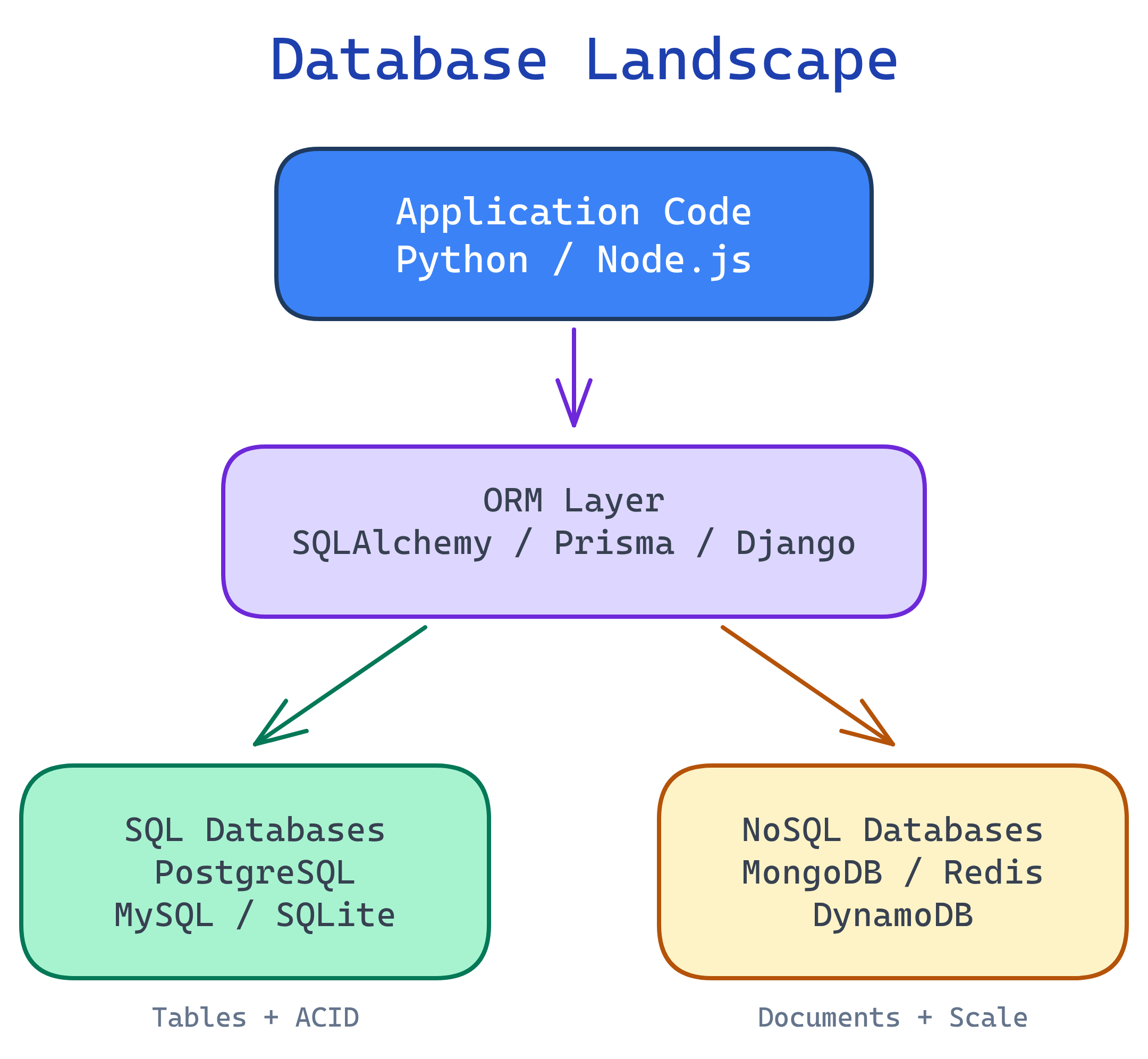
Every backend application needs to store and retrieve data. The database landscape has two major camps — SQL and NoSQL — with ORMs sitting on top as a translation layer between your code and the database engine.
Explain Like I'm 12
A database is like a giant filing cabinet for your app. SQL databases are like a perfectly organized cabinet — every file has a label, goes in the right drawer, and follows strict rules. NoSQL databases are like a big box — throw anything in, it's flexible, but finding stuff can be harder. An ORM is like a translator who speaks both your language and the cabinet's language, so you never have to learn the cabinet's weird filing system yourself.
SQL vs NoSQL
This is the first decision you'll make for every project: do you need strict structure or flexible schemas? Here's the honest breakdown.
| Feature | SQL (Relational) | NoSQL |
|---|---|---|
| Data Model | Tables with rows and columns | Documents, key-value, columns, or graphs |
| Schema | Fixed schema, enforced by the DB | Flexible / schema-less |
| Scaling | Vertical (bigger server) | Horizontal (more servers) |
| Consistency | Strong (ACID) | Eventual (BASE), varies by DB |
| Relationships | JOINs across tables | Denormalized / embedded |
| Best For | Structured data, complex queries, transactions | Flexible data, high throughput, rapid iteration |
Database Types at a Glance
| Category | Examples | Data Model | Best For |
|---|---|---|---|
| Relational (SQL) | PostgreSQL, MySQL, SQLite | Tables, rows, columns | Most apps, transactions, reporting |
| Document | MongoDB, CouchDB | JSON-like documents | CMS, catalogs, user profiles |
| Key-Value | Redis, DynamoDB | Simple key → value pairs | Caching, sessions, leaderboards |
| Column-Family | Cassandra, ScyllaDB | Wide columns, sparse rows | Time series, IoT, massive writes |
| Graph | Neo4j, Amazon Neptune | Nodes and edges | Social networks, recommendations |
CRUD Operations
CRUD stands for Create, Read, Update, Delete — the four fundamental operations every database supports. Let's compare how they look in SQL versus MongoDB so you can see the mental model shift between relational and document databases.
Create
-- SQL: Insert a row into a table
INSERT INTO users (name, email, age)
VALUES ('Alice', '[email protected]', 30);
// MongoDB: Insert a document into a collection
db.users.insertOne({
name: "Alice",
email: "[email protected]",
age: 30
});Read
-- SQL: Query with a filter
SELECT name, email FROM users
WHERE age > 25
ORDER BY name;
// MongoDB: Find with a filter
db.users.find(
{ age: { $gt: 25 } },
{ name: 1, email: 1 }
).sort({ name: 1 });Update
-- SQL: Update matching rows
UPDATE users
SET email = '[email protected]'
WHERE name = 'Alice';
// MongoDB: Update matching documents
db.users.updateOne(
{ name: "Alice" },
{ $set: { email: "[email protected]" } }
);Delete
-- SQL: Delete matching rows
DELETE FROM users
WHERE age < 18;
// MongoDB: Delete matching documents
db.users.deleteMany({ age: { $lt: 18 } });ORMs: The Database Translator
An ORM (Object-Relational Mapper) lets you interact with your database using your programming language's objects and methods instead of writing raw SQL strings. You define a model class, and the ORM generates the SQL behind the scenes.
Pros and Cons
| Pros | Cons |
|---|---|
| Write Python/JS instead of SQL | Hides what SQL is actually running |
| Database-agnostic (switch DBs easily) | Complex queries are harder than raw SQL |
| Built-in protection against SQL injection | Performance overhead for large datasets |
| Auto-generates migrations | Learning curve for the ORM itself |
| Type safety and IDE autocompletion | Can encourage N+1 queries (see below) |
Popular ORMs
| ORM | Language | Style |
|---|---|---|
| SQLAlchemy | Python | Full-featured, supports raw SQL + ORM patterns |
| Django ORM | Python | Batteries-included, tightly integrated with Django |
| Prisma | Node.js / TypeScript | Type-safe, modern, auto-generated client |
| Sequelize | Node.js | Mature, promise-based, supports multiple DBs |
SQLAlchemy Example
from sqlalchemy import create_engine, Column, Integer, String
from sqlalchemy.orm import declarative_base, Session

Base = declarative_base()

# Define a model (maps to a database table)
class User(Base):
    __tablename__ = "users"
    id = Column(Integer, primary_key=True)
    name = Column(String(100), nullable=False)
    email = Column(String(200), unique=True)

# Connect and create tables
engine = create_engine("postgresql://user:pass@localhost/mydb")
Base.metadata.create_all(engine)

# Create a user (INSERT)
with Session(engine) as session:
    user = User(name="Alice", email="[email protected]")
    session.add(user)
    session.commit()

# Query users (SELECT)
with Session(engine) as session:
    users = session.query(User).filter(User.name == "Alice").all()
    for u in users:
print(u.name, u.email)The N+1 Problem
The N+1 problem is the single most common performance trap when using ORMs. It happens when your code fetches a list of records, then makes a separate database query for each record's related data. One query to get the list (1), plus one query per item (N) = N+1 queries.
The Problem: N+1 Queries
Imagine you want to display all users and their posts:
# BAD: N+1 queries
# Query 1: Get all users
users = session.query(User).all()

# Queries 2 to N+1: Get posts for EACH user
for user in users:
    # This fires a SEPARATE query for each user!
    print(f"{user.name}: {len(user.posts)} posts")
If you have 100 users, this fires 101 database queries. With 10,000 users, it fires 10,001. Your page load time goes from milliseconds to seconds.
The Fix: Eager Loading
# GOOD: 1 query with eager loading (JOIN)
from sqlalchemy.orm import joinedload

users = session.query(User).options(
    joinedload(User.posts)
).all()

# Now posts are already loaded — no extra queries
for user in users:
    print(f"{user.name}: {len(user.posts)} posts")
The Fix in Raw SQL
-- Instead of querying users, then posts separately:
-- Query 1: SELECT * FROM users;
-- Query 2-N: SELECT * FROM posts WHERE user_id = ?;

-- Use a single JOIN:
SELECT users.name, COUNT(posts.id) AS post_count
FROM users
LEFT JOIN posts ON posts.user_id = users.id
GROUP BY users.name;Indexing Strategies
An index is a data structure that makes queries faster — like the index at the back of a textbook. Without it, the database scans every single row (a "full table scan"). With it, the database jumps straight to the matching rows.
Index Types
| Index Type | How It Works | Best For |
|---|---|---|
| B-tree (default) | Balanced tree, sorted data | Equality, range queries, ORDER BY, LIKE 'prefix%' |
| Hash | Hash table lookup | Exact equality only (=), very fast for lookups |
| GIN | Generalized Inverted Index | Full-text search, JSONB, arrays (PostgreSQL) |
| Composite | Multi-column B-tree | Queries that filter/sort on multiple columns |
Creating Indexes
-- Single column index
CREATE INDEX idx_users_email ON users(email);

-- Composite index (column order matters!)
CREATE INDEX idx_orders_user_date ON orders(user_id, created_at);

-- Unique index (also enforces uniqueness)
CREATE UNIQUE INDEX idx_users_email_unique ON users(email);

-- Partial index (only index active users)
CREATE INDEX idx_active_users ON users(email)
WHERE status = 'active';

-- Check if your query uses the index
EXPLAIN ANALYZE SELECT * FROM users WHERE email = '[email protected]';
Performance Impact
| Scenario | Without Index | With Index |
|---|---|---|
| Find user by email (1M rows) | ~500ms (full table scan) | ~1ms (index lookup) |
| Find orders by user + date range | ~2s (scanning all orders) | ~5ms (composite index) |
| INSERT a new row | ~1ms | ~2ms (must update index too) |
When NOT to Index
- Low-cardinality columns — A boolean
is_activecolumn with only 2 values won't benefit much from an index. - Tiny tables — If the table has fewer than 1,000 rows, a full scan is already fast.
- Write-heavy tables — If you're inserting millions of rows per second, every index slows writes.
- Columns you never query on — Indexes only help the columns you actually filter or sort by.
Connection Pooling
Opening a database connection is expensive. It involves DNS resolution, TCP handshake, TLS negotiation, and authentication — all before you send a single query. A typical connection takes 50–200ms to establish. If every API request opens a new connection, your app crumbles under load.
A connection pool solves this by maintaining a set of pre-opened connections. When your code needs to talk to the database, it borrows a connection from the pool, uses it, and returns it. No setup cost, no teardown waste.
How It Works
- Pool size — The number of connections kept open (e.g., 10–20).
- Borrow — Your code requests a connection; the pool hands one over instantly.
- Return — After the query, the connection goes back to the pool (not closed).
- Overflow — If all connections are in use, requests wait in a queue or create temporary overflow connections.
Pool Configuration Example
# SQLAlchemy connection pool
from sqlalchemy import create_engine

engine = create_engine(
    "postgresql://user:pass@localhost/mydb",
    pool_size=10,        # Keep 10 connections open
    max_overflow=20,     # Allow 20 extra under heavy load
    pool_timeout=30,     # Wait max 30s for a connection
    pool_recycle=1800,   # Recycle connections every 30 min
    pool_pre_ping=True,  # Test connections before use
)pool_size = (2 * CPU cores) + number_of_disks. For a 4-core server with SSDs, that's about 10 connections. More isn't always better — too many connections actually hurt performance because the database spends time context-switching between them instead of executing queries.
Migrations
A migration is a versioned script that changes your database schema — adding a table, renaming a column, creating an index. Migrations let you evolve your database the same way you evolve your code: incrementally, reversibly, and tracked in version control.
Why Migrations Matter
- Reproducibility — Any developer can run migrations to get an identical database schema.
- Version control — Schema changes are tracked in git alongside code changes.
- Rollbacks — Each migration has an "up" (apply) and "down" (revert) operation.
- Team collaboration — Multiple developers can evolve the schema without conflicts.
Migration Tools
| Tool | Language | Works With |
|---|---|---|
| Alembic | Python | SQLAlchemy |
| Prisma Migrate | Node.js / TypeScript | Prisma ORM |
| Flyway | Java / Any | Any SQL database |
| Django Migrations | Python | Django ORM |
Migration Example (Alembic)
"""Add email column to users table

Revision ID: a1b2c3d4
Create Date: 2026-04-01
"""
from alembic import op
import sqlalchemy as sa

def upgrade():
    # Apply the change
    op.add_column('users', sa.Column('email', sa.String(200)))
    op.create_unique_constraint('uq_users_email', 'users', ['email'])

def downgrade():
    # Revert the change
    op.drop_constraint('uq_users_email', 'users')
    op.drop_column('users', 'email')
# Generate a migration from model changes
alembic revision --autogenerate -m "Add email column"
# Apply all pending migrations
alembic upgrade head
# Rollback the last migration
alembic downgrade -1Transactions & ACID
A transaction groups multiple database operations into a single unit. Either all operations succeed, or none of them do. This is critical for data integrity — you never want money to vanish mid-transfer.
ACID Properties
| Property | Meaning | Real-World Analogy |
|---|---|---|
| Atomicity | All or nothing — if any step fails, everything rolls back | A bank transfer either moves money or doesn't — no in-between state |
| Consistency | The database always moves from one valid state to another | Account balances can never go negative if that's a rule |
| Isolation | Concurrent transactions don't interfere with each other | Two people transferring money at the same time don't see partial results |
| Durability | Once committed, the data survives crashes and power failures | After the bank confirms the transfer, it's permanent — even if the power goes out |
Transaction Example: Money Transfer
-- Transfer $100 from Alice to Bob
BEGIN TRANSACTION;

-- Debit Alice
UPDATE accounts SET balance = balance - 100
WHERE name = 'Alice' AND balance >= 100;

-- Credit Bob
UPDATE accounts SET balance = balance + 100
WHERE name = 'Bob';

-- If both succeeded, make it permanent
COMMIT;

-- If anything failed, undo everything
-- ROLLBACK;
# Same transaction in SQLAlchemy
from sqlalchemy.orm import Session
with Session(engine) as session:
try:
alice = session.query(Account).filter_by(name="Alice").one()
bob = session.query(Account).filter_by(name="Bob").one()
if alice.balance < 100:
raise ValueError("Insufficient funds")
alice.balance -= 100
bob.balance += 100
session.commit() # All or nothing
except Exception:
session.rollback() # Undo everything
raiseChoosing the Right Database
Don't overthink this. Most applications start with PostgreSQL and add specialized databases as needed. Here's a practical decision guide:
- Structured data with relationships? → PostgreSQL. Users, orders, products, anything with foreign keys.
- Document-like, flexible data? → MongoDB. CMS content, product catalogs with varying attributes, user-generated data.
- Caching or sessions? → Redis. In-memory, blazing fast, perfect for short-lived data.
- Complex relationships matter most? → PostgreSQL (or Neo4j for extreme cases like social graphs).
- Massive scale, simple queries? → DynamoDB or Cassandra. When you need to handle millions of writes per second with simple key-value lookups.
- Full-text search? → PostgreSQL (built-in) or Elasticsearch (dedicated search engine).
- Time-series data? → TimescaleDB (PostgreSQL extension) or InfluxDB.
Test Yourself
Q1: When would you choose MongoDB over PostgreSQL?
Q2: What is the N+1 problem and how do you fix it?
joinedload in SQLAlchemy, include in Prisma, select_related / prefetch_related in Django) to fetch everything in 1–2 queries.Q3: Explain ACID with a real-world example.
Q4: Why is connection pooling important?
Q5: What's the trade-off of adding an index?
Interview Questions
Q1: You have a slow query that takes 5 seconds. Walk me through how you'd debug it.
Step 1: EXPLAIN ANALYZE — Run the query with EXPLAIN ANALYZE to see the execution plan. Look for full table scans (Seq Scan) where you expect index usage.
Step 2: Check indexes — Are the columns in WHERE, JOIN, and ORDER BY indexed? If not, create targeted indexes.
Step 3: Check the query itself — Is it selecting SELECT * when it only needs 2 columns? Is there a missing WHERE clause pulling millions of rows? Are there unnecessary JOINs?
Step 4: Check data volume — Is the table huge? Consider pagination, archiving old data, or partitioning.
Step 5: Check N+1 — If this is an ORM query, enable query logging. Are you seeing hundreds of similar queries instead of one JOIN?
Step 6: Check connection and server — Is the database server under heavy load? Are connections maxed out? Check pg_stat_activity for locks or long-running queries.
Q2: Design the database schema for a social media app (users, posts, comments, likes).
Users table: id (PK), username (unique), email (unique), password_hash, bio, avatar_url, created_at.
Posts table: id (PK), user_id (FK → users), content (text), image_url, created_at. Index on user_id + created_at for "user's recent posts" queries.
Comments table: id (PK), post_id (FK → posts), user_id (FK → users), content, created_at. Index on post_id.
Likes table: id (PK), user_id (FK → users), post_id (FK → posts), created_at. Unique constraint on (user_id, post_id) to prevent double-liking. Index on post_id for counting likes.
Follows table: follower_id (FK → users), following_id (FK → users), created_at. Composite PK on both columns. Indexes on both columns for "who follows me" and "who do I follow" queries.
For the feed, use a fanout-on-read approach: query posts from followed users with JOIN follows ON follows.following_id = posts.user_id WHERE follows.follower_id = ?.
Q3: Explain the CAP theorem and how it affects database choice.
The CAP theorem states that a distributed system can only guarantee two of three properties simultaneously:
- Consistency — Every read returns the most recent write.
- Availability — Every request gets a response (even if it's not the latest data).
- Partition tolerance — The system works even if network connections between nodes fail.
Since network partitions are unavoidable in distributed systems, you're really choosing between CP (consistency + partition tolerance) and AP (availability + partition tolerance).
CP databases (PostgreSQL, MongoDB with majority reads): Choose consistency — during a partition, some requests may fail rather than return stale data. Best for banking, inventory, anything where correctness matters.
AP databases (Cassandra, DynamoDB, CouchDB): Choose availability — every request gets a response, but data may be slightly stale. Best for social feeds, analytics, shopping carts where "close enough" is fine.
Q4: What happens if two users try to buy the last item simultaneously?
Without proper handling, both users could buy the same item (a race condition). Here are three solutions:
1. Pessimistic locking (SELECT FOR UPDATE): Lock the row when the first user reads it. The second user waits until the first transaction completes. Prevents the issue but reduces throughput.
2. Optimistic locking (version column): Add a version column. When updating, include WHERE version = expected_version. If another transaction already changed it, the UPDATE affects 0 rows and you know to retry or show "sold out."
3. Atomic UPDATE: Use UPDATE inventory SET quantity = quantity - 1 WHERE product_id = ? AND quantity > 0. The database handles concurrency — if quantity is already 0, the WHERE clause prevents the update. Check the affected row count to know if you got the item.
The atomic UPDATE approach is simplest and works for most e-commerce scenarios. Pessimistic locking is safer for complex multi-step transactions.