Authentication & Security
Authentication verifies WHO you are (login). Authorization checks WHAT you can do (permissions). Sessions store state on the server, JWTs store it in the token. OAuth lets third-party apps access your data without your password. Always hash passwords, use HTTPS, validate all input, and never trust the client.
The Big Picture
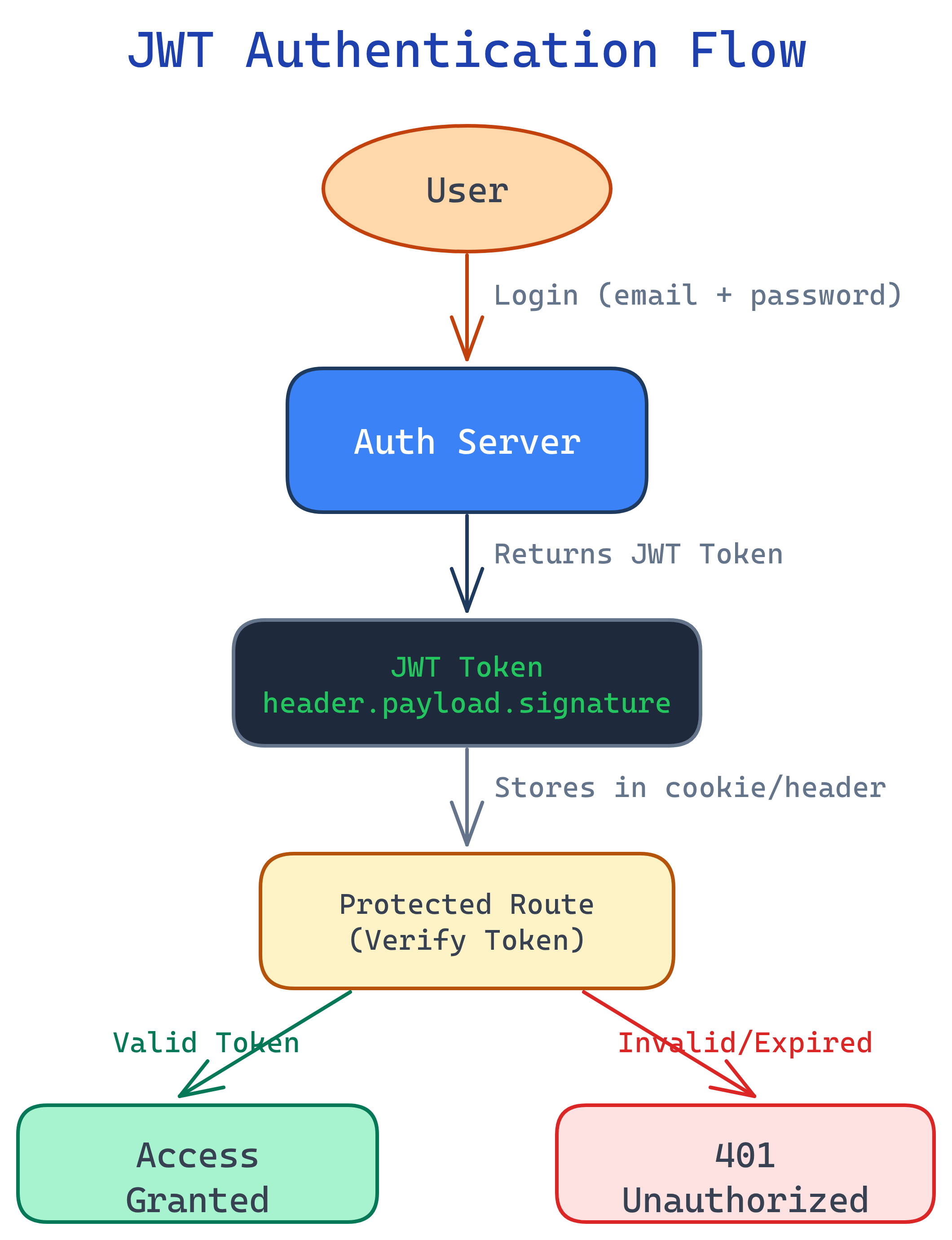
Here is the full authentication flow — from login to accessing a protected resource. Every arrow is a potential attack surface, which is why security matters at every step.
Explain Like I'm 12
Authentication is like showing your ID at a club — proving you are who you say you are. Authorization is like the VIP section — even after they let you in, you might not have access to everything. A JWT is like a wristband that proves you already showed your ID, so you don't have to show it every time.
Authentication vs Authorization
These two words sound similar, but they solve completely different problems. Getting them confused is one of the most common mistakes in backend development. Let's break it down.
| Aspect | Authentication (AuthN) | Authorization (AuthZ) |
|---|---|---|
| Question it answers | "Who are you?" | "What can you do?" |
| Real-world analogy | Showing your ID at the door | Checking if your ticket allows backstage access |
| Happens when | User logs in | User tries to access a resource |
| Determines | User identity | User permissions / roles |
| HTTP status on failure | 401 Unauthorized |
403 Forbidden |
| Methods | Passwords, OAuth, biometrics, MFA | Roles, policies, ACLs, scopes |
Session-Based Authentication
Sessions are the classic approach to keeping users logged in. Here's the flow, step by step:
- User logs in — sends username + password to the server.
- Server verifies credentials — checks against the database.
- Server creates a session — stores session data (user ID, role, expiry) in memory, a database, or Redis.
- Server sends a cookie — the response includes a
Set-Cookieheader with the session ID. - Client sends cookie on every request — the browser automatically includes the cookie.
- Server looks up the session — reads the session ID from the cookie, finds the session data, and knows who the user is.
// Express.js session example
const express = require('express');
const session = require('express-session');

const app = express();

app.use(session({
  secret: 'your-secret-key',    // Signs the session cookie
  resave: false,                 // Don't save unchanged sessions
  saveUninitialized: false,      // Don't create empty sessions
  cookie: {
    httpOnly: true,              // JS can't access the cookie
    secure: true,                // HTTPS only
    maxAge: 1000 * 60 * 60 * 24 // 24 hours
  }
}));

// Login route
app.post('/login', async (req, res) => {
  const { username, password } = req.body;
  const user = await verifyCredentials(username, password);

  if (user) {
    req.session.userId = user.id;   // Store user ID in session
    req.session.role = user.role;
    res.json({ message: 'Logged in' });
  } else {
    res.status(401).json({ error: 'Invalid credentials' });
  }
});

// Protected route
app.get('/dashboard', (req, res) => {
  if (!req.session.userId) {
    return res.status(401).json({ error: 'Not authenticated' });
  }
  res.json({ message: `Welcome, user ${req.session.userId}` });
});JWT (JSON Web Tokens)
JWTs flip the script on sessions. Instead of storing state on the server, the token itself contains all the information. The server signs the token, and the client sends it back on every request. The server verifies the signature — no database lookup needed.
Anatomy of a JWT
A JWT has three parts, separated by dots: header.payload.signature
# Decoded JWT structure
# HEADER (algorithm + type)
{
  "alg": "HS256",
  "typ": "JWT"
}

# PAYLOAD (claims — the actual data)
{
  "sub": "user123",
  "name": "Alice",
  "role": "admin",
  "iat": 1712000000,
  "exp": 1712086400
}

# SIGNATURE
HMACSHA256(
  base64UrlEncode(header) + "." + base64UrlEncode(payload),
  secret
)
Creating and Verifying JWTs
const jwt = require('jsonwebtoken');

const SECRET = process.env.JWT_SECRET; // Never hardcode secrets!

// Create a token (on login)
function generateTokens(user) {
  const accessToken = jwt.sign(
    { userId: user.id, role: user.role },
    SECRET,
    { expiresIn: '15m' }  // Short-lived access token
  );

  const refreshToken = jwt.sign(
    { userId: user.id },
    SECRET,
    { expiresIn: '7d' }   // Long-lived refresh token
  );

  return { accessToken, refreshToken };
}

// Verify a token (middleware)
function authenticate(req, res, next) {
  const authHeader = req.headers.authorization;
  if (!authHeader) return res.status(401).json({ error: 'No token' });

  const token = authHeader.split(' ')[1]; // "Bearer "

  try {
    const decoded = jwt.verify(token, SECRET);
    req.user = decoded; // Attach user info to request
    next();
  } catch (err) {
    res.status(401).json({ error: 'Invalid or expired token' });
  }
}

// Protected route
app.get('/profile', authenticate, (req, res) => {
  res.json({ userId: req.user.userId, role: req.user.role });
});
Sessions vs JWT
| Feature | Sessions | JWT |
|---|---|---|
| State | Server-side (stateful) | Client-side (stateless) |
| Storage | Server memory / DB / Redis | Client (cookie or header) |
| Scalability | Needs shared session store | Scales easily (no server state) |
| Revocation | Easy (delete the session) | Hard (token valid until it expires) |
| Size | Small cookie (just session ID) | Larger (contains payload) |
| Best for | Same-domain web apps | APIs, microservices, mobile apps |
OAuth 2.0
OAuth 2.0 solves a specific problem: how can a third-party app access your data without knowing your password? Think "Sign in with Google" — you never give the app your Google password. Instead, Google gives the app a limited access token.
The 4 Roles
| Role | Who / What | Example |
|---|---|---|
| Resource Owner | The user who owns the data | You (the Google user) |
| Client | The app requesting access | A task management app |
| Authorization Server | Issues tokens after consent | Google's OAuth server |
| Resource Server | Hosts the protected data | Google Calendar API |
Authorization Code Flow (Step by Step)
This is the most common and most secure OAuth flow. Here's what happens when you click "Sign in with Google":
// Step 1: Redirect user to authorization server
// Your app sends the user to Google's OAuth page
const authUrl = `https://accounts.google.com/o/oauth2/auth?
  client_id=YOUR_CLIENT_ID
  &redirect_uri=https://yourapp.com/callback
  &response_type=code
  &scope=email profile
  &state=random_csrf_token`;

// Step 2: User logs in and grants permission
// Google shows a consent screen. User clicks "Allow."

// Step 3: Auth server redirects back with an authorization code
// Google sends user to: https://yourapp.com/callback?code=AUTH_CODE&state=random_csrf_token

// Step 4: Exchange code for tokens (server-to-server, never in browser)
app.get('/callback', async (req, res) => {
  const { code, state } = req.query;

  // Verify state to prevent CSRF
  if (state !== expectedState) return res.status(403).send('CSRF detected');

  // Exchange authorization code for access token
  const tokenResponse = await fetch('https://oauth2.googleapis.com/token', {
    method: 'POST',
    headers: { 'Content-Type': 'application/x-www-form-urlencoded' },
    body: new URLSearchParams({
      code,
      client_id: process.env.GOOGLE_CLIENT_ID,
      client_secret: process.env.GOOGLE_CLIENT_SECRET,
      redirect_uri: 'https://yourapp.com/callback',
      grant_type: 'authorization_code'
    })
  });

  const { access_token, id_token } = await tokenResponse.json();

  // Step 5: Use the access token to call Google APIs
  const userInfo = await fetch('https://www.googleapis.com/oauth2/v2/userinfo', {
    headers: { Authorization: `Bearer ${access_token}` }
  });

  const user = await userInfo.json();
  // { id: "123", email: "[email protected]", name: "Alice" }
});Password Security
Here's a truth that still surprises people: even big companies get breached. The question isn't if your database leaks, it's when. What matters is whether the attacker can read your users' passwords when it happens.
Why Never Store Plaintext
If you store passwords as plain text and your database is breached, every user's password is instantly compromised. Most people reuse passwords, so one breach cascades across all their accounts.
Hashing vs Encryption
| Property | Hashing | Encryption |
|---|---|---|
| Direction | One-way (can't reverse) | Two-way (can decrypt) |
| Purpose | Verify data matches | Protect data in transit/storage |
| For passwords? | Yes — always hash | No — if you can decrypt, so can an attacker |
Salt + Bcrypt
A salt is a random string added to the password before hashing. This means two users with the same password get different hashes. Bcrypt automatically generates and stores the salt.
import bcrypt

# Hashing a password (on registration)
password = "my_secure_password".encode('utf-8')
salt = bcrypt.gensalt(rounds=12)           # Cost factor: 2^12 iterations
hashed = bcrypt.hashpw(password, salt)
# b'$2b$12$LJ3m4ys3Lk0TBxvUZq8eNe...'

# Store `hashed` in the database (never the plain password)

# Verifying a password (on login)
login_password = "my_secure_password".encode('utf-8')
if bcrypt.checkpw(login_password, hashed):
    print("Login successful")
else:
print("Invalid password")HTTPS & Transport Security
HTTPS wraps HTTP in a TLS (Transport Layer Security) layer, encrypting everything between the client and server. Without it, anyone on the network (coffee shop Wi-Fi, ISPs, attackers) can read passwords, cookies, and tokens in plain text.
TLS Handshake (Simplified)
- Client Hello — browser sends supported cipher suites and a random number.
- Server Hello — server picks a cipher suite, sends its SSL certificate (contains public key).
- Certificate Verification — browser checks the certificate against trusted Certificate Authorities (CAs).
- Key Exchange — client and server agree on a shared symmetric key (using asymmetric crypto).
- Encrypted Communication — all data is now encrypted with the shared key.
HSTS (HTTP Strict Transport Security)
HSTS tells browsers: "Never talk to me over HTTP. Always use HTTPS." This prevents downgrade attacks where an attacker intercepts the initial HTTP request before the redirect to HTTPS.
# HSTS header (add to your server response)
Strict-Transport-Security: max-age=31536000; includeSubDomains; preloadCommon Vulnerabilities
The OWASP Top 10 is the industry-standard list of the most critical web security risks. Let's look at the ones every backend developer must know.
SQL Injection
SQL injection happens when user input is directly concatenated into a SQL query. The attacker sends malicious SQL that the database executes as if it were part of the query.
-- VULNERABLE: User input directly in the query
-- If username = "admin' OR '1'='1" ...
SELECT * FROM users WHERE username = 'admin' OR '1'='1' AND password = '';
-- This returns ALL users! The attacker is now "logged in."

-- The attacker could also do:
-- username = "'; DROP TABLE users; --"
SELECT * FROM users WHERE username = ''; DROP TABLE users; --';
// VULNERABLE - string concatenation
const query = `SELECT * FROM users WHERE username = '${username}'`;
// SAFE - parameterized query (placeholder)
const query = 'SELECT * FROM users WHERE username = $1';
const result = await db.query(query, [username]);XSS (Cross-Site Scripting)
XSS lets an attacker inject malicious JavaScript into your pages. When other users view the page, the script runs in their browser — stealing cookies, tokens, or redirecting them to phishing sites.
// VULNERABLE: Rendering user input as HTML
element.innerHTML = userComment;
// If userComment = ""
// The script executes in every visitor's browser!
// SAFE: Use textContent (escapes HTML)
element.textContent = userComment;
// SAFE: Server-side output encoding
// Most template engines auto-escape: {{ userComment }} in EJS, Jinja2, etc.textContent instead of innerHTML. Set Content-Security-Policy headers. Use HttpOnly cookies so JS can't access session cookies even if XSS occurs.
CSRF (Cross-Site Request Forgery)
CSRF tricks a logged-in user's browser into making a request they didn't intend. If you're logged into your bank and visit a malicious page, that page could submit a hidden form to transfer money — your browser sends your cookies automatically.
// CSRF attack: malicious page includes this hidden form
//
//
// PREVENTION: Include a CSRF token in your forms
// Server generates a unique token per session
app.use((req, res, next) => {
if (req.method === 'GET') {
req.session.csrfToken = generateRandomToken();
}
next();
});
// Verify the token on POST/PUT/DELETE
app.post('/transfer', (req, res) => {
if (req.body.csrfToken !== req.session.csrfToken) {
return res.status(403).json({ error: 'CSRF token mismatch' });
}
// Process the legitimate request
});SameSite=Strict or SameSite=Lax on cookies. Verify the Origin and Referer headers on state-changing requests.
CORS Misconfiguration
CORS (Cross-Origin Resource Sharing) is a browser security feature that blocks requests from a different domain unless the server explicitly allows it. Misconfiguring CORS can open your API to attacks.
// DANGEROUS - allows ANY origin
app.use(cors({ origin: '*', credentials: true }));
// This is a security hole! Any website can make requests to your API.

// SAFE - whitelist specific origins
const allowedOrigins = [
  'https://yourapp.com',
  'https://admin.yourapp.com'
];

app.use(cors({
  origin: (origin, callback) => {
    if (!origin || allowedOrigins.includes(origin)) {
      callback(null, true);
    } else {
      callback(new Error('Not allowed by CORS'));
    }
  },
  credentials: true  // Allow cookies
}));origin: '*' with credentials: true. Whitelist specific domains. Understand that CORS is a browser restriction — it doesn't protect against server-to-server attacks (use API keys or auth tokens for that).
Security Checklist
Keep this list handy when building or reviewing any backend system. If you check all 10 boxes, you're ahead of most developers.
- Hash passwords with bcrypt or Argon2 — never store plaintext, never use MD5/SHA alone.
- Use HTTPS everywhere — TLS in production is non-negotiable. Enable HSTS.
- Validate and sanitize ALL input — never trust the client. Validate on the server, even if the frontend also validates.
- Use parameterized queries — prevent SQL injection. Never concatenate user input into queries.
- Set secure cookie flags —
HttpOnly,Secure,SameSite=Lax(orStrict). - Implement rate limiting — prevent brute-force login attacks. Use libraries like
express-rate-limitor API gateway limits. - Keep dependencies updated — run
npm auditorpip auditregularly. Outdated packages are the #1 attack vector. - Use environment variables for secrets — never commit API keys, database passwords, or JWT secrets to version control.
- Set Content-Security-Policy headers — restrict what scripts, styles, and resources browsers can load.
- Log security events — track failed logins, permission changes, and suspicious activity. You can't fix what you can't see.
Test Yourself
Q1: What's the difference between authentication and authorization? Give a real-world example.
Q2: When would you choose sessions over JWT?
Q3: Why should passwords be hashed with bcrypt instead of SHA-256?
Q4: Explain how a SQL injection attack works and how to prevent it.
SELECT * FROM users WHERE username = '${input}' and the attacker enters ' OR '1'='1, the query becomes SELECT * FROM users WHERE username = '' OR '1'='1', which returns all rows. Prevention: use parameterized queries (prepared statements) where user input is passed as a separate parameter, never interpolated into the query string. ORMs handle this automatically.Q5: What is CORS and why do browsers enforce it?
evil.com could make API requests to bank.com using your cookies. The browser enforces CORS by checking the Access-Control-Allow-Origin response header. If the server doesn't explicitly allow the requesting origin, the browser blocks the response. Note: CORS only applies to browsers — server-to-server requests are unaffected.Interview Questions
Q1: Walk me through what happens when a user logs in to a web app using JWT.
- User submits their email and password to a
POST /loginendpoint. - The server retrieves the user record from the database and verifies the password against the stored bcrypt hash using
bcrypt.compare(). - If credentials are valid, the server creates a JWT containing the user's ID and role, signs it with a secret key, and sets an expiration (e.g., 15 minutes for access tokens).
- The server also generates a longer-lived refresh token (e.g., 7 days) and stores its hash in the database.
- Both tokens are sent to the client. The access token goes in the response body; the refresh token goes in an
HttpOnlycookie. - On subsequent requests, the client sends the access token in the
Authorization: Bearer <token>header. - The server middleware verifies the signature, checks expiration, and attaches the decoded user info to the request object.
- When the access token expires, the client uses the refresh token to get a new access token without re-entering credentials.
Q2: How would you implement role-based access control (RBAC)?
RBAC assigns permissions to roles, then assigns roles to users. The implementation involves:
- Database schema: Three tables —
users(with arolecolumn or a many-to-manyuser_rolesjoin table),roles(admin, editor, viewer), andpermissions(create_post, delete_user, etc.) linked via arole_permissionsjoin table. - Auth middleware: After authenticating the user (JWT or session), extract their role. Create an authorization middleware:
authorize('admin', 'editor')that checks if the user's role is in the allowed list. - Route protection: Apply the middleware to routes:
app.delete('/users/:id', authenticate, authorize('admin'), deleteUser). - Frontend: Conditionally render UI elements based on the user's role (but always enforce on the server — never trust the client).
For more complex needs, consider attribute-based access control (ABAC) or policy engines like Casbin or OPA (Open Policy Agent).
Q3: A developer stores JWT tokens in localStorage. What's wrong with this?
localStorage is accessible via JavaScript, which means any XSS vulnerability allows an attacker to steal the token with localStorage.getItem('token'). Unlike cookies, there's no HttpOnly flag for localStorage.
Better alternatives:
- HttpOnly cookies — JavaScript can't access them, so XSS can't steal the token. Add
Secure(HTTPS only) andSameSite=Strict(CSRF protection). - In-memory storage — store the access token in a JavaScript variable (cleared on page refresh). Use a refresh token in an HttpOnly cookie to get a new access token silently.
The tradeoff: cookies are automatically sent with requests (convenient but CSRF risk), while localStorage requires manual header attachment (no CSRF risk but XSS risk). HttpOnly cookies with CSRF tokens give you the best of both worlds.
Q4: Explain the OAuth 2.0 Authorization Code flow and when you'd use it.
The Authorization Code flow is the most secure OAuth flow, used when you have a server-side application that can securely store a client secret.
- User clicks "Sign in with Google." Your app redirects to Google's authorization endpoint with your
client_id,redirect_uri, requestedscope, and astateparameter (CSRF prevention). - User logs in to Google and grants permission on a consent screen.
- Google redirects back to your
redirect_uriwith a short-lived authorizationcode. - Your server (not the browser) exchanges the code for an access token by sending the code +
client_secretto Google's token endpoint. The client secret never touches the browser. - Your server uses the access token to call Google APIs on behalf of the user.
Use it when: you have a backend that can keep the client_secret safe. For SPAs or mobile apps (no secure backend), use the Authorization Code flow with PKCE (Proof Key for Code Exchange), which replaces the client secret with a dynamically generated code verifier.