JavaScript & the DOM
JavaScript makes web pages interactive by manipulating the DOM (the browser’s live representation of HTML). Master selectors, events, async/await, and the Fetch API and you can build any frontend feature.
The Big Picture
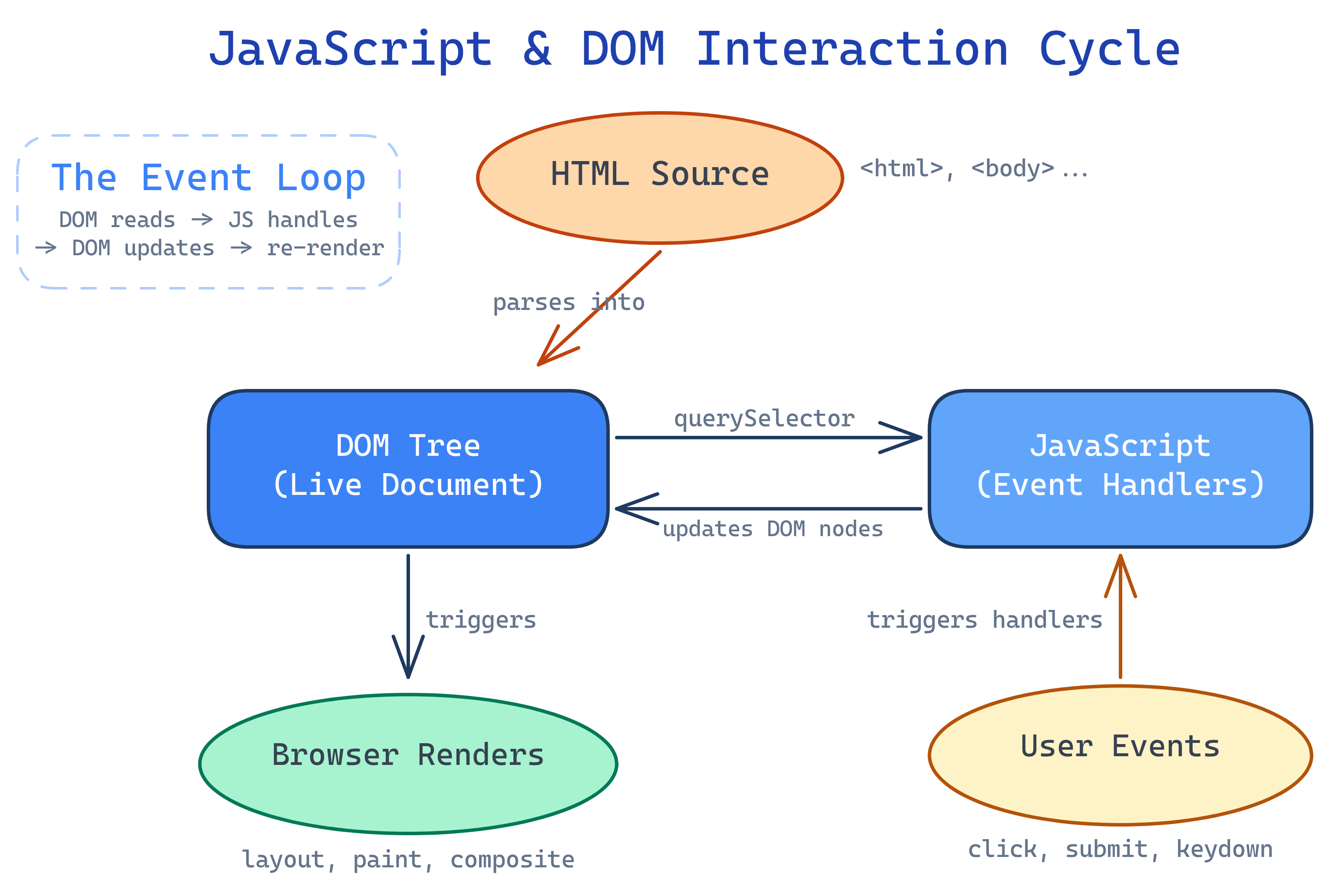
The browser parses your HTML and builds a tree of objects called the DOM. JavaScript reads and modifies this tree — adding elements, changing text, responding to clicks, and fetching data from servers. This is how static pages become interactive applications.
Explain Like I'm 12
Imagine a puppet show. The HTML is the puppet (the thing the audience sees). The DOM is the puppet’s skeleton — the wooden frame that holds it together. JavaScript is the puppeteer — it pulls the strings to make the puppet move, talk, and react. Events are the audience clapping or shouting — signals from the outside that the puppeteer responds to.
DOM Selection
Before you can change anything on the page, you need to select the element. JavaScript provides several methods, but querySelector and querySelectorAll are all you need.
// Select ONE element (first match)
const title = document.querySelector('h1');
const submitBtn = document.querySelector('#submit-btn');
const firstCard = document.querySelector('.card');
const emailInput = document.querySelector('input[type="email"]');

// Select ALL matching elements (NodeList)
const allCards = document.querySelectorAll('.card');
const allLinks = document.querySelectorAll('nav a');

// Loop through NodeList
allCards.forEach(function(card) {
  console.log(card.textContent);
});

// Convert to array for .map(), .filter(), etc.
const cardTexts = Array.from(allCards).map(function(card) {
  return card.textContent;
});querySelectorAll returns a NodeList, not an array. It has forEach but not map or filter. Use Array.from() to convert it when you need array methods.
DOM Manipulation
Once you have an element, you can read its properties, change its content, modify its attributes, or add/remove it from the page.
// Change text content (safe — escapes HTML)
const heading = document.querySelector('h1');
heading.textContent = 'New Title';

// Change HTML content (careful — can inject HTML)
const container = document.querySelector('.content');
container.innerHTML = '<p>Updated <strong>content</strong></p>';

// Modify CSS classes
const card = document.querySelector('.card');
card.classList.add('active');
card.classList.remove('loading');
card.classList.toggle('expanded');

// Modify attributes
const link = document.querySelector('a');
link.setAttribute('href', '/new-page');
link.getAttribute('data-id');

// Modify inline styles (prefer classes instead)
card.style.display = 'none';

// Create new elements
const newCard = document.createElement('article');
newCard.className = 'card';
newCard.innerHTML = `
  <h3>New Card</h3>
  <p>Dynamically created content</p>
`;

// Add to the page
document.querySelector('.card-grid').appendChild(newCard);

// Insert before a specific element
const grid = document.querySelector('.card-grid');
const firstChild = grid.firstElementChild;
grid.insertBefore(newCard, firstChild);

// Remove from the page
const oldCard = document.querySelector('.card.deprecated');
oldCard.remove();innerHTML with user-provided data. It can create XSS (cross-site scripting) vulnerabilities. Use textContent for text or createElement for structured content.
Event Handling
Events are the bridge between users and your code. The browser fires events for clicks, key presses, form submissions, scroll, resize, and dozens more.
// Basic click handler
const button = document.querySelector('#save-btn');
button.addEventListener('click', function(event) {
  console.log('Saved!');
  console.log(event.target); // the element that was clicked
});

// Form submission — ALWAYS prevent default
const form = document.querySelector('#login-form');
form.addEventListener('submit', function(event) {
  event.preventDefault(); // Stop the page from reloading

  const formData = new FormData(form);
  const email = formData.get('email');
  const password = formData.get('password');

  loginUser(email, password);
});

// Keyboard events
document.addEventListener('keydown', function(event) {
  if (event.key === 'Escape') closeModal();
  if (event.key === '/' && !event.ctrlKey) focusSearch();
});

// Input events (real-time search)
const searchInput = document.querySelector('#search');
searchInput.addEventListener('input', function(event) {
  const query = event.target.value;
  filterResults(query);
});
Event Delegation
Instead of attaching handlers to every element, attach one handler to a parent and let events bubble up. This is more efficient and works for dynamically added elements.
// Bad: attaching to every card (slow, doesn't work for new cards)
document.querySelectorAll('.card').forEach(function(card) {
  card.addEventListener('click', handleCardClick);
});

// Good: event delegation on the parent
document.querySelector('.card-grid').addEventListener('click', function(event) {
  const card = event.target.closest('.card');
  if (!card) return; // clicked outside a card

  const cardId = card.dataset.id;
  navigateToCard(cardId);
});event.target is the element the user actually clicked. event.target.closest('.card') walks up the DOM tree to find the nearest ancestor matching the selector. This handles clicks on child elements inside the card.
Async JavaScript
JavaScript is single-threaded but handles async operations through the event loop. Promises and async/await let you write async code that reads like synchronous code.
// Promises (the foundation)
fetch('https://api.example.com/users')
  .then(function(response) {
    if (!response.ok) throw new Error('Network response was not ok');
    return response.json();
  })
  .then(function(users) {
    console.log(users);
  })
  .catch(function(error) {
    console.error('Fetch failed:', error);
  });

// async/await (cleaner syntax, same thing under the hood)
async function getUsers() {
  try {
    const response = await fetch('https://api.example.com/users');
    if (!response.ok) throw new Error('Network response was not ok');
    const users = await response.json();
    return users;
  } catch (error) {
    console.error('Fetch failed:', error);
    return [];
  }
}

// Parallel requests with Promise.all
async function getDashboardData() {
  const [users, posts, stats] = await Promise.all([
    fetch('/api/users').then(r => r.json()),
    fetch('/api/posts').then(r => r.json()),
    fetch('/api/stats').then(r => r.json())
  ]);

  renderDashboard(users, posts, stats);
}response.ok after fetch(). Unlike other libraries, fetch does NOT throw on HTTP errors (404, 500). It only throws on network failures (server unreachable).
Essential ES6+ Features
Modern JavaScript (ES6 and beyond) introduced features that make code cleaner and more powerful. Every modern browser supports these.
// Template literals (string interpolation)
const name = 'Alice';
const greeting = `Hello, ${name}! You have ${inbox.length} messages.`;

// Destructuring (extract values from objects/arrays)
const { title, author, year } = book;
const [first, second, ...rest] = numbers;

// Spread operator (copy/merge)
const newArr = [...oldArr, newItem];
const newObj = { ...oldObj, updated: true };

// Optional chaining (safe property access)
const city = user?.address?.city; // undefined if any step is null/undefined

// Nullish coalescing (default values)
const theme = userPreference ?? 'light'; // only falls back on null/undefined

// Array methods
const adults = users.filter(u => u.age >= 18);
const names = users.map(u => u.name);
const total = prices.reduce((sum, p) => sum + p, 0);
const admin = users.find(u => u.role === 'admin');

// Modules (import/export)
// math.js
export function add(a, b) { return a + b; }
export const PI = 3.14159;

// app.js
import { add, PI } from './math.js';?? (nullish coalescing) differs from || (logical OR). || falls back on any falsy value (0, '', false). ?? only falls back on null or undefined. Use ?? when 0 or empty string are valid values.
Local Storage
The browser provides localStorage for persisting key-value data across sessions. Perfect for user preferences, theme choices, and cached data.
// Store data (strings only — serialize objects with JSON)
localStorage.setItem('theme', 'dark');
localStorage.setItem('user', JSON.stringify({ name: 'Alice', role: 'admin' }));

// Read data
const theme = localStorage.getItem('theme'); // 'dark'
const user = JSON.parse(localStorage.getItem('user'));

// Remove data
localStorage.removeItem('theme');

// Clear all
localStorage.clear();

// Check if key exists
if (localStorage.getItem('onboarded') === null) {
  showOnboarding();
}localStorage. It’s accessible to any JavaScript on the page, including third-party scripts. Use HTTP-only cookies for authentication tokens.
Test Yourself
What is the difference between textContent and innerHTML?
textContent gets/sets the plain text of an element, escaping any HTML. innerHTML gets/sets the HTML content, parsing tags. Use textContent for text to prevent XSS. Use innerHTML only when you need to insert HTML and the source is trusted.What is event delegation and why is it useful?
event.target.closest() to identify which child was clicked. Benefits: (1) fewer listeners = better performance, (2) works for dynamically added elements, (3) less code to manage.Why does fetch() not throw an error on 404 or 500 responses?
fetch() considers any completed HTTP request a success, even 404s and 500s. It only rejects the promise on network errors (server unreachable, DNS failure, CORS blocked). You must check response.ok (or response.status) and throw manually for HTTP errors.What is the difference between ?? and || for default values?
|| returns the right-hand side for any falsy value: false, 0, '', null, undefined. ?? (nullish coalescing) only returns the right-hand side for null or undefined. Example: 0 || 10 returns 10, but 0 ?? 10 returns 0. Use ?? when zero or empty string are valid values.What is Promise.all() and when would you use it?
Promise.all() takes an array of promises and returns a single promise that resolves when all input promises resolve (or rejects if any one rejects). Use it when you need to make multiple independent async operations in parallel, like fetching data for a dashboard from 3 different APIs simultaneously.Interview Questions
What is a closure in JavaScript?
function createCounter() {
  let count = 0;
  return function() {
    count++;
    return count;
  };
}
const counter = createCounter();
counter(); // 1
counter(); // 2
Explain the JavaScript event loop.
Promise.resolve().then() runs before setTimeout(fn, 0).What is the difference between == and ===?
== (loose equality) converts types before comparing: '5' == 5 is true. === (strict equality) compares both value AND type: '5' === 5 is false. Always use === to avoid unexpected type coercion bugs.What are let, const, and var — and when should you use each?
var is function-scoped and hoisted (accessible before declaration as undefined). let is block-scoped and can be reassigned. const is block-scoped and cannot be reassigned (but objects/arrays it points to CAN be mutated). Best practice: use const by default, let when you need to reassign, never use var.