Python Data Structures
Master Python lists, dictionaries, sets, and tuples. Know when to use each, their time complexities, and common patterns like list comprehensions, dict comprehensions, and unpacking.
Explain Like I'm 12
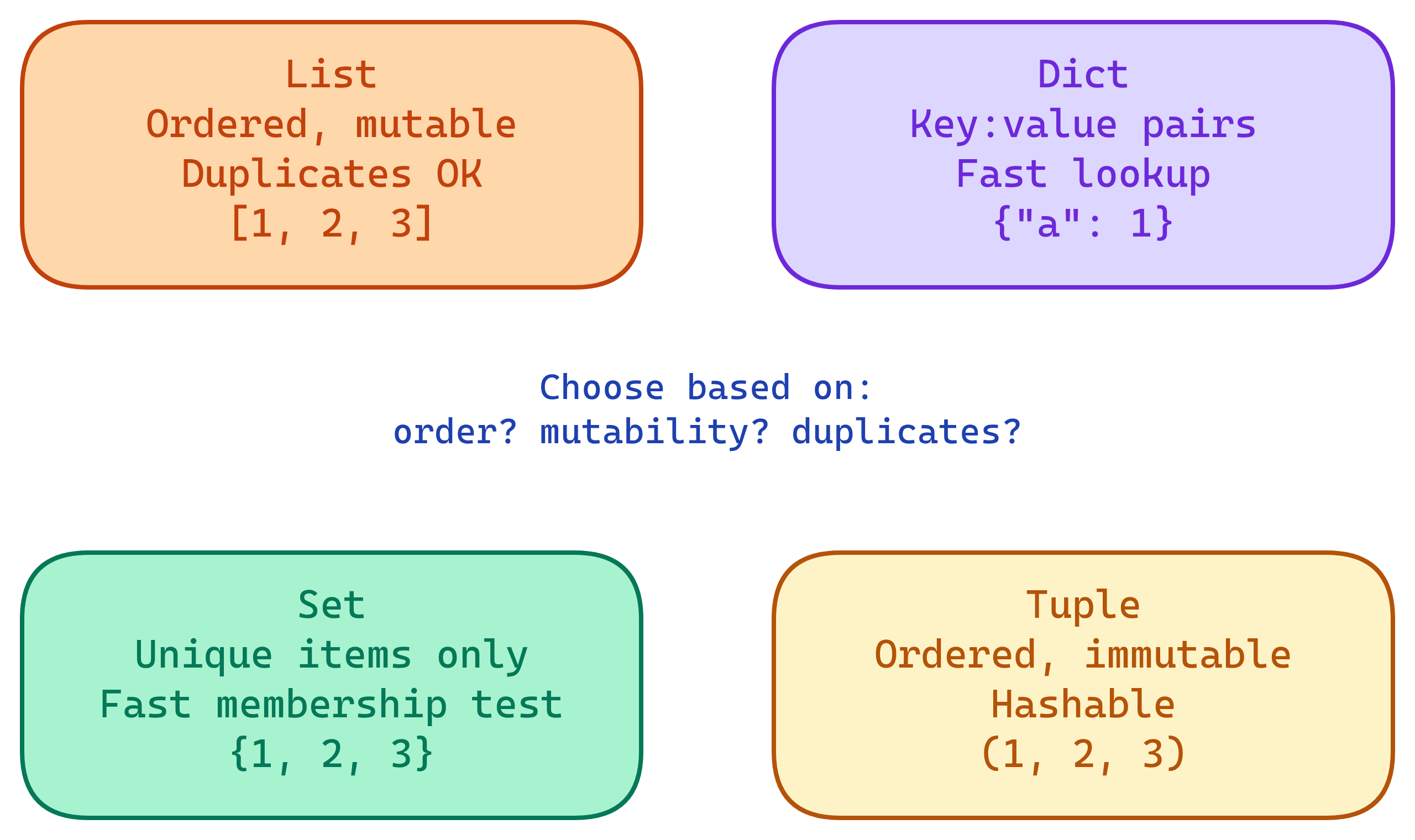
Think of data structures as different kinds of containers. A list is like a numbered shelf — items stay in order and you can grab any by its position. A dictionary is like a phone book — you look up a name (key) to get a number (value). A set is like a bag of unique marbles — no duplicates allowed. A tuple is like a sealed envelope — once you put stuff in, you can't change it.
Picking the right container makes your code faster and easier to understand.
The 4 Core Data Structures
Lists
Ordered, mutable, allows duplicates. The most versatile Python collection. Use when you need an ordered sequence that can change.
Creating and Accessing
# Creating lists
fruits = ["apple", "banana", "cherry"]
numbers = list(range(1, 6))        # [1, 2, 3, 4, 5]
mixed = [1, "hello", True, 3.14]   # Any type allowed

# Indexing (0-based)
fruits[0]     # "apple"
fruits[-1]    # "cherry" (last item)

# Slicing [start:stop:step]
fruits[0:2]   # ["apple", "banana"]
fruits[::-1]  # ["cherry", "banana", "apple"] (reversed)
Common Operations
# Adding
fruits.append("date")         # Add to end
fruits.extend(["fig", "grape"])  # Add multiple
fruits.insert(1, "avocado")   # Insert at index

# Removing
fruits.remove("banana")       # Remove by value (first match)
popped = fruits.pop()         # Remove & return last
del fruits[0]                 # Remove by index

# Sorting
nums = [3, 1, 4, 1, 5]
nums.sort()                   # In-place: [1, 1, 3, 4, 5]
sorted_nums = sorted(nums, reverse=True)  # Returns new list

# Useful checks
len(fruits)                   # Length
"apple" in fruits # Membership test (O(n))collections.deque instead of a list when you need fast append/pop from both ends. Deque gives O(1) for both; list gives O(n) for left-side operations.
Dictionaries
Key-value pairs, unordered (insertion-ordered since Python 3.7), mutable. The go-to structure for fast lookups by key.
Creating and Accessing
# Creating dicts
user = {"name": "Alice", "age": 30, "role": "engineer"}
user2 = dict(name="Bob", age=25)  # Keyword constructor

# Accessing
user["name"]                   # "Alice" (KeyError if missing)
user.get("salary", 0)         # 0 (default if missing, no error)

# Keys, values, items
user.keys()                    # dict_keys(['name', 'age', 'role'])
user.values()                  # dict_values(['Alice', 30, 'engineer'])
user.items()                   # dict_items([('name','Alice'), ...])
Common Operations
# Adding/updating
user["salary"] = 100000        # Add new key
user.update({"age": 31, "team": "backend"})  # Bulk update

# Removing
del user["role"]               # Remove key (KeyError if missing)
salary = user.pop("salary", None)  # Remove & return (safe)

# Merging (Python 3.9+)
defaults = {"theme": "dark", "lang": "en"}
overrides = {"lang": "fr"}
config = defaults | overrides  # {'theme': 'dark', 'lang': 'fr'}

# Iterating
for key, value in user.items():
    print(f"{key}: {value}")
defaultdict and Counter
from collections import defaultdict, Counter

# defaultdict — auto-creates missing keys
word_count = defaultdict(int)
for word in ["cat", "dog", "cat", "fish", "dog", "cat"]:
    word_count[word] += 1
# defaultdict(int, {'cat': 3, 'dog': 2, 'fish': 1})

# Counter — same thing, but built for counting
counter = Counter(["cat", "dog", "cat", "fish", "dog", "cat"])
counter.most_common(2)  # [('cat', 3), ('dog', 2)]

# Grouping with defaultdict(list)
by_dept = defaultdict(list)
employees = [("Alice", "eng"), ("Bob", "sales"), ("Charlie", "eng")]
for name, dept in employees:
    by_dept[dept].append(name)
# {'eng': ['Alice', 'Charlie'], 'sales': ['Bob']}dict.setdefault(key, default) when you need to initialize a key only if it doesn't exist yet. It's like defaultdict but for regular dicts.
Sets
Unordered, mutable, no duplicates. Optimized for membership testing and mathematical set operations.
in) are O(1) vs O(n) for lists. Use sets when you need fast lookups or deduplication.
Creating and Basic Operations
# Creating sets
colors = {"red", "green", "blue"}
from_list = set([1, 2, 2, 3, 3])  # {1, 2, 3} (deduped)
empty = set()                       # NOT {} (that's an empty dict)

# Adding and removing
colors.add("yellow")
colors.discard("red")     # Remove (no error if missing)
colors.remove("green")    # Remove (KeyError if missing)

# Membership
"blue" in colors          # True — O(1)
Set Operations
a = {1, 2, 3, 4}
b = {3, 4, 5, 6}

a | b      # Union:        {1, 2, 3, 4, 5, 6}
a & b      # Intersection:  {3, 4}
a - b      # Difference:    {1, 2}
a ^ b      # Symmetric diff: {1, 2, 5, 6}

# Subset/superset checks
{1, 2}.issubset(a)        # True
a.issuperset({1, 2})      # True
Practical: Deduplication
# Remove duplicates from a list (order NOT preserved)
unique = list(set([3, 1, 4, 1, 5, 9, 2, 6, 5]))

# Remove duplicates preserving order (Python 3.7+)
seen = set()
unique_ordered = []
for x in [3, 1, 4, 1, 5, 9, 2, 6, 5]:
    if x not in seen:
        seen.add(x)
        unique_ordered.append(x)
# [3, 1, 4, 5, 9, 2, 6]

# One-liner with dict.fromkeys (Python 3.7+)
unique_ordered = list(dict.fromkeys([3, 1, 4, 1, 5, 9, 2, 6, 5]))dict.fromkeys() or a manual loop with a set tracker.
Tuples
Ordered, immutable, allows duplicates. Use for fixed collections that shouldn't change, function return values, and dict keys.
Creating and Unpacking
# Creating tuples
point = (10, 20)
single = (42,)              # Trailing comma needed for single-element tuple
from_list = tuple([1, 2, 3])

# Unpacking
x, y = point                # x=10, y=20
first, *rest = (1, 2, 3, 4) # first=1, rest=[2, 3, 4]

# Swap trick
a, b = b, a                 # Uses tuple packing/unpacking under the hood

# Multiple return values
def min_max(nums):
    return min(nums), max(nums)

lo, hi = min_max([3, 1, 4, 1, 5])  # lo=1, hi=5
Named Tuples
from collections import namedtuple

# Define a named tuple type
Point = namedtuple("Point", ["x", "y"])
p = Point(10, 20)
p.x        # 10 (access by name)
p[0]       # 10 (access by index)

# Real-world example
User = namedtuple("User", ["name", "age", "email"])
alice = User("Alice", 30, "[email protected]")
print(f"{alice.name} is {alice.age}")  # "Alice is 30"

# Python 3.6+ alternative: typing.NamedTuple
from typing import NamedTuple

class Point(NamedTuple):
    x: float
    y: float
label: str = "origin" # Default valuedataclasses instead.
Comparison Table
| Feature | List | Dict | Set | Tuple |
|---|---|---|---|---|
| Ordered | Yes | Yes (3.7+) | No | Yes |
| Mutable | Yes | Yes | Yes | No |
| Duplicates | Allowed | Keys unique | No | Allowed |
| Syntax | [1, 2, 3] |
{"a": 1} |
{1, 2, 3} |
(1, 2, 3) |
| Hashable | No | No | No (frozenset is) | Yes |
| Best for | Ordered sequences | Key-value lookups | Unique items, membership | Fixed records, dict keys |
Time Complexity
Knowing Big-O helps you pick the right structure. Here are the most common operations:
| Operation | List | Dict | Set |
|---|---|---|---|
| Access by index | O(1) | N/A | N/A |
Search / in |
O(n) | O(1) | O(1) |
| Append / Insert at end | O(1)* | O(1) | O(1) |
| Insert at front | O(n) | N/A | N/A |
| Delete by value | O(n) | O(1) | O(1) |
| Sort | O(n log n) | N/A | N/A |
* Amortized O(1). Occasionally O(n) when the internal array needs to resize.
if item in my_list inside a loop creates O(n²) time. Convert the list to a set first for O(n) total: my_set = set(my_list).
Comprehensions
Comprehensions are Pythonic one-liners for building collections. Faster than equivalent loops because they're optimized at the C level.
List Comprehensions
# Basic
squares = [x**2 for x in range(10)]       # [0, 1, 4, 9, ..., 81]

# With filter
evens = [x for x in range(20) if x % 2 == 0]

# Nested (flatten a matrix)
matrix = [[1, 2], [3, 4], [5, 6]]
flat = [num for row in matrix for num in row]  # [1, 2, 3, 4, 5, 6]

# With transformation
names = ["alice", "bob", "charlie"]
upper = [name.upper() for name in names]
Dict Comprehensions
# Basic
squares = {x: x**2 for x in range(6)}
# {0: 0, 1: 1, 2: 4, 3: 9, 4: 16, 5: 25}

# Invert a dict
original = {"a": 1, "b": 2, "c": 3}
inverted = {v: k for k, v in original.items()}
# {1: 'a', 2: 'b', 3: 'c'}

# Filter
scores = {"Alice": 85, "Bob": 62, "Charlie": 91}
passed = {name: score for name, score in scores.items() if score >= 70}
Set Comprehensions
# Unique first letters
names = ["Alice", "Aaron", "Bob", "Charlie", "Cathy"]
initials = {name[0] for name in names} # {'A', 'B', 'C'}Nested Structures
Real-world data is rarely flat. Combine structures to model complex data.
# List of dicts (very common — JSON-like)
users = [
    {"name": "Alice", "age": 30, "skills": ["Python", "SQL"]},
    {"name": "Bob", "age": 25, "skills": ["JavaScript", "React"]},
]

# Access nested data
users[0]["skills"][1]          # "SQL"

# Dict of lists (grouping pattern)
teams = {
    "backend": ["Alice", "Charlie"],
    "frontend": ["Bob", "Diana"],
}

# Dict of dicts (nested config)
config = {
    "database": {"host": "localhost", "port": 5432},
    "cache": {"host": "redis", "port": 6379},
}
config["database"]["port"] # 5432dataclasses or NamedTuple instead of deeply nested dicts. They add type safety and autocompletion in your editor.
Common Patterns
Counter Pattern
from collections import Counter

words = "the cat sat on the mat the cat".split()
freq = Counter(words)
freq.most_common(3)  # [('the', 3), ('cat', 2), ('sat', 1)]
Grouping Pattern
from collections import defaultdict

records = [
    ("Alice", "Engineering"),
    ("Bob", "Sales"),
    ("Charlie", "Engineering"),
    ("Diana", "Sales"),
]
grouped = defaultdict(list)
for name, dept in records:
    grouped[dept].append(name)
# {'Engineering': ['Alice', 'Charlie'], 'Sales': ['Bob', 'Diana']}
Dedup While Preserving Order
items = [3, 1, 4, 1, 5, 9, 2, 6, 5, 3]
unique = list(dict.fromkeys(items))  # [3, 1, 4, 5, 9, 2, 6]
Zip and Enumerate
# Pair two lists
names = ["Alice", "Bob", "Charlie"]
scores = [85, 92, 78]
pairs = dict(zip(names, scores))  # {'Alice': 85, 'Bob': 92, 'Charlie': 78}

# Loop with index
for i, name in enumerate(names):
    print(f"{i}: {name}")
Flatten a Nested List
# Shallow flatten
nested = [[1, 2], [3, 4], [5, 6]]
flat = [item for sublist in nested for item in sublist]

# Deep flatten (recursive)
def flatten(lst):
    result = []
    for item in lst:
        if isinstance(item, list):
            result.extend(flatten(item))
        else:
            result.append(item)
    return result

flatten([1, [2, [3, [4]]], 5])  # [1, 2, 3, 4, 5]
Test Yourself
Q: What is the time complexity of checking x in my_list vs x in my_set?
Q: What is the difference between list.append() and list.extend()?
append(x) adds x as a single element. extend(iterable) adds each item from the iterable individually. [1,2].append([3,4]) gives [1,2,[3,4]]. [1,2].extend([3,4]) gives [1,2,3,4].Q: Why can a tuple be a dictionary key but a list cannot?
Q: How would you remove duplicates from a list while preserving the original order?
list(dict.fromkeys(original_list)). Since Python 3.7, dicts preserve insertion order, so this deduplicates while maintaining sequence. Alternatively, iterate with a seen set.Q: What does defaultdict(list) do that a regular dict doesn't?
defaultdict(list) automatically creates it with an empty list as the default value. A regular dict raises KeyError. This is perfect for grouping patterns where you append to a key's list without first checking if the key exists.Interview Questions
Q: What is the difference between a list and a tuple? When would you use each?
Q: Explain the time complexity of common dict operations. Why are dicts so fast?
get, set, delete, and in are all O(1) average case. Python hashes the key to compute a slot index, then jumps directly to it. Worst case is O(n) if many keys collide to the same hash slot, but Python's hash function makes this extremely rare in practice.Q: What is a list comprehension? How does it compare to map() and filter()?
[expr for x in iterable if condition]. It replaces list(map(func, iterable)) and list(filter(func, iterable)). Comprehensions are generally more readable and Pythonic. Performance is similar, but comprehensions avoid the overhead of calling a function per element. Use map/filter when you already have a named function and the expression is simple.Q: How would you implement a simple cache (memoization) using a dictionary?
# Manual cache
cache = {}
def fibonacci(n):
    if n in cache:
        return cache[n]
    if n <= 1:
        return n
    result = fibonacci(n-1) + fibonacci(n-2)
    cache[n] = result
    return result

# Or use functools.lru_cache (preferred)
from functools import lru_cache

@lru_cache(maxsize=128)
def fibonacci(n):
    if n <= 1:
        return n
    return fibonacci(n-1) + fibonacci(n-2)
The dict stores previously computed results. Before computing, check if the answer is already cached. lru_cache does this automatically with a decorator.