Python Functions & Modules
Functions are reusable blocks of code. Modules organize functions into files. Packages bundle modules. Master def, *args/**kwargs, lambda, decorators, and how to structure a Python project.
Explain Like I'm 12
A function is like a recipe. You give it ingredients (arguments), it follows steps, and gives you back a dish (return value). You write the recipe once and use it anytime.
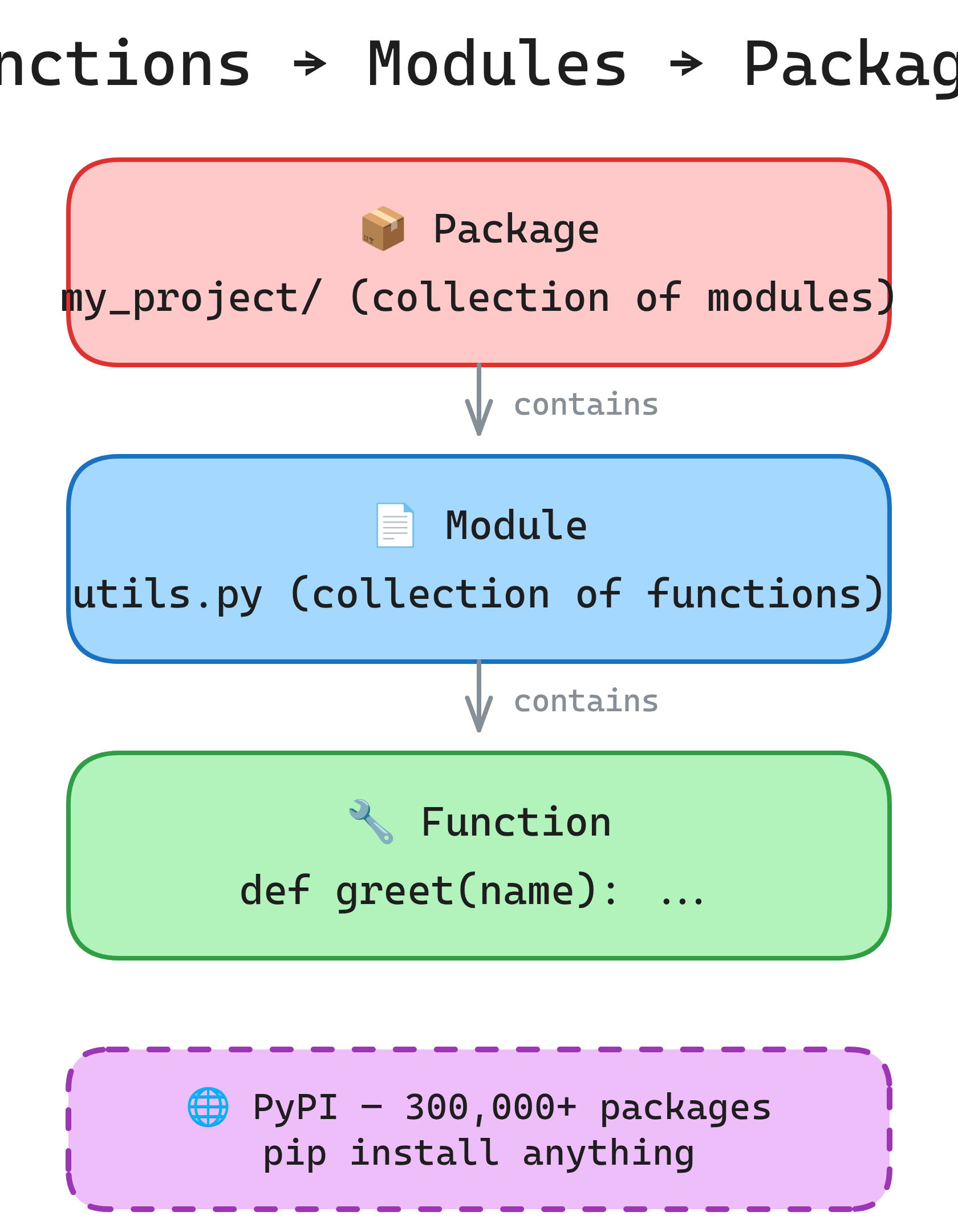
A module is like a recipe book — a file full of related functions. A package is a shelf of recipe books (a folder of modules). Python comes with a huge library of pre-written recipe books, and you can install more with pip.
Functions, Modules & Packages
Function Basics
Functions encapsulate logic into reusable, testable blocks. Every function should do one thing well.
Defining and Calling
# Basic function
def greet(name):
    """Return a greeting string."""  # Docstring
    return f"Hello, {name}!"

message = greet("Alice")  # "Hello, Alice!"

# Function with no return (returns None)
def log(msg):
    print(f"[LOG] {msg}")

# Multiple return values (returns a tuple)
def divide(a, b):
    quotient = a // b
    remainder = a % b
    return quotient, remainder

q, r = divide(17, 5)  # q=3, r=2
Docstrings
def calculate_bmi(weight_kg, height_m):
    """Calculate Body Mass Index.

    Args:
        weight_kg: Weight in kilograms.
        height_m: Height in meters.

    Returns:
        BMI as a float, rounded to 1 decimal place.

    Raises:
        ValueError: If height is zero or negative.
    """
    if height_m <= 0:
        raise ValueError("Height must be positive")
    return round(weight_kg / (height_m ** 2), 1)

# Access the docstring
help(calculate_bmi)
calculate_bmi.__doc__Parameters & Arguments
Python has five kinds of parameters, giving you full control over how functions accept input.
Positional and Keyword
# Positional
def power(base, exponent):
    return base ** exponent

power(2, 10)                  # Positional: 1024
power(exponent=10, base=2)    # Keyword: 1024

# Default values
def connect(host, port=5432, ssl=True):
    print(f"Connecting to {host}:{port} (SSL={ssl})")

connect("db.example.com")              # Uses defaults
connect("db.example.com", port=3306)   # Override port
*args and **kwargs
# *args — captures extra positional arguments as a tuple
def add(*nums):
    return sum(nums)

add(1, 2, 3)          # 6
add(10, 20, 30, 40)   # 100

# **kwargs — captures extra keyword arguments as a dict
def build_profile(**kwargs):
    return kwargs

build_profile(name="Alice", age=30, role="engineer")
# {'name': 'Alice', 'age': 30, 'role': 'engineer'}

# Combining all parameter types (order matters!)
def func(pos, /, normal, *, kw_only, **kwargs):
    pass
# pos: positional-only (Python 3.8+)
# normal: positional or keyword
# kw_only: keyword-only (after *)
# **kwargs: catch-all keyword argsdef add_item(item, lst=[]) shares the same list across all calls. Use None as default and create inside the function.
# WRONG — shared mutable default
def add_item(item, lst=[]):
    lst.append(item)
    return lst

add_item("a")  # ['a']
add_item("b")  # ['a', 'b'] — BUG! Same list reused

# CORRECT
def add_item(item, lst=None):
    if lst is None:
        lst = []
    lst.append(item)
    return lst
Lambda Functions
Anonymous, single-expression functions. Useful for short callbacks and sort keys.
def.
# Syntax: lambda arguments: expression
square = lambda x: x ** 2
square(5)  # 25

# Common use: sort key
users = [("Alice", 30), ("Bob", 25), ("Charlie", 35)]
users.sort(key=lambda u: u[1])  # Sort by age
# [('Bob', 25), ('Alice', 30), ('Charlie', 35)]

# Common use: filter
nums = [1, 2, 3, 4, 5, 6]
evens = list(filter(lambda x: x % 2 == 0, nums))  # [2, 4, 6]

# Common use: map
doubled = list(map(lambda x: x * 2, nums)) # [2, 4, 6, 8, 10, 12]square = lambda x: x**2). Use a regular def instead — it's more readable and gives the function a proper name in tracebacks.
Scope: The LEGB Rule
Python resolves variable names in this order: Local → Enclosing → Global → Built-in.
x = "global"             # Global scope

def outer():
    x = "enclosing"       # Enclosing scope

    def inner():
        x = "local"       # Local scope
        print(x)          # "local"

    inner()
    print(x)              # "enclosing"

outer()
print(x)                  # "global"
global and nonlocal
# global — modify a global variable from inside a function
counter = 0

def increment():
    global counter
    counter += 1

increment()
print(counter)  # 1

# nonlocal — modify an enclosing scope variable
def make_counter():
    count = 0
    def increment():
        nonlocal count
        count += 1
        return count
    return increment

counter = make_counter()
counter()  # 1
counter()  # 2
counter() # 3global in production code. Global state makes functions unpredictable and hard to test. Pass values as arguments and return results instead. Use nonlocal sparingly — closures are the right pattern when you need it.
Decorators
Decorators wrap a function to add behavior before/after it runs. They're the most powerful Python pattern for cross-cutting concerns like logging, caching, and auth.
@decorator syntax is sugar for func = decorator(func).
Basic Decorator
import functools
import time

def timer(func):
    """Log how long a function takes to run."""
    @functools.wraps(func)  # Preserve original name/docstring
    def wrapper(*args, **kwargs):
        start = time.perf_counter()
        result = func(*args, **kwargs)
        elapsed = time.perf_counter() - start
        print(f"{func.__name__} took {elapsed:.4f}s")
        return result
    return wrapper

@timer
def slow_function():
    time.sleep(1)
    return "done"

slow_function()  # Prints: "slow_function took 1.0012s"
Decorator with Arguments
def retry(max_attempts=3):
    """Retry a function up to max_attempts times on exception."""
    def decorator(func):
        @functools.wraps(func)
        def wrapper(*args, **kwargs):
            for attempt in range(1, max_attempts + 1):
                try:
                    return func(*args, **kwargs)
                except Exception as e:
                    if attempt == max_attempts:
                        raise
                    print(f"Attempt {attempt} failed: {e}. Retrying...")
        return wrapper
    return decorator

@retry(max_attempts=5)
def fetch_data(url):
    # Might fail due to network issues
    pass
Practical Decorators
# Cache decorator (memoization)
from functools import lru_cache

@lru_cache(maxsize=128)
def fibonacci(n):
    if n <= 1:
        return n
    return fibonacci(n - 1) + fibonacci(n - 2)

fibonacci(100)  # Instant — cached

# Built-in decorators
class Circle:
    def __init__(self, radius):
        self._radius = radius

    @property
    def area(self):
        """Access like an attribute: circle.area"""
        return 3.14159 * self._radius ** 2

    @staticmethod
    def is_valid_radius(r):
        """No access to instance or class."""
        return r > 0

    @classmethod
    def from_diameter(cls, d):
        """Alternative constructor."""
return cls(d / 2)@functools.wraps(func) in your decorators. Without it, the decorated function loses its original __name__, __doc__, and other metadata, which breaks debugging and documentation tools.
Modules & Imports
A module is any .py file. Importing a module gives you access to its functions, classes, and variables.
import a module, Python executes the file top to bottom. The if __name__ == "__main__" guard prevents code from running when the file is imported (vs run directly).
Import Styles
# Import the module
import math
math.sqrt(16)            # 4.0

# Import specific names
from math import sqrt, pi
sqrt(16)                 # 4.0

# Import with alias
import pandas as pd
import numpy as np

# Import all (avoid — pollutes namespace)
from math import *       # Bad practice
The __name__ Guard
# utils.py
def add(a, b):
    return a + b

def main():
    print(add(2, 3))

# Only runs when executed directly: python utils.py
# Does NOT run when imported: from utils import add
if __name__ == "__main__":
main()isort automate this.
Packages & Project Structure
A package is a directory of modules with an __init__.py file. Packages organize large projects into logical groups.
Package Structure
# Typical project layout
my_project/
    pyproject.toml          # Project metadata & dependencies
    README.md
    src/
        my_package/
            __init__.py     # Makes it a package (can be empty)
            core.py         # Main logic
            utils.py        # Helper functions
            models/
                __init__.py
                user.py
                order.py
    tests/
        test_core.py
        test_utils.py
Installing Packages
# Install from PyPI
pip install requests
pip install pandas numpy matplotlib

# Install from requirements file
pip install -r requirements.txt

# List installed packages
pip list
pip freeze > requirements.txt  # Save current packages
Virtual Environments
Isolate project dependencies. Each project gets its own copy of Python packages, preventing version conflicts.
# Create a virtual environment
python3 -m venv .venv

# Activate it
source .venv/bin/activate      # macOS/Linux
.venv\Scripts\activate         # Windows

# Install packages (now isolated)
pip install requests flask

# Deactivate when done
deactivate
Modern Alternatives
# uv — ultra-fast package manager (Rust-based)
uv venv                        # Create venv
uv pip install requests        # 10-100x faster than pip

# poetry — dependency management + packaging
poetry init
poetry add requests
poetry install

# pipenv — Pipfile-based workflow
pipenv install requests
pipenv shelluv for speed. It's a drop-in replacement for pip and venv, written in Rust, and is now the fastest Python package manager by a large margin.
Project Structure Best Practices
# Production-ready layout
my_api/
    pyproject.toml            # Single config file (replaces setup.py)
    .gitignore
    .env                      # Secrets (NEVER commit)
    src/
        my_api/
            __init__.py
            app.py            # Entry point
            config.py         # Settings from env vars
            routes/
                __init__.py
                users.py
                orders.py
            services/
                __init__.py
                auth.py
                email.py
            models/
                __init__.py
                user.py
            utils/
                __init__.py
                validators.py
    tests/
        conftest.py           # Shared test fixtures
        test_users.py
        test_orders.py
    docs/
api.mdsrc/ layout to prevent accidental imports from the project root. (2) Group by feature (routes, services, models), not by type. (3) Keep __init__.py files minimal — import only public APIs. (4) Use pyproject.toml as the single config file.
Test Yourself
Q: What is the difference between *args and **kwargs?
*args collects extra positional arguments into a tuple. **kwargs collects extra keyword arguments into a dict. Together, they let a function accept any number and type of arguments: def func(*args, **kwargs).Q: What does the LEGB rule stand for?
print, len.Q: Why should you never use a mutable default argument like def f(lst=[])?
None as default and create the mutable object inside the function body.Q: What does @functools.wraps(func) do in a decorator?
__name__, __doc__, __module__, and other metadata to the wrapper function. Without it, the decorated function appears to have the wrapper's name and docstring, which breaks help(), logging, and debugging.Q: What is the purpose of if __name__ == "__main__"?
python my_file.py), not when imported as a module. Python sets __name__ to "__main__" for the entry script and to the module name for imported files.Interview Questions
Q: Explain closures in Python. Give an example.
def make_multiplier(n):
    def multiplier(x):
        return x * n  # 'n' is captured from enclosing scope
    return multiplier

double = make_multiplier(2)
double(5)   # 10
double(10)  # 20
The inner function multiplier "closes over" the variable n. Even after make_multiplier returns, double still has access to n=2. Closures are the foundation of decorators, callbacks, and factory functions.
Q: What is the difference between a decorator and a regular function wrapper?
@my_decorator above a function is equivalent to func = my_decorator(func). The @ syntax just makes it clearer that the function is being wrapped. Under the hood, a decorator is a higher-order function that takes a function and returns a new function (usually with added behavior).Q: What is a generator? How does it differ from a regular function?
yield instead of return. It produces values lazily — one at a time — instead of computing all results upfront and storing them in memory.
def count_up(limit):
    n = 0
    while n < limit:
        yield n    # Pauses here, resumes on next()
        n += 1

for num in count_up(1000000):
    if num > 5:
        break
Key differences: (1) Memory efficient — only one value in memory at a time. (2) Lazy — values computed on demand. (3) Can represent infinite sequences. (4) State is preserved between yield calls.
Q: Explain the difference between import module and from module import func. When would you use each?
import module imports the whole module — you access names via module.func(). This avoids name collisions and makes the source clear. from module import func imports func directly into your namespace. Use import module when the module name is short or you use many of its names. Use from ... import when you use one or two names frequently. Never use from module import * — it pollutes the namespace and makes it unclear where names come from.