JWT & Token-Based Authentication
A JWT (JSON Web Token) is a signed, base64-encoded string with three parts: header.payload.signature. The server signs it once; any server can verify it without a database lookup. Use short-lived access tokens + long-lived refresh tokens for the best security/UX balance.
Explain Like I'm 12
Imagine your teacher writes you a hall pass: "Jane, 3rd period, going to the library, signed Mrs. Smith." Any teacher in the hallway can read it and verify Mrs. Smith's signature. They don't need to call Mrs. Smith to check — the pass itself is proof. That's a JWT — it carries your info AND proof it hasn't been tampered with. But if someone photocopied it, they could use it too — which is why hall passes (and JWTs) should expire quickly.
Anatomy of a JWT
A JWT has three base64url-encoded parts separated by dots:
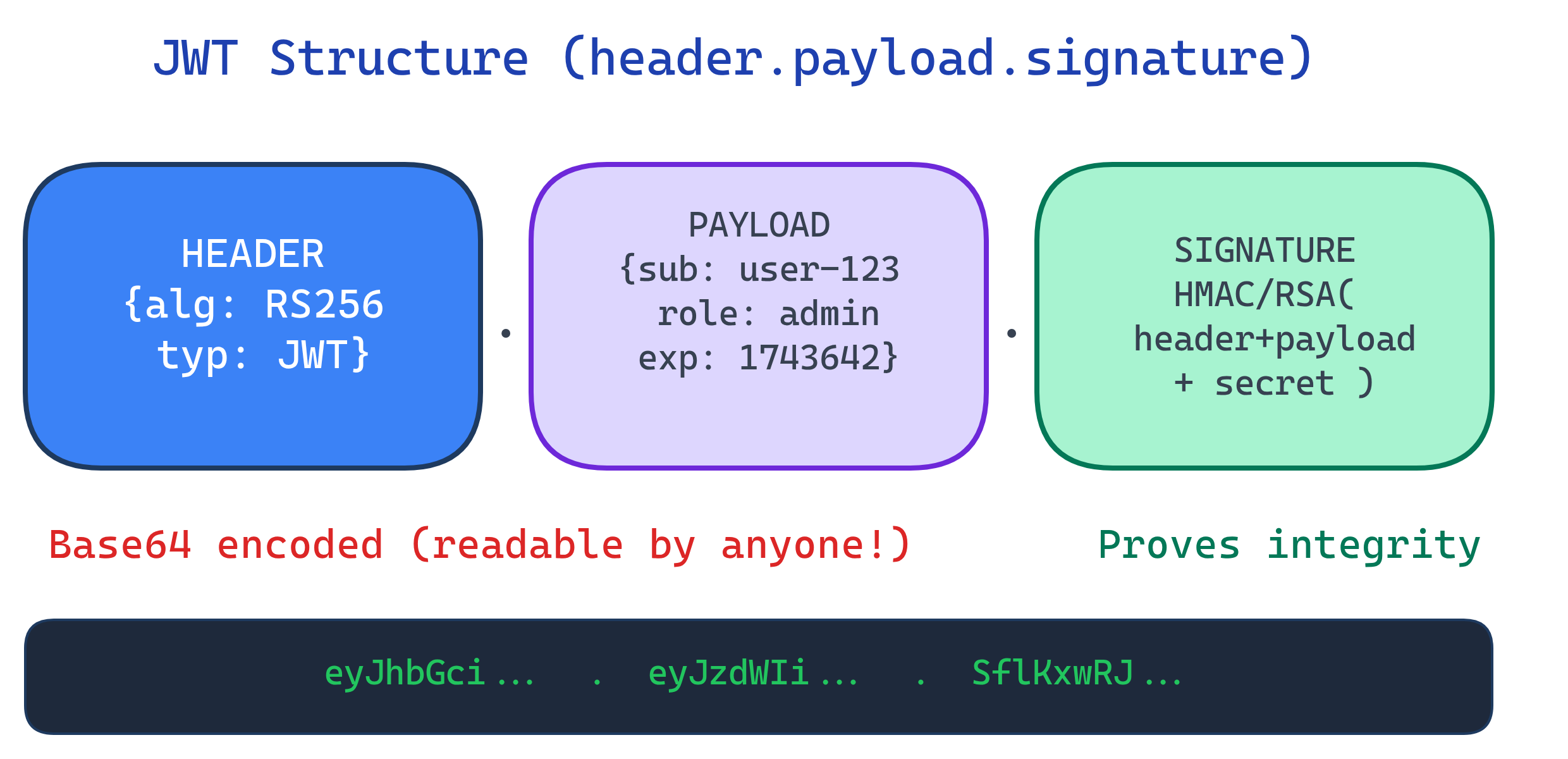
# A real JWT (line breaks added for readability)
eyJhbGciOiJIUzI1NiIsInR5cCI6IkpXVCJ9.    # Header
eyJzdWIiOiIxMjMiLCJuYW1lIjoiSmFuZSIsInJ  # Payload
vbGUiOiJhZG1pbiIsImlhdCI6MTc0MzYzODQwMC
wiZXhwIjoxNzQzNjQyMDAwfQ.
SflKxwRJSMeKKF2QT4fwpMeJf36POk6yJV_adQssw5c # SignatureHeader
The header specifies the signing algorithm and token type:
{
  "alg": "HS256",    // HMAC-SHA256 (symmetric)
  "typ": "JWT"
}
Payload (Claims)
The payload contains claims — statements about the user and metadata. There are registered (standard), public, and private claims:
{
  "sub": "user-123",        // Subject (user ID) — registered
  "name": "Jane Doe",       // Public claim
  "role": "admin",          // Private claim (your app's data)
  "iat": 1743638400,        // Issued At — registered
  "exp": 1743642000,        // Expiration — registered (1 hour later)
  "iss": "myapp.com",       // Issuer — registered
  "aud": "api.myapp.com"    // Audience — registered
}| Claim | Full Name | Purpose |
|---|---|---|
sub | Subject | Who this token represents (user ID) |
iss | Issuer | Who created and signed this token |
aud | Audience | Who should accept this token |
exp | Expiration | When this token expires (Unix timestamp) |
iat | Issued At | When this token was created |
nbf | Not Before | Token is invalid before this time |
jti | JWT ID | Unique identifier (for revocation) |
Signature & Signing Algorithms
The signature ensures the token hasn't been tampered with. Different algorithms serve different use cases:
| Algorithm | Type | Key | Use Case |
|---|---|---|---|
| HS256 | Symmetric (HMAC) | One shared secret | Single server or trusted internal services |
| RS256 | Asymmetric (RSA) | Private key signs, public key verifies | Distributed systems, third-party verification |
| ES256 | Asymmetric (ECDSA) | Private key signs, public key verifies | Same as RS256 but smaller keys, faster |
| No signature | None | NEVER use — disables all security |
# Python: Sign and verify JWT with RS256 (asymmetric)
import jwt  # PyJWT library

# Sign with private key
private_key = open('private.pem').read()
token = jwt.encode(
    {'sub': 'user-123', 'role': 'admin', 'exp': 1743642000},
    private_key,
    algorithm='RS256'
)

# Verify with public key (can be shared freely)
public_key = open('public.pem').read()
decoded = jwt.decode(token, public_key, algorithms=['RS256'])
print(decoded['sub']) # user-123Access Tokens vs Refresh Tokens
A common pattern: issue a short-lived access token for API calls and a long-lived refresh token to get new access tokens without re-login.
| Access Token | Refresh Token | |
|---|---|---|
| Lifetime | 5-60 minutes | Days to months |
| Sent to | Resource servers (APIs) | Auth server only |
| Storage | Memory (JS variable) | httpOnly cookie or server-side |
| If stolen | Limited damage (short-lived) | Full account compromise |
| Revocable? | Not easily (check on every request is expensive) | Yes (server-side check) |
// Token refresh flow (client-side)
async function fetchWithAuth(url, options = {}) {
  let response = await fetch(url, {
    ...options,
    headers: { ...options.headers, 'Authorization': `Bearer ${accessToken}` }
  });

  // If 401, try refreshing the token
  if (response.status === 401) {
    const refreshResponse = await fetch('/api/auth/refresh', {
      method: 'POST',
      credentials: 'include'  // sends httpOnly refresh cookie
    });

    if (refreshResponse.ok) {
      const { access_token } = await refreshResponse.json();
      accessToken = access_token;  // update in-memory token

      // Retry original request with new token
      response = await fetch(url, {
        ...options,
        headers: { ...options.headers, 'Authorization': `Bearer ${accessToken}` }
      });
    } else {
      // Refresh failed — redirect to login
      window.location.href = '/login';
    }
  }

  return response;
}
Common JWT Security Pitfalls
| Attack/Pitfall | What Goes Wrong | Prevention |
|---|---|---|
| alg:none attack | Attacker changes alg to "none", server skips verification | Always validate the alg claim; reject "none" |
| Key confusion | Attacker switches RS256→HS256, signs with public key | Hardcode expected algorithm; never accept alg from token |
| No expiration | Token valid forever if stolen | Always set exp claim; verify it on every request |
| Sensitive data in payload | Token is base64, not encrypted — anyone can read it | Only put non-sensitive claims; use JWE for encryption |
| localStorage storage | XSS can steal tokens from localStorage | Store access tokens in memory, refresh tokens in httpOnly cookies |
# SAFE: Hardcode the algorithm — never trust the token's header
decoded = jwt.decode(
    token,
    public_key,
    algorithms=['RS256'],  # Only accept RS256
    audience='api.myapp.com',
    issuer='myapp.com'
)

# DANGEROUS: Accepting any algorithm from the token
# decoded = jwt.decode(token, key, algorithms=jwt.get_unverified_header(token)['alg'])When NOT to Use JWTs
- You need instant revocation — JWTs can't be revoked until they expire (without a blocklist, which defeats the "stateless" benefit)
- You have a single server — sessions with server-side storage are simpler and more secure
- You need to store sensitive data — JWT payloads are readable by anyone. Use server-side sessions or JWE (encrypted JWT)
- Your tokens get very large — JWTs are sent with every request. Large payloads = bigger requests = slower performance
Test Yourself
What are the three parts of a JWT and what does each contain?
Why are JWTs "signed but not encrypted"? What's the practical implication?
When should you use RS256 over HS256?
Why store access tokens in memory instead of localStorage?
What is token rotation and why does it matter for refresh tokens?
Interview Questions
How would you implement token revocation for JWTs without losing the stateless benefit?
jti claims) — only tokens that haven't expired yet need to be in the list, so it stays small. Alternatively, use token introspection (RFC 7662) for high-security operations.Explain the "alg:none" attack and how to prevent it.
{"alg": "none"} and removes the signature. Vulnerable libraries skip verification for "none" algorithm. Prevention: always hardcode the expected algorithm in your verification code (algorithms=['RS256']), never derive it from the token's header, and use well-maintained JWT libraries that reject "none" by default.Your microservices architecture uses JWTs. Service A issues tokens, Services B/C/D verify them. How do you handle key rotation?
kid header), 3) Verifiers fetch updated JWKS and match by kid, 4) Remove old key after all existing tokens expire. This is exactly how OAuth providers like Auth0 and Okta handle rotation.