OAuth 2.0 & OpenID Connect
OAuth 2.0 lets users grant apps limited access to their data without sharing passwords. OpenID Connect (OIDC) adds an identity layer on top — it's how "Login with Google/GitHub" works. The authorization code flow with PKCE is the recommended approach for most apps.
Explain Like I'm 12
Imagine you're at a hotel and you want room service to clean your room. You DON'T give them your master key. Instead, you go to the front desk (authorization server), say "let housekeeping into my room for 1 hour" and they get a temporary key card (access token) that only works for your room, only for cleaning, and only for 1 hour. That's OAuth — you never shared your password, and the access is limited and temporary.
What Problem Does OAuth Solve?
Before OAuth, if a third-party app (like a calendar tool) needed your Gmail contacts, you'd give it your Google password. This was terrible — the app could read your email, change your password, or do anything as you. OAuth fixes this by letting you grant limited, revocable access without sharing credentials.
The Four Roles
| Role | What It Is | Real Example |
|---|---|---|
| Resource Owner | The user who owns the data | You (the Google account holder) |
| Client | The app requesting access | A calendar app wanting your contacts |
| Authorization Server | Issues tokens after user consent | accounts.google.com |
| Resource Server | Hosts the protected data/API | contacts.google.com API |
Authorization Code Flow (with PKCE)
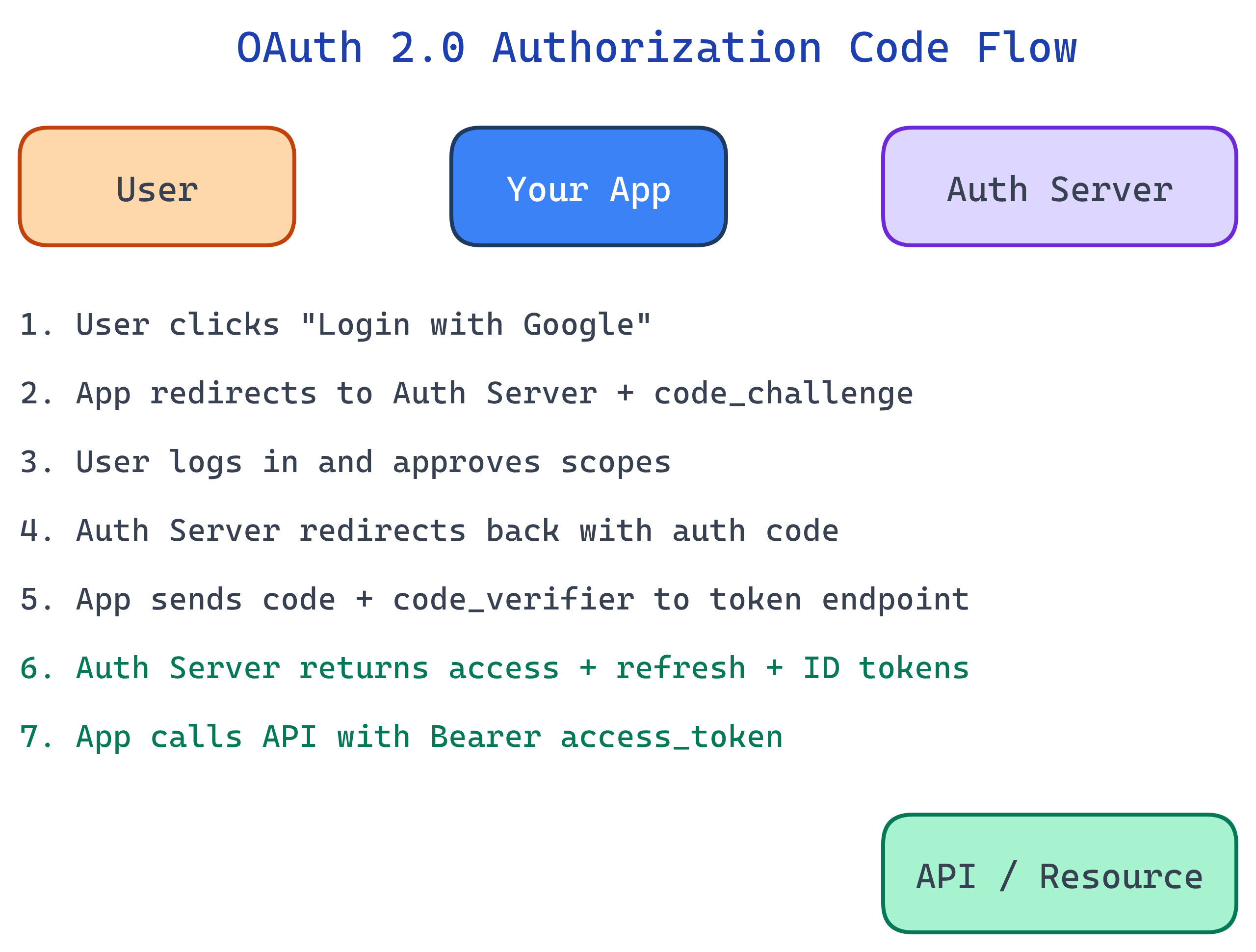
This is the recommended flow for web apps, mobile apps, and SPAs. PKCE (Proof Key for Code Exchange) prevents authorization code interception attacks.
- App generates a code_verifier (random string) and its SHA-256 hash (code_challenge)
- User is redirected to the auth server with the code_challenge
- User logs in and consents to the requested scopes
- Auth server redirects back with an authorization code
- App exchanges the code + code_verifier for tokens
- Auth server verifies the code_verifier matches and returns access + refresh tokens
// Step 1: Generate PKCE values
function generateCodeVerifier() {
  const array = new Uint8Array(32);
  crypto.getRandomValues(array);
  return base64URLEncode(array);
}

async function generateCodeChallenge(verifier) {
  const hash = await crypto.subtle.digest(
    'SHA-256',
    new TextEncoder().encode(verifier)
  );
  return base64URLEncode(new Uint8Array(hash));
}

// Step 2: Build the authorization URL
const authUrl = new URL('https://accounts.google.com/o/oauth2/v2/auth');
authUrl.searchParams.set('client_id', CLIENT_ID);
authUrl.searchParams.set('redirect_uri', 'https://myapp.com/callback');
authUrl.searchParams.set('response_type', 'code');
authUrl.searchParams.set('scope', 'openid email profile');
authUrl.searchParams.set('code_challenge', codeChallenge);
authUrl.searchParams.set('code_challenge_method', 'S256');

window.location.href = authUrl.toString();
// Step 5: Exchange code for tokens (server-side)
const tokenResponse = await fetch('https://oauth2.googleapis.com/token', {
  method: 'POST',
  headers: { 'Content-Type': 'application/x-www-form-urlencoded' },
  body: new URLSearchParams({
    grant_type: 'authorization_code',
    code: authorizationCode,
    redirect_uri: 'https://myapp.com/callback',
    client_id: CLIENT_ID,
    code_verifier: storedCodeVerifier
  })
});

const { access_token, refresh_token, id_token } = await tokenResponse.json();
OAuth 2.0 Grant Types Compared
| Grant Type | Use Case | Security |
|---|---|---|
| Authorization Code + PKCE | Web apps, mobile, SPAs | Best — code exchange with proof key |
| Client Credentials | Service-to-service (no user) | Good — only for trusted backends |
| Device Code | Smart TVs, CLI tools (no browser) | Good — user authorizes on another device |
| Deprecated — tokens exposed in URL | ||
| Deprecated — shares credentials with app |
Scopes: Limiting Access
Scopes define what the token can access. The user sees them on the consent screen and can approve or deny.
# Google scopes example
scope=openid email profile                    # Basic identity
scope=https://www.googleapis.com/auth/drive.readonly  # Read Google Drive

# GitHub scopes example
scope=read:user repo                          # Read profile + access repos
scope=read:org # Read org membershipOpenID Connect (OIDC)
OAuth 2.0 handles authorization (what can the app do?) but not authentication (who is the user?). OpenID Connect adds an ID token — a JWT containing user identity claims.
// Decoded ID token (JWT payload)
{
  "iss": "https://accounts.google.com",
  "sub": "110169484474386276334",
  "email": "[email protected]",
  "name": "Jane Doe",
  "picture": "https://lh3.googleusercontent.com/a/photo.jpg",
  "aud": "your-client-id.apps.googleusercontent.com",
  "iat": 1743638400,
  "exp": 1743642000,
  "nonce": "abc123"
}| Concept | OAuth 2.0 | OIDC (adds to OAuth) |
|---|---|---|
| Purpose | Authorization (delegated access) | Authentication (user identity) |
| Token | Access token (opaque or JWT) | ID token (always JWT) |
| Scope | Custom per API | openid, email, profile |
| User info | Not standardized | /userinfo endpoint |
Access Tokens vs Refresh Tokens
| Token | Lifetime | Purpose | Where It's Sent |
|---|---|---|---|
| Access Token | Short (5-60 min) | Call APIs on behalf of user | Authorization: Bearer <token> |
| Refresh Token | Long (days-months) | Get a new access token without re-login | POST to token endpoint (server-side only) |
| ID Token | Short (matches access token) | Prove user identity to the client | Never sent to APIs — only consumed by client |
httpOnly cookies or server-side storage.Test Yourself
What problem did OAuth 2.0 solve that didn't exist with simple password-based auth?
What is PKCE and why is it needed?
What's the difference between an access token and an ID token?
When would you use the Client Credentials grant instead of Authorization Code?
Why is the Implicit flow deprecated?
Interview Questions
A company's mobile app uses OAuth. A user revokes access via their Google account settings. The app's existing access token still works for 30 more minutes. Why? How would you fix this?
Explain the security difference between storing OAuth tokens in localStorage vs httpOnly cookies.
Your team is building a CLI tool that needs GitHub access. There's no browser available. Which OAuth flow would you use?
gh auth login.