Authentication & Authorization: Core Concepts
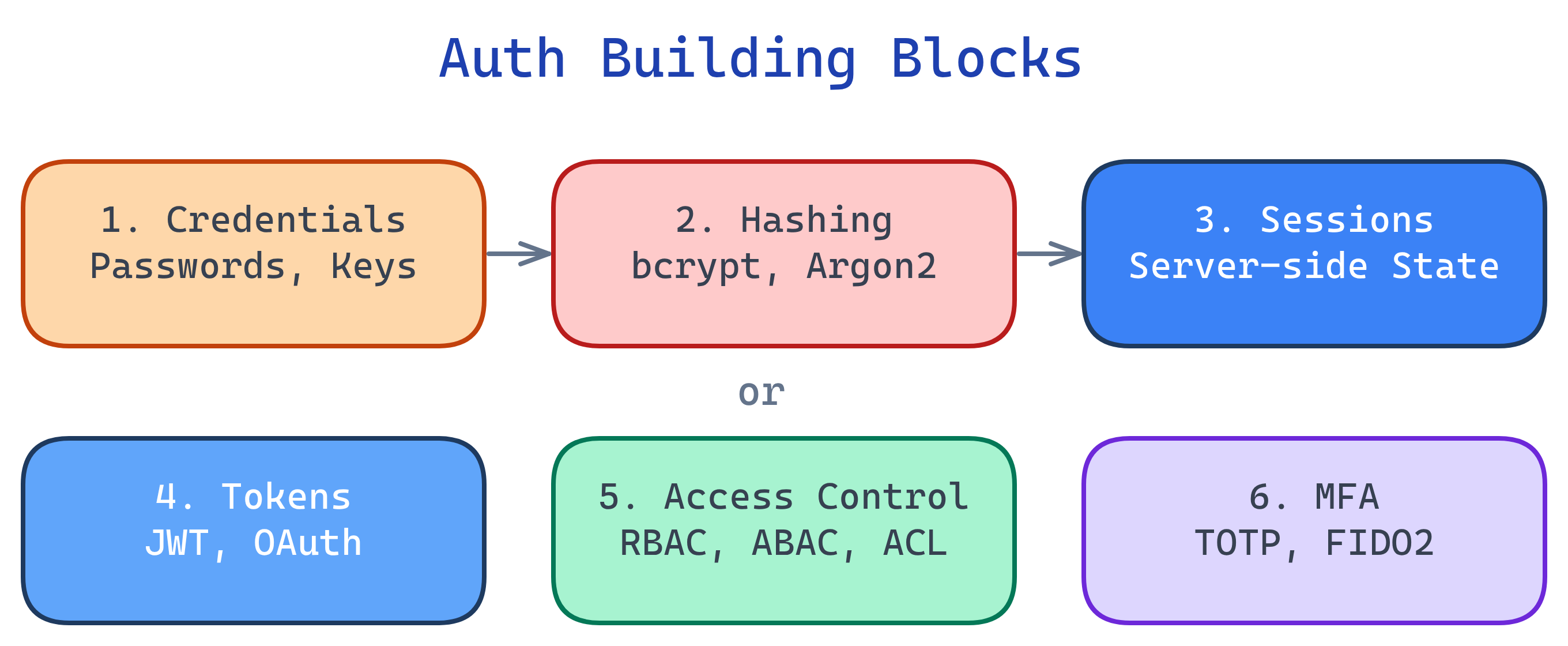
Auth has 6 building blocks: credentials (what you provide), hashing (how passwords are stored), sessions (server remembers you), tokens (you carry proof), access control (RBAC/ABAC rules), and MFA (layered factors). Master these and every auth system makes sense.
Concept Map
Explain Like I'm 12
Think of auth like getting into a theme park. Your ticket (credentials) proves you paid. The park stamps your hand (session/token) so you don't need to show your ticket every time. Different wristband colors (roles) let you ride different rides — VIP gets everything, basic gets most. And some rides require you to be tall enough AND have the right wristband (multi-factor). The lock on the ticket booth (hashing) makes sure nobody can peek at everyone's payment info.
Cheat Sheet
| Concept | What It Does | Key Tools |
|---|---|---|
| Credentials | Something you present to prove identity | Passwords, API keys, SSH keys, certificates |
| Hashing & Salting | One-way transform so passwords aren't stored in plaintext | bcrypt, Argon2, scrypt, PBKDF2 |
| Sessions | Server stores login state, sends a session ID cookie | express-session, Flask-Login, Redis |
| Tokens | Client carries a signed proof of identity | JWT, OAuth access tokens, refresh tokens |
| Access Control | Rules that map users to permissions | RBAC, ABAC, ACLs, OAuth scopes |
| Multi-Factor Auth | Requires 2+ independent proof types | TOTP apps, SMS, hardware keys (FIDO2/WebAuthn) |
The Building Blocks
1. Credentials
A credential is anything you present to prove you are who you claim. The most common is a username + password pair, but credentials come in many forms:
| Credential Type | Factor Category | Strength |
|---|---|---|
| Password / PIN | Something you know | Weak alone (phishable, guessable) |
| SSH private key | Something you have | Strong (never leaves your machine) |
| FIDO2 hardware key | Something you have | Very strong (phishing-resistant) |
| Fingerprint / Face ID | Something you are | Strong (hard to fake, can't be shared) |
| X.509 certificate | Something you have | Strong (PKI-backed, used in mTLS) |
2. Hashing & Salting
You never store passwords in plaintext. A hash function converts a password into a fixed-length string that can't be reversed. A salt is random data added before hashing so identical passwords produce different hashes.
# Python: Hash a password with bcrypt
import bcrypt

password = b"my_secure_password"
salt = bcrypt.gensalt(rounds=12)
hashed = bcrypt.hashpw(password, salt)

# Verify later
if bcrypt.checkpw(b"my_secure_password", hashed):
    print("Password matches!")
3. Sessions
In session-based auth, after you log in, the server creates a session (a record of your login state) and sends back a session ID as a cookie. On every subsequent request, your browser sends that cookie, and the server looks up your session.
// Express.js session setup
const session = require('express-session');

app.use(session({
  secret: 'your-secret-key',
  resave: false,
  saveUninitialized: false,
  cookie: { secure: true, httpOnly: true, maxAge: 3600000 }
}));

// After login
app.post('/login', (req, res) => {
  // ... verify credentials ...
  req.session.userId = user.id;
  req.session.role = user.role;
  res.redirect('/dashboard');
});
4. Tokens
Token-based auth flips the model: instead of the server remembering you, it gives you a signed token (like a JWT) that you carry. Each request includes the token, and the server verifies the signature without looking anything up.
// JWT creation (Node.js)
const jwt = require('jsonwebtoken');

const token = jwt.sign(
  { userId: 123, role: 'admin' },  // payload (claims)
  process.env.JWT_SECRET,           // signing key
  { expiresIn: '1h' }              // options
);

// JWT verification
try {
  const decoded = jwt.verify(token, process.env.JWT_SECRET);
  console.log(decoded.userId); // 123
} catch (err) {
  console.log('Invalid or expired token');
}
| Sessions | Tokens |
|---|---|
| Server stores state | Client carries state |
| Easy to revoke (delete session) | Hard to revoke (until expiry) |
| Needs sticky sessions or shared store | Any server can verify |
| Great for web apps with cookies | Great for APIs and microservices |
5. Access Control
Once you know WHO someone is (authentication), you need rules for WHAT they can do (authorization). The most common models:
| Model | How It Works | Best For |
|---|---|---|
| RBAC (Role-Based) | Users get roles (admin, editor, viewer); roles have permissions | Most web apps, enterprise systems |
| ABAC (Attribute-Based) | Policies use attributes (time, location, department, resource owner) | Complex enterprise rules, cloud IAM |
| ACL (Access Control List) | Each resource lists who can access it and how | File systems, network firewalls |
| OAuth Scopes | Tokens carry specific permission strings (read:email, write:repo) | APIs, third-party integrations |
# Simple RBAC middleware example (Python/Flask)
from functools import wraps
from flask import session, abort

def require_role(role):
    def decorator(f):
        @wraps(f)
        def wrapper(*args, **kwargs):
            if session.get('role') != role:
                abort(403)  # Forbidden
            return f(*args, **kwargs)
        return wrapper
    return decorator

@app.route('/admin')
@require_role('admin')
def admin_panel():
    return 'Welcome, admin!'
6. Multi-Factor Authentication (MFA)
MFA requires two or more different factor types. A password + a TOTP code from your phone = MFA. Two passwords ≠ MFA (same factor type).
| Factor | Examples | Phishing Resistant? |
|---|---|---|
| Something you know | Password, PIN, security question | No |
| Something you have | TOTP app, SMS code, hardware key | Hardware keys: Yes. SMS/TOTP: Partially |
| Something you are | Fingerprint, Face ID, iris scan | Yes |
Test Yourself
Why should you use bcrypt instead of SHA-256 for password hashing?
What's the key trade-off between session-based and token-based authentication?
A user enters a password and a TOTP code from their authenticator app. Is this MFA? What about a password + a security question?
When would you choose ABAC over RBAC?
Why is the httpOnly flag important on session cookies?
httpOnly prevents JavaScript from reading the cookie, which blocks XSS attacks from stealing session IDs. Even if an attacker injects a script, they can't access document.cookie to exfiltrate the session.