SSH & Key-Based Authentication
SSH key-based auth uses a public/private key pair — your private key stays on your machine, the public key goes on the server. No passwords cross the network. Use ssh-keygen to create keys, ssh-copy-id to deploy them, and ssh-agent to avoid retyping passphrases.
Explain Like I'm 12
Imagine you have a special padlock (public key) and the only key that opens it (private key). You send copies of the padlock to everyone — your school, your friend, your locker. When they want to make sure it's really you, they lock a secret message with your padlock. Only YOU can open it because only you have the key. That's SSH keys — your private key never leaves your pocket.
How SSH Key Authentication Works
When you connect to a server via SSH, a cryptographic handshake happens behind the scenes:
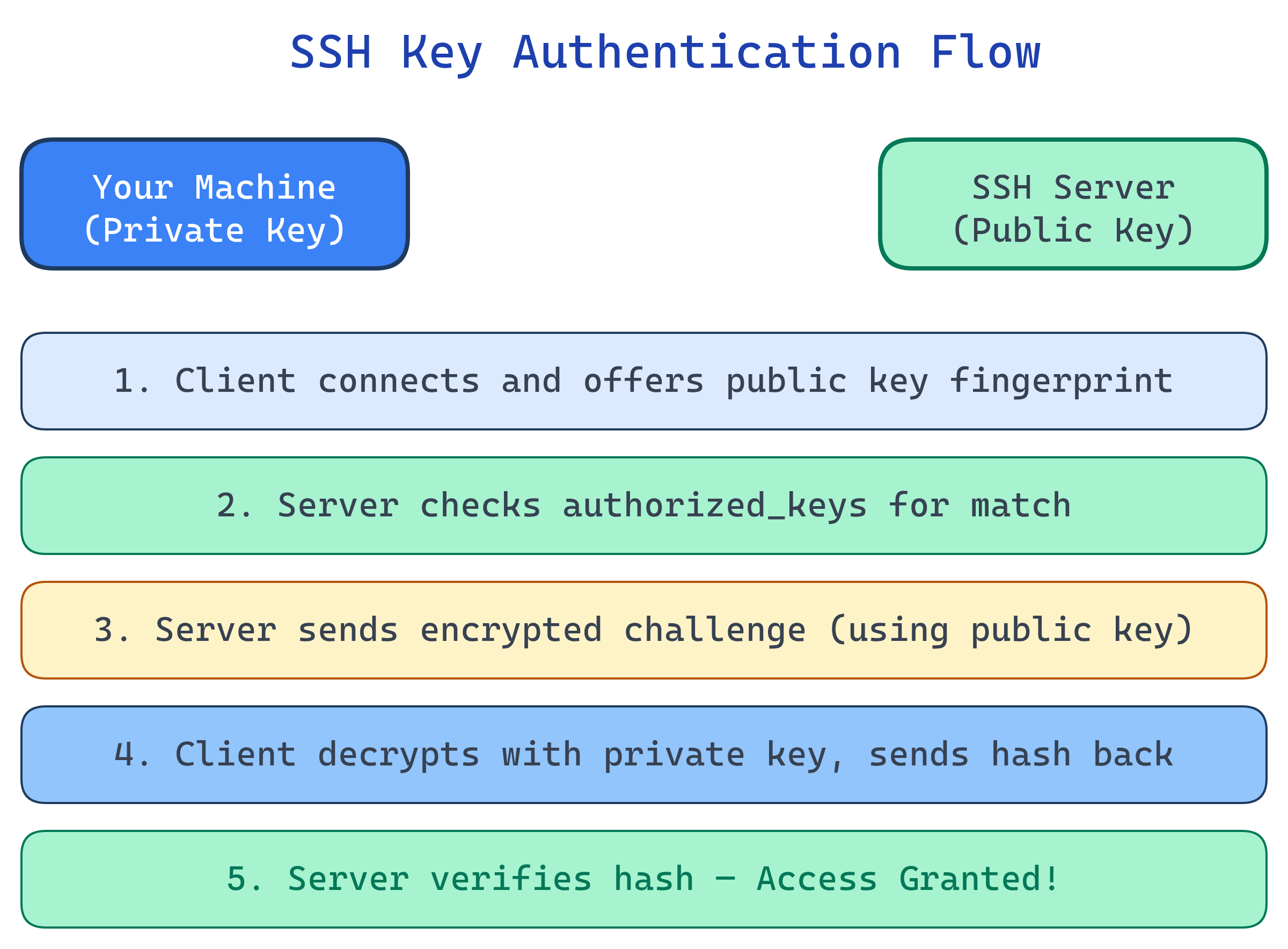
- Client connects to the SSH server and presents its public key
- Server checks if that public key is in
~/.ssh/authorized_keys - Server sends a challenge — random data encrypted with the client's public key
- Client decrypts the challenge with its private key and sends back a hash
- Server verifies the hash — if it matches, authentication succeeds
Generating SSH Keys
# Generate an Ed25519 key (recommended — fast, secure, short)
ssh-keygen -t ed25519 -C "[email protected]"
# Output: ~/.ssh/id_ed25519 (private) + ~/.ssh/id_ed25519.pub (public)

# Generate an RSA key (wider compatibility, use 4096 bits)
ssh-keygen -t rsa -b 4096 -C "[email protected]"
# Output: ~/.ssh/id_rsa (private) + ~/.ssh/id_rsa.pub (public)

# ALWAYS set a passphrase when prompted!
# It encrypts your private key at rest.| Algorithm | Key Size | Security | Recommendation |
|---|---|---|---|
| Ed25519 | 256-bit | Excellent | Use this (modern, fast, short keys) |
| RSA | 4096-bit | Good | Fallback when Ed25519 isn't supported |
| ECDSA | 256/384/521-bit | Good | Avoid (potential implementation issues) |
| 1024-bit | Weak | Deprecated — never use |
Deploying Your Public Key
# Method 1: ssh-copy-id (easiest)
ssh-copy-id -i ~/.ssh/id_ed25519.pub [email protected]

# Method 2: Manual copy
cat ~/.ssh/id_ed25519.pub | ssh user@server "mkdir -p ~/.ssh && chmod 700 ~/.ssh && cat >> ~/.ssh/authorized_keys && chmod 600 ~/.ssh/authorized_keys"

# Method 3: For GitHub/GitLab — paste the public key in Settings > SSH Keys
cat ~/.ssh/id_ed25519.pub
# Copy the output and paste it into GitHub SSH settingsauthorized_keys file lives at ~/.ssh/authorized_keys on the server. Each line is one public key. You can add multiple keys for different machines.SSH Agent: Don't Retype Your Passphrase
The ssh-agent holds your decrypted private keys in memory so you only enter your passphrase once per session.
# Start the agent (usually auto-started on modern systems)
eval "$(ssh-agent -s)"

# Add your key (prompts for passphrase once)
ssh-add ~/.ssh/id_ed25519

# List loaded keys
ssh-add -l

# On macOS, add to Keychain so it persists across reboots
ssh-add --apple-use-keychain ~/.ssh/id_ed25519ssh -A) lets you use your local keys on a remote server to hop to another server. But use it carefully — a compromised remote server could use your forwarded agent.SSH Config File
The ~/.ssh/config file lets you create shortcuts and set per-host options:
# ~/.ssh/config

# Short alias for a production server
Host prod
    HostName 203.0.113.50
    User deploy
    IdentityFile ~/.ssh/id_ed25519_work
    Port 2222

# GitHub with specific key
Host github.com
    HostName github.com
    User git
    IdentityFile ~/.ssh/id_ed25519_github

# Jump through a bastion host
Host internal-db
    HostName 10.0.1.50
    User admin
    ProxyJump bastion.example.com

# Now just type: ssh prod  (instead of ssh -i ~/.ssh/id_ed25519_work -p 2222 [email protected])
Security Best Practices
| Practice | Why | How |
|---|---|---|
| Use Ed25519 | Modern, fast, short keys, high security | ssh-keygen -t ed25519 |
| Always set a passphrase | Encrypts private key at rest | Enter passphrase when prompted by ssh-keygen |
| Disable password auth on server | Prevents brute-force attacks | PasswordAuthentication no in sshd_config |
| Disable root login | Forces use of named accounts + sudo | PermitRootLogin no in sshd_config |
| Use ssh-agent, not passphrase-less keys | Convenience without sacrificing security | ssh-add ~/.ssh/id_ed25519 |
| Rotate keys periodically | Limits exposure window if compromised | Generate new key, deploy, remove old |
| Set correct file permissions | SSH refuses keys with loose permissions | chmod 700 ~/.ssh; chmod 600 ~/.ssh/* |
# Harden sshd_config on your server
# /etc/ssh/sshd_config

PasswordAuthentication no
PermitRootLogin no
PubkeyAuthentication yes
AuthorizedKeysFile .ssh/authorized_keys
MaxAuthTries 3
X11Forwarding no

# Restart SSH after changes
sudo systemctl restart sshdSSH for Git (GitHub, GitLab, Bitbucket)
# Test your SSH connection to GitHub
ssh -T [email protected]
# Hi username! You've authenticated, but GitHub does not provide shell access.

# Clone with SSH (no password prompts ever)
git clone [email protected]:username/repo.git

# Switch existing repo from HTTPS to SSH
git remote set-url origin [email protected]:username/repo.gitTest Yourself
In SSH key authentication, what is sent over the network — the public key or the private key?
authorized_keys. During the handshake, the server uses it to create a challenge. The private key never leaves your machine — it's used locally to decrypt the challenge and prove you own it.Why should you use Ed25519 over RSA for new SSH keys?
What happens if your ~/.ssh directory has 777 permissions?
~/.ssh must be 700, private keys must be 600. This prevents other users on the system from reading your keys.What is agent forwarding and what's the risk?
ssh -A) lets a remote server use your local ssh-agent to authenticate to other servers. The risk: if the remote server is compromised, an attacker can use your forwarded agent to access any server your key is authorized on. Use ProxyJump instead when possible.You've set up key-based auth and want to disable passwords. What should you verify first?
PasswordAuthentication and your key doesn't work (wrong permissions, wrong key deployed), you'll be locked out permanently. Always keep an active session open while testing.Interview Questions
Explain the SSH key-based authentication handshake in detail. What happens at each step?
authorized_keys for a match. 3) Server generates a random number, encrypts it with the client's public key, and sends it. 4) Client decrypts with its private key, combines with the session ID, and sends back an HMAC hash. 5) Server verifies the hash. If it matches, the client proved it holds the private key without ever transmitting it.How would you set up SSH access through a bastion host (jump server) securely?
ProxyJump in SSH config: Host internal\n ProxyJump bastion. This creates a direct tunnel — your SSH client connects through the bastion to the internal host. The bastion never sees your private key (unlike agent forwarding). Add strict bastion rules: key-only auth, limited users, audit logging, session recording.A developer commits their SSH private key to a public GitHub repo. What's the remediation plan?
authorized_keys files on every server. 2) Generate a new key pair and deploy the new public key. 3) Audit access logs on all servers for unauthorized access. 4) Remove the key from git history (git filter-branch or BFG Repo-Cleaner). 5) Add id_* patterns to .gitignore and consider pre-commit hooks to prevent future leaks.What's the difference between SSH key-based auth and certificate-based SSH auth?
authorized_keys — doesn't scale well. Certificate-based: a CA signs short-lived SSH certificates. Servers trust the CA, not individual keys. Benefits: automatic expiry, no authorized_keys management, centralized revocation. Tools like HashiCorp Vault can issue SSH certificates on demand.