Lakehouses & Warehouses in Microsoft Fabric
Fabric gives you two ways to store structured data: Lakehouse (files + Delta tables, queried with Spark or auto-generated SQL endpoint) and Warehouse (full T-SQL with INSERT/UPDATE/DELETE). Both store data as Delta Parquet in OneLake. Use a lakehouse for data engineering (Spark, Python), a warehouse for SQL-heavy analytics. Use Direct Lake to connect Power BI to either without importing data.
Explain Like I'm 12
A lakehouse is like a big toy chest where you can throw in anything (LEGOs, action figures, books) and a magic robot (Spark) sorts it for you. You can also look at the organized stuff through a window (SQL endpoint) but you can’t rearrange through that window. A warehouse is like a perfectly organized bookshelf where you can add books, move them, or remove them using labels (SQL). Both sit in the same room (OneLake).
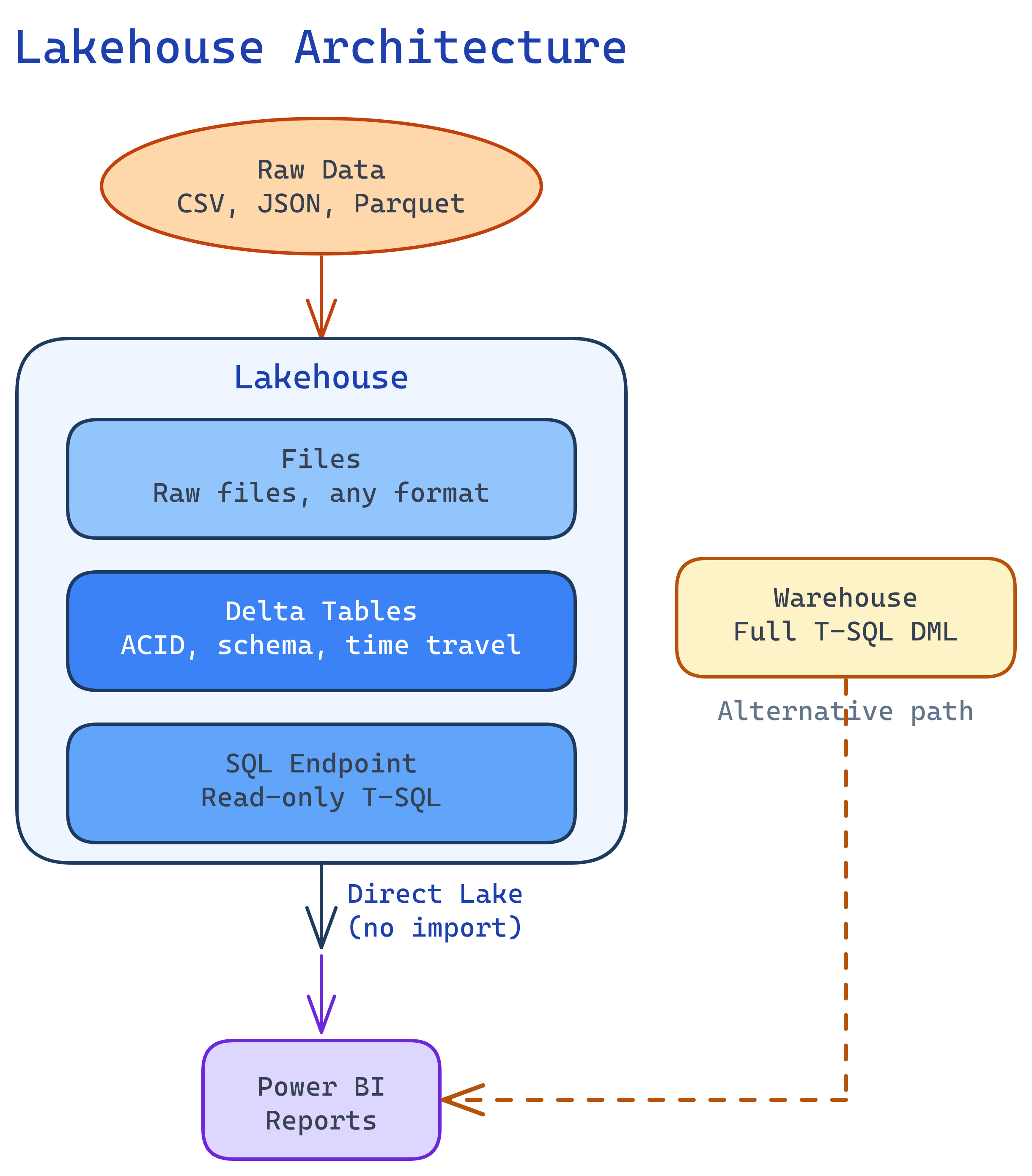
Lakehouse Architecture
A Fabric lakehouse has three layers that are automatically kept in sync:
| Layer | What It Contains | How You Access It |
|---|---|---|
| Files | Raw files (CSV, JSON, Parquet, images, etc.) | Spark notebooks, ABFS paths |
| Tables | Delta tables (Parquet + transaction log) | Spark SQL, PySpark, SQL endpoint |
| SQL Endpoint | Auto-generated read-only T-SQL interface to Delta tables | SSMS, Azure Data Studio, any SQL client |
# Create a Delta table from raw CSV files
df = spark.read.csv("Files/raw/customers.csv", header=True, inferSchema=True)

# Clean the data
df_clean = (df
    .dropDuplicates(["customer_id"])
    .withColumn("created_date", df["created_date"].cast("date"))
    .filter(df["customer_id"].isNotNull())
)

# Write as managed Delta table — auto-appears in SQL endpoint
df_clean.write.format("delta").mode("overwrite").saveAsTable("dim_customers")
Warehouse Deep Dive
The Fabric warehouse is a fully managed T-SQL data warehouse. Unlike the lakehouse SQL endpoint, it supports full DML operations:
-- Create a table in the warehouse
CREATE TABLE dbo.fact_sales (
    sale_id     BIGINT NOT NULL,
    customer_id BIGINT NOT NULL,
    product_id  INT NOT NULL,
    sale_date   DATE NOT NULL,
    amount      DECIMAL(18,2) NOT NULL,
    region      VARCHAR(50)
);

-- Insert data (not possible in lakehouse SQL endpoint!)
INSERT INTO dbo.fact_sales
SELECT * FROM bronze_lakehouse.dbo.raw_sales
WHERE sale_date >= '2024-01-01';

-- Cross-database query (warehouse exclusive)
SELECT w.sale_id, l.customer_name
FROM dbo.fact_sales w
JOIN lakehouse_db.dbo.dim_customers l
ON w.customer_id = l.customer_id;INSERT/UPDATE/DELETE, you want stored procedures, or you need cross-database queries. Choose lakehouse when you need Spark/Python for complex transformations or you work with semi-structured data.
Lakehouse vs Warehouse: Decision Matrix
| Criteria | Lakehouse | Warehouse |
|---|---|---|
| Primary language | PySpark, Spark SQL | T-SQL |
| Write operations | Spark notebooks only | Full T-SQL DML |
| SQL read access | SQL endpoint (read-only) | Full T-SQL |
| Stored procedures | No | Yes |
| Cross-database queries | No | Yes |
| Semi-structured data | Excellent (JSON, XML, etc.) | Limited |
| Data science / ML | Native (Spark ML, MLflow) | Not supported |
| Streaming ingestion | Spark Structured Streaming | No |
| Storage format | Delta Parquet in OneLake | Delta Parquet in OneLake |
| Direct Lake in Power BI | Yes | Yes |
| Best for | Data engineers, data scientists | SQL analysts, BI developers |
Delta Tables in Fabric
Every table in Fabric (lakehouse or warehouse) is stored as a Delta table — Parquet data files plus a JSON transaction log (_delta_log/). This gives you:
- ACID transactions — no corrupt data from failed writes
- Time travel — query data as it was at any point in time
- Schema enforcement — reject writes that don’t match the table schema
- Z-Order optimization — co-locate related rows for faster queries
# Time travel — read the table as it was 2 versions ago
df_old = spark.read.format("delta").option("versionAsOf", 2).table("fact_sales")

# Or by timestamp
df_yesterday = (spark.read.format("delta")
    .option("timestampAsOf", "2026-03-30")
    .table("fact_sales"))

# Optimize with Z-Order for common query patterns
spark.sql("OPTIMIZE fact_sales ZORDER BY (region, sale_date)")Direct Lake Mode
Direct Lake is Fabric’s breakthrough connection mode for Power BI. Instead of importing data or sending live queries, Power BI reads Delta Parquet files directly from OneLake into the VertiPaq engine’s memory on demand.
How Direct Lake Works
- A user opens a Power BI report
- The VertiPaq engine checks which Delta table columns are needed
- It reads the Parquet files from OneLake directly (no copy, no query to Spark/SQL)
- Data is loaded into columnar memory for lightning-fast DAX calculations
- When Delta tables are updated, the next report interaction picks up the new data
Direct Lake Requirements
- Data must be in Delta tables in a Fabric lakehouse or warehouse
- Tables must be in the default semantic model (auto-created) or a custom one
- Capacity must be F64 or higher for production-scale Direct Lake
- Row count and column limits depend on SKU (F64: 300M rows per table)
OneLake Shortcuts
Shortcuts let you reference external data without copying it. They appear as folders in your lakehouse, but the data stays in its original location.
| Shortcut Source | Use Case |
|---|---|
| Another OneLake lakehouse | Share data between workspaces without duplication |
| Azure Data Lake Gen2 | Access existing ADLS data without migration |
| Amazon S3 | Multi-cloud: query S3 data from Fabric |
| Google Cloud Storage | Multi-cloud: query GCS data from Fabric |
| Dataverse | Access Dynamics 365 / Power Platform data |
Medallion Architecture in Practice
Here’s a concrete implementation of the Bronze → Silver → Gold pattern in Fabric:
# === BRONZE: Raw ingestion (notebook in bronze_lakehouse) ===
# Ingest raw CSV files into a Delta table as-is
df_raw = spark.read.csv("Files/landing/sales_*.csv", header=True)
df_raw.write.format("delta").mode("append").saveAsTable("raw_sales")

# === SILVER: Clean + conform (notebook in silver_lakehouse) ===
# Read from bronze via shortcut, clean, write to silver
df_bronze = spark.read.format("delta").table("bronze_lakehouse.raw_sales")
df_silver = (df_bronze
    .dropDuplicates(["transaction_id"])
    .filter("amount > 0")
    .withColumn("sale_date", df_bronze["sale_date"].cast("date"))
    .withColumnRenamed("cust_id", "customer_id")
)
df_silver.write.format("delta").mode("overwrite").saveAsTable("clean_sales")

# === GOLD: Business aggregates (notebook in gold_lakehouse) ===
df_gold = spark.sql("""
    SELECT region, sale_date, COUNT(*) as txn_count, SUM(amount) as revenue
    FROM silver_lakehouse.clean_sales
    GROUP BY region, sale_date
""")
df_gold.write.format("delta").mode("overwrite").saveAsTable("daily_revenue")gold_lakehouse. Analysts get curated, aggregated data without touching Bronze or Silver layers.
Test Yourself
Q: You have a team of SQL analysts who need INSERT/UPDATE/DELETE capabilities. Should you use a lakehouse or warehouse?
Q: How does Direct Lake differ from Import and DirectQuery modes?
Q: What happens when a PySpark notebook writes a Delta table to a lakehouse?
Q: What is V-Order and do you need to enable it?
Q: When would you use a OneLake shortcut instead of copying data into a lakehouse?
Interview Questions
Q: Your company has an existing Azure Data Lake with 50TB of Parquet files. How would you integrate this with Fabric without moving the data?
Q: A Power BI report on Direct Lake mode is frequently falling back to DirectQuery. How do you troubleshoot?
Q: How would you implement a medallion architecture in Fabric for a real-time e-commerce analytics pipeline?
bronze_lakehouse (raw events via Eventstream), silver_lakehouse (cleaned/deduped with Spark notebooks), gold_lakehouse (business aggregates). Use Fabric pipelines to orchestrate Bronze → Silver → Gold transformations on a schedule. Point Power BI Direct Lake at Gold. For real-time metrics, use Real-Time Intelligence (KQL database) in parallel with the batch medallion flow.Q: Explain the difference between a managed table and an unmanaged (external) table in a Fabric lakehouse.
saveAsTable(). Unmanaged (external) table: You specify the file path. Fabric manages only the metadata. Dropping the table removes the metadata but not the files. Created with .save("Files/path") plus a separate table registration.Related Topics
