Data Pipelines & Dataflows in Microsoft Fabric
Fabric has two ETL tools: Pipelines (code-first orchestration based on Azure Data Factory — copy data, run notebooks, chain activities) and Dataflows Gen2 (Power Query Online for no-code ETL that lands data into lakehouses). Use pipelines for orchestration and scale, dataflows for citizen-developer self-service.
Explain Like I'm 12
A pipeline is like an assembly line in a factory. First, the robot arm picks up raw materials (Copy Activity), then the paint machine transforms them (Notebook), then the quality checker verifies everything (If Condition), and finally the packing machine delivers the finished product (Write to lakehouse). You set the schedule, and it runs automatically every day. A Dataflow Gen2 is like a simpler version — more like a kitchen blender. You throw ingredients in (connect data), press buttons to chop and mix (Power Query transforms), and pour the result into a bowl (lakehouse table).
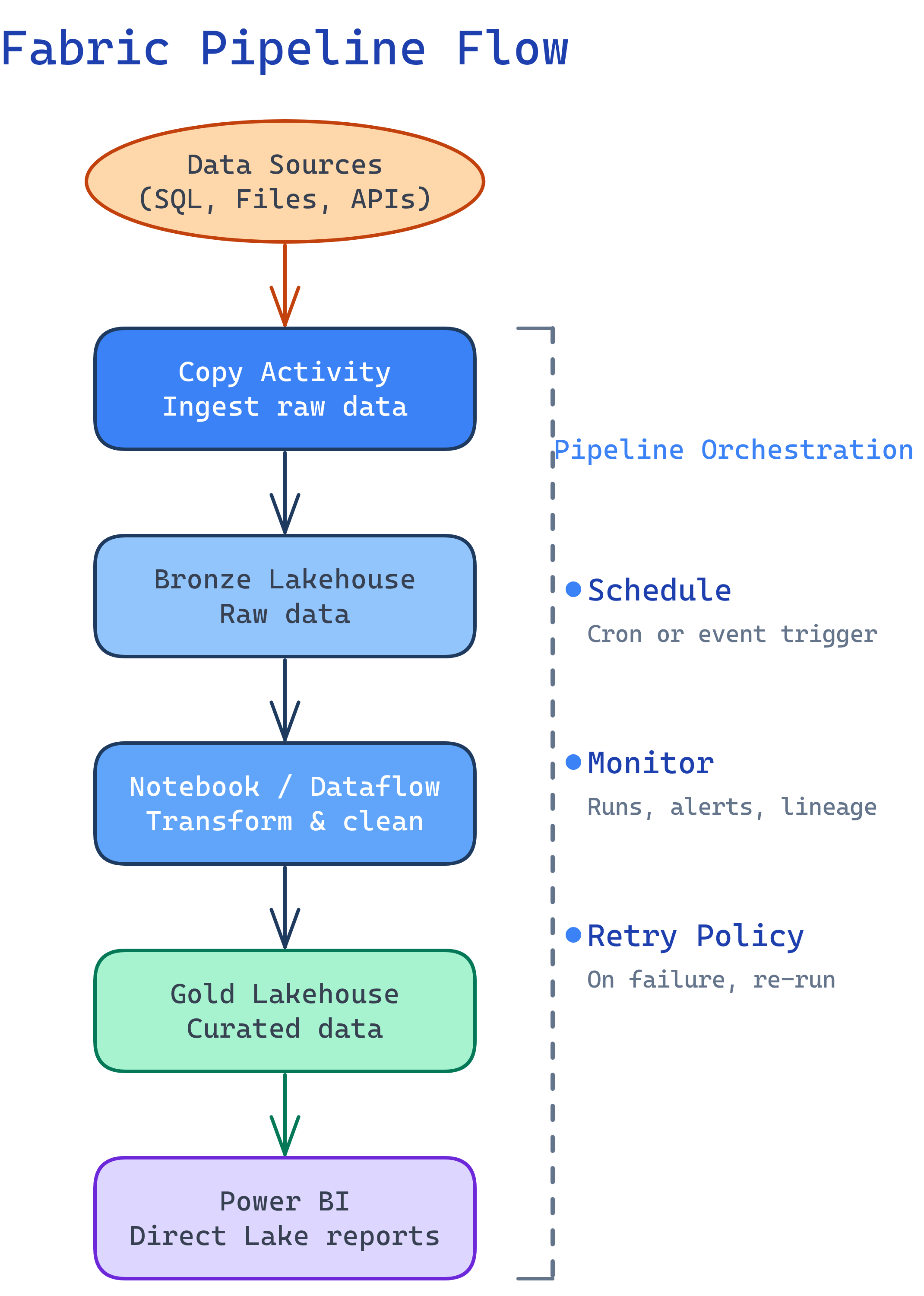
Pipelines Overview
Fabric pipelines are the orchestration engine, based on Azure Data Factory (ADF). If you’ve used ADF before, the pipeline designer will look familiar — same activities, same drag-and-drop UI, but now integrated into Fabric.
Key Activities
| Activity | What It Does | When to Use |
|---|---|---|
| Copy Data | Move data from source to destination | Ingest from 100+ connectors into OneLake |
| Notebook | Run a Spark notebook | Complex transformations with PySpark |
| Dataflow | Run a Dataflow Gen2 | No-code transformations in a pipeline |
| Stored Procedure | Execute a warehouse stored proc | T-SQL-based transformations |
| For Each | Loop over a collection | Process multiple files or tables |
| If Condition | Branch logic (if/else) | Skip steps based on data conditions |
| Set Variable | Set a pipeline variable | Store values for later activities |
| Web | Call a REST API | Trigger external systems or notifications |
| Wait | Pause for a specified duration | Rate limiting or waiting for external process |
Copy Activity Deep Dive
The Copy Activity is the workhorse for data ingestion. It connects to 100+ sources and writes to Fabric lakehouses, warehouses, or KQL databases.
Common Source → Destination Patterns
| Source | Destination | Pattern |
|---|---|---|
| Azure SQL Database | Lakehouse (Delta table) | Full or incremental load |
| REST API (JSON) | Lakehouse (Files) | Land raw JSON, process with Spark |
| On-prem SQL Server | Lakehouse | Via On-Premises Data Gateway |
| Amazon S3 / ADLS Gen2 | Lakehouse (Files) | Cloud-to-cloud file copy |
| SharePoint / Excel | Lakehouse (Delta table) | Business user data ingestion |
last_modified_date) to only copy new/changed rows on each run. Store the watermark in a pipeline variable or a control table.
-- Example: Watermark-based incremental pattern
-- Control table tracks the last loaded timestamp
CREATE TABLE dbo.watermark (
    table_name   VARCHAR(100),
    last_loaded  DATETIME2
);

-- Pipeline Copy Activity query (parameterized):
-- SELECT * FROM source_table
-- WHERE modified_date > '@{activity('Lookup').output.firstRow.last_loaded}'
-- AND modified_date <= '@{pipeline().parameters.current_time}'
Dataflows Gen2
Dataflows Gen2 bring Power Query Online into Fabric. If you’ve used Power Query in Excel or Power BI Desktop, you already know the interface. The key difference: Dataflows Gen2 write output to Fabric destinations (lakehouses, warehouses) instead of just loading into a Power BI model.
Dataflow Gen2 vs Gen1
| Feature | Dataflow Gen1 | Dataflow Gen2 |
|---|---|---|
| Output destination | Power BI dataset only | Lakehouse, warehouse, KQL database |
| Compute engine | Mashup engine | Enhanced compute (faster for large data) |
| Staging | Optional | OneLake staging (auto, can be disabled) |
| Incremental refresh | Yes | Yes (improved) |
| Use in pipelines | Limited | Yes (as a pipeline activity) |
Orchestration Patterns
Pattern 1: Simple ETL
Copy → Transform → Load
-- Pipeline structure:
-- 1. Copy Activity: Source DB → Bronze lakehouse (raw_sales table)
-- 2. Notebook Activity: Bronze → Silver (clean, deduplicate)
-- 3. Notebook Activity: Silver → Gold (aggregate for reporting)
-- 4. (Optional) Refresh semantic model for Power BI
Pattern 2: Dynamic Pipeline with ForEach
Process multiple tables dynamically:
-- Pipeline structure:
-- 1. Lookup Activity: Read table list from control table
--    SELECT table_name, source_schema FROM dbo.etl_config WHERE is_active = 1
-- 2. ForEach Activity: Loop over lookup results
--    2a. Copy Activity (parameterized): Copy source_table → lakehouse
--    2b. Notebook Activity (parameterized): Transform table
-- 3. On completion: Send Teams notification via Web ActivityisSequential: true if order matters.
Pattern 3: Conditional Branching
-- Pipeline structure:
-- 1. Lookup Activity: Check if new data exists
--    SELECT COUNT(*) as row_count FROM staging WHERE processed = 0
-- 2. If Condition: row_count > 0
--    True path: Run Notebook → Update watermark
--    False path: Log "no new data" → Skip processing
Scheduling & Monitoring
Every pipeline can be triggered in three ways:
| Trigger Type | How It Works | Use Case |
|---|---|---|
| Schedule | Cron-like schedule (hourly, daily, custom) | Regular batch loads |
| Manual | Run on demand from the UI or API | Ad-hoc loads, testing |
| Event-based | Trigger on file arrival in OneLake | React to new data landing |
Monitoring
Fabric provides a Monitoring Hub that shows all pipeline runs, notebook runs, dataflow refreshes, and Spark job history across the workspace. Key metrics to watch:
- Duration — track trends; sudden increases signal problems
- CU consumption — monitor capacity usage to avoid throttling
- Rows read/written — verify data volumes match expectations
- Error details — drill into failed activities for stack traces
Fabric Pipelines vs ADF vs Airflow
| Feature | Fabric Pipelines | Azure Data Factory | Apache Airflow |
|---|---|---|---|
| Interface | Drag-and-drop UI | Drag-and-drop UI | Python code (DAGs) |
| Compute | Shared Fabric capacity (CUs) | Integration Runtime | Workers (Celery, K8s) |
| Native Spark | Fabric notebooks | HDInsight / Databricks | SparkSubmitOperator |
| Native Power BI | Built-in refresh | No | No |
| Cost model | Included in Fabric capacity | Per-activity + DIU hours | Infrastructure cost |
| Event triggers | OneLake file events | Blob storage events | Sensors (S3, GCS, etc.) |
| Open source | No | No | Yes (Apache 2.0) |
| Best for | Microsoft-first teams in Fabric | Azure-native ETL | Cloud-agnostic orchestration |
Test Yourself
Q: What is the difference between a Fabric pipeline and a Dataflow Gen2?
Q: How do you implement an incremental load in a Fabric pipeline?
Q: When would you use a notebook activity inside a pipeline instead of a Dataflow Gen2?
Q: What is the maximum concurrency for a ForEach activity in Fabric pipelines?
batchCount property). Default is 20. If you need sequential execution, set isSequential: true. Items beyond the batch count wait for a slot to open.Q: Name three ways to trigger a Fabric pipeline.
Interview Questions
Q: Your company migrates from Azure Data Factory to Fabric pipelines. What changes and what stays the same?
Q: Design a pipeline that ingests data from 50 source tables into a bronze lakehouse, with error handling and notifications.
Q: A dataflow Gen2 is running too slowly on large datasets. How would you troubleshoot and optimize?
Q: How would you handle a scenario where a pipeline needs to process data from both a real-time stream and a daily batch source?
Related Topics


