Microsoft Fabric Core Concepts
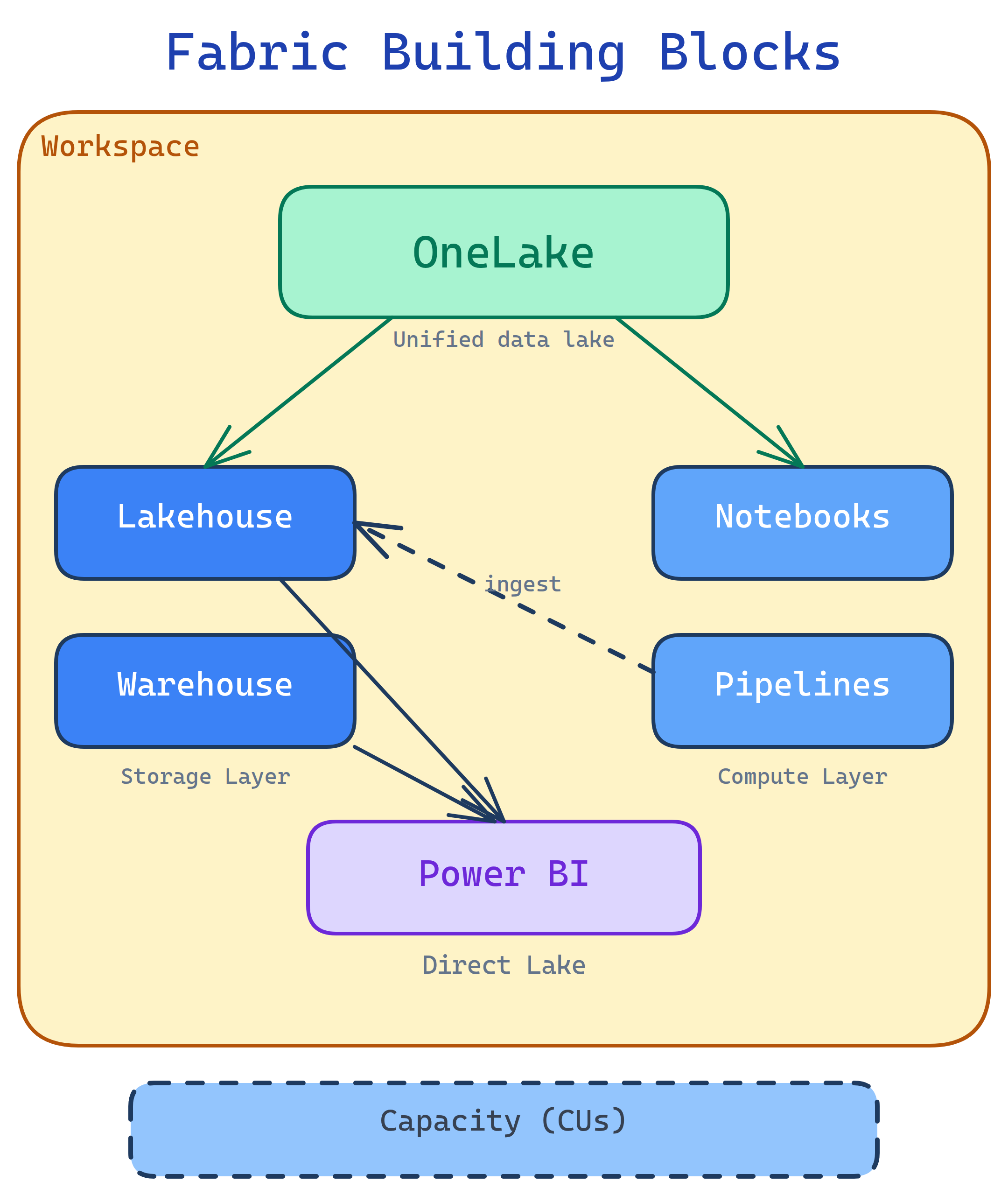
Fabric has 7 building blocks: OneLake (unified storage), Workspaces (project folders), Capacities (compute you pay for), Lakehouse (files + Delta tables), Warehouse (T-SQL analytics), Pipelines & Dataflows (ETL), and Power BI (reports). Everything lives in OneLake and shares one security model.
Explain Like I'm 12
Think of Fabric as a huge shared Google Drive for data. OneLake is the drive itself. Workspaces are folders — each team gets one. Capacities are like how much electricity the building gets (more capacity = more people can work at once). Inside each folder you have a Lakehouse (a messy inbox that auto-organizes), a Warehouse (a perfectly organized filing cabinet), Pipelines (mail carriers that deliver data), and Power BI (a printer that turns data into pretty charts).
Cheat Sheet
| Concept | What It Does | Plain English |
|---|---|---|
| OneLake | Unified ADLS Gen2 storage for all Fabric items | “One shared hard drive for all your data” |
| Workspace | Container for items (lakehouses, warehouses, reports) | “A project folder with access controls” |
| Capacity | Compute resources measured in CUs (Capacity Units) | “The engine that powers everything — bigger engine = faster” |
| Lakehouse | Schema-on-read store with files + Delta tables + SQL endpoint | “Dump data in, query it with Spark or SQL” |
| Warehouse | Full T-SQL data warehouse with DML support | “A traditional SQL warehouse, fully managed” |
| Pipeline | ADF-like data orchestration (copy, transform, schedule) | “Automated data delivery — move data from A to B on a schedule” |
| Dataflow Gen2 | Power Query Online for no-code ETL into lakehouses | “Excel-like drag-and-drop data cleaning that writes to OneLake” |
| Notebook | PySpark/Spark SQL notebook for data engineering + ML | “Jupyter notebook connected to your lakehouse” |
| Semantic Model | Power BI data model (formerly “dataset”) with DAX measures | “The brain behind your Power BI reports” |
| Direct Lake | Power BI reads Delta tables in OneLake directly — no import/copy | “Reports load from the lake at import speed without importing” |
1. OneLake
OneLake is Fabric’s single storage layer. It’s built on Azure Data Lake Storage Gen2 but abstracted away so you never manage storage accounts. Every Fabric tenant gets exactly one OneLake — every workspace, lakehouse, and warehouse writes to it.
Shortcuts
OneLake shortcuts let you reference external data (ADLS Gen2, S3, GCS, Dataverse) without moving it. The shortcut appears as a folder in your lakehouse, but the data stays where it is. This is Fabric’s answer to “I don’t want to copy terabytes.”
-- You can query shortcut data just like local data
SELECT * FROM lakehouse1.shortcut_to_s3_bucket.sales_2024
WHERE region = 'US'
2. Workspaces
A workspace is a container for Fabric items — lakehouses, warehouses, notebooks, pipelines, reports. Think of it as a project folder with role-based access control (Admin, Member, Contributor, Viewer).
| Role | Can Do |
|---|---|
| Admin | Everything + manage workspace settings and access |
| Member | Create, edit, delete all items + share items |
| Contributor | Create and edit items, but cannot share or manage access |
| Viewer | View items only (read reports, browse data) |
3. Capacities
A capacity is the compute engine that powers your Fabric workloads. You buy a capacity SKU (F2, F4, F8 … F2048), and all workspaces assigned to that capacity share its resources. Measured in CUs (Capacity Units).
| SKU | CUs | Typical Use |
|---|---|---|
| F2 | 2 | Dev/test, small team exploration |
| F64 | 64 | Production workloads, department-level |
| F256+ | 256+ | Enterprise, heavy Spark/warehouse workloads |
4. Lakehouse
The lakehouse is Fabric’s core data store. It combines unstructured files and structured Delta tables in one place. You get:
- Files section — drop CSVs, Parquet, JSON, images, anything
- Tables section — Delta tables with ACID transactions
- SQL endpoint — auto-generated read-only T-SQL interface to your Delta tables
- Default semantic model — auto-created Power BI model for Direct Lake reporting
# PySpark in a Fabric notebook — read CSV, write as Delta table
df = spark.read.csv("Files/raw/sales_2024.csv", header=True, inferSchema=True)
df.write.format("delta").mode("overwrite").saveAsTable("sales_2024")
5. Warehouse
The Fabric warehouse is a full T-SQL data warehouse. Unlike the lakehouse SQL endpoint (read-only), the warehouse supports INSERT, UPDATE, DELETE, stored procedures, and cross-database queries.
| Feature | Lakehouse SQL Endpoint | Warehouse |
|---|---|---|
| Read (SELECT) | Yes | Yes |
| Write (INSERT/UPDATE/DELETE) | No (read-only) | Yes |
| Stored procedures | No | Yes |
| Cross-database queries | No | Yes |
| Storage format | Delta Parquet (OneLake) | Delta Parquet (OneLake) |
6. Pipelines & Dataflows Gen2
Pipelines are Fabric’s orchestration engine (based on Azure Data Factory). Use them to copy data from 100+ sources, run notebooks, trigger dataflows, and schedule everything.
Dataflows Gen2 are Power Query Online mashups that land data directly into lakehouses or warehouses. They’re the no-code/low-code option for data transformation.
7. Power BI & Direct Lake
Power BI is built into Fabric as a first-class experience. The game-changer is Direct Lake mode — Power BI reads Delta tables directly from OneLake without importing a copy. You get import-level speed with DirectQuery-level freshness.
| Mode | How It Works | Speed | Data Freshness |
|---|---|---|---|
| Import | Copies data into Power BI model | Fast | Stale until refresh |
| DirectQuery | Queries source on every interaction | Slow | Always live |
| Direct Lake | Reads Delta Parquet from OneLake directly | Fast | Near real-time |
8. Medallion Architecture
Fabric encourages the medallion architecture (Bronze → Silver → Gold) for organizing data in lakehouses:
| Layer | Purpose | Data Quality |
|---|---|---|
| Bronze | Raw ingestion — land data as-is from sources | Raw, unvalidated |
| Silver | Cleaned, deduplicated, joined — “single source of truth” | Validated, conformed |
| Gold | Business-level aggregates — ready for reports and dashboards | Curated, optimized |
bronze_lakehouse, silver_lakehouse, gold_lakehouse), or use schemas within a single lakehouse. Notebooks or pipelines move data between layers.
Test Yourself
Q: What is OneLake and how is it different from ADLS Gen2?
Q: What’s the difference between a lakehouse SQL endpoint and a warehouse?
Q: What is Direct Lake mode in Power BI?
Q: When would you use a pipeline vs a Dataflow Gen2 vs a notebook?
Q: What are the three layers of the medallion architecture?
Related Topics


