What is Microsoft Fabric?
Microsoft Fabric is an all-in-one analytics platform (SaaS) that combines data engineering, data warehousing, data science, real-time analytics, and Power BI — all sharing a single storage layer called OneLake. Think of it as Microsoft’s answer to Databricks, but with Power BI baked in and everything managed by one capacity you pay for.
The Big Picture
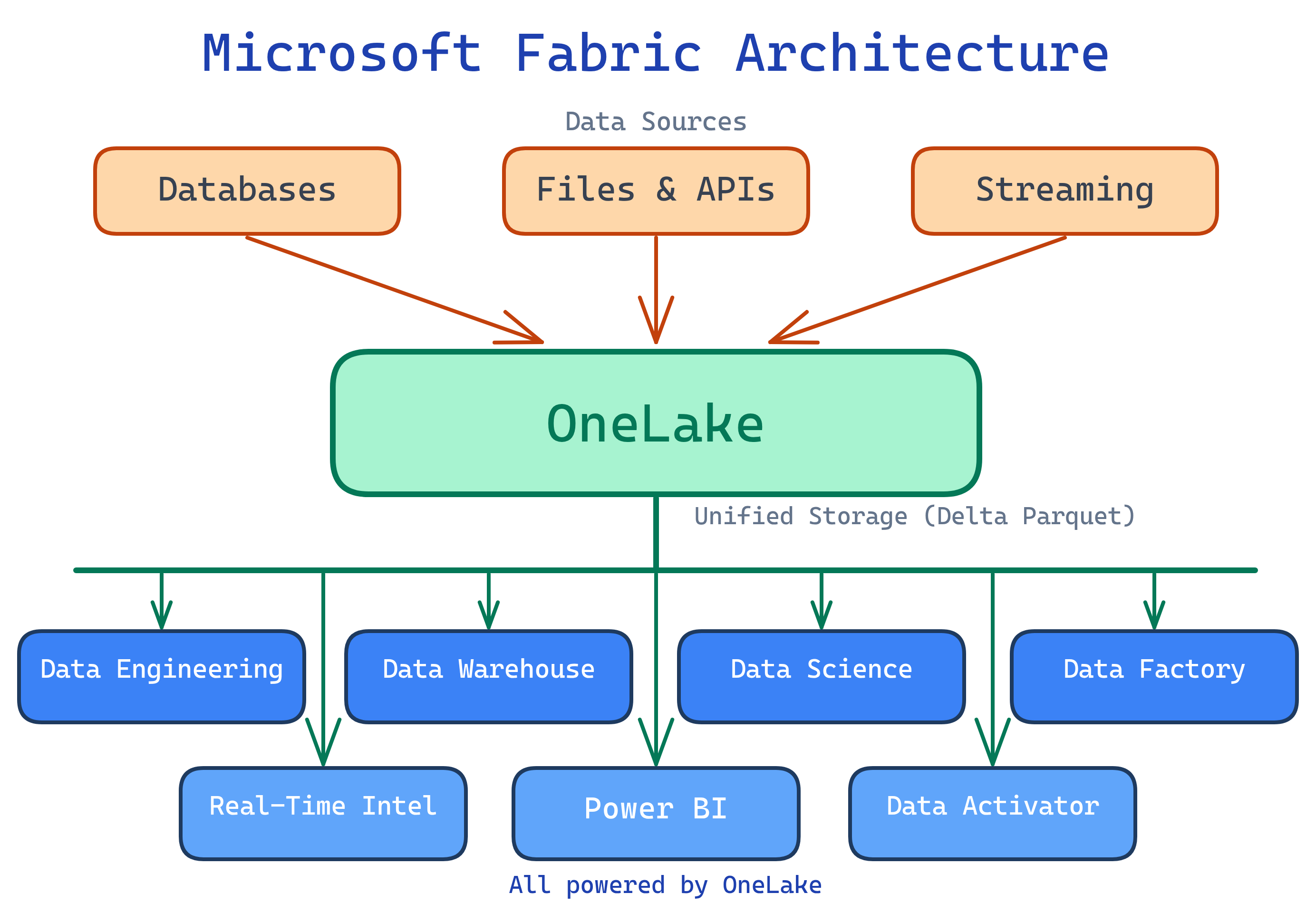
Before Fabric, Microsoft’s analytics story was scattered across Azure Data Factory, Azure Synapse, Azure Data Lake, Power BI, and more — each with its own billing, security, and storage. Fabric brings them all under one roof with one storage format (Delta Parquet in OneLake), one security model, one billing (capacity units), and one governance layer.
Explain Like I'm 12
Imagine your school needs different things: a library for books (data storage), a science lab for experiments (data science), a newspaper team for reporting (Power BI), and a mail room for delivering packages (data pipelines). Before Fabric, each of these was a separate building with separate keys and separate budgets. Microsoft Fabric is like combining all of them into one mega-building where everyone shares the same hallways, the same security badge, and the same budget — and all the books are on the same shelf so nobody has to carry copies around.
Who is Microsoft Fabric For?
| Role | What You Do in Fabric |
|---|---|
| Data Engineer | Build pipelines, create lakehouses, transform data with Spark notebooks or Dataflows Gen2 |
| Data Analyst | Query the warehouse with T-SQL, build Power BI reports directly on lakehouse/warehouse data |
| Data Scientist | Train ML models in Spark notebooks, use MLflow for experiment tracking |
| Analytics Engineer | Build semantic models (formerly datasets), manage data quality, set up medallion architecture |
| BI Developer | Create Power BI reports and dashboards with Direct Lake mode for blazing-fast visuals |
What You’ll Learn
Key Capabilities
| Capability | What It Means |
|---|---|
| OneLake | Single storage layer for all data — like OneDrive for data. One copy, accessible by all engines. |
| Lakehouse | Combine files and Delta tables in one place. Query with Spark or SQL. |
| Warehouse | Fully managed T-SQL data warehouse with cross-database queries. |
| Data Pipelines | ADF-like orchestration — copy, transform, schedule, and monitor data flows. |
| Dataflows Gen2 | Power Query Online for no-code/low-code ETL that lands data into lakehouses. |
| Notebooks | Apache Spark notebooks supporting PySpark, Spark SQL, Scala, and R. |
| Real-Time Intelligence | Ingest and query streaming data with KQL (Kusto Query Language) and Eventstreams. |
| Power BI (built-in) | Create reports and dashboards directly on Fabric data with Direct Lake mode. |
| Copilot | AI assistant across all experiences — generate code, DAX, SQL, and summaries. |
Microsoft Fabric vs. Alternatives
| Feature | Microsoft Fabric | Databricks | Snowflake |
|---|---|---|---|
| Architecture | SaaS lakehouse (OneLake) | Lakehouse (Delta Lake) | Cloud data warehouse |
| Storage | OneLake (Delta Parquet) | Delta Lake (open Parquet) | Proprietary + Iceberg |
| BI tool | Power BI (built-in) | Partner connect (Tableau, etc.) | Snowsight + partners |
| ETL | Pipelines + Dataflows Gen2 | Workflows + Spark | Snowpipe + Streams/Tasks |
| ML / Data Science | Spark notebooks + MLflow | MLflow + AutoML | Snowpark ML |
| Real-time | Eventstreams + KQL | Structured Streaming | Snowpipe Streaming |
| Pricing | Capacity Units (CUs) | DBU-based | Credit-based |
| Governance | Purview integration | Unity Catalog | Horizon (governance) |
Test Yourself
Q: What problem does Microsoft Fabric solve that Azure Synapse didn’t?
Q: What is OneLake, and why does it matter?
Q: How is Fabric different from Databricks?
Q: What are the main “experiences” inside Fabric?
Q: What storage format does Fabric use internally?
Related Topics


