PostgreSQL Core Concepts
PostgreSQL organizes data in databases → schemas → tables. Tables have columns (with types) and rows (your data). Constraints enforce data integrity. Transactions wrap multiple operations into atomic units. MVCC allows concurrent reads/writes without locking. Roles control who can do what.
Concept Map
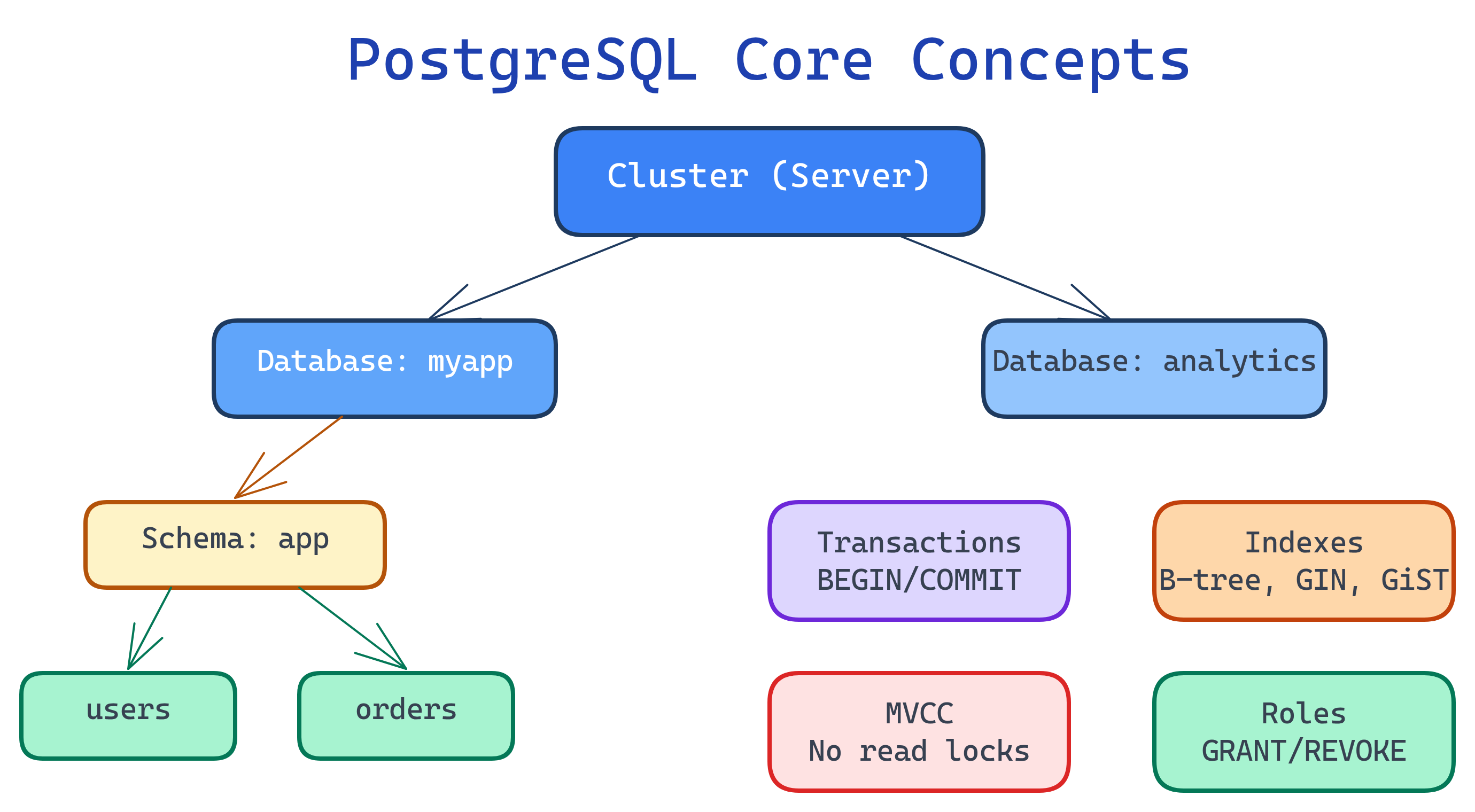
Explain Like I'm 12
Imagine a big library (that's the PostgreSQL cluster). Inside are different rooms (databases). Each room has bookshelves (schemas). Each bookshelf has folders (tables). Each folder has pages (rows) with columns of information. The librarian (role) decides who can read or edit which folders. And there are index cards (indexes) that let you find any page instantly without scanning every folder.
Cheat Sheet
| Concept | What It Does | Key Commands |
|---|---|---|
| Database | Top-level container — isolated set of schemas, tables, and data | CREATE DATABASE, \l |
| Schema | Namespace within a database — organizes tables logically | CREATE SCHEMA, SET search_path |
| Table | Structured collection of rows and columns | CREATE TABLE, \dt |
| Column / Data Type | Each column has a name and type that constrains its values | INTEGER, TEXT, JSONB, TIMESTAMPTZ |
| Constraint | Rules enforced on data (PK, FK, UNIQUE, CHECK, NOT NULL) | PRIMARY KEY, REFERENCES |
| Index | Data structure that speeds up lookups (like a book's index) | CREATE INDEX, \di |
| Transaction | Atomic unit of work — all succeeds or all rolls back | BEGIN, COMMIT, ROLLBACK |
| MVCC | Multi-Version Concurrency Control — readers don't block writers | Automatic; see xmin/xmax system columns |
| Role | User or group with permissions | CREATE ROLE, GRANT, REVOKE |
The Building Blocks
1. Cluster, Databases & Schemas
A PostgreSQL cluster is a single running instance of the server. It contains one or more databases. Each database is fully isolated — you can't join tables across databases.
Within a database, schemas organize objects (tables, views, functions). Every database has a public schema by default.
-- Create a new database
CREATE DATABASE myapp;

-- Connect to it
\c myapp

-- Create a schema for your app
CREATE SCHEMA app;

-- Create a table in that schema
CREATE TABLE app.users (
  id SERIAL PRIMARY KEY,
  email TEXT UNIQUE NOT NULL,
  created_at TIMESTAMPTZ DEFAULT NOW()
);app for your tables, analytics for reporting views, audit for change logs. This keeps things organized as your database grows.2. Tables & Data Types
Tables are where your data lives. Each column has a data type that determines what values it can hold.
| Category | Types | Use For |
|---|---|---|
| Numeric | INTEGER, BIGINT, NUMERIC, REAL | IDs, counts, prices, measurements |
| Text | TEXT, VARCHAR(n), CHAR(n) | Names, emails, descriptions |
| Boolean | BOOLEAN | Flags: is_active, is_deleted |
| Date/Time | TIMESTAMPTZ, DATE, INTERVAL | Created dates, durations, schedules |
| JSON | JSONB | Flexible structured data, API payloads |
| UUID | UUID | Globally unique identifiers |
| Array | INTEGER[], TEXT[] | Tags, categories, multi-value fields |
TIMESTAMPTZ (with time zone), not TIMESTAMP. Postgres stores both as UTC internally, but TIMESTAMPTZ converts to the client's time zone on output. Using bare TIMESTAMP is a common source of bugs.3. Constraints
Constraints are rules the database enforces automatically. They prevent invalid data from ever getting in.
CREATE TABLE orders (
  id         BIGSERIAL PRIMARY KEY,          -- auto-incrementing unique ID
  user_id    INTEGER NOT NULL REFERENCES users(id), -- foreign key
  amount     NUMERIC(10,2) CHECK (amount > 0),      -- must be positive
  status     TEXT NOT NULL DEFAULT 'pending',
  email      TEXT UNIQUE,                            -- no duplicates
  created_at TIMESTAMPTZ NOT NULL DEFAULT NOW()
);| Constraint | What It Enforces |
|---|---|
PRIMARY KEY | Unique + NOT NULL. One per table. Automatically creates an index. |
FOREIGN KEY | Value must exist in referenced table — prevents orphan records |
UNIQUE | No duplicate values in this column (NULLs are allowed by default) |
NOT NULL | Column cannot be empty |
CHECK | Custom condition that must be true (e.g., price > 0) |
DEFAULT | Auto-fill value when not specified |
4. Transactions & ACID
A transaction groups multiple SQL statements into a single atomic unit. Either all statements succeed, or none of them do.
BEGIN;
  -- Transfer $100 from account A to account B
  UPDATE accounts SET balance = balance - 100 WHERE id = 1;
  UPDATE accounts SET balance = balance + 100 WHERE id = 2;

  -- If either UPDATE fails, ROLLBACK undoes everything
COMMIT; -- Makes both changes permanent
ACID guarantees:
- Atomicity — All or nothing. If any statement fails, everything rolls back.
- Consistency — Constraints are always satisfied before and after the transaction.
- Isolation — Concurrent transactions don't see each other's uncommitted changes.
- Durability — Once committed, data survives crashes (written to WAL on disk).
5. MVCC (Multi-Version Concurrency Control)
MVCC is PostgreSQL's secret weapon for concurrency. Instead of locking rows when someone reads them, Postgres keeps multiple versions of each row.
- Readers never block writers — a SELECT sees a snapshot of data at the transaction start
- Writers never block readers — an UPDATE creates a new row version; old version is still visible to existing transactions
- Dead tuples — old row versions accumulate until
VACUUMcleans them up
VACUUM matters. Without it, dead tuples pile up and slow down queries. PostgreSQL's autovacuum daemon handles this automatically, but high-write tables may need tuning.6. Roles & Permissions
PostgreSQL uses roles (not "users" and "groups" — they're all roles). A role can own objects, log in, and be granted permissions.
-- Create a role that can log in
CREATE ROLE app_user WITH LOGIN PASSWORD 'secure_password';

-- Grant permissions
GRANT CONNECT ON DATABASE myapp TO app_user;
GRANT USAGE ON SCHEMA app TO app_user;
GRANT SELECT, INSERT, UPDATE ON ALL TABLES IN SCHEMA app TO app_user;

-- Read-only role
CREATE ROLE readonly;
GRANT CONNECT ON DATABASE myapp TO readonly;
GRANT USAGE ON SCHEMA app TO readonly;
GRANT SELECT ON ALL TABLES IN SCHEMA app TO readonly;postgres superuser for your application.Test Yourself
What's the hierarchy of objects in PostgreSQL?
Cluster → Database → Schema → Table. A cluster is a running server instance. Databases are isolated containers. Schemas are namespaces within a database. Tables hold the actual data.
Why should you use TIMESTAMPTZ instead of TIMESTAMP?
TIMESTAMPTZ stores the value in UTC and automatically converts to the client's time zone on output. TIMESTAMP (without time zone) stores the raw value with no conversion — leading to bugs when clients are in different time zones. Always use TIMESTAMPTZ.
What is MVCC and why does PostgreSQL use it?
Multi-Version Concurrency Control. Instead of locking rows, Postgres keeps multiple versions. Readers see a consistent snapshot without blocking writers, and writers create new versions without blocking readers. This enables high concurrency without traditional lock contention.
What happens if you don't VACUUM a heavily-updated table?
Dead tuples (old row versions from MVCC) accumulate, causing table bloat. The table grows larger on disk, indexes become less efficient, and queries slow down. Autovacuum handles this automatically, but high-write tables may need more aggressive vacuum settings.
What's the difference between a PRIMARY KEY and a UNIQUE constraint?
Both enforce uniqueness, but: PRIMARY KEY = UNIQUE + NOT NULL, one per table, defines the row's identity. UNIQUE allows NULL values (multiple NULLs by default), and you can have multiple UNIQUE constraints per table. Both automatically create an index.
