PostgreSQL Queries & Data Types
PostgreSQL querying covers SELECT, JOINs, CTEs, window functions, and subqueries — plus rich data types like JSONB, arrays, UUID, and full-text search that go far beyond standard SQL.
Explain Like I'm 12
Imagine a giant spreadsheet with millions of rows. PostgreSQL queries are like asking super-specific questions: "Show me all orders from last week, grouped by customer, ranked by total spent." You can combine sheets (JOINs), create temporary mini-sheets to work with (CTEs), and even peek at the row above or below (window functions).
Data types are like choosing the right container for your stuff — numbers go in number boxes, dates go in date boxes, and PostgreSQL even has special boxes for things like JSON documents, lists of tags, and full-text search content.
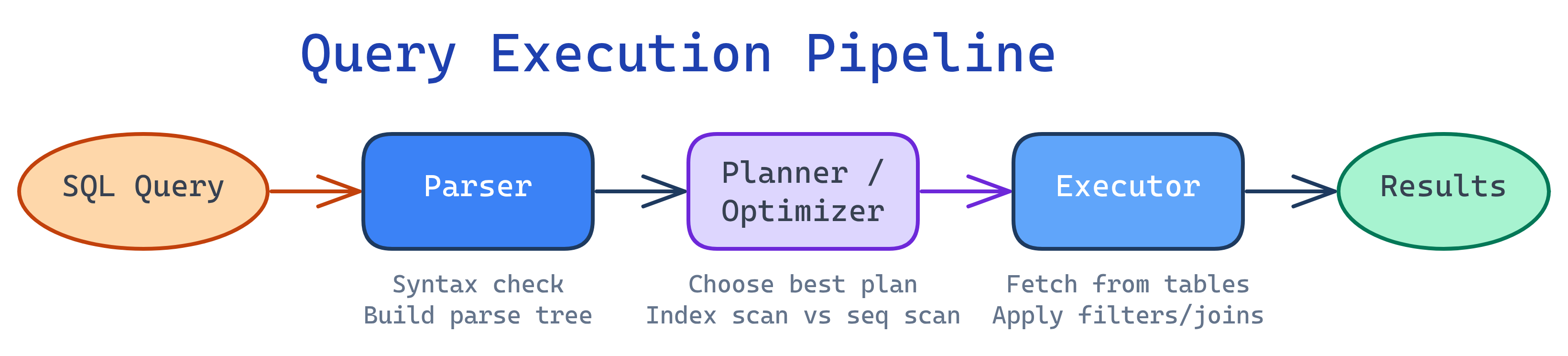
Query Execution Pipeline
SELECT & Filtering
Every query starts with SELECT. PostgreSQL provides powerful filtering operators beyond basic = comparisons.
-- Basic SELECT with WHERE
SELECT first_name, last_name, email, created_at
FROM users
WHERE status = 'active'
  AND created_at >= '2025-01-01';

-- Pattern matching with LIKE and ILIKE (case-insensitive)
SELECT * FROM products
WHERE name ILIKE '%wireless%';

-- IN for multiple values
SELECT * FROM orders
WHERE status IN ('pending', 'processing', 'shipped');

-- BETWEEN for ranges (inclusive on both ends)
SELECT * FROM events
WHERE event_date BETWEEN '2025-06-01' AND '2025-06-30';

-- IS NULL / IS NOT NULL
SELECT * FROM users
WHERE deleted_at IS NULL
AND phone IS NOT NULL;ILIKE instead of LIKE for case-insensitive pattern matching. It's a PostgreSQL extension — standard SQL doesn't have it. For better performance on large tables, consider a GIN trigram index with pg_trgm.
-- Combining conditions with AND, OR, NOT
SELECT * FROM products
WHERE (category = 'electronics' OR category = 'accessories')
  AND price BETWEEN 10 AND 500
  AND NOT discontinued;
JOINs in Practice
JOINs combine rows from multiple tables based on related columns. Here are the four main types with a practical example.
INNER JOIN returns only matching rows. LEFT JOIN returns all rows from the left table, with NULLs where no match exists on the right. RIGHT JOIN is the mirror of LEFT. FULL JOIN returns all rows from both tables.
-- INNER JOIN: only users who have placed orders
SELECT u.first_name, u.email, o.id AS order_id, o.total
FROM users u
INNER JOIN orders o ON o.user_id = u.id
WHERE o.created_at >= '2025-01-01';

-- LEFT JOIN: all users, even those with no orders
SELECT u.first_name, u.email,
       COUNT(o.id) AS order_count,
       COALESCE(SUM(o.total), 0) AS lifetime_value
FROM users u
LEFT JOIN orders o ON o.user_id = u.id
GROUP BY u.id, u.first_name, u.email;

-- RIGHT JOIN: all orders, including those with deleted users
SELECT u.first_name, o.id AS order_id, o.total
FROM users u
RIGHT JOIN orders o ON o.user_id = u.id;

-- FULL OUTER JOIN: all users and all orders, matched where possible
SELECT u.first_name, o.id AS order_id
FROM users u
FULL OUTER JOIN orders o ON o.user_id = u.id;SELECT * with JOINs — it pulls columns from all joined tables and can cause ambiguous column names. Always list the specific columns you need.
CTEs (Common Table Expressions)
CTEs use the WITH clause to define temporary named result sets. They make complex queries readable and maintainable.
-- Basic CTE: calculate monthly revenue, then filter
WITH monthly_revenue AS (
  SELECT
    DATE_TRUNC('month', created_at) AS month,
    SUM(total) AS revenue,
    COUNT(*) AS order_count
  FROM orders
  WHERE status = 'completed'
  GROUP BY DATE_TRUNC('month', created_at)
)
SELECT month, revenue, order_count,
       ROUND(revenue / order_count, 2) AS avg_order_value
FROM monthly_revenue
WHERE revenue > 10000
ORDER BY month DESC;MATERIALIZED or NOT MATERIALIZED to override.
Chaining Multiple CTEs
WITH active_users AS (
  SELECT id, first_name, email
  FROM users
  WHERE status = 'active'
),
user_orders AS (
  SELECT u.id, u.first_name, COUNT(o.id) AS order_count,
         SUM(o.total) AS total_spent
  FROM active_users u
  JOIN orders o ON o.user_id = u.id
  GROUP BY u.id, u.first_name
)
SELECT first_name, order_count, total_spent,
       CASE
         WHEN total_spent >= 1000 THEN 'VIP'
         WHEN total_spent >= 500  THEN 'Regular'
         ELSE 'New'
       END AS customer_tier
FROM user_orders
ORDER BY total_spent DESC;
Recursive CTEs
Recursive CTEs can traverse hierarchical data like org charts, threaded comments, or category trees.
-- Traverse an org chart: find all reports under a manager
WITH RECURSIVE org_tree AS (
  -- Base case: start with the top manager
  SELECT id, name, manager_id, 1 AS depth
  FROM employees
  WHERE id = 1

  UNION ALL

  -- Recursive step: find direct reports
  SELECT e.id, e.name, e.manager_id, t.depth + 1
  FROM employees e
  JOIN org_tree t ON e.manager_id = t.id
)
SELECT id, name, depth
FROM org_tree
ORDER BY depth, name;LIMIT clause to recursive CTEs to prevent infinite loops in cyclic data. Use WHERE depth < 10 as a safety net.
Window Functions
Window functions perform calculations across a set of rows related to the current row — without collapsing them like GROUP BY.
Ranking Functions
SELECT
  name, department, salary,
  ROW_NUMBER() OVER (PARTITION BY department ORDER BY salary DESC) AS row_num,
  RANK()       OVER (PARTITION BY department ORDER BY salary DESC) AS rank,
  DENSE_RANK() OVER (PARTITION BY department ORDER BY salary DESC) AS dense_rank
FROM employees;ROW_NUMBER always gives unique numbers (1, 2, 3). RANK ties share a rank but skips (1, 2, 2, 4). DENSE_RANK ties share a rank with no gaps (1, 2, 2, 3). Use ROW_NUMBER for pagination, DENSE_RANK for "top N."
LAG & LEAD
-- Month-over-month revenue comparison
SELECT
  month,
  revenue,
  LAG(revenue) OVER (ORDER BY month)  AS prev_month,
  revenue - LAG(revenue) OVER (ORDER BY month) AS change,
  ROUND(100.0 * (revenue - LAG(revenue) OVER (ORDER BY month))
    / LAG(revenue) OVER (ORDER BY month), 1) AS pct_change
FROM monthly_revenue;
Running Totals with SUM OVER
-- Running total of order amounts per customer
SELECT
  customer_id,
  order_date,
  total,
  SUM(total) OVER (
    PARTITION BY customer_id
    ORDER BY order_date
    ROWS BETWEEN UNBOUNDED PRECEDING AND CURRENT ROW
  ) AS running_total
FROM orders;SUM() OVER (ORDER BY ...) is RANGE BETWEEN UNBOUNDED PRECEDING AND CURRENT ROW. Specifying ROWS instead of RANGE avoids surprises with tied values and is generally the safer choice.
Subqueries
Subqueries are queries nested inside other queries. They can appear in SELECT, FROM, or WHERE clauses.
Uncorrelated Subqueries
These run once and their result is used by the outer query.
-- Find employees earning above the company average
SELECT name, salary
FROM employees
WHERE salary > (SELECT AVG(salary) FROM employees);

-- IN with subquery: users who placed orders last month
SELECT first_name, email
FROM users
WHERE id IN (
  SELECT DISTINCT user_id
  FROM orders
  WHERE created_at >= DATE_TRUNC('month', CURRENT_DATE - INTERVAL '1 month')
    AND created_at < DATE_TRUNC('month', CURRENT_DATE)
);
Correlated Subqueries
These reference columns from the outer query and run once per outer row.
-- Find each department's highest-paid employee
SELECT e.name, e.department, e.salary
FROM employees e
WHERE e.salary = (
  SELECT MAX(salary)
  FROM employees
  WHERE department = e.department
);
EXISTS
-- Find users who have at least one order (more efficient than IN)
SELECT u.first_name, u.email
FROM users u
WHERE EXISTS (
  SELECT 1 FROM orders o
  WHERE o.user_id = u.id
);EXISTS over IN with subqueries when the subquery returns many rows. EXISTS short-circuits after finding the first match, while IN must evaluate the entire subquery result.
JSONB — Structured Data in PostgreSQL
JSONB stores JSON in a decomposed binary format, enabling fast lookups and indexing. It's one of PostgreSQL's most powerful features.
-- Create a table with JSONB
CREATE TABLE events (
  id BIGSERIAL PRIMARY KEY,
  event_type TEXT NOT NULL,
  payload JSONB NOT NULL DEFAULT '{}',
  created_at TIMESTAMPTZ DEFAULT NOW()
);

-- Insert JSON data
INSERT INTO events (event_type, payload) VALUES
  ('page_view', '{"url": "/home", "user_agent": "Chrome", "duration_ms": 1200}'),
  ('purchase',  '{"product_id": 42, "amount": 29.99, "currency": "USD"}'),
  ('signup',    '{"email": "[email protected]", "source": "google", "plan": "pro"}');
Querying JSONB
-- -> returns JSON, ->> returns text
SELECT
  payload -> 'url'          AS url_json,    -- returns: "/home" (with quotes)
  payload ->> 'url'         AS url_text,    -- returns: /home   (plain text)
  payload -> 'product_id'   AS product_json -- returns: 42      (as JSON number)
FROM events;

-- Filter on nested JSON values
SELECT * FROM events
WHERE payload ->> 'source' = 'google';

-- Cast JSON values for comparison
SELECT * FROM events
WHERE (payload ->> 'amount')::NUMERIC > 20;

-- Nested path access with #> and #>>
SELECT payload #>> '{address,city}' AS city
FROM users_data;-> returns JSON, ->> returns text. Use ->> for comparisons and display, -> when you need to chain deeper into the structure. The @> operator checks containment.
Containment & GIN Indexes
-- @> containment: does the JSON contain this subset?
SELECT * FROM events
WHERE payload @> '{"currency": "USD"}';

-- Create a GIN index for fast JSONB lookups
CREATE INDEX idx_events_payload ON events USING GIN (payload);

-- GIN index supports: @>, ?, ?|, ?& operators
-- Check if a key exists
SELECT * FROM events
WHERE payload ? 'email';JSONB, not JSON. The JSON type stores raw text and must re-parse on every access. JSONB is pre-parsed, supports indexing, and is faster for reads. The only trade-off: slightly slower inserts and no key-order preservation.
Arrays & Other Types
PostgreSQL supports array columns, UUIDs, enums, and range types natively — no extensions needed.
Array Operations
-- Create a table with an array column
CREATE TABLE articles (
  id SERIAL PRIMARY KEY,
  title TEXT NOT NULL,
  tags TEXT[] DEFAULT '{}'
);

-- Insert with arrays
INSERT INTO articles (title, tags) VALUES
  ('Getting Started with Postgres', ARRAY['postgresql', 'beginner', 'tutorial']),
  ('Advanced JSONB Tricks',         '{"postgresql","jsonb","advanced"}');

-- Query: find articles with a specific tag
SELECT * FROM articles
WHERE 'postgresql' = ANY(tags);

-- Array contains operator
SELECT * FROM articles
WHERE tags @> ARRAY['postgresql', 'advanced'];

-- Unnest arrays into rows
SELECT id, title, UNNEST(tags) AS tag
FROM articles;

-- Append to an array
UPDATE articles
SET tags = ARRAY_APPEND(tags, 'updated')
WHERE id = 1;GIN indexes on array columns for fast @> and && (overlap) queries: CREATE INDEX idx_tags ON articles USING GIN (tags);
UUID
-- Enable UUID generation (built-in since PostgreSQL 13)
-- For older versions: CREATE EXTENSION IF NOT EXISTS "uuid-ossp";

CREATE TABLE api_keys (
  id UUID PRIMARY KEY DEFAULT gen_random_uuid(),
  user_id INTEGER REFERENCES users(id),
  key_name TEXT NOT NULL,
  created_at TIMESTAMPTZ DEFAULT NOW()
);

-- UUIDs are great for distributed systems - no coordination needed
INSERT INTO api_keys (user_id, key_name)
VALUES (1, 'production')
RETURNING id;
-- Returns: 'a0eebc99-9c0b-4ef8-bb6d-6bb9bd380a11'
ENUM Types
-- Create an enum type
CREATE TYPE order_status AS ENUM ('pending', 'processing', 'shipped', 'delivered', 'cancelled');

CREATE TABLE orders (
  id BIGSERIAL PRIMARY KEY,
  status order_status NOT NULL DEFAULT 'pending'
);

-- Enums enforce valid values at the database level
INSERT INTO orders (status) VALUES ('invalid'); -- ERROR!
Range Types
-- Date ranges for booking systems
CREATE TABLE room_bookings (
  id SERIAL PRIMARY KEY,
  room_id INTEGER NOT NULL,
  booked_during TSTZRANGE NOT NULL,
  -- Exclude overlapping bookings for the same room
  EXCLUDE USING GIST (room_id WITH =, booked_during WITH &&)
);

INSERT INTO room_bookings (room_id, booked_during) VALUES
  (1, '[2025-07-01 09:00, 2025-07-01 11:00)');

-- This will fail: overlaps with existing booking
INSERT INTO room_bookings (room_id, booked_during) VALUES
(1, '[2025-07-01 10:00, 2025-07-01 12:00)'); -- ERROR!Full-Text Search
PostgreSQL has built-in full-text search using tsvector (documents) and tsquery (search terms). No external search engine needed for many use cases.
-- Convert text to a searchable vector
SELECT to_tsvector('english', 'PostgreSQL is a powerful open-source database');
-- Result: 'databas':6 'open':5 'open-sourc':4 'postgresql':1 'power':3 'sourc':5

-- Create a search query
SELECT to_tsquery('english', 'postgresql & database');

-- Match documents against a query
SELECT title, body
FROM articles
WHERE to_tsvector('english', title || ' ' || body) @@ to_tsquery('english', 'postgresql & indexing');
Stored tsvector Column with GIN Index
-- Add a pre-computed tsvector column for performance
ALTER TABLE articles ADD COLUMN search_vector TSVECTOR;

-- Populate it
UPDATE articles
SET search_vector = to_tsvector('english', COALESCE(title, '') || ' ' || COALESCE(body, ''));

-- Create a GIN index for fast searches
CREATE INDEX idx_articles_search ON articles USING GIN (search_vector);

-- Keep it up to date with a trigger
CREATE FUNCTION articles_search_trigger() RETURNS TRIGGER AS $$
BEGIN
  NEW.search_vector := to_tsvector('english', COALESCE(NEW.title, '') || ' ' || COALESCE(NEW.body, ''));
  RETURN NEW;
END;
$$ LANGUAGE plpgsql;

CREATE TRIGGER trig_articles_search
  BEFORE INSERT OR UPDATE ON articles
  FOR EACH ROW EXECUTE FUNCTION articles_search_trigger();
Ranking Search Results
-- ts_rank scores relevance; higher = more relevant
SELECT title,
       ts_rank(search_vector, query) AS rank
FROM articles,
     to_tsquery('english', 'postgresql | performance') AS query
WHERE search_vector @@ query
ORDER BY rank DESC
LIMIT 20;ts_headline() to generate highlighted snippets in search results.
Test Yourself
Q: What is the difference between -> and ->> when querying JSONB?
-> returns the value as a JSON object (preserving type and quotes). ->> returns the value as plain text. Use ->> when comparing values or displaying them, and -> when chaining deeper into nested JSON structures.
Q: When should you use a CTE instead of a subquery?
Use CTEs when: (1) the same result is referenced multiple times, (2) you need recursive queries (hierarchies), or (3) you want to improve readability by breaking a complex query into named steps. Subqueries are fine for simple, one-off use cases. Since PostgreSQL 12, non-recursive CTEs used once are automatically inlined, so performance is usually equivalent.
Q: What does EXISTS do and why is it often faster than IN with a subquery?
EXISTS returns true if the subquery returns at least one row. It short-circuits after finding the first match, while IN may need to evaluate the entire subquery result set. For large subquery results, EXISTS is typically more efficient.
Q: How do you create a GIN index on a JSONB column and what operators does it support?
CREATE INDEX idx_name ON table_name USING GIN (jsonb_column); — A GIN index on JSONB supports the @> (containment), ? (key exists), ?| (any key exists), and ?& (all keys exist) operators. For path-specific queries using ->>, use a B-tree index on the expression instead.
Q: What are the key components of PostgreSQL full-text search?
tsvector represents a document as a sorted list of lexemes (normalized words). tsquery represents a search query with boolean operators (&, |, !). The @@ operator matches a tsvector against a tsquery. ts_rank() scores relevance, and a GIN index on the tsvector column makes searches fast.
Interview Questions
Q: You have a table with 10 million rows. A query filtering on a JSONB column is slow. How would you optimize it?
Several approaches depending on the query pattern:
- GIN index:
CREATE INDEX idx ON table USING GIN (payload);— supports@>,?, and other containment/existence operators. - Expression index:
CREATE INDEX idx ON table ((payload ->> 'status'));— for specific key lookups using->>in WHERE clauses. - Generated column: Extract a frequently-queried key into a real column with a generated column, then index that.
- Partial index: If you only query a subset (e.g.,
WHERE event_type = 'purchase'), add a partial index to reduce index size.
Q: Explain the difference between a correlated and uncorrelated subquery. Give an example where each is appropriate.
An uncorrelated subquery runs independently of the outer query — it executes once and the result is reused. Example: WHERE salary > (SELECT AVG(salary) FROM employees).
A correlated subquery references columns from the outer query and runs once per outer row. Example: "Find each department's highest earner" using WHERE e.salary = (SELECT MAX(salary) FROM employees WHERE department = e.department).
Correlated subqueries can be expensive on large datasets. Often they can be rewritten with window functions or JOINs for better performance.
Q: When would you use PostgreSQL's built-in full-text search versus an external tool like Elasticsearch?
PostgreSQL FTS is ideal when: data is already in Postgres, document count is under ~1 million, you need transactional consistency between search and data, and you want simpler infrastructure.
Elasticsearch is better when: you need to search across billions of documents, require complex faceted search, need fuzzy matching / auto-complete at scale, or need real-time log analysis.
PostgreSQL FTS eliminates the need for a separate search service and avoids sync issues. For most web applications, it's sufficient and dramatically simpler to operate.

