Git Branching Strategies
Git Flow gives you structured release control with long-lived branches. GitHub Flow keeps it simple with main + feature branches. Trunk-based development maximizes delivery speed by committing to main constantly. GitLab Flow adds environment branches as a middle ground. Pick based on your team size, release cadence, and CI/CD maturity.
Explain Like I'm 12
Imagine your class is writing a group story. There are different ways to organize who writes what:
Git Flow = The teacher collects draft chapters, edits them in a special "editing" notebook, then copies the final version to the "published" book. Very organized, but slow.
GitHub Flow = Each student writes their chapter on a separate paper, the teacher checks it, and pastes it straight into the book. Simple and fast.
Trunk-based = Everyone writes directly in the same book, but only a sentence or two at a time, so you never step on each other's toes. Super fast, but you need to be careful.
GitLab Flow = Like GitHub Flow, but the story goes through a "review copy" before making it into the final book.
Branching Strategies at a Glance
Each strategy balances complexity against deployment speed differently. The diagram below shows how branches flow in each model.
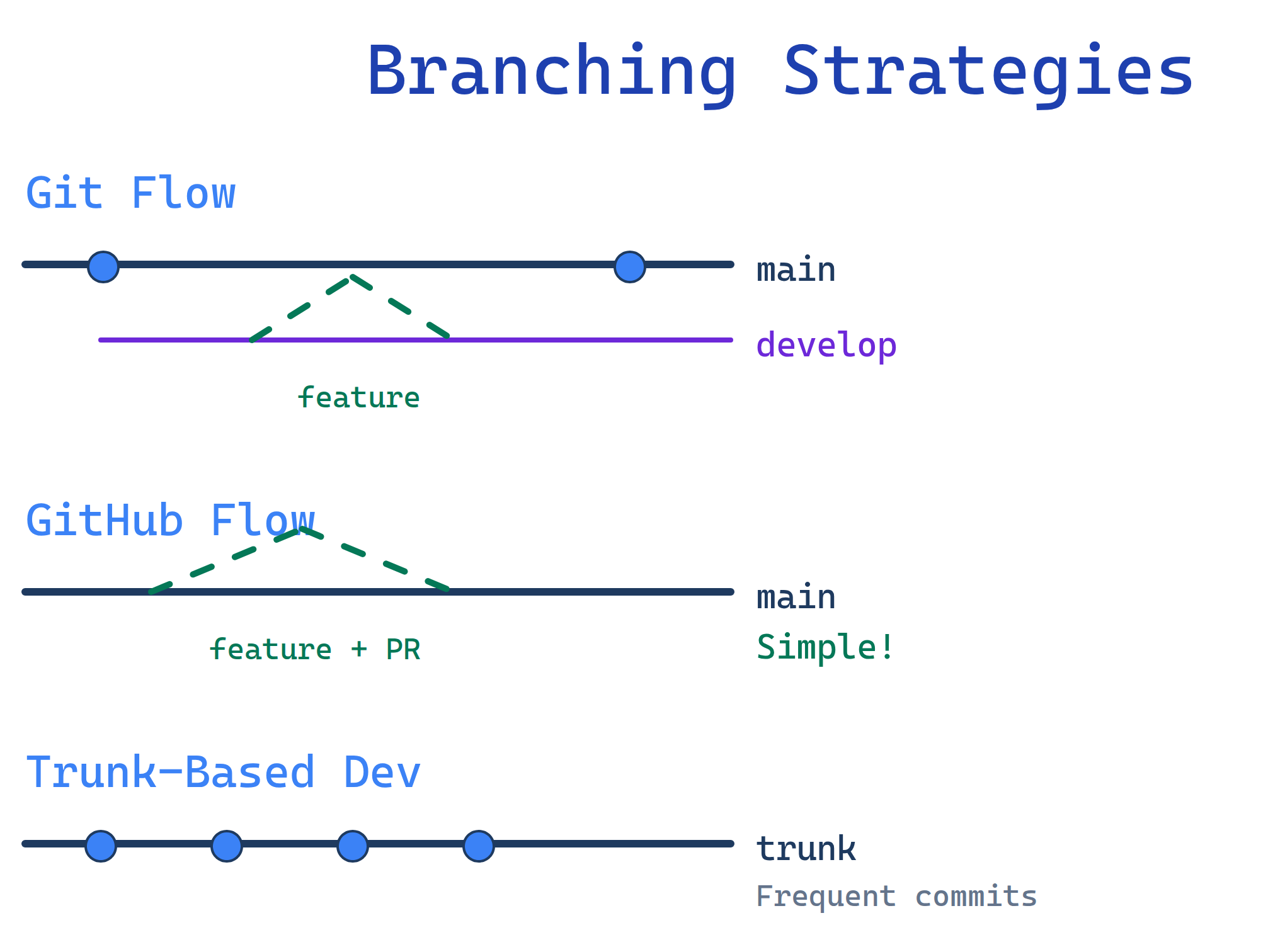
Git Flow
Git Flow is a structured branching model designed by Vincent Driessen. It uses five types of branches, each with a clear purpose:
| Branch | Purpose | Lifetime | Merges Into |
|---|---|---|---|
main | Production-ready code, tagged with version numbers | Permanent | — |
develop | Integration branch for the next release | Permanent | main (via release) |
feature/* | New features or enhancements | Days to weeks | develop |
release/* | Release prep — bug fixes, version bumps, docs | Days | main + develop |
hotfix/* | Emergency production fixes | Hours to days | main + develop |
# Start a new feature
git switch develop
git switch -c feature/user-auth

# Work on the feature, then merge back
git switch develop
git merge --no-ff feature/user-auth
git branch -d feature/user-auth

# Create a release branch
git switch develop
git switch -c release/2.0.0
# ... fix bugs, bump version ...
git switch main
git merge --no-ff release/2.0.0
git tag -a v2.0.0 -m "Release 2.0.0"
git switch develop
git merge --no-ff release/2.0.0
git branch -d release/2.0.0

# Emergency hotfix from production
git switch main
git switch -c hotfix/fix-login-crash
# ... fix the bug ...
git switch main
git merge --no-ff hotfix/fix-login-crash
git tag -a v2.0.1 -m "Hotfix 2.0.1"
git switch develop
git merge --no-ff hotfix/fix-login-crash
git branch -d hotfix/fix-login-crashdevelop branch can become a long-lived merge target where conflicts accumulate. Avoid it for small teams or web apps that deploy continuously.GitHub Flow
GitHub Flow is a lightweight model with one rule: main is always deployable. Everything else happens in short-lived feature branches.
- Create a branch from
main - Make commits with descriptive messages
- Open a pull request for code review
- Discuss, review, and iterate
- Merge to
main - Deploy immediately
# Create a feature branch from main
git switch main
git pull origin main
git switch -c feature/add-search

# Make changes and push
git add src/search.js
git commit -m "Add search bar component"
git push -u origin feature/add-search

# After PR review and approval, merge on GitHub
# Then clean up locally
git switch main
git pull origin main
git branch -d feature/add-searchdevelop, release, and hotfix branches — simplicity is the goal.Trunk-Based Development
In trunk-based development, everyone commits directly to main (the trunk) or uses extremely short-lived feature branches that last less than a day. The trunk is always in a releasable state.
Key Practices
- Short-lived branches — merge within hours, never more than 1-2 days
- Feature flags — hide incomplete features behind toggles so they don't affect production
- Continuous integration — automated tests run on every commit to catch breakage immediately
- Small, frequent commits — reduce merge conflict risk by integrating constantly
# Option A: Commit directly to main (small teams)
git switch main
git pull origin main
# Make a small, self-contained change
git add src/button.css
git commit -m "Increase button padding for accessibility"
git push origin main

# Option B: Short-lived branch (larger teams)
git switch main
git pull origin main
git switch -c feat/improve-button
# Make change, push, open PR
git add src/button.css
git commit -m "Increase button padding for accessibility"
git push -u origin feat/improve-button
# PR reviewed and merged same day — branch deletedGitLab Flow
GitLab Flow is a middle ground between Git Flow's complexity and GitHub Flow's simplicity. It adds environment branches that represent deployment stages.
Environment Branches
| Branch | Purpose |
|---|---|
main | Development integration (always latest code) |
staging | Pre-production testing environment |
production | Live production code — only promoted from staging |
# Develop on a feature branch
git switch main
git switch -c feature/dark-mode

# After review, merge to main
git switch main
git merge --no-ff feature/dark-mode
git branch -d feature/dark-mode

# Promote to staging for QA
git switch staging
git merge main
git push origin staging
# Staging CI/CD deploys to staging environment

# After QA approval, promote to production
git switch production
git merge staging
git push origin production
# Production CI/CD deploys to liverelease/1.x, release/2.x). Fixes are cherry-picked from main into the appropriate release branch.Comparison Table
Side-by-side comparison of all four branching strategies:
| Aspect | Git Flow | GitHub Flow | Trunk-Based | GitLab Flow |
|---|---|---|---|---|
| Complexity | High — 5 branch types | Low — main + features | Lowest — main only | Medium — env branches |
| Release style | Scheduled releases with versions | Continuous deployment | Continuous deployment | Staged promotion |
| Team size | Medium to large (5+) | Any size | Any size (needs discipline) | Medium to large |
| CI/CD requirement | Optional but recommended | Recommended | Required — non-negotiable | Required for env promotion |
| Branch lifetime | Days to weeks | Hours to days | Hours (< 1 day) | Hours to days |
| Merge conflicts | Common (long-lived branches) | Rare (short branches) | Very rare (tiny changes) | Uncommon |
| Hotfix process | Dedicated hotfix branch | Feature branch + fast merge | Direct commit to main | Merge to main, promote up |
| Best example | Mobile apps, libraries | Web apps, open source | Google, Meta, Netflix | SaaS with staging gates |
How to Choose
Use this decision guide based on your team's situation:
Choose Git Flow if:
- You have scheduled releases with version numbers (v1.0, v2.0)
- Multiple versions are maintained in production simultaneously
- Your team is large enough to benefit from formal release management
- You build mobile apps, desktop software, or published libraries
Choose GitHub Flow if:
- You deploy continuously (multiple times per day or week)
- You want simplicity — one main branch, feature branches, PRs
- Your team is small to medium and everyone reviews PRs
- You're building a web application or API
Choose Trunk-Based Development if:
- You have a robust CI/CD pipeline with fast, reliable tests
- Your team practices feature flags and small, incremental changes
- You want maximum deployment velocity
- Your engineers are experienced and disciplined about keeping main green
Choose GitLab Flow if:
- You need a staging environment for QA before production
- You want more control than GitHub Flow but less overhead than Git Flow
- Your deployment requires promotion through environments (dev → staging → production)
- Compliance or regulation requires a staging gate
Test Yourself
What are the five branch types in Git Flow and what is each one used for?
How does GitHub Flow differ from Git Flow?
What prerequisites does trunk-based development require to work safely?
What problem does GitLab Flow solve that GitHub Flow does not?
A team of 3 developers builds a web API with weekly deployments. Which branching strategy would you recommend and why?
Interview Questions
Your company uses Git Flow. A critical security vulnerability is discovered in production on a Friday afternoon. Walk through the exact steps to fix and deploy it.
hotfix/security-patch branch from main (the current production tag). (2) Fix the vulnerability, write a test to verify the fix, and commit. (3) Merge the hotfix into main with --no-ff and tag it (e.g., v3.2.1). (4) Deploy from main. (5) Merge the hotfix into develop so the fix carries into the next release. (6) Delete the hotfix branch. The key is that hotfix branches go to both main and develop to prevent regression.Compare trunk-based development and Git Flow. When would you choose each, and what are the trade-offs?
You're migrating a team from Git Flow to trunk-based development. What steps would you take to make the transition successful?
