Cross-Repo Workflows — Trigger Actions Across Repositories
You can trigger GitHub Actions in one repo from another using repository_dispatch (webhook-style), workflow_dispatch (API call), or workflow_call (reusable workflows). This lets you keep CI/CD logic in a central private repo and trigger it from any of your website repos on push.
Explain Like I'm 12
Imagine you have 5 different homework folders (your website repos), and one smart robot (your central actions repo) that knows how to check and submit homework. Instead of putting a copy of the robot in every folder, you put a tiny walkie-talkie in each folder. When you drop new homework in any folder, the walkie-talkie calls the robot: "Hey, folder 3 has new homework!" The robot wakes up, grabs the homework, checks it, and submits it. One robot, many folders.
How Cross-Repo Triggering Works
Your website repos detect a push and send a signal to the central actions repo. The central repo runs the shared workflow, checking out the website code and deploying it.
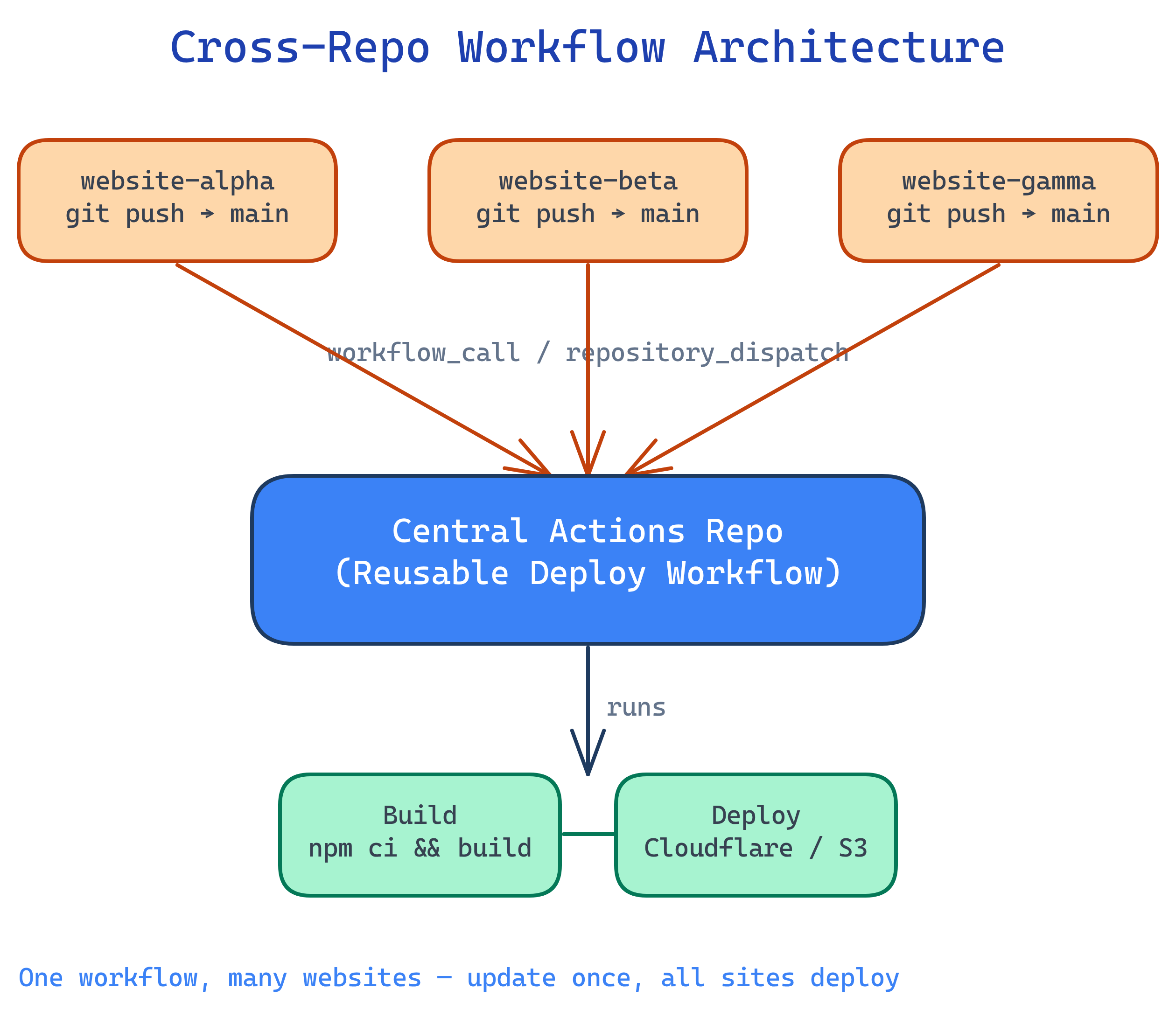
3 Ways to Trigger Cross-Repo Workflows
| Approach | Trigger | Direction | Best For |
|---|---|---|---|
| repository_dispatch | API webhook event | Source repo → target repo | Fire-and-forget triggers with custom payloads |
| workflow_dispatch (API) | REST API call | Source repo → target repo | Triggering with typed inputs, manual or automated |
| workflow_call | Reusable workflow | Caller imports from central repo | Shared workflow definitions, DRY CI/CD |
GITHUB_TOKEN only has access to the current repo.Approach 1: repository_dispatch
The source repo (website) fires an API event to the target repo (central actions). The target repo listens for that event and runs a workflow.
Step 1: Create a PAT
Go to Settings → Developer settings → Personal access tokens → Fine-grained tokens and create a token with:
- Repository access: select the central actions repo
- Permissions: Contents (read), Metadata (read), Actions (write)
Add this token as a secret (DISPATCH_TOKEN) in each website repo under Settings → Secrets → Actions.
Step 2: Listener in the Central Repo
# central-actions-repo/.github/workflows/deploy-website.yml
name: Deploy Website

on:
  repository_dispatch:
    types: [deploy-website]

jobs:
  deploy:
    runs-on: ubuntu-latest
    steps:
      - name: Show which site triggered this
        run: |
          echo "Repo: ${{ github.event.client_payload.repo }}"
          echo "Branch: ${{ github.event.client_payload.branch }}"
          echo "Commit: ${{ github.event.client_payload.sha }}"

      - name: Checkout the website repo
        uses: actions/checkout@v4
        with:
          repository: ${{ github.event.client_payload.repo }}
          ref: ${{ github.event.client_payload.sha }}
          token: ${{ secrets.WEBSITE_REPO_TOKEN }}

      - name: Build and deploy
        run: |
          echo "Building ${{ github.event.client_payload.repo }}..."
          # Your build & deploy commands here
          npm ci
npm run buildclient_payload is a free-form JSON object — pass any data you need (repo name, branch, commit SHA, environment). The central workflow uses it to know which site to build.Step 3: Trigger from Each Website Repo
# website-repo/.github/workflows/trigger-deploy.yml
name: Trigger Central Deploy

on:
  push:
    branches: [main]

jobs:
  trigger:
    runs-on: ubuntu-latest
    steps:
      - name: Dispatch to central actions repo
        run: |
          curl -X POST \
            -H "Accept: application/vnd.github+json" \
            -H "Authorization: Bearer ${{ secrets.DISPATCH_TOKEN }}" \
            https://api.github.com/repos/YOUR-ORG/central-actions/dispatches \
            -d '{
              "event_type": "deploy-website",
              "client_payload": {
                "repo": "${{ github.repository }}",
                "branch": "${{ github.ref_name }}",
                "sha": "${{ github.sha }}",
                "site_name": "my-website-1"
              }
}'YOUR-ORG/central-actions with your actual org/user and repo name. The event_type must match the types: array in the listener workflow.Approach 2: workflow_dispatch via API
Similar to repository_dispatch, but you trigger a specific workflow file and can pass typed inputs (string, choice, boolean).
Listener in the Central Repo
# central-actions-repo/.github/workflows/deploy-website.yml
name: Deploy Website

on:
  workflow_dispatch:
    inputs:
      repo:
        description: 'Full repo name (org/repo)'
        required: true
        type: string
      ref:
        description: 'Git ref to deploy'
        required: true
        type: string
      environment:
        description: 'Target environment'
        required: true
        default: 'production'
        type: choice
        options:
          - staging
          - production

jobs:
  deploy:
    runs-on: ubuntu-latest
    environment: ${{ inputs.environment }}
    steps:
      - name: Checkout website code
        uses: actions/checkout@v4
        with:
          repository: ${{ inputs.repo }}
          ref: ${{ inputs.ref }}
          token: ${{ secrets.WEBSITE_REPO_TOKEN }}

      - name: Build and deploy
        run: |
          echo "Deploying ${{ inputs.repo }} to ${{ inputs.environment }}"
          npm ci && npm run build
Trigger via API from the Website Repo
# website-repo/.github/workflows/trigger-deploy.yml
name: Trigger Central Deploy

on:
  push:
    branches: [main]

jobs:
  trigger:
    runs-on: ubuntu-latest
    steps:
      - name: Trigger workflow_dispatch via API
        run: |
          curl -X POST \
            -H "Accept: application/vnd.github+json" \
            -H "Authorization: Bearer ${{ secrets.DISPATCH_TOKEN }}" \
            https://api.github.com/repos/YOUR-ORG/central-actions/actions/workflows/deploy-website.yml/dispatches \
            -d '{
              "ref": "main",
              "inputs": {
                "repo": "${{ github.repository }}",
                "ref": "${{ github.sha }}",
                "environment": "production"
              }
}'"ref": "main" at the top level tells GitHub which branch of the central repo to use for the workflow file. The inputs.ref is your custom input for the website commit.Approach 3: Reusable Workflows (workflow_call)
Instead of the central repo listening for events, each website repo calls a reusable workflow defined in the central repo. The CI/CD logic lives centrally, but execution happens in the caller's context.
Reusable Workflow in the Central Repo
# central-actions-repo/.github/workflows/build-and-deploy.yml
name: Reusable Build & Deploy

on:
  workflow_call:
    inputs:
      node-version:
        description: 'Node.js version'
        required: false
        type: string
        default: '22'
      environment:
        description: 'Deploy target'
        required: true
        type: string
    secrets:
      CF_API_TOKEN:
        required: true
      CF_ACCOUNT_ID:
        required: true

jobs:
  build-deploy:
    runs-on: ubuntu-latest
    environment: ${{ inputs.environment }}
    steps:
      - uses: actions/checkout@v4

      - name: Setup Node.js
        uses: actions/setup-node@v4
        with:
          node-version: ${{ inputs.node-version }}
          cache: 'npm'

      - run: npm ci
      - run: npm run build

      - name: Deploy to Cloudflare Pages
        uses: cloudflare/pages-action@v1
        with:
          apiToken: ${{ secrets.CF_API_TOKEN }}
          accountId: ${{ secrets.CF_ACCOUNT_ID }}
          projectName: ${{ github.event.repository.name }}
          directory: dist
Caller in Each Website Repo
# website-repo/.github/workflows/deploy.yml
name: Deploy

on:
  push:
    branches: [main]

jobs:
  deploy:
    uses: YOUR-ORG/central-actions/.github/workflows/build-and-deploy.yml@main
    with:
      environment: production
      node-version: '22'
    secrets:
      CF_API_TOKEN: ${{ secrets.CF_API_TOKEN }}
CF_ACCOUNT_ID: ${{ secrets.CF_ACCOUNT_ID }}Which Approach Should You Use?
| Factor | repository_dispatch | workflow_dispatch API | workflow_call |
|---|---|---|---|
| Where logic lives | Central repo | Central repo | Central repo (imported) |
| Where jobs run | Central repo's runners | Central repo's runners | Caller repo's runners |
| Minutes billed to | Central repo owner | Central repo owner | Caller repo owner |
| Checkout context | Central repo (must explicitly checkout website) | Central repo (must explicitly checkout website) | Caller repo (automatic) |
| Typed inputs | No (free-form JSON) | Yes (string, choice, boolean) | Yes (string, number, boolean) |
| Visible in caller's Actions tab | No | No | Yes |
| Private repo access | PAT with repo scope | PAT with repo scope | Org-level access setting |
workflow_call) are the cleanest option — minutes are billed per-site, logs appear in each site's Actions tab, and you get actions/checkout for free. Use repository_dispatch if you need the central repo to orchestrate across multiple sites in one run.Full Example: Your Multi-Website Setup
Here's the complete setup for your scenario: multiple website repos, one central private repo with shared deploy logic.
Repo Structure
# Your repos:
your-org/central-actions    # Private — contains reusable workflows
your-org/website-alpha      # Private — website 1
your-org/website-beta       # Private — website 2
your-org/website-gamma      # Private — website 3
Central Repo: Reusable Deploy Workflow
# central-actions/.github/workflows/deploy.yml
name: Reusable Deploy

on:
  workflow_call:
    inputs:
      build-command:
        description: 'Build command to run'
        type: string
        default: 'npm run build'
      output-dir:
        description: 'Build output directory'
        type: string
        default: 'dist'
      node-version:
        type: string
        default: '22'
    secrets:
      DEPLOY_TOKEN:
        required: true

jobs:
  build:
    runs-on: ubuntu-latest
    steps:
      - uses: actions/checkout@v4

      - uses: actions/setup-node@v4
        with:
          node-version: ${{ inputs.node-version }}
          cache: 'npm'

      - run: npm ci
      - run: ${{ inputs.build-command }}

      - name: Upload build artifact
        uses: actions/upload-artifact@v4
        with:
          name: build-output
          path: ${{ inputs.output-dir }}

  deploy:
    needs: build
    runs-on: ubuntu-latest
    steps:
      - name: Download build artifact
        uses: actions/download-artifact@v4
        with:
          name: build-output
          path: ./deploy

      - name: Deploy
        env:
          DEPLOY_TOKEN: ${{ secrets.DEPLOY_TOKEN }}
        run: |
          echo "Deploying ${{ github.event.repository.name }}..."
          # Replace with your actual deploy command:
          # e.g., rsync, scp, Cloudflare Wrangler, AWS S3 sync
          ls -la ./deploy
Each Website Repo: 3-Line Caller
# website-alpha/.github/workflows/deploy.yml
name: Deploy Website

on:
  push:
    branches: [main]

jobs:
  deploy:
    uses: your-org/central-actions/.github/workflows/deploy.yml@main
    with:
      build-command: 'npm run build'
      output-dir: 'dist'
    secrets:
      DEPLOY_TOKEN: ${{ secrets.DEPLOY_TOKEN }}
That's it. Every website repo has the same tiny workflow file. All the build/deploy logic lives in central-actions. Update once, all sites get the change.
@v1) instead of @main for stability. Create releases in the central repo when you change the workflow, so sites opt-in to updates by bumping the tag.Token & Permissions Setup
Cross-repo access requires careful token configuration. Here's what each approach needs:
For repository_dispatch / workflow_dispatch
- Create a Fine-grained PAT with access to the central repo (Contents: read, Actions: write)
- Add the PAT as a secret (
DISPATCH_TOKEN) in every website repo - The website repo's workflow uses this token to call the GitHub API
For reusable workflows (workflow_call)
- In the central repo: Settings → Actions → General → Access → "Accessible from repositories in the organization"
- No PAT needed for the call itself (org-level trust)
- Secrets are passed explicitly from the caller — the central workflow never "sees" secrets it isn't given
For checking out cross-repo code (repository_dispatch approach)
- The central repo needs a PAT (
WEBSITE_REPO_TOKEN) that can read the website repos - Used in
actions/checkoutwith therepository:andtoken:parameters
repo scope. Use fine-grained tokens scoped to specific repos with minimum permissions. Rotate tokens regularly. For organizations, prefer GitHub App installation tokens over personal tokens.Debugging Cross-Repo Triggers
Cross-repo workflows fail silently more often than in-repo ones. Common pitfalls:
| Problem | Cause | Fix |
|---|---|---|
| Dispatch returns 404 | PAT lacks access to target repo | Check fine-grained token has Actions (write) on the target |
| Dispatch returns 204 but no run | event_type doesn't match types: filter | Ensure exact string match (case-sensitive) |
| Reusable workflow "not found" | Central repo access not enabled | Enable under Settings → Actions → General → Access |
| Secrets are empty in reusable workflow | Secrets not passed from caller | Explicitly pass every secret in the secrets: block |
| Checkout fails in dispatch | Token can't read the source repo | Add token: param to actions/checkout with cross-repo PAT |
| Wrong code checked out | Missing ref: in checkout | Always pass the exact SHA from client_payload |
Verify a Dispatch Worked
# Send a test repository_dispatch
curl -i -X POST \
  -H "Accept: application/vnd.github+json" \
  -H "Authorization: Bearer ghp_YOUR_TOKEN" \
  https://api.github.com/repos/YOUR-ORG/central-actions/dispatches \
  -d '{"event_type":"deploy-website","client_payload":{"repo":"test","sha":"abc123"}}'

# Expected: HTTP 204 No Content (success)
# If 404: token lacks access. If 422: malformed JSON.
# Check if a workflow run was triggered
gh run list --repo YOUR-ORG/central-actions --limit 5echo statements at the start of your central workflow to log the payload. Check the Actions tab of the central repo (not the website repo) for dispatch-triggered runs.Test Yourself
What's the difference between repository_dispatch and workflow_call?
repository_dispatch sends an API event to a target repo — the workflow runs in the target repo's context (billed to the target, logs in the target). workflow_call imports a reusable workflow — the workflow runs in the caller's context (billed to the caller, logs in the caller). Dispatch is fire-and-forget; workflow_call is like a function call.Why can't you use the default GITHUB_TOKEN to trigger workflows in another repo?
GITHUB_TOKEN is scoped to the current repository only. It cannot read, write, or trigger actions in other repos. You need a Personal Access Token (PAT) or GitHub App installation token with cross-repo permissions.You send a repository_dispatch and get HTTP 204, but no workflow runs. What went wrong?
event_type in the API call and the types: filter in the workflow YAML. The strings must match exactly (case-sensitive). Also check that the workflow file is on the repo's default branch — dispatch workflows must exist on the default branch to trigger.How do you pass secrets to a reusable workflow?
on: workflow_call: secrets: block. The caller passes them explicitly: secrets: MY_SECRET: ${{ secrets.MY_SECRET }}. Alternatively, use secrets: inherit to pass all of the caller's secrets (convenient but less explicit).In a multi-website setup, which approach keeps CI minutes billed to each website repo?
workflow_call). Since the jobs run in the caller's context, minutes are billed to each website repo individually. With repository_dispatch and workflow_dispatch, all minutes are billed to the central repo.Interview Questions
Design a CI/CD architecture where 10 microservices share the same build and deploy pipeline, but each service has different environment variables and deploy targets.
What are the security implications of using repository_dispatch with a PAT vs. reusable workflows with org-level access?
How would you implement a deployment gate where the central repo runs tests before deploying, and blocks the deploy if tests fail — all triggered from the website repo?
test and deploy. Set deploy.needs: test so deploy only runs if tests pass. Add a GitHub Environment with required reviewers for production deploys. The caller triggers the reusable workflow on push. Tests run automatically. If tests pass, the deploy job waits for manual approval (reviewer notification). If tests fail, the workflow stops and the caller's Actions tab shows the failure. Status checks propagate back to the PR if triggered by pull_request.