Backend Development: Core Concepts
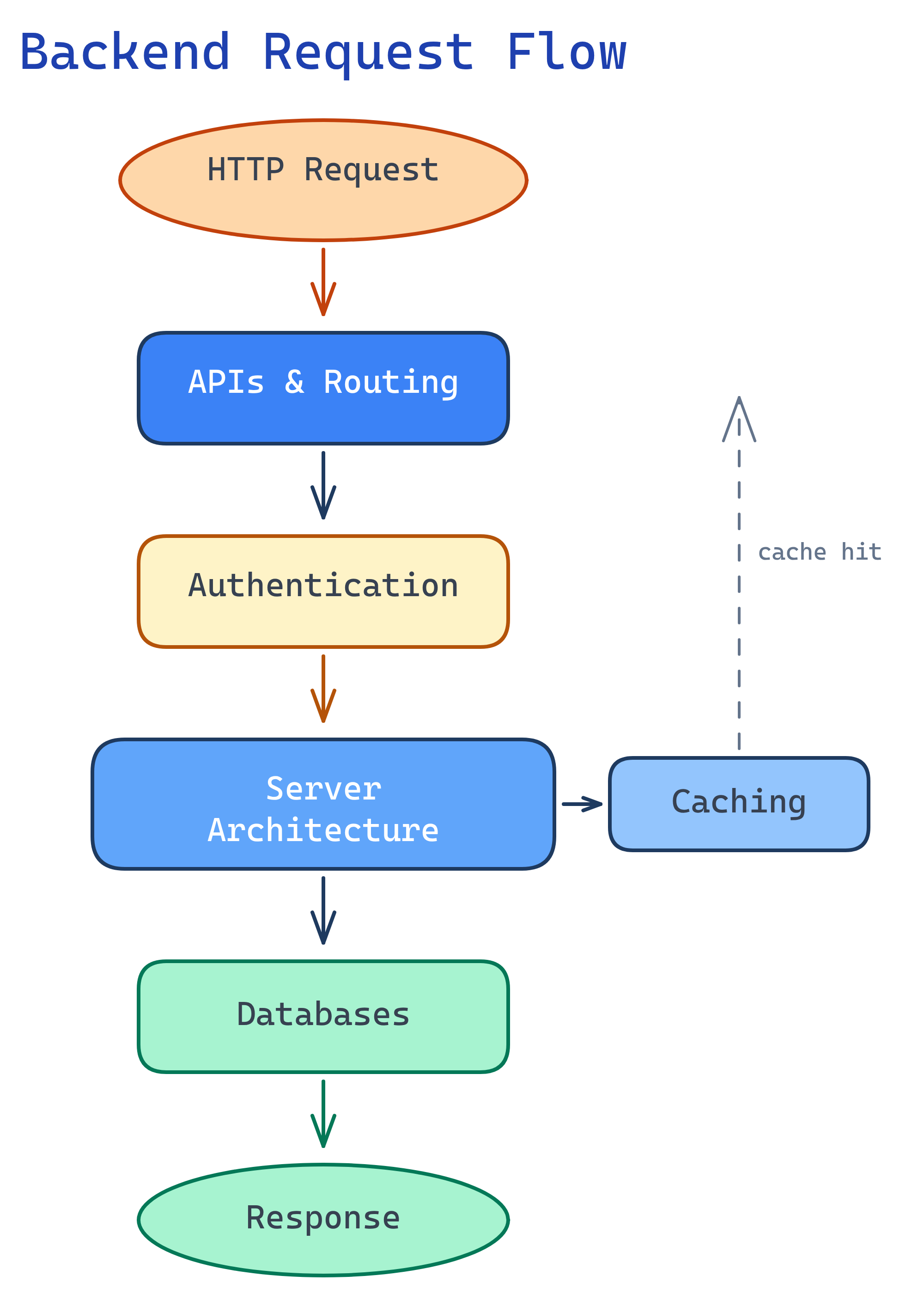
Backend development has 6 building blocks: HTTP & the Request Cycle, APIs & Routing, Databases & Persistence, Authentication & Authorization, Server Architecture, and Caching & Performance. Master these and you can build any backend.
The Big Picture
Every backend system is built from these six building blocks. They work together to receive requests, process logic, store data, and return responses.
Explain Like I'm 12
Think of a backend like a fast-food restaurant. The HTTP request is your order at the counter. The API routes are the menu items. The database is the fridge storing ingredients. Authentication checks your membership card. The server architecture is how the kitchen is organized. And caching is pre-making popular items so they're ready instantly.
Cheat Sheet
| Concept | What It Does | Key Tools |
|---|---|---|
| HTTP & Request Cycle | Client sends request, server processes, returns response | GET/POST/PUT/DELETE, status codes |
| APIs & Routing | Map URLs to handler functions | Express.js, Django URLs, Flask routes |
| Databases | Store and retrieve data persistently | PostgreSQL, MongoDB, Redis |
| Authentication | Verify who the user is | JWT, OAuth 2.0, sessions |
| Server Architecture | Organize code into layers | MVC, middleware, microservices |
| Caching | Store frequent results to avoid recomputation | Redis, CDN, HTTP cache headers |
The 6 Building Blocks
HTTP & the Request Cycle
HTTP (HyperText Transfer Protocol) is the language browsers and servers speak. Every interaction follows the same pattern: the client sends a request, the server processes it, and sends back a response.
A request has four parts: the method (what you want to do), the URL (which resource), headers (metadata like auth tokens and content type), and an optional body (data you're sending). The response mirrors this with a status code (did it work?), headers, and a body (the data coming back).
# A typical HTTP request
GET /api/users/42 HTTP/1.1
Host: example.com
Authorization: Bearer eyJhbGciOiJIUzI1NiJ9...
Accept: application/json

# The server responds
HTTP/1.1 200 OK
Content-Type: application/json

{"id": 42, "name": "Alice", "email": "[email protected]"}
The four main HTTP methods map to CRUD operations: GET (read), POST (create), PUT (update/replace), and DELETE (remove). Status codes tell you what happened: 2xx means success, 4xx means the client made a mistake, and 5xx means the server broke.
200 OK, 201 Created, 400 Bad Request, 401 Unauthorized, 403 Forbidden, 404 Not Found, and 500 Internal Server Error. Memorize these — you'll see them every day.
APIs & Routing
An API (Application Programming Interface) is a contract between your server and the outside world. It defines which URLs exist, what methods they accept, and what data they return. Routing is the mechanism that maps incoming URLs to the right handler function in your code.
REST (Representational State Transfer) is the most common API style. It uses standard HTTP methods on resource URLs: GET /users lists users, POST /users creates one, GET /users/42 fetches a specific user, and DELETE /users/42 removes them.
// Express.js (Node.js)
const express = require('express');
const app = express();

app.get('/api/users', (req, res) => {
  res.json(users);            // List all users
});

app.post('/api/users', (req, res) => {
  const user = createUser(req.body);
  res.status(201).json(user); // Create and return new user
});

app.get('/api/users/:id', (req, res) => {
  const user = findUser(req.params.id);
  res.json(user);             // Get one user by ID
});
# Flask (Python)
from flask import Flask, request, jsonify
app = Flask(__name__)
@app.route('/api/users', methods=['GET'])
def list_users():
return jsonify(users)
@app.route('/api/users', methods=['POST'])
def create_user():
user = create_user(request.json)
return jsonify(user), 201
@app.route('/api/users/<int:user_id>', methods=['GET'])
def get_user(user_id):
return jsonify(find_user(user_id))/users, /orders), not verbs (/getUsers, /createOrder). The HTTP method already tells you the action. This is a core REST convention that makes APIs predictable and easy to learn.
Databases & Persistence
Without a database, your data disappears when the server restarts. Databases solve this by storing data on disk in an organized, queryable format. The two main families are SQL (relational: tables with rows and columns) and NoSQL (non-relational: documents, key-value pairs, graphs).
SQL databases (PostgreSQL, MySQL) excel when your data has clear relationships and you need strong consistency. NoSQL databases (MongoDB, DynamoDB) are better for flexible schemas and horizontal scaling.
-- SQL: Create a table and query it (PostgreSQL)
CREATE TABLE users (
  id SERIAL PRIMARY KEY,
  name VARCHAR(100) NOT NULL,
  email VARCHAR(255) UNIQUE NOT NULL,
  created_at TIMESTAMP DEFAULT NOW()
);

-- CRUD operations
INSERT INTO users (name, email) VALUES ('Alice', '[email protected]');
SELECT * FROM users WHERE id = 1;
UPDATE users SET name = 'Alice Smith' WHERE id = 1;
DELETE FROM users WHERE id = 1;
// MongoDB (NoSQL): Same operations, document-based
// Insert
db.users.insertOne({
name: "Alice",
email: "[email protected]",
createdAt: new Date()
});
// Find
db.users.findOne({ _id: ObjectId("...") });
// Update
db.users.updateOne(
{ _id: ObjectId("...") },
{ $set: { name: "Alice Smith" } }
);Authentication & Authorization
These are two different things that often get confused. Authentication (authn) answers "who are you?" — verifying identity via passwords, tokens, or OAuth. Authorization (authz) answers "what can you do?" — checking permissions after identity is confirmed.
The two main approaches are session-based (server stores login state, client sends a cookie) and token-based (server issues a JWT, client sends it with every request). Tokens are stateless and scale better; sessions are simpler and easier to revoke.
// JWT (JSON Web Token) - token-based auth
const jwt = require('jsonwebtoken');
const SECRET = process.env.JWT_SECRET;

// Login: verify credentials, issue token
function login(email, password) {
  const user = verifyCredentials(email, password);
  const token = jwt.sign(
    { userId: user.id, role: user.role },
    SECRET,
    { expiresIn: '24h' }
  );
  return token;
}

// Middleware: verify token on every request
function authenticate(req, res, next) {
  const token = req.headers.authorization?.split(' ')[1];
  try {
    req.user = jwt.verify(token, SECRET);
    next();                        // Authenticated - proceed
  } catch {
    res.status(401).json({ error: 'Invalid token' });
  }
}

// Authorization: check permissions
function requireAdmin(req, res, next) {
  if (req.user.role !== 'admin') {
    return res.status(403).json({ error: 'Forbidden' });
  }
  next();
}Server Architecture
Server architecture is how you organize your code so it doesn't turn into spaghetti as it grows. The most common pattern is MVC (Model-View-Controller): Models define data, Views present it, Controllers handle logic. In APIs, the "View" is usually just the JSON response.
Middleware is the backbone of modern backend frameworks. It's a pipeline of functions that process requests in order — each one can modify the request, send a response, or pass control to the next middleware. Logging, authentication, rate limiting, and error handling are all middleware.
// Express.js middleware pipeline
const express = require('express');
const app = express();

// Middleware 1: Log every request
app.use((req, res, next) => {
  console.log(`${req.method} ${req.url}`);
  next();  // Pass to next middleware
});

// Middleware 2: Parse JSON bodies
app.use(express.json());

// Middleware 3: Authenticate
app.use('/api', authenticate);

// Route handler (end of pipeline)
app.get('/api/users', (req, res) => {
  res.json(getUsers());
});

// Error-handling middleware (catches thrown errors)
app.use((err, req, res, next) => {
  console.error(err.stack);
  res.status(500).json({ error: 'Something broke!' });
});Caching & Performance
Caching stores the result of an expensive operation so you don't have to repeat it. It exists at every layer of the backend: browser cache (saves static files locally), CDN cache (serves content from edge servers close to users), application cache (stores computed results in memory), and database cache (query result caching).
The most popular application cache is Redis — an in-memory key-value store that responds in microseconds. Use it for session storage, API response caching, rate limiting counters, and leaderboard rankings.
// Redis caching in Node.js
const redis = require('redis');
const client = redis.createClient();

async function getUser(id) {
  // 1. Check cache first
  const cached = await client.get(`user:${id}`);
  if (cached) {
    return JSON.parse(cached);  // Cache hit - instant!
  }

  // 2. Cache miss - query database
  const user = await db.query('SELECT * FROM users WHERE id = $1', [id]);

  // 3. Store in cache for next time (expire after 1 hour)
  await client.setEx(`user:${id}`, 3600, JSON.stringify(user));

  return user;
}
# HTTP cache headers (Flask)
from flask import Flask, make_response, jsonify
app = Flask(__name__)
@app.route('/api/products')
def list_products():
products = get_all_products()
response = make_response(jsonify(products))
response.headers['Cache-Control'] = 'public, max-age=300' # Cache 5 min
response.headers['ETag'] = generate_etag(products)
return responseTest Yourself
What are the 4 main HTTP methods and when do you use each?
What's the difference between authentication and authorization?
When would you choose NoSQL over SQL?
What is middleware and why is it useful?
next(). It's useful because it lets you separate cross-cutting concerns (logging, auth, rate limiting, error handling) from business logic, keeping code modular and reusable.Name 3 places you can add caching in a backend system.
Cache-Control and ETag. 2. CDN cache — edge servers worldwide cache responses so users get data from the nearest location. 3. Application cache — in-memory stores like Redis cache database query results, session data, or computed values. Other options include database query caches and OS-level page caches.