Tools & Function Calling
Function calling lets LLMs invoke external tools by generating structured JSON that your code executes. The LLM sees tool definitions (name, description, parameters as JSON Schema), decides when to call one, outputs the arguments, and your code runs the actual function. Standards like MCP (Model Context Protocol) make tools shareable across agents. Good tool design = clear names, precise descriptions, minimal parameters.
Explain Like I'm 12
Imagine you're texting a friend and they can do things for you in the real world. You text "check the weather in NYC" and they actually open a weather app, look it up, and text you back "72F and sunny." That's function calling! The AI is the texter — it can't check the weather itself, but it knows it can ask for the weather tool to be used. It writes a little instruction like {"tool": "get_weather", "city": "NYC"}, your computer runs the actual weather API, and sends the result back to the AI. The AI never touches the internet directly — it just knows which buttons it can ask you to press.
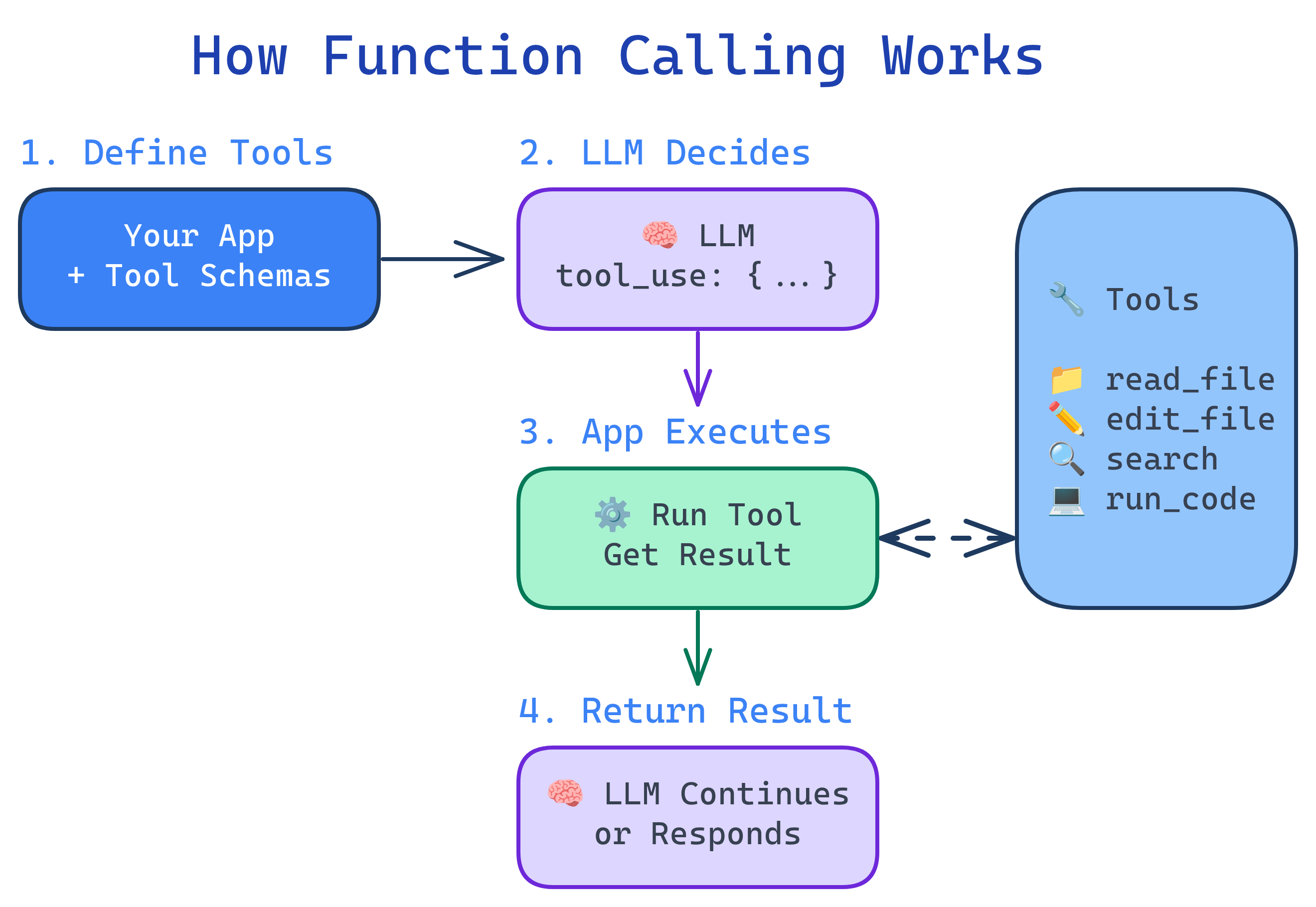
How Function Calling Works
Function calling follows a precise 4-step protocol between the LLM and your application:
Defining Tools
Tools are described to the LLM using JSON Schema. The better your tool definition, the more reliably the LLM will use it correctly.
import anthropic

client = anthropic.Anthropic()

# Tool definition — this is what the LLM "sees"
tools = [
    {
        "name": "search_database",
        "description": "Search the customer database by name, email, or order ID. Returns matching customer records with contact info and order history.",
        "input_schema": {
            "type": "object",
            "properties": {
                "query": {
                    "type": "string",
                    "description": "Search term: customer name, email address, or order ID (e.g., 'ORD-12345')"
                },
                "limit": {
                    "type": "integer",
                    "description": "Maximum number of results to return (default: 5)",
                    "default": 5
                }
            },
            "required": ["query"]
        }
    },
    {
        "name": "send_email",
        "description": "Send an email to a customer. Use for order confirmations, support responses, or follow-ups.",
        "input_schema": {
            "type": "object",
            "properties": {
                "to": {"type": "string", "description": "Recipient email address"},
                "subject": {"type": "string", "description": "Email subject line"},
                "body": {"type": "string", "description": "Email body (plain text)"}
            },
            "required": ["to", "subject", "body"]
        }
    }
]

# Send request with tools
response = client.messages.create(
    model="claude-sonnet-4-6",
    max_tokens=1024,
    tools=tools,
    messages=[{"role": "user", "content": "Find customer John Smith and send him a shipping update"}]
)Executing Tool Calls
When the LLM decides to use a tool, it returns a tool_use content block with the tool name and arguments. Your code must execute it and feed the result back:
# Process the LLM's response
for block in response.content:
    if block.type == "tool_use":
        tool_name = block.name
        tool_input = block.input

        # Execute the actual function
        if tool_name == "search_database":
            result = search_database(**tool_input)
        elif tool_name == "send_email":
            result = send_email(**tool_input)

        # Feed the result back to the LLM
        follow_up = client.messages.create(
            model="claude-sonnet-4-6",
            max_tokens=1024,
            tools=tools,
            messages=[
                {"role": "user", "content": "Find customer John Smith and send him a shipping update"},
                {"role": "assistant", "content": response.content},
                {"role": "user", "content": [
                    {"type": "tool_result", "tool_use_id": block.id, "content": str(result)}
                ]}
            ]
)MCP: Model Context Protocol
MCP (Model Context Protocol) is an open standard by Anthropic that makes tools shareable across agents and applications. Instead of hard-coding tools in every agent, you run MCP servers that expose tools via a standard protocol.
| Without MCP | With MCP |
|---|---|
| Tools hard-coded in each agent | Tools exposed as reusable servers |
| Different format per LLM provider | One standard protocol for all |
| Rebuild tools for each new project | Plug in existing MCP servers |
| No tool discovery | Agents discover available tools at runtime |
# MCP server example (using FastMCP)
from mcp.server.fastmcp import FastMCP

mcp = FastMCP("customer-service")

@mcp.tool()
def search_customers(query: str, limit: int = 5) -> list[dict]:
    """Search the customer database by name, email, or order ID."""
    return db.search(query, limit=limit)

@mcp.tool()
def get_order_status(order_id: str) -> dict:
    """Get the current status of an order by its ID (e.g., ORD-12345)."""
    return orders.get_status(order_id)

# Run the server — any MCP-compatible agent can now use these tools
mcp.run()Designing Great Tools
Well-designed tools dramatically improve agent reliability. Poorly designed tools cause confusion, errors, and wasted tokens.
| Principle | Bad Example | Good Example |
|---|---|---|
| Clear names | do_thing | search_customers |
| Precise descriptions | "Searches stuff" | "Search customers by name, email, or order ID. Returns up to N matching records." |
| Minimal parameters | 10 optional params | 1-3 required, 1-2 optional with defaults |
| Typed inputs | "data": "any" | "email": {"type": "string", "format": "email"} |
| Useful errors | Error: 500 | No customer found with email 'xyz'. Try searching by name instead. |
Parallel Tool Calls
Modern LLMs can request multiple tools simultaneously when the calls are independent. This dramatically reduces latency for tasks that require gathering information from multiple sources.
# The LLM might return multiple tool_use blocks in one response:
# 1. search_database(query="John Smith")
# 2. get_order_status(order_id="ORD-12345")
#
# Execute them in parallel:
import asyncio

async def execute_parallel(tool_calls):
    tasks = [execute_tool(tc.name, tc.input) for tc in tool_calls]
    results = await asyncio.gather(*tasks)
return resultstool_use blocks in a single response. Always check for multiple blocks, not just the first one.Tool Security
Every tool is a potential attack vector. Treat agent tool use with the same rigor as a public API:
- Input validation — sanitize all LLM-generated inputs before execution
- Sandboxing — run code execution tools in containers or restricted environments
- Permission levels — classify tools as safe (read-only), moderate (write), and dangerous (delete, execute)
- Human-in-the-loop — require approval for dangerous operations
- Rate limiting — prevent runaway agents from making thousands of API calls
- Audit logging — record every tool call for review and debugging
Test Yourself
Walk through the 4 steps of function calling.
What is MCP and what problem does it solve?
Why should you treat LLM-generated tool inputs like untrusted user input?
What makes a good tool description? Give an example.
When would an agent use parallel tool calls?
Interview Questions
How would you implement a permission system for agent tools?
Explain the prompt injection risk in tool results and how to mitigate it.
Design a tool interface for a customer support agent that handles refunds. What tools would you define?
search_customer(query) — find customer by name/email/ID. (2) get_order(order_id) — retrieve order details and status. (3) check_refund_eligibility(order_id) — verify if the order qualifies for a refund per policy. (4) process_refund(order_id, amount, reason) — execute the refund (requires human approval). (5) send_message(customer_id, message) — notify the customer. Key design: the refund tool should be gated behind approval, and the eligibility check should be separate so the agent can explain policy before acting.