QA Automation Core Concepts
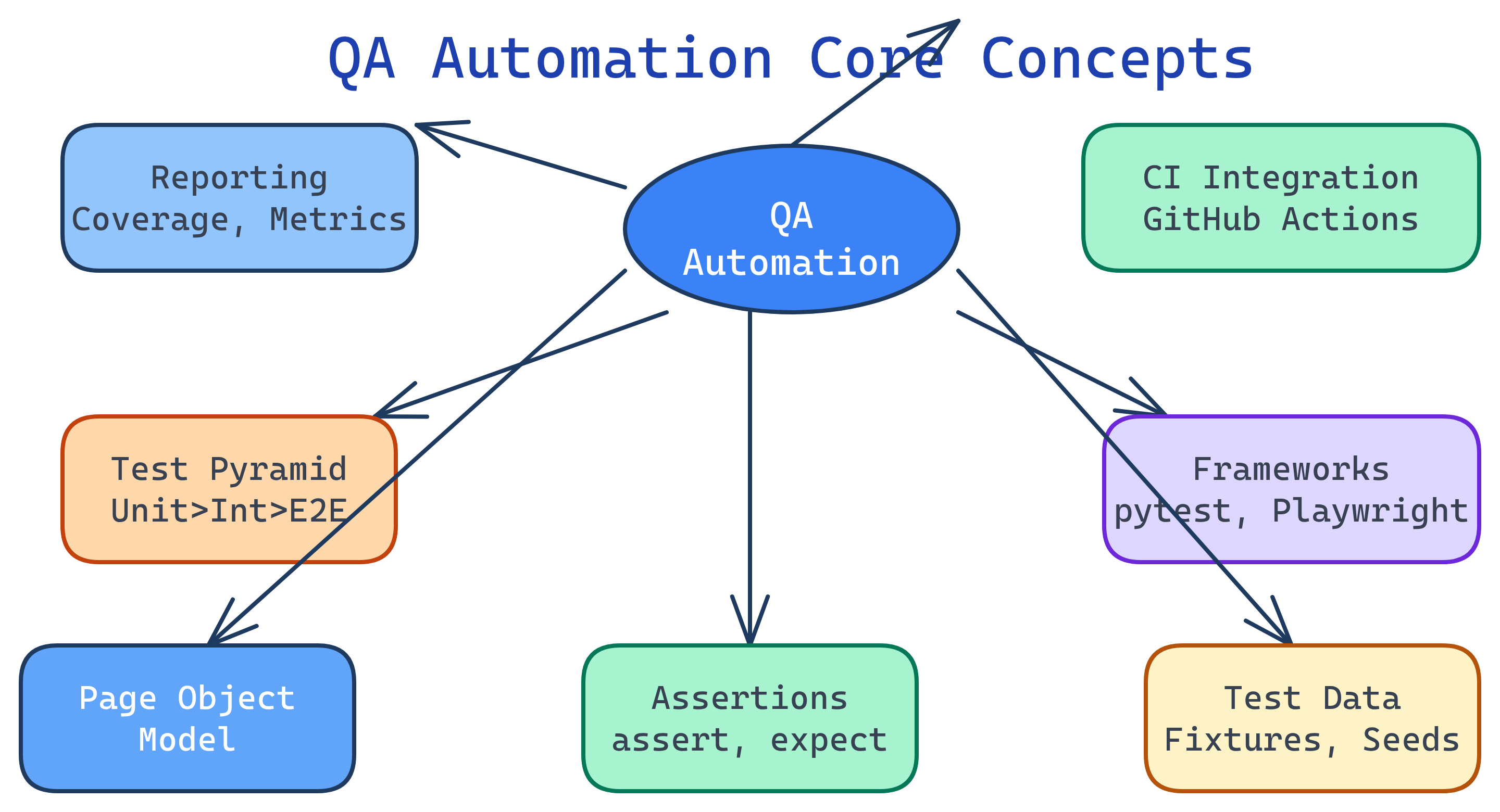
QA Automation is built on 7 core concepts: the test pyramid (balance speed vs. confidence), test types (unit → integration → E2E), test frameworks (the tools that run your tests), Page Object Model (organize UI tests), assertions (verify expected outcomes), test data management (reliable inputs), and CI integration (run tests on every commit).
Concept Map
Here's how the core QA automation concepts connect to each other — from writing individual tests to running them in a CI/CD pipeline.
Explain Like I'm 12
Think of testing like checking a bicycle before riding it:
- Unit tests = checking each part alone (do the brakes squeeze? does the bell ring?)
- Integration tests = checking parts work together (does squeezing the brake lever actually stop the wheel?)
- E2E tests = riding the whole bike around the block
The test pyramid says: check lots of individual parts (fast and cheap), fewer combos, and only a few full rides (slow and expensive). A framework is the toolkit you use to do the checking. And CI means the checks happen automatically every time someone changes something on the bike.
Cheat Sheet
| Concept | What It Does | Key Tools |
|---|---|---|
| Test Pyramid | Guides the ratio of test types — many unit, fewer integration, fewest E2E | Any framework |
| Unit Tests | Test a single function or method in isolation | pytest, JUnit, Jest |
| Integration Tests | Test how modules/services work together | pytest, TestContainers |
| E2E Tests | Simulate real user actions through the full application | Playwright, Cypress, Selenium |
| Page Object Model | Encapsulates UI elements in reusable classes for maintainable tests | Any UI framework |
| Assertions | Verify actual results match expected outcomes | assert, expect, assertThat |
| Test Data | Manage inputs/fixtures so tests are repeatable and isolated | Fixtures, factories, seeds |
| CI Integration | Run tests automatically on every push/PR | GitHub Actions, Jenkins |
The Building Blocks
1. The Test Pyramid
The test pyramid (coined by Mike Cohn) is the most important concept in test automation strategy. It tells you how many tests of each type to write:
| Layer | Count | Speed | Cost | Confidence |
|---|---|---|---|---|
| Unit (base) | Thousands | Milliseconds | Low | Single function works |
| Integration (middle) | Hundreds | Seconds | Medium | Modules work together |
| E2E (top) | Dozens | Minutes | High | Full user flow works |
2. Test Types
Unit tests verify a single function or method in complete isolation. Dependencies are mocked or stubbed.
# Unit test example (pytest)
def test_calculate_discount():
    assert calculate_discount(100, 0.2) == 80.0
    assert calculate_discount(50, 0) == 50.0
    assert calculate_discount(100, 1) == 0.0
Integration tests verify that multiple components work together — e.g., your API handler talks to the database correctly.
# Integration test — hits a real (test) database
def test_create_user_saves_to_db(test_db):
    response = client.post("/users", json={"name": "Alice"})
    assert response.status_code == 201
    user = test_db.query(User).filter_by(name="Alice").first()
    assert user is not None
End-to-end (E2E) tests simulate a real user interacting with the full application through the browser.
# E2E test example (Playwright)
def test_user_can_login(page):
    page.goto("https://myapp.com/login")
    page.fill("#email", "[email protected]")
    page.fill("#password", "secret123")
    page.click("button[type='submit']")
assert page.url == "https://myapp.com/dashboard"3. Page Object Model (POM)
POM is a design pattern for UI test automation. Instead of scattering selectors across test files, you encapsulate each page's elements and actions in a class. When the UI changes, you update one place instead of dozens of tests.
# Page Object
class LoginPage:
    def __init__(self, page):
        self.page = page
        self.email = page.locator("#email")
        self.password = page.locator("#password")
        self.submit = page.locator("button[type='submit']")

    def login(self, email, password):
        self.email.fill(email)
        self.password.fill(password)
        self.submit.click()

# Test using the Page Object
def test_login(page):
    login = LoginPage(page)
    page.goto("/login")
    login.login("[email protected]", "secret123")
assert page.url.endswith("/dashboard")4. Assertions & Matchers
Assertions are the "checkpoints" in your tests — they compare what actually happened with what you expected. If an assertion fails, the test fails.
# Python (pytest)
assert result == 42
assert "error" not in response.text
assert len(users) > 0

# JavaScript (Jest/Playwright)
# expect(result).toBe(42)
# expect(response).not.toContain("error")
# expect(users.length).toBeGreaterThan(0)5. Test Data Management
Tests need predictable inputs to produce predictable outputs. Strategies include:
- Fixtures — Predefined data loaded before tests (pytest fixtures, JUnit @BeforeEach)
- Factories — Generate test objects programmatically (Factory Boy, Faker)
- Database seeding — Populate a test DB with known state before each run
- Test isolation — Each test gets a clean slate (transactions rolled back, containers reset)
# pytest fixture for test data
import pytest

@pytest.fixture
def sample_user(test_db):
    user = User(name="Test User", email="[email protected]")
    test_db.add(user)
    test_db.commit()
    yield user
    test_db.delete(user)
test_db.commit()6. CI Integration
The ultimate goal of test automation is running tests on every code change — automatically. A typical CI pipeline:
- Developer pushes code or opens a PR
- CI server detects the change and starts the pipeline
- Unit tests run first (fast — fail early)
- Integration tests run next (moderate speed)
- E2E tests run last (slow but high confidence)
- Results are reported back to the PR as pass/fail status checks
- If all tests pass, code is eligible for merge/deploy
# GitHub Actions example
name: Tests
on: [push, pull_request]
jobs:
  test:
    runs-on: ubuntu-latest
    steps:
      - uses: actions/checkout@v4
      - uses: actions/setup-python@v5
        with: { python-version: '3.12' }
      - run: pip install -r requirements-test.txt
      - run: pytest tests/unit/ --junitxml=unit-results.xml
      - run: pytest tests/integration/ --junitxml=integration-results.xml
- run: pytest tests/e2e/ --junitxml=e2e-results.xml7. Test Reporting & Metrics
Good test suites produce actionable reports. Key metrics to track:
| Metric | What It Tells You | Target |
|---|---|---|
| Pass rate | % of tests passing | > 98% |
| Flaky test rate | Tests that sometimes pass, sometimes fail | < 2% |
| Code coverage | % of code executed by tests | 70-90% (diminishing returns above) |
| Test execution time | How long the full suite takes | Under 10 min for CI |
| Defect escape rate | Bugs found in production that tests should have caught | Trending down |
Test Yourself
Why does the test pyramid recommend more unit tests than E2E tests?
What problem does the Page Object Model solve?
What's the difference between a flaky test and a failing test?
Why is test isolation important for test data management?
In a CI pipeline, why should unit tests run before E2E tests?
