What is Git?
Git is a distributed version control system that tracks every change to your code, lets multiple people work in parallel on branches, and makes it safe to experiment — because you can always roll back. Created by Linus Torvalds in 2005, it's the foundation of nearly all modern software development.
The rebase vs. merge debate is less important than understanding what each does to history. Merge preserves the fact that two branches existed and were combined; rebase rewrites history to make it look like commits happened sequentially on a single branch. Neither is universally correct. In open-source projects where a clean, bisectable history matters, rebase is preferred for feature branches before merging. In teams doing continuous deployment where the merge commit itself signals a deployment, merge commits are useful. The Pro Git book chapter on rebasing is the definitive explanation — and it is free online.
Detached HEAD state is the concept that most confuses Git beginners. It simply means your working copy is checked out at a specific commit rather than at a branch tip. Any commits you make in this state are reachable only from the commit hash, not from any branch name — so they become unreachable (garbage-collectible) if you switch branches. The fix is git checkout -b new-branch-name before making new commits. The git reflog command is the recovery tool when you have lost commits this way.
Git's real power is not in its commands but in its data model: every object (file, tree, commit) is content-addressed by SHA-1, making it impossible to silently modify history without breaking all downstream references. Understanding the object model makes advanced operations (cherry-pick, bisect, filter-branch) predictable rather than magical.
The Big Picture
Every developer needs Git. It solves three fundamental problems: tracking changes (who changed what and when), parallel work (multiple people editing the same codebase without overwriting each other), and safe experimentation (try risky changes on a branch, throw them away if they don't work).
Explain Like I'm 12
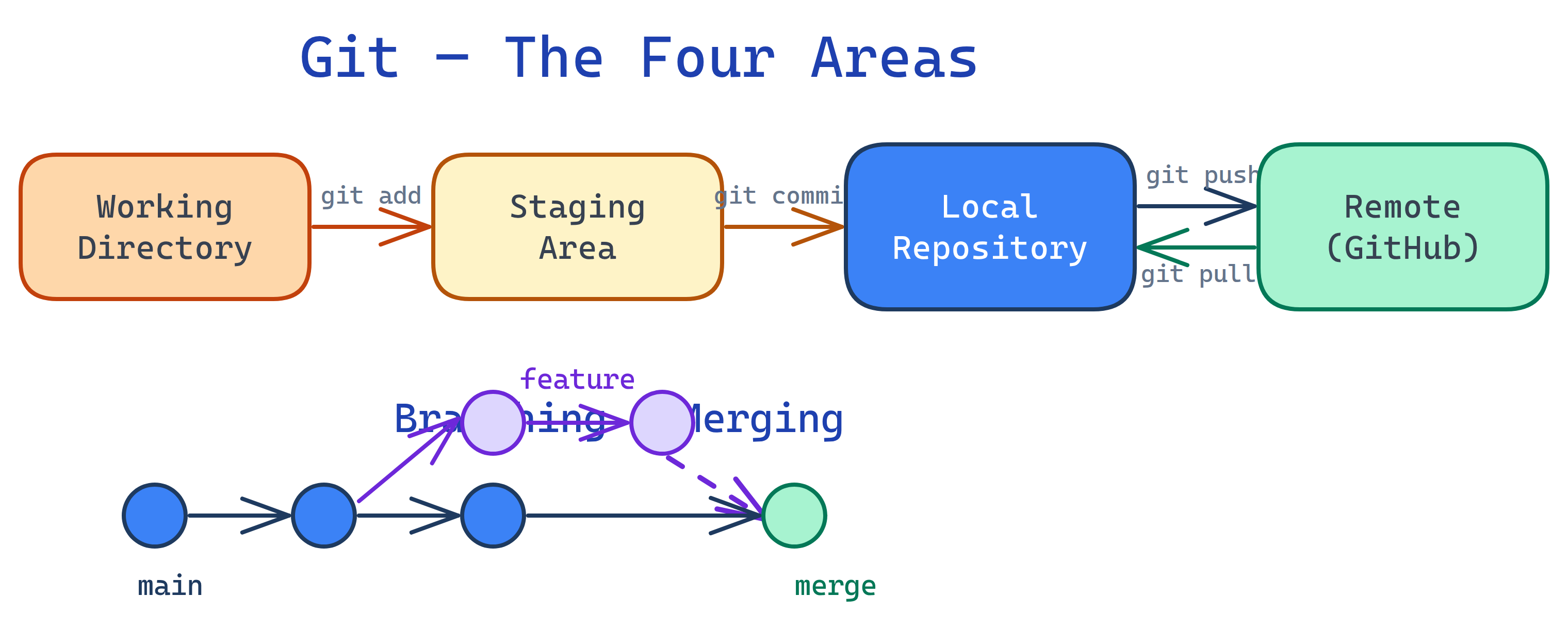
Imagine you're writing a story in a notebook. Every time you finish a page, you take a photo of it (that's a commit). Now you have a timeline of every version of your story.
Want to try a crazy plot twist without ruining the main story? Photocopy the notebook, experiment on the copy (that's a branch). If the twist works, tape the pages back into the original (that's a merge). If it's terrible, throw the copy away.
Now imagine your friend has their own copy of the notebook too. You both write at the same time, then combine your pages later. That's distributed version control — everyone has the full history, and you sync up when you're ready.
What is Git?
Git is an open-source distributed version control system (DVCS). Unlike older tools (SVN, CVS), every developer has a complete copy of the repository — including its full history. This means you can commit, branch, and search history without any network connection.
Git was created by Linus Torvalds in 2005 to manage the Linux kernel source code. Its design priorities were speed, data integrity, and support for distributed, non-linear workflows — and those priorities made it the dominant VCS worldwide.
Why It Matters
| Without Git | With Git |
|---|---|
Files named report_final_v2_REAL_final.docx | Clean history with meaningful commit messages |
| Email files back and forth to collaborate | Push/pull to a shared remote repository |
| One person edits at a time to avoid conflicts | Everyone works in parallel on branches |
| Experiment by copying the entire folder | Create a branch in milliseconds |
| "Who broke this?" — nobody knows | git blame and git bisect find exactly who and when |
| Accidentally deleted a file? Gone forever | git checkout restores any file from any point in history |
Who Is It For?
- Every software developer — Git is non-negotiable; every team uses it
- Data scientists & analysts — Version control notebooks, scripts, and SQL queries
- DevOps engineers — Infrastructure as Code lives in Git repos
- Technical writers — Docs-as-code workflows use Git for collaboration
- Students — Learning Git early makes every future project easier
Key Capabilities
- Commits — Snapshot your project at any point with a message explaining why
- Branches — Create isolated lines of development in milliseconds
- Merging — Combine branches back together, Git handles most conflicts automatically
- Distributed — Full repo on every machine, no single point of failure
- Staging area — Choose exactly which changes go into each commit
- History tools —
log,blame,bisect,reflogfor forensic investigation - Rebasing — Rewrite commit history for clean, linear timelines
What You'll Learn
Test Yourself
What makes Git "distributed" and why does that matter?
log and blame are instant because they don't require network access.What problem do branches solve?
What's the difference between Git and GitHub?
Why was Git created?

