What is Docker?
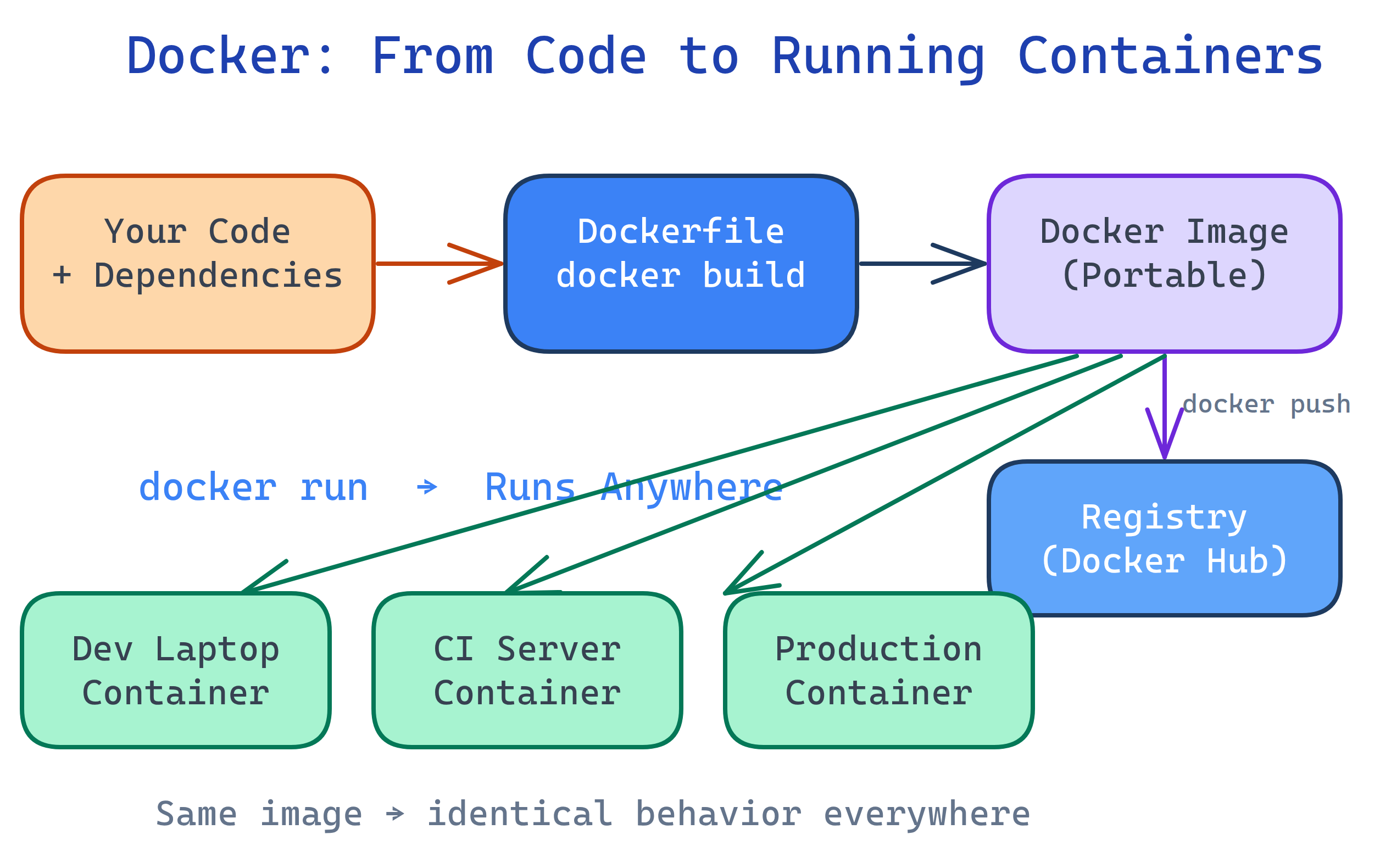
Docker packages your app and all its dependencies into a container — a lightweight, isolated environment that runs identically on any machine. Write once, run anywhere: your laptop, CI server, or production cloud.
Layer caching is Docker's biggest productivity multiplier — and the most commonly misused feature. The canonical mistake is putting COPY . . before RUN pip install -r requirements.txt. Any change to any source file then busts the pip install cache, turning a 30-second rebuild into a 5-minute one. The fix is to copy only requirements.txt first, install dependencies, then copy the application code. The Docker build cache documentation explains the layer invalidation rules precisely.
Multi-stage builds are essential for production images but invisible to many developers who only use Docker locally. A data science project might have a 3 GB development image with Jupyter, matplotlib, and all its dev tools. The production serving image, built from a second FROM python:3.12-slim stage that copies only the trained model and serving code, might be under 200 MB. Container security follows directly: fewer layers means fewer attack surfaces. See the official multi-stage builds guide for the pattern.
Deciding whether to containerize: almost always yes, even for local development. The exception is when you are wrapping a tool that has deep OS integration (e.g., GPU drivers for ML training) — there the overhead of getting GPU passthrough right can outweigh the consistency benefits early in a project.
The Big Picture
Before Docker, deploying software was painful. "It works on my machine" was a daily headache. Different OS versions, library conflicts, and configuration drift meant apps that ran perfectly in development would break in production.
Docker solved this by packaging your application, runtime, libraries, and config into a single image. That image runs as a container — an isolated process that behaves the same everywhere. Think of it as shipping your entire computer as a file.
Explain Like I'm 12
Imagine you have a recipe for your favorite cookies. You need specific ingredients, the right oven temperature, and exact baking time. Now imagine you could pack the entire kitchen — oven, ingredients, recipe — into a lunchbox. Wherever you open that lunchbox, you get perfect cookies every time.
That's Docker. Your app is the recipe. The container is the lunchbox. It has everything your app needs, so it works the same on every computer.
What is Docker, Really?
Docker is an open-source platform for building, shipping, and running applications inside containers. A container is an isolated process that shares the host OS kernel but has its own filesystem, networking, and process space.
Unlike virtual machines, containers don't need a full OS. They start in seconds, use minimal memory, and you can run dozens on a single laptop.
| Feature | Virtual Machine | Container |
|---|---|---|
| Boot time | Minutes | Seconds |
| Size | GBs (full OS) | MBs (just your app) |
| Isolation | Full hardware-level | Process-level (shared kernel) |
| Performance | ~5-10% overhead | Near-native |
| Density | ~10 per host | ~100s per host |
Who is it For?
Developers — Consistent dev environments, no more "works on my machine." Onboard new team members in minutes, not days.
DevOps/SREs — Standardized deployment artifacts, easy rollbacks, and reproducible builds across staging and production.
Data Engineers — Portable Airflow/Spark environments, consistent Python dependencies, and isolated notebook servers.
Anyone who deploys software — If you ship code to servers, Docker eliminates environment drift.
What Docker Can Do
- Build — Create images from a
Dockerfile(a recipe for your container) - Ship — Push images to a registry (Docker Hub, ECR, GCR) for sharing
- Run — Start containers from images on any Docker-enabled machine
- Compose — Define multi-container apps (API + database + cache) in a single YAML file
- Network — Connect containers together with virtual networks
- Store — Persist data with volumes that survive container restarts
What You'll Learn
Test Yourself
What problem does Docker solve that virtual machines also solve, but more efficiently?
What is the difference between a Docker image and a container?
Why are containers "lightweight" compared to virtual machines?
Name three scenarios where Docker is especially useful.