What is Linux?
Linux is a free, open-source operating system kernel that powers 96% of the world's top servers, all Android phones, most containers, and virtually all cloud infrastructure. It gives you a shell (command line) to control everything — files, processes, networking, and users — with precision that GUIs can't match.
The Linux skill that pays off most disproportionately is systemd. Once you understand that most daemons on modern Linux are systemd units, debugging a service that "won't start" becomes a three-command sequence: systemctl status, journalctl -u servicename -n 50, and systemctl cat servicename to see the exact unit file. The systemd service unit reference is dense but worth bookmarking.
File permissions and ownership are where Linux surprises people coming from Windows. The combination of user/group/other with read/write/execute creates 512 possible permission sets, but in practice you use fewer than 10 in regular work. What trips people up is setuid and setgid bits — files that run with the owner's privileges rather than the caller's. Security audits routinely find world-writable setuid files that were set that way during debugging and never reverted. Run find / -perm -4000 -type f 2>/dev/null on any Linux box to see what is setuid; the result is often surprising.
If you are deciding how deep to go on Linux: if you ever SSH into a remote server, administer a cloud VM, or work with Docker/Kubernetes, you need at least working fluency. The Linux man pages are underrated as a reference; most answers are one man command away.
The Big Picture
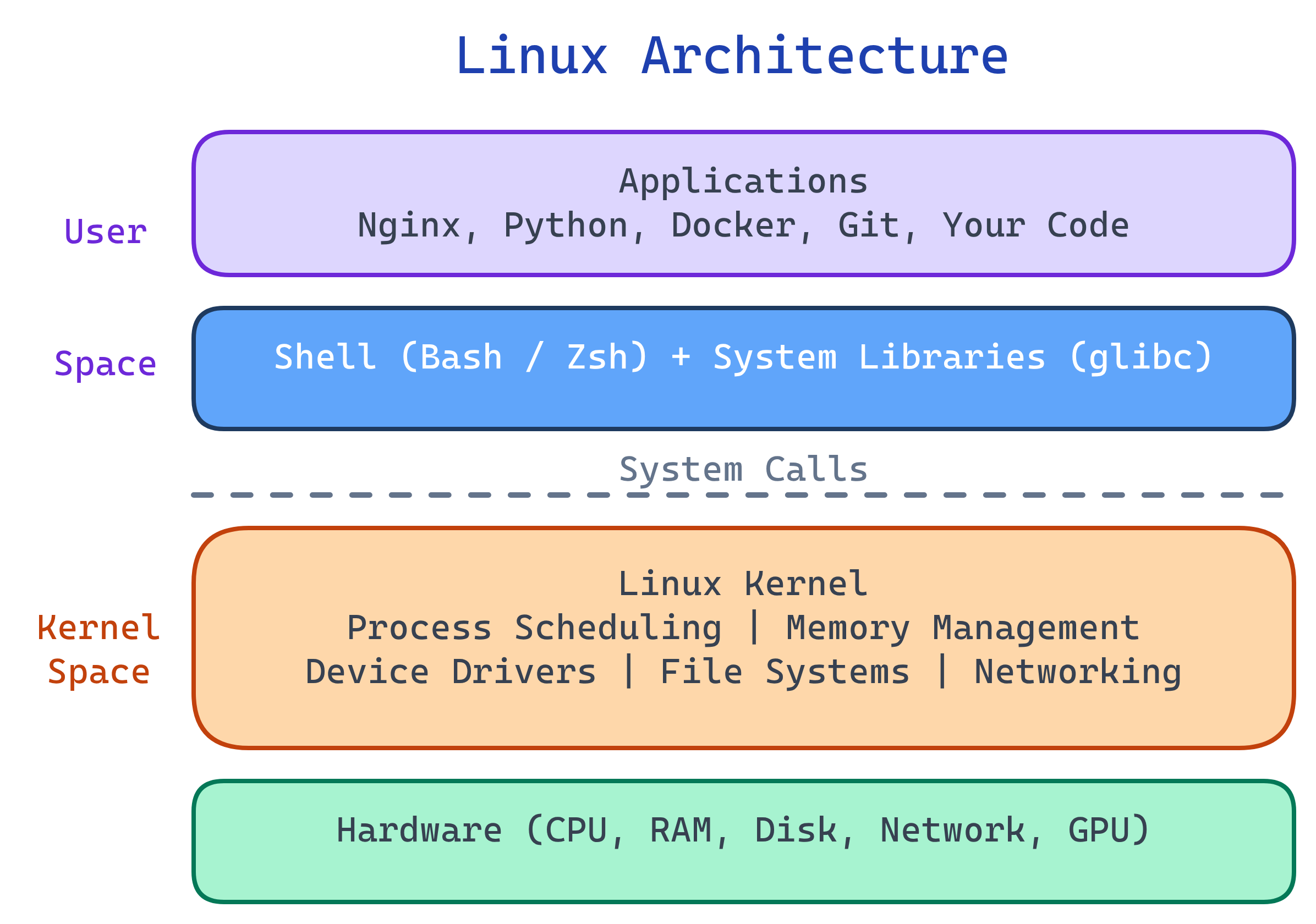
An operating system is the software layer between your hardware and your applications. Linux is the most important OS for developers and DevOps engineers because it's what runs in production. Whether you're deploying a Docker container, SSHing into a server, or running a CI/CD pipeline — you're using Linux.
Explain Like I'm 12
Think of your computer like a restaurant. The hardware is the kitchen equipment (oven, fridge, stove). The kernel (Linux) is the head chef — it decides which burner gets used, when food is ready, and makes sure nothing burns. The shell is the waiter — you tell the waiter what you want, and they relay your orders to the kitchen. Applications are the dishes being prepared. You never go into the kitchen directly — the chef (kernel) manages everything, and you talk through the waiter (shell).
Why Linux Matters
| Where | Linux Share | Why |
|---|---|---|
| Web servers | ~96% | Free, stable, secure, scriptable |
| Cloud (AWS, GCP, Azure) | ~90% | Default OS for VMs and containers |
| Containers (Docker/K8s) | ~100% | Containers ARE Linux processes with namespaces |
| Android phones | ~72% mobile | Android kernel is Linux |
| Supercomputers (Top 500) | 100% | Performance, customizability |
| IoT / Embedded | ~70% | Small footprint, no licensing fees |
Linux Distributions
Linux is just the kernel. A distribution (distro) bundles the kernel with a package manager, utilities, and sometimes a desktop environment.
| Distro | Based On | Package Manager | Best For |
|---|---|---|---|
| Ubuntu | Debian | apt | Beginners, desktops, cloud servers |
| Debian | — | apt | Stability, servers |
| CentOS / Rocky / Alma | RHEL | dnf/yum | Enterprise servers |
| Fedora | RHEL upstream | dnf | Developers, latest packages |
| Arch Linux | — | pacman | Power users, rolling release |
| Alpine | — | apk | Containers (tiny ~5MB base) |
Who Is This For?
- Developers who deploy to Linux servers or use WSL/macOS terminals
- DevOps/SRE engineers managing infrastructure, containers, and CI/CD
- Data engineers working with Spark, Airflow, or cloud pipelines
- Anyone preparing for interviews — Linux questions are standard for backend/DevOps roles
What You'll Learn
Test Yourself
What is the difference between the Linux kernel and a Linux distribution?
Why do almost all containers (Docker) run Linux?
What is a shell, and how is it different from a terminal?
Why would you choose Alpine Linux for a Docker container over Ubuntu?
musl libc (not glibc) and apk package manager. Trade-off: some software expects glibc, so Alpine can have compatibility issues.