Core Concepts of MLOps
MLOps has 7 building blocks: Experiment Tracking (log every training run), Data & Model Versioning (Git for datasets and models), ML Pipelines (automate the training workflow), Model Registry (promote models through stages), Model Serving (deploy as an API), Monitoring (watch for drift and degradation), and Feature Stores (reuse features across models). Master these and you can productionize any ML system.
The Big Picture
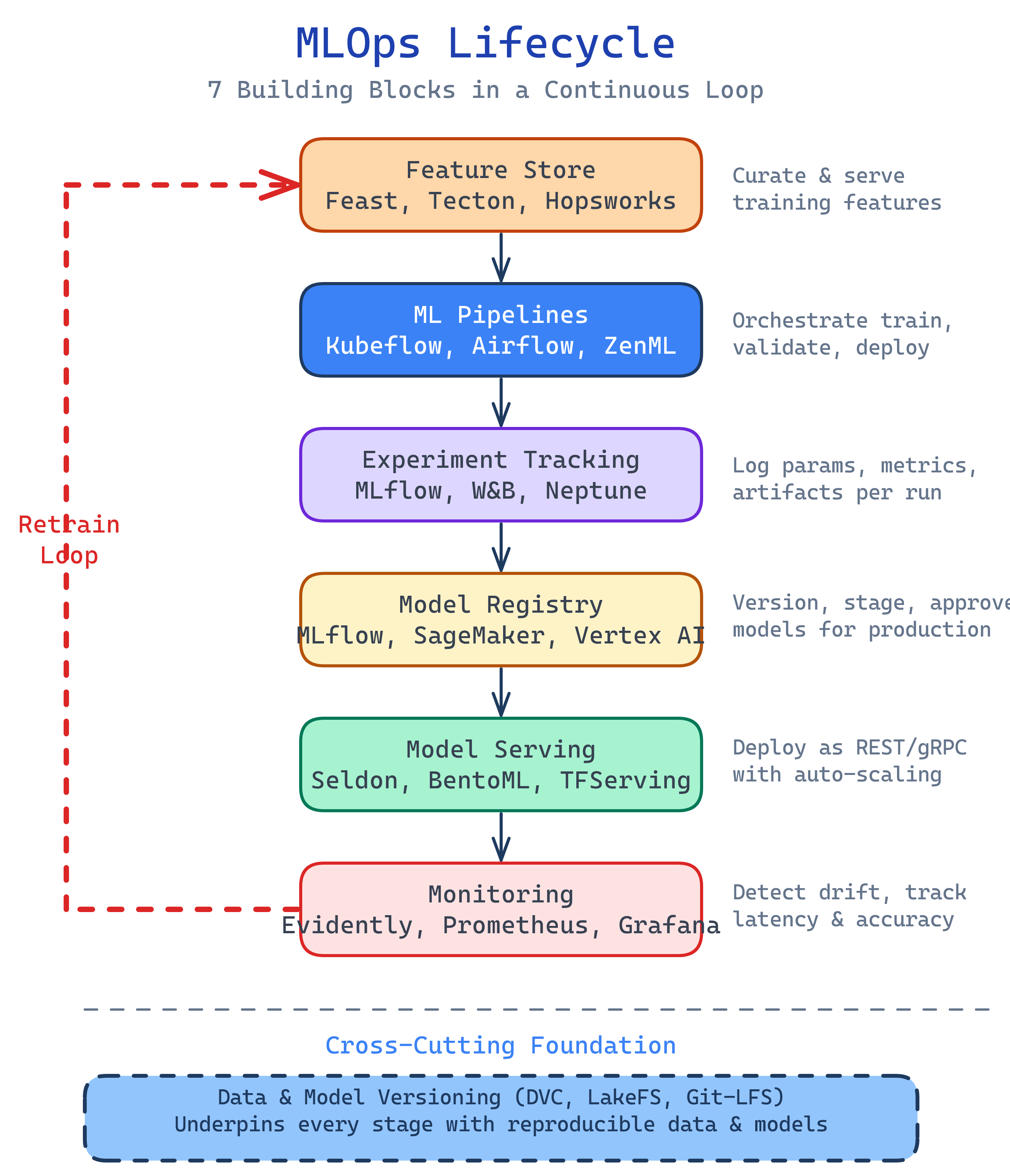
These seven concepts form the MLOps stack. Data flows up through feature engineering and training, models are versioned and registered, then deployed and monitored — with feedback loops driving retraining:
Explain Like I'm 12
Imagine you're baking cookies and trying to find the perfect recipe.
Experiment Tracking is your lab notebook. Every batch you bake, you write down the exact ingredients and oven temperature, then rate how they taste. Without the notebook, you'd forget which batch was the best.
Versioning is like numbering your recipe drafts: Recipe v1 (too salty), Recipe v2 (too sweet), Recipe v3 (perfect!). You keep all versions so you can go back.
Pipelines are your kitchen assembly line. Instead of doing everything by hand, you set up robots: one mixes ingredients, one shapes the dough, one runs the oven, one taste-tests. Push a button and cookies come out.
Model Registry is the display case. Your best cookies go from "testing" to "approved" to "on sale." Customers only eat the approved ones.
Serving is the bakery counter. Customers walk up and order cookies. You need to serve them fast without the counter breaking.
Monitoring is checking customer reviews. If people start complaining the cookies taste different, you investigate and rebake.
Feature Store is your pre-prepped ingredients shelf. Instead of chopping chocolate chips fresh for every recipe, you keep a shelf of pre-chopped ingredients that any recipe can grab.
Cheat Sheet
| Concept | Tool Example | Plain English |
|---|---|---|
| Experiment Tracking | MLflow, W&B | Log every training run's hyperparameters, metrics, and artifacts |
| Versioning | DVC, LakeFS | Version datasets and models like you version code with Git |
| ML Pipelines | Kubeflow, Airflow | Chain data prep → training → evaluation into automated workflows |
| Model Registry | MLflow Registry, SageMaker | Store model versions and promote them through staging → production |
| Model Serving | Seldon, BentoML, TorchServe | Deploy models as REST/gRPC APIs for real-time or batch predictions |
| Monitoring | Evidently, Whylabs, Arize | Detect data drift, prediction drift, and performance degradation |
| Feature Store | Feast, Tecton, Databricks FS | Centralize features so teams share and reuse them across models |
The 7 Building Blocks
1. Experiment Tracking
Data scientists don't write code once and ship it. They run hundreds of experiments — trying different algorithms, tuning hyperparameters, adding or removing features. Without tracking, you end up with a notebook called model_final_v3_ACTUALLY_FINAL.ipynb and no idea which parameters produced the best model.
Experiment tracking tools log every run's parameters (learning rate, batch size, epochs), metrics (accuracy, F1, loss), and artifacts (the trained model file, plots, confusion matrices). You can compare runs side by side and reproduce any result.
import mlflow

mlflow.set_experiment("fraud-detection")

with mlflow.start_run():
    # Log hyperparameters
    mlflow.log_param("learning_rate", 0.001)
    mlflow.log_param("n_estimators", 100)
    mlflow.log_param("max_depth", 6)

    # Train model
    model = train_model(X_train, y_train, lr=0.001, n_estimators=100)

    # Log metrics
    mlflow.log_metric("accuracy", 0.94)
    mlflow.log_metric("f1_score", 0.89)
    mlflow.log_metric("auc_roc", 0.97)

    # Log the model artifact
mlflow.sklearn.log_model(model, "model")2. Data & Model Versioning
Git versions your code, but datasets and model files are too large for Git (think gigabytes of CSVs, images, or model weights). DVC (Data Version Control) solves this by storing a lightweight pointer in Git while the actual data lives in cloud storage (S3, GCS, Azure Blob).
This gives you the full Git experience for data: branches, diffs, tags, rollbacks. When someone asks "what data did we train model v2.3 on?" you can answer in one command.
# Initialize DVC in your Git repo
dvc init

# Track a large dataset
dvc add data/training_set.parquet

# Git tracks the .dvc pointer file
git add data/training_set.parquet.dvc .gitignore
git commit -m "Add training dataset v1"

# Push data to remote storage
dvc push

# Later: switch to a different data version
git checkout v2.0
dvc checkout3. ML Pipelines
An ML pipeline chains together the steps of your ML workflow: data ingestion → data validation → feature engineering → training → evaluation → registration. Each step is a self-contained unit with defined inputs and outputs.
Why not just run a script? Because pipelines give you reproducibility (every run is identical), caching (skip steps that haven't changed), parallelism (run independent steps simultaneously), and scheduling (trigger retraining daily or on data arrival).
Tools range from code-first (Kubeflow Pipelines, ZenML) to orchestrators you already know (Airflow, Prefect) to managed services (SageMaker Pipelines, Vertex AI Pipelines).
Deep dive: ML Pipelines & Feature Stores
4. Model Registry
A model registry is a central catalog of trained models. Think of it like a Docker registry, but for ML models. Each model has versions, and each version moves through stages: None → Staging → Production → Archived.
The registry stores the model artifact, its lineage (which experiment and data produced it), and metadata (metrics, tags, description). When you deploy to production, you pull from the registry — never from someone's laptop.
import mlflow

# Register a model from an experiment run
result = mlflow.register_model(
    model_uri="runs:/abc123/model",
    name="fraud-detector"
)

# Promote to production
client = mlflow.tracking.MlflowClient()
client.transition_model_version_stage(
    name="fraud-detector",
    version=3,
    stage="Production"
)5. Model Serving
Model serving is how predictions reach end users. There are two main patterns:
- Real-time (online) serving — Model runs behind a REST or gRPC API. User sends a request, gets a prediction back in milliseconds. Example: fraud detection on a payment, content recommendations on page load.
- Batch serving — Model processes a large dataset on a schedule (daily, hourly). Results are written to a table or file. Example: scoring all customers for churn risk overnight.
For real-time serving, you need to think about latency (how fast), throughput (how many concurrent requests), autoscaling (handle traffic spikes), and A/B testing (route a percentage of traffic to a new model version).
6. Monitoring
Traditional monitoring watches CPU, memory, and error rates. ML monitoring adds a layer: is the model still making good predictions?
Three things to monitor:
- Data drift — The input data distribution has changed from what the model was trained on. Example: a new customer segment starts using your product.
- Prediction drift — The model's output distribution is changing, even if the input looks similar. The model may be "confused" by subtle shifts.
- Performance degradation — When you have ground truth labels (often delayed), you can directly measure accuracy, precision, recall. If they drop below a threshold, trigger retraining.
from evidently.report import Report
from evidently.metric_preset import DataDriftPreset

# Compare training data vs recent production data
report = Report(metrics=[DataDriftPreset()])
report.run(
    reference_data=training_df,
    current_data=production_df
)

# Save or display the drift report
report.save_html("drift_report.html")Deep dive: ML Model Lifecycle
7. Feature Stores
Features are the processed inputs your model needs. A "user_avg_transaction_30d" feature takes raw transaction data and computes a 30-day rolling average. This feature might be useful for fraud detection, credit scoring, and churn prediction.
Without a feature store, each team writes its own feature computation code, leading to inconsistency (training uses one calculation, serving uses another) and duplication (five teams compute the same feature five different ways).
A feature store provides:
- Single source of truth — One definition per feature, used by both training and serving
- Online + offline serving — Low-latency reads for real-time predictions, batch reads for training
- Point-in-time correctness — Prevents data leakage by only using features available at prediction time
- Feature discovery — A catalog so teams can search and reuse existing features
Deep dive: ML Pipelines & Feature Stores
MLOps Maturity Levels
Google's MLOps maturity model defines three levels. Most teams start at Level 0 and work their way up:
| Level | Name | What it looks like |
|---|---|---|
| 0 | Manual | Notebooks, manual training, manual deployment, no monitoring. "It works on my laptop." |
| 1 | ML Pipeline Automation | Automated training pipelines, experiment tracking, model registry. Training is reproducible. Deployment may still be manual. |
| 2 | CI/CD for ML | Full CI/CD: automated testing of data, models, and code. Automated deployment with canary rollouts. Monitoring triggers retraining. The entire loop is automated. |
Test Yourself
What is the difference between experiment tracking and a model registry?
Why can't you just use Git for dataset versioning?
What are the three types of drift you should monitor in production ML?
What problem does a feature store solve?
Describe Google's three MLOps maturity levels.