ML Pipelines & Feature Stores
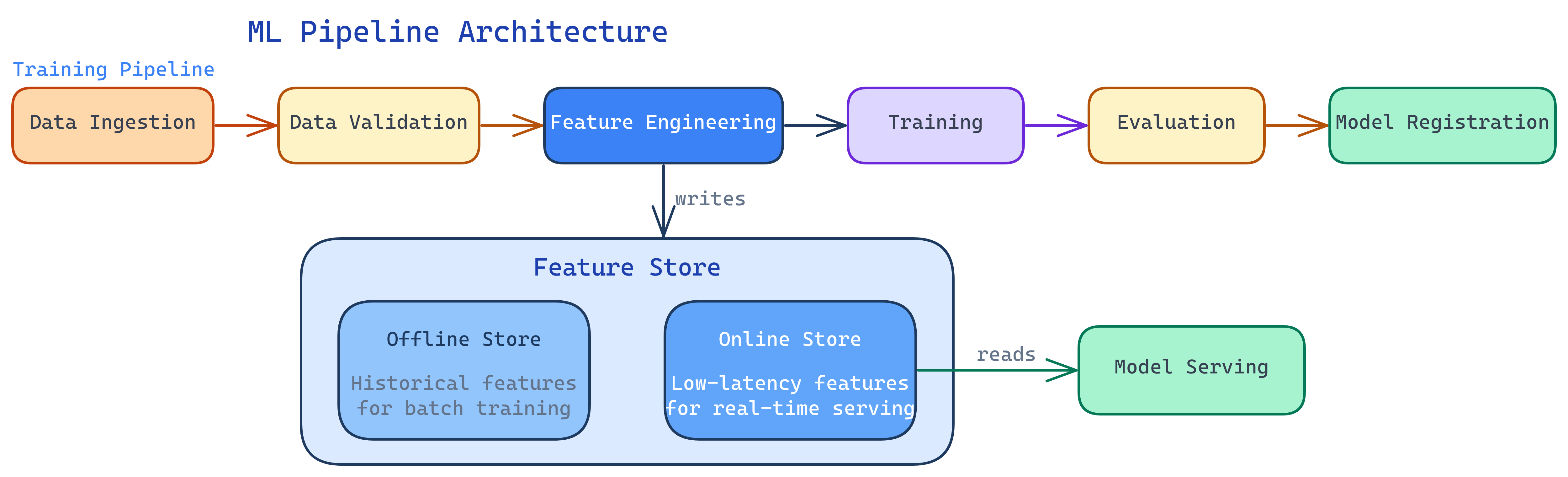
ML pipelines automate the training workflow: data ingestion → validation → feature engineering → training → evaluation → registration. Feature stores centralize feature computation so training and serving use the same code, eliminating training/serving skew. Together they make ML systems reproducible and scalable.
The Big Picture
Explain Like I'm 12
Think of a car factory assembly line. Raw materials come in one end, and finished cars roll out the other. Each station does one job: stamp the metal, attach the engine, paint the body, test the brakes. If any station fails quality checks, the car doesn't ship.
An ML pipeline is the same thing, but for models. Raw data comes in, gets cleaned, gets turned into features, feeds a training algorithm, and the finished model rolls out — tested and ready.
The feature store is like a parts warehouse. Instead of every assembly line making its own screws, there's one warehouse where all lines grab the same standardized screws. That way every car has identical parts.
ML Pipeline Architecture
A production ML pipeline has these stages, each implemented as an independent, rerunnable step:
1. Data Ingestion
Pull data from sources: databases, APIs, data lakes, streaming platforms. Validate schema and freshness. If the data didn't arrive or has the wrong format, stop here — don't train on garbage.
2. Data Validation
Check data quality: missing values, unexpected distributions, schema changes, range violations. Tools like Great Expectations or TensorFlow Data Validation (TFDV) automate these checks.
import great_expectations as gx

context = gx.get_context()
batch = context.get_batch("training_data")

# Define expectations
batch.expect_column_values_to_not_be_null("user_id")
batch.expect_column_values_to_be_between("age", min_value=0, max_value=120)
batch.expect_column_values_to_be_in_set("country", ["US", "UK", "CA", "DE", "FR"])
batch.expect_table_row_count_to_be_between(min_value=10000)

# Validate - fails fast if any expectation breaks
results = batch.validate()
if not results.success:
raise ValueError(f"Data validation failed: {results}")3. Feature Engineering
Transform raw data into model-ready features. This might mean aggregations (average transaction amount over 30 days), encodings (one-hot, label, target), or derived features (ratios, time-since-event). Feature stores (see below) make this step reusable.
4. Training
Train the model on processed features. Log all parameters, metrics, and the model artifact to your experiment tracking system. This step is often the most resource-intensive (GPU clusters for deep learning).
5. Evaluation & Validation
Test the trained model against a held-out set. Run automated validation gates: does it beat the current champion? Does it meet minimum metric thresholds? Does inference latency fit within the SLA?
6. Model Registration
If the model passes all gates, register it in the model registry. Tag it with metadata (training data version, metrics, commit hash). It's now ready for deployment.
Pipeline Tool Comparison
| Tool | Type | Best For | Trade-off |
|---|---|---|---|
| Kubeflow Pipelines | Kubernetes-native | Teams already on K8s; need GPU scheduling | Complex setup; requires K8s expertise |
| Apache Airflow | General orchestrator | Teams already using Airflow for data pipelines | Not ML-specific; no built-in experiment tracking |
| SageMaker Pipelines | Managed (AWS) | AWS shops wanting fully managed ML | Vendor lock-in; expensive at scale |
| Vertex AI Pipelines | Managed (GCP) | GCP shops; uses Kubeflow SDK | GCP-only; Kubeflow SDK learning curve |
| ZenML | Framework-agnostic | Teams wanting infrastructure portability | Newer ecosystem; smaller community |
| Prefect / Dagster | Modern orchestrators | Pythonic API; good data awareness | Less ML-specific tooling than Kubeflow |
Feature Stores Deep Dive
The Training/Serving Skew Problem
This is the core problem feature stores solve. During training, you compute features from a historical dataset (batch). During serving, you compute the same features in real-time from a live request. If the code is different — and it almost always is, because batch SQL and real-time Python are different languages — your model sees different inputs in production than it was trained on.
The result: degraded accuracy that's incredibly hard to debug because the model itself hasn't changed.
Feature Store Architecture
A feature store has two main components:
- Offline store — Optimized for batch reads. Stores historical feature values for training. Backed by a data warehouse or data lake (BigQuery, S3/Parquet, Snowflake).
- Online store — Optimized for low-latency point lookups. Stores the latest feature values for real-time serving. Backed by Redis, DynamoDB, or similar key-value stores.
Feature definitions are written once. The store materializes them to both offline and online stores, guaranteeing consistency.
from feast import Entity, Feature, FeatureView, FileSource
from feast.types import Float64, Int64

# Define a feature view
driver_stats = FeatureView(
    name="driver_stats",
    entities=[Entity(name="driver_id", join_keys=["driver_id"])],
    schema=[
        Feature(name="avg_daily_trips", dtype=Int64),
        Feature(name="avg_rating", dtype=Float64),
        Feature(name="lifetime_trip_count", dtype=Int64),
    ],
    source=FileSource(
        path="data/driver_stats.parquet",
        timestamp_field="event_timestamp",
    ),
    ttl=timedelta(days=1),  # Feature freshness
)

# At training time: get historical features
training_df = store.get_historical_features(
    entity_df=entity_df,  # driver_ids + timestamps
    features=["driver_stats:avg_daily_trips", "driver_stats:avg_rating"],
).to_df()

# At serving time: get latest features (low-latency)
online_features = store.get_online_features(
    features=["driver_stats:avg_daily_trips", "driver_stats:avg_rating"],
    entity_rows=[{"driver_id": 1001}],
).to_dict()
Point-in-Time Correctness
A subtle but critical feature: when building training data, the feature store only returns feature values that were available at the time of the event. This prevents data leakage — accidentally using future information to predict the past. Without this, your model looks great in offline evaluation but performs terribly in production.
CI/CD for ML Pipelines
Just like application code, ML pipelines need CI/CD. But the scope is wider — you're testing code, data, and model quality:
| Stage | What's Tested | Example |
|---|---|---|
| Code Tests | Feature engineering logic, data transforms | Unit tests for feature functions |
| Data Tests | Schema, distributions, freshness | Great Expectations validation suite |
| Model Tests | Metrics, latency, bias | F1 > 0.85, p99 latency < 100ms |
| Integration Tests | End-to-end pipeline execution | Run full pipeline on a sample dataset |
# .github/workflows/ml-pipeline-ci.yml
name: ML Pipeline CI
on:
  push:
    paths:
      - 'ml/**'
      - 'features/**'

jobs:
  test:
    runs-on: ubuntu-latest
    steps:
      - uses: actions/checkout@v4
      - name: Install dependencies
        run: pip install -r requirements.txt
      - name: Run unit tests
        run: pytest tests/unit/ -v
      - name: Run data validation
        run: python scripts/validate_data.py --sample
      - name: Run pipeline on sample
        run: python pipelines/train.py --sample-size 1000
      - name: Check model metrics
run: python scripts/check_metrics.py --min-f1 0.80Test Yourself
What is training/serving skew and how does a feature store prevent it?
Why is data validation important in an ML pipeline?
Compare Kubeflow Pipelines vs Apache Airflow for ML workflows.
What is point-in-time correctness in a feature store?
How is CI/CD for ML different from CI/CD for traditional software?
Interview Questions
Q: Your team has 10 models all computing the same "user_avg_transactions_30d" feature independently. What would you do?
Q: How would you design a retraining pipeline that runs when data drift is detected?
Q: What's the difference between an offline and online feature store?