AI Agents: Core Concepts
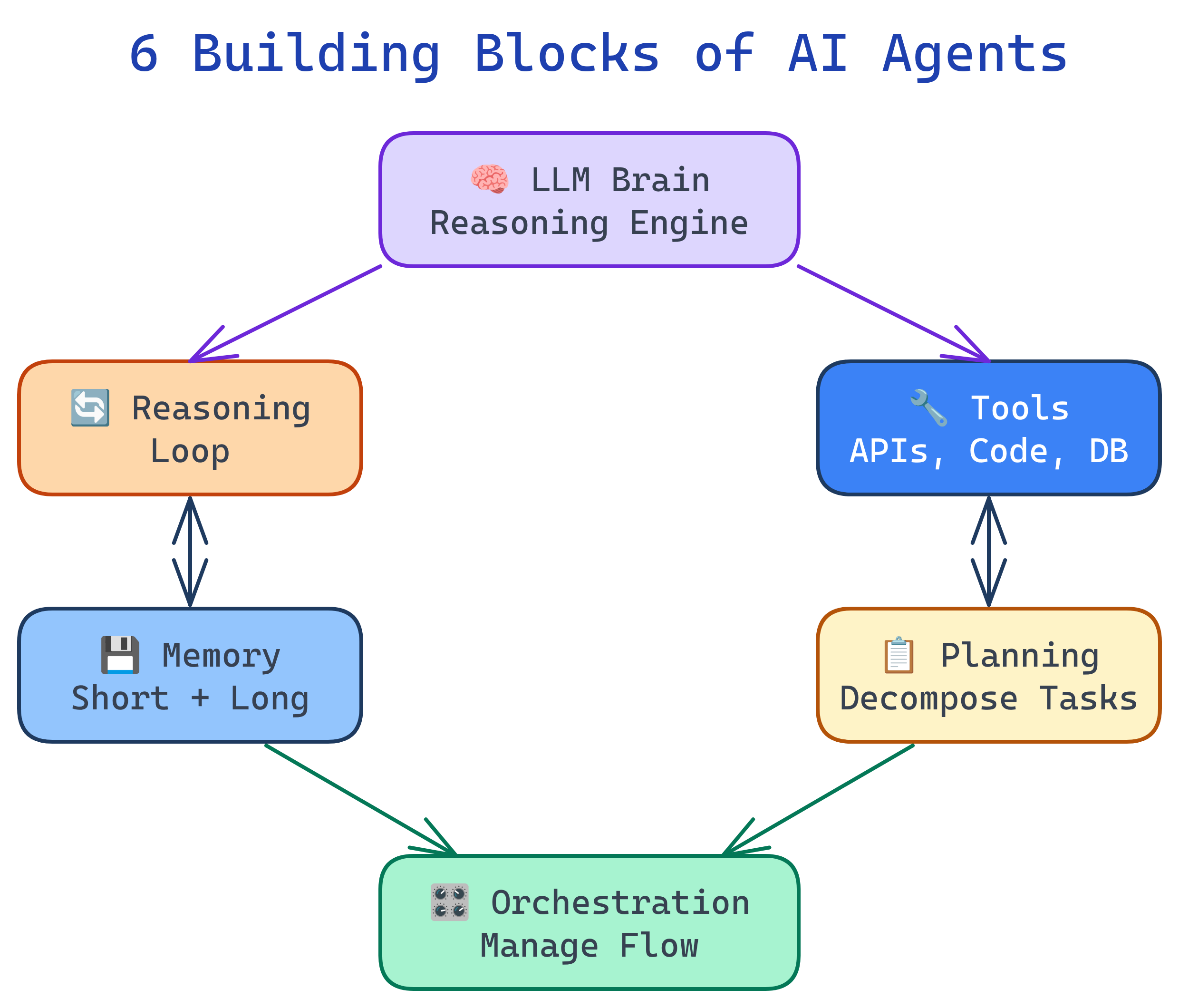
AI agents have 6 building blocks: LLM Brain (reasoning engine), Reasoning Loop (observe-think-act cycle), Tools (external capabilities), Memory (short and long-term context), Planning (breaking goals into steps), and Orchestration (managing execution flow). Every agent system — from simple scripts to multi-agent platforms — is a combination of these primitives.
Concept Map
Here's how the 6 building blocks connect to form a working agent:
Explain Like I'm 12
Think of an AI agent like a student doing a big school project. The LLM Brain is the student's intelligence — they can read, think, and write. The Reasoning Loop is how they work: read the assignment, think about what to do, do something, check if it's right, repeat. Tools are like the calculator, dictionary, and internet — things they use to get stuff done. Memory is their notebook where they write down what they've learned and what they still need to do. Planning is when they break the big project into smaller tasks. And Orchestration is the teacher making sure everyone in the group project is working on the right part.
Cheat Sheet
| Concept | What It Does | Key Patterns |
|---|---|---|
| LLM Brain | Generates reasoning, decisions, and text output | System prompts, temperature control, model selection |
| Reasoning Loop | The observe → think → act cycle that drives agent behavior | ReAct, Chain-of-Thought, Reflexion |
| Tools | External capabilities the agent can invoke | Function calling, MCP, JSON Schema definitions |
| Memory | Stores context across steps and sessions | Short-term (conversation), long-term (vector DB), episodic |
| Planning | Breaks complex goals into executable sub-tasks | Task decomposition, plan-and-execute, tree search |
| Orchestration | Controls execution flow, error handling, and agent coordination | Sequential, parallel, supervisor, router |
The Building Blocks
1. LLM Brain
The LLM is the agent's reasoning engine. It reads the current state, decides what to do next, and generates the output (text, code, or tool calls). The choice of model matters enormously:
- Larger models (Claude Opus, GPT-4) — better at complex reasoning and planning, but slower and more expensive
- Smaller models (Claude Haiku, GPT-4o-mini) — faster and cheaper, good for simple tool-calling tasks
- System prompts shape the agent's personality, constraints, and behavior
# The LLM brain is configured via system prompt + model choice
import anthropic

client = anthropic.Anthropic()
response = client.messages.create(
    model="claude-sonnet-4-6",
    max_tokens=1024,
    system="You are a helpful coding agent. Break tasks into steps. Use tools when needed.",
    messages=[{"role": "user", "content": "Find and fix the bug in auth.py"}]
)2. Reasoning Loop
The reasoning loop is the heartbeat of every agent. It's a cycle: observe the current state, think about what to do, act (call a tool or generate output), then observe the result and repeat. Most agents run this loop until they either complete the task or hit a stopping condition.
# Simplified agent loop (pseudocode)
def agent_loop(goal, tools, max_steps=10):
    messages = [{"role": "user", "content": goal}]

    for step in range(max_steps):
        # THINK: Ask the LLM what to do next
        response = llm.generate(messages)

        # CHECK: Did the agent finish?
        if response.stop_reason == "end_turn":
            return response.text  # Task complete

        # ACT: Execute the tool call
        tool_call = response.tool_use
        result = execute_tool(tool_call.name, tool_call.input)

        # OBSERVE: Feed the result back
        messages.append({"role": "assistant", "content": response})
        messages.append({"role": "user", "content": result})

return "Max steps reached"3. Tools
Tools are what make agents useful. Without tools, an agent is just a chatbot. Tools let agents interact with the real world:
| Tool Type | Examples | Use Case |
|---|---|---|
| Code execution | Python REPL, Bash shell | Run scripts, install packages, test code |
| File I/O | Read, Write, Edit files | Modify codebases, create documents |
| Web access | HTTP requests, web search | Fetch data, research, API calls |
| Database | SQL queries, vector search | Query data, store/retrieve knowledge |
| Communication | Email, Slack, GitHub | Send messages, create PRs, comment |
# Tools are defined as JSON schemas that tell the LLM what's available
tools = [{
    "name": "read_file",
    "description": "Read the contents of a file at the given path",
    "input_schema": {
        "type": "object",
        "properties": {
            "path": {"type": "string", "description": "Absolute file path"}
        },
        "required": ["path"]
    }
}]4. Memory
Memory lets agents maintain context across steps and sessions. There are three types:
- Short-term (working) memory — the conversation history within one session. Limited by the LLM's context window.
- Long-term memory — persisted knowledge stored in files, databases, or vector stores. Survives across sessions.
- Episodic memory — records of past task executions. Helps agents learn from experience ("last time this approach failed, try something else").
# Short-term memory = conversation messages list
messages = [
    {"role": "user", "content": "Fix the login bug"},
    {"role": "assistant", "content": "I'll read auth.py first..."},
    {"role": "tool", "content": "# contents of auth.py..."},
    # This list IS the agent's working memory
]

# Long-term memory = external storage
# Claude Code uses MEMORY.md files
# Other agents use vector databases (Pinecone, Chroma)5. Planning
Planning is how agents break complex goals into manageable steps. Without planning, agents stumble through tasks reactively. With planning, they work systematically:
- Task decomposition — break "build a REST API" into "design schema → create routes → add auth → write tests"
- Plan-and-execute — create the full plan first, then execute steps one at a time
- Adaptive planning — adjust the plan as new information emerges
# Plan-and-execute pattern
plan = llm.generate("Break this task into steps: " + goal)
# plan = ["1. Read the existing code", "2. Identify the bug", "3. Write fix", "4. Run tests"]

for step in plan:
    result = agent_loop(step, tools)
    if not result.success:
        # Re-plan based on what went wrong
        plan = llm.generate(f"Step failed: {result.error}. Revise plan: {plan}")
6. Orchestration
Orchestration controls how the agent executes — sequential steps, parallel operations, error handling, and multi-agent coordination. Key patterns:
| Pattern | How It Works | When to Use |
|---|---|---|
| Sequential | Steps execute one after another | Simple, ordered workflows |
| Parallel | Independent steps run simultaneously | Research tasks, multi-file edits |
| Router | Classify input and route to specialized handler | Customer support triage |
| Supervisor | One agent manages a team of worker agents | Complex projects with subtasks |
Test Yourself
What are the 6 building blocks of an AI agent?
What's the difference between short-term and long-term memory in an agent?
Why is planning important for AI agents? What happens without it?
What security risk do tools introduce, and how do you mitigate it?
When would you choose parallel orchestration over sequential?

